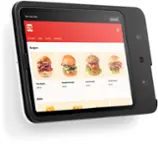
POS Stand for iPad - (2nd generation, USB-C)
- Terminal All-In-One Credit Card Machine$269.00The price was $298.99

Related Item

About This Item
- Key Specs
- Model Compatibility: Select iPad, iPad Pro and iPad Air
- General
- Brand: Square
- Model Number: A-SKU-0837
- Product Name: POS Stand for iPad - (2nd generation, USB-C)
- Color: Black
- Dimensions
- Product Height: 9.5 inches (The out of box height of the item. Height is measured as the vertical distance from the bottom of the item to the top as it would be primarily used or placed.)
- Product Length: 4.44 inches (The out of box length of the item. Length is measured as the longest dimension of the item.)
- Product Width: 12.6 inches (The out of box width of the item. Width is measured as the horizontal distance from one side of the item to the other as it would be primarily used or placed.)
- Product Weight: 4.44 pounds (The out of box weight of the item.)
- Compatibility
- Model Compatibility: Select iPad, iPad Pro and iPad Air
- Features
- Accessory Type: Stand
- Warranty
- Warranty - Parts: 1 year
- Warranty - Labor: 1 year
- Other
- UPC: 817044023281
In just a few minutes, turn an iPad into an easy-to-use, professional point of sale with built-in payments and none of the clutter of extra cables and card readers. Manage your entire business from one place — no manuals, service visits, or training required. Then, keep your lines moving with an intuitive checkout that guides your customers through order confirmation and payment. Accept all major credit and debit cards and pay one simple rate with no hidden fees and no long-term contracts required. iPad sold separately.
- iPad to POS in Minutes: Slide in an iPad and download a free Square point of sale app to get started. No pricey training or service visits needed.
- Your entire business in one place: Power every part of what you do, all on one device. That’s payments, your website, daily reporting, and so much more.
- No extra readers required: Super fast built-in payments mean far fewer cords, zero fears of disconnecting, and a cleaner counter from here on out.
- Keep selling, even offline: Keep taking payments with offline payments even when your Wi-Fi or connectivity is down. Just reconnect to the internet within 24 hours to upload transactions. Terms and conditions apply.
- Stay powered even without power: if you need to unplug or if you lose power, Square Stand can run off a full iPad battery. iPad-powered mode only on USB-C compatible version.
- Compatible with select iPads: iPad (10th generation), iPad Air (4th, 5th generation), iPad Pro 11-inch (1st, 2nd, 3rd, 4th generation), iPad Air 11-inch (M2)
- iPad to POS in Minutes: Slide in an iPad and download a free Square point of sale app to get started. No pricey training or service visits needed.
- Your entire business in one place: Power every part of what you do, all on one device. That’s payments, your website, daily reporting, and so much more.
- No extra readers required: Super fast built-in payments mean far fewer cords, zero fears of disconnecting, and a cleaner counter from here on out.
- Keep selling, even offline: Keep taking payments with offline payments even when your Wi-Fi or connectivity is down. Just reconnect to the internet within 24 hours to upload transactions. Terms and conditions apply.
- Stay powered even without power: if you need to unplug or if you lose power, Square Stand can run off a full iPad battery. iPad-powered mode only on USB-C compatible version.
- Compatible with select iPads: iPad (10th generation), iPad Air (4th, 5th generation), iPad Pro 11-inch (1st, 2nd, 3rd, 4th generation), iPad Air 11-inch (M2)
Whats Included
- Square Stand
- Power adapter
- Power adapter cable
- Hub
- Mounting Kit
- Getting Started Guide
- Square Stand and Square Kiosk Adapter for iPad Air and iPad Pro
- Square Stand
- Power adapter
- Power adapter cable
- Hub
- Mounting Kit
- Getting Started Guide
- Square Stand and Square Kiosk Adapter for iPad Air and iPad Pro
Q: Does the Square Stand require any additional card readers?
A: No, the Square Stand has a built-in card reader, eliminating the need for extra readers and cords.
Q: What does the Square Stand allow you to do?
A: The Square Stand turns your iPad into a point of sale system with a built-in payments reader.
Q: Can I still use the Square Stand if I lose internet connection?
A: Yes, you can continue to accept payments offline if your internet connection is down. Just reconnect within 24 hours to upload the transactions.
Q: How easy is the Square Stand to set up?
A: The Square Stand is designed for easy set up right out of the box, with no training required.
Q: Does the Square Stand come with any software?
A: Yes, the Square Stand includes free robust point of sale software to manage sales, orders, inventory, and more.
Q: Which iPads are compatible with the Square Stand?
A: The Square Stand is compatible with the iPad (10th generation), iPad Air (4th and 5th generation), iPad Pro 11-inch (1st, 2nd, 3rd, and 4th generation), and iPad Air 11-inch (M2).
Q: Can the Square Stand be customized for specific business types?
A: Yes, the Square Stand is customizable with specialized software for restaurants, retail, and appointments.
A: The Square Stand (2nd generation, v2) is designed with a USB-C connector for iPads. Since the iPad (9th generation) uses a Lightning connector, it is not compatible with this version of the Square Stand. View all compatible iPad models here: https://squ.re/3UJ2FAu.
Reviews
Customers are saying
Customers are positive about the build quality of the POS Stand for iPad, with users appreciating the overall quality. However, customers have expressed concerns regarding connectivity issues. Some users have reported problems with the USB-C connection, indicating a potential weakness in this area. Therefore, while the stand is well-made, the connectivity may be a point of concern for potential buyers.
- Ease of use (6)
- Connectivity (4)
Customer Images
The vast majority of our reviews come from verified purchases. Reviews from customers may include My Best Buy members, employees, and Tech Insider Network members (as tagged). Select reviewers may receive discounted products, promotional considerations or entries into drawings for honest, helpful reviews.
Compare similar products

In just a few minutes, turn an iPad into an easy-to-use, professional point of sale with built-in payments and none of the clutter of extra cables and card readers. Manage your entire business from one place — no manuals, service visits, or training required. Then, keep your lines moving with an intuitive checkout that guides your customers through order confirmation and payment. Accept all major credit and debit cards and pay one simple rate with no hidden fees and no long-term contracts required. iPad sold separately.
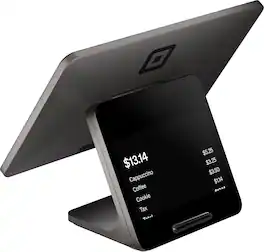
Square Register is a complete point-of-sale system built for busy counters. With dual responsive touchscreens — one for you and one for your customers — it delivers fast, reliable checkout and a smooth, connected experience on both sides of the counter. Advanced POS software is built in to handle everything from sales and inventory to customer management, while powerful processing and stronger wireless connectivity keep you running through every rush. Accept all major cards at one simple rate, get your funds as soon as the next business day, and keep selling even when you’re offline. Designed with IP54-rated durability, Square Register stands up to spills, dust, and daily wear. It’s built to work hard, day after day. Square’s hardware is only approved for use in the country for which it is intended. For example, hardware sold or intended for sale in the United States is not approved for use in Australia, Canada, Japan, or the United Kingdom.

Square Terminal is your all-in-one device for payments and receipts. Take every payment quickly and securely with 24/7 fraud prevention and 24/7 phone support. Accept all major credit and debit cards and pay one simple rate with no hidden fees and no long-term contracts required. Get your money as soon as the next business day. Square Point of Sale has tailored solutions for your industry with unique tools to streamline everything you do. Square Terminal also works with any standard 2.25 in. x 50 ft. thermal printer paper, making refills easy. It does not have an internet browser or support additional apps.

Do business anywhere and take credit card payments on your Apple or Android mobile device with the Square Reader for magstripe. It’s quick and easy to get started: Download a free Square Point of Sale app, plug Square Reader for magstripe into your device’s USB-C connection, and you’re ready to swipe cards anywhere. Your Square app takes care of payments, tipping, inventory, reports, and more. Accept all major credit and debit cards and pay one simple rate with no hidden fees and no long-term contracts required. Fast transfers come standard — get money in your bank account as soon as the next business day, or instantly for a small fee. Add on complementary hardware or software to accept more payment types, like EMV chip cards, Apple Pay, Google Pay, and other NFC payments. Either enable Tap to Pay on iPhone or Tap to Pay on Android and take tap payments, or try Square Reader for contactless and chip to accept tap and chip cards.
| Pros for POS Stand for iPad - (2nd generation, USB-C) | |||
|---|---|---|---|
| Ease of use | There were no pros for this product— | Ease of use, Overall Performance, Battery Life, Size, Speed | Overall Performance, Ease of Use, Connectivity, Compatibility |
| Cons for POS Stand for iPad - (2nd generation, USB-C) | |||
| Connectivity | There were no cons for this product— | Connectivity, Price, Software | There were no cons for this product— |
Specs
Discover lifestyle innovations Sponsored
- $379.99The price was $449.99
- $119.99The price was $129.99