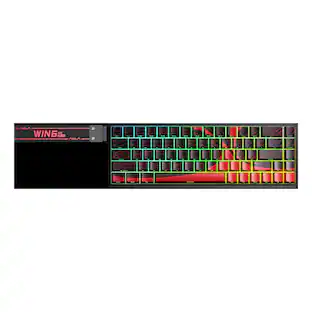
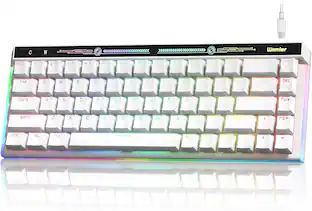
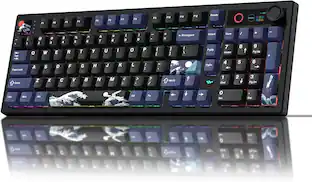
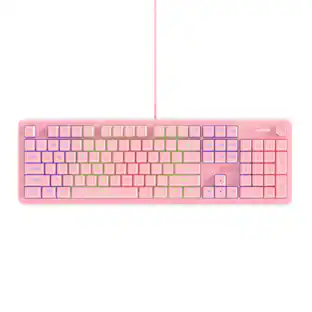
REDRAGON - K513 RGB Membrane Standard 104 Keys Linear Mechanical-Feel Keyboard w/5 Extra On-Board Macro G Keys - Black
Reviews coming soon
About this product
5 Extra On-Board Macro G Keys; Dedicated Media Control; Solid Metal Top Case; 26 Anti-ghost Keys; Full dynamic RGB backlighting; Pro Software Standby
5 Extra On-Board Macro G Keys
Dedicated Media Control
Extra Onboard G Keys
5 onboard macro keys (G1~G5) are programmable and work on the fly without any additional software. The keys are easy to edit and can perform a variety of different macros.
Convenient Media Keys
There are 4 extra media keys placed on the top right keyboard for easy-access media controls, stop/previous & next song/play & pause are all available to work.
- Form FactorFull-sizeConnection TypeWired
Reviews
This product doesn't have any reviews yet.





Compare similar products
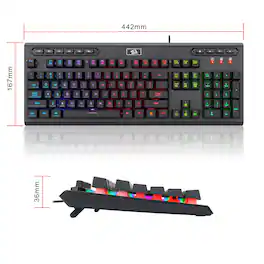
5 Extra On-Board Macro G Keys; Dedicated Media Control; Solid Metal Top Case; 26 Anti-ghost Keys; Full dynamic RGB backlighting; Pro Software Standby

The CORSAIR K70 CORE gaming keyboard empowers your best play and makes gaming and typing amazing. With silky smooth CORSAIR Red linear mechanical switches and two layers of sound dampening foam for a superior typing sound and feel, this is premier CORSAIR performance at its core. Take control effortlessly with a multi-function rotary dial and programmable media button, configurable in iCUE. Use iCUE to also customize the K70 CORE’s dazzling per-key RGB lighting and make your desktop your own dynamic work of art, and then save your RGB settings and macros on up to five onboard profiles to always have at the ready. Your ambition starts with the K70 CORE.

Take the first step towards next-level performance with the Razer Ornata V3 X—a low-profile ergonomic gaming keyboard designed to elevate your work and play. Featuring a new ultra-slim form factor, more durable keycaps, and Razer Chroma RGB, it is the perfect introduction to our unfair advantage.
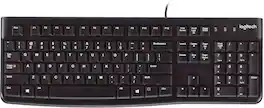
Logitech Keyboard K120. A better typing experience that's built to last. You’ll enjoy a comfortable and quiet typing experience thanks to the low-profile keys that barely make a sound and standard layout with full-size F-keys and number pad. With its thin profile, spill-resistant design, durable keys that can withstand up to 10 million keystrokes and sturdy, adjustable tilt legs, this sleek keyboard not only looks and feels good—it’s built to last. Setup is simple too. You just plug it into a USB port and start using it right out of the box. Bold, bright white characters make the keys easier to read. And it all comes with the high quality and reliability that’s made Logitech the global leader for keyboards and mice.
| Pros for REDRAGON - K513 RGB Membrane Standard 104 Keys Linear Mechanical-Feel Keyboard w/5 Extra On-Board Macro G Keys - Black | |||
|---|---|---|---|
| There were no pros for this product— | Keyboard Quality, Key Feel, Noise Level, RGB Lighting, Lighting | Keyboard Quality, Noise Level, Key Feel, RGB Backlighting, Comfort | Keyboard Quality, Key Feel, Price, Ease of use, Spill Resistance |
| Cons for REDRAGON - K513 RGB Membrane Standard 104 Keys Linear Mechanical-Feel Keyboard w/5 Extra On-Board Macro G Keys - Black | |||
| There were no cons for this product— | Wrist Rest, Software, Connectivity, Volume Knob | Wrist Rest, Functionality | Battery Life, Noise Level |
Specs
Be the first to ask a question.
We’ll try to get your question answered within 24 hours by a Best Buy customer or brand representative.
Customers often buy these together

Logitech - MK270 Full-size Wireless Membrane Keyboard and Mouse Bundle for PC - Black
$26.99The price was $29.99





![Sure, here is the corrected and grouped text from the image:
**Top Row:**
- ESC
- F1
- F2
- F3
- F4
- F5
- F6
- F7
- F8
- F9
- F10
- F11
- F12
- PRTSC
- DEL
**Number Row:**
- 1
- 2
- 3
- 4
- 5
- 6
- 7
- 8
- 9
- 0
- -
- =
- \
**Letter Row:**
- TAB
- Q
- W
- E
- R
- T
- Y
- U
- I
- O
- P
- [
- ]
- \
**Letter Row:**
- CAPS
- A
- S
- D
- F
- G
- H
- J
- K
- L
- ;
- '
**Letter Row:**
- SHIFT
- Z
- X
- C
- V
- B
- N
- M
- ,
- .
- /
**Function Row:**
-](https://pisces.bbystatic.com/image2/BestBuy_US/images/products/9be10b95-8e90-4a5d-b85f-cbc6a7d8e8df.png;maxHeight=232;maxWidth=233?format=webp)

![esc 1 ! 2 @ 3 # 4 $ 5 % 6 ^ 7 & 8 * 9 ( 0 ) - = | F1 F2 F3 F4 F5 F6 F7 F8 F9 F10 F11 F12 tab Q W E R T Y U I O P [ ] { } | caps A S D F G H J K L : : enter shift Z X C V B N M , < > ? shift ctrl alt fn ctrl](https://pisces.bbystatic.com/image2/BestBuy_US/images/products/bc5bce35-ca08-45da-bcc3-8d6fb215154b.jpg;maxHeight=232;maxWidth=233?format=webp)


![Sure, here is the corrected and grouped text:
```
ESC F1 F2 F3 F4 F5 F6 F7 F8 F9 F10 F11 F12 1 2 3 logitech - - 1 2 # $ 4 % 5 6 & 7 8 9 0 - - back insert home page up num lock clear / . tab Q W E R T Y U I O P { [ } ] / delete end page down 7 home 8 A 9 P9 up + caps lock A S D F G H J K L : ; a enter 4 5 6 shift Z X C V B N M < > ? shift 1 end 2 3 pg dn enter ctrl fn start alt opt alt crnd x alt cmd x fn ctrl alt opt 0 ins del 1 logitech
```](https://pisces.bbystatic.com/image2/BestBuy_US/images/products/5761/5761911_sd.jpg;maxHeight=232;maxWidth=233?format=webp)

![Esc F1 F2 F3 F4 F5 F6 F7 F8 F9 F10 F11 F12 Print Screen Scroll Lock Pause Break 1 2 3 4 5 6 7 8 9 0 - + = Backspace Insert Home H Page Up A Num Look 1 I Tab Q W E R T Y U I o P { [ } ] I I Delete End IN Page Down 7 Home 8 9 Pg Up Caps A Lock A S D F G H J K L ; : DE g Enter 4 5 6 Shift Z X C V N M < > ? I Shift 1 End 2 3 Pp Dn Enter Ctrl Alt Alt Ctrl 0 Ins Del](https://pisces.bbystatic.com/image2/BestBuy_US/images/products/a588d446-5678-40ae-86b8-1f15e0026e66.jpg;maxHeight=232;maxWidth=233?format=webp)

Customers ultimately bought


Explore tech essentials Sponsored
 $59.99The price was $79.99
 $179.99The price was $249.99
 $159.99The price was $219.99



Discover related products
 $12.99The price was $13.99
 $24.99The price was $27.99





Keep exploring
 $199.95The price was $209.95
 $55.99The price was $62.99
 $195.99The price was $283.49