Outlet EventEnds Oct. 26. Limited quantities. No rainchecks.Shop now

Main Content
product image

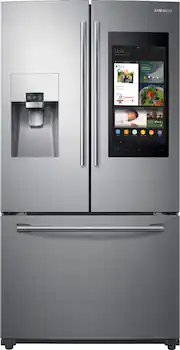
Samsung - Family Hub 24.2 Cu. Ft. 3-Door French Door Refrigerator - Stainless steel

Model: RF265BEAESR
SKU: 5728819
This item is no longer available in new condition. See similar items below
  • Key Specs
    • Color Finish: Stainless steel
    • Product Height: 70 inches (The out of box height of the item. Height is measured as the vertical distance from the bottom of the item to the top as it would be primarily used or placed.)
    • Product Width: 35 3/4 inches (The out of box width of the item. Width is measured as the horizontal distance from one side of the item to the other as it would be primarily used or placed.)
    • Height To Top Of Refrigerator (Without Hinges): 68 5/8 inches (Height from bottom of refrigerator to top of the door, without the top hinges.)
    • Height To Top Of Door Hinge: 70 inches (Height from bottom of refrigerator to top of the door, including the top hinge.)
    • Depth Without Handle: 33 1/2 inches (Measurement from the back of the product to its front (with door closed), not including handle.)
    • Depth With Handle: 35 5/8 inches (Measurement from the back of the product to its front (with door closed), including the handle.)
    • Total Capacity: 24.2 cubic feet
    • Refrigerator Style: French Door
    • Lighting Type: LED
    • Ice Maker: Yes
    • App Compatible: false (The product can be connected to a program or software application on a mobile device, which then receives collected data from the product.)
    • Works With: SmartThings, Amazon Alexa (Compatible with or able to be connected to other smart devices or applications.)
    • Voice Assistant Built-in: Bixby, Amazon Alexa (A digital assistant built into the device that uses voice commands to answer questions and control smart devices.)
  • General
    • Brand: Samsung
    • Model Number: RF265BEAESR
    • Product Name: Family Hub 24.2 Cu. Ft. 3-Door French Door Refrigerator
    • Color: Stainless steel
    • Color Finish: Stainless steel
  • Dimensions
    • Product Height: 70 inches (The out of box height of the item. Height is measured as the vertical distance from the bottom of the item to the top as it would be primarily used or placed.)
    • Product Width: 35 3/4 inches (The out of box width of the item. Width is measured as the horizontal distance from one side of the item to the other as it would be primarily used or placed.)
    • Product Depth: 35 5/8 inches (The out of box depth of the item. Depth is measured as the distance from the front of the item to the back as it would be primarily used or placed.)
    • Height To Top Of Refrigerator (Without Hinges): 68 5/8 inches (Height from bottom of refrigerator to top of the door, without the top hinges.)
    • Height To Top Of Door Hinge: 70 inches (Height from bottom of refrigerator to top of the door, including the top hinge.)
    • Standardized Width: 36 inches (An approximated measurement (exact width may differ slightly) determined by the manufacturer in accordance with industry standards. Standardized sizes are intended to assist consumers when purchasing appliances and planning for installation.)
    • Counter Depth: false (The product case installs flush with the depth of standard kitchen counters to provide a built-in appearance.)
    • Depth Without Handle: 33 1/2 inches (Measurement from the back of the product to its front (with door closed), not including handle.)
    • Depth With Handle: 35 5/8 inches (Measurement from the back of the product to its front (with door closed), including the handle.)
    • Depth Without Door: 29 1/4 inches (Measurement from the back of the product to its front, not including the door.)
    • Depth With Door 90 Degrees Open: 48 inches (Measurement from the back of the product to its front, with the door open at a 90-degree angle.)
    • Product Weight: 334 pounds (The out of box weight of the item.)
  • Capacity
    • Total Capacity: 24.2 cubic feet
    • Refrigerator Capacity: 16.2 cubic feet (Total amount of space within the refrigerator compartment. Usable space may be reduced by shelves, cabinets, or other storage features.)
    • Freezer Capacity: 8 cubic feet (Total amount of space within the freezer compartment. Usable space may be reduced by shelves, cabinets, or other storage features.)
  • Features
    • Configuration: Freestanding (The size, arrangement, and physical configuration of the product.)
    • Panel Ready: false (Product is ready to be fit with a customized front panel that integrates with existing cabinetry and décor.)
    • Refrigerator Style: French Door
    • Fingerprint Resistant: false
    • Convertible Temperature Zone: false (Refrigerators with this feature include a separate compartment with independent temperature controls from the main product. These compartments offer a flexible space that allows you to change the temperature based on your additional storage needs. Whether it’s a place to chill beverages for an evening with friends, keep snacks cool, or even provide extra freezer space.)
    • Dual Evaporation: true (A cooling system that works to create a stable climate for the refrigerator and freezer separately. This ensures that each compartment is able to maintain a separate humidity and temperature level ideal for the respective stored items. Freezers tend to require lower humidity while refrigerators require higher humidity to keep foods fresher for longer.)
    • Door-Open Alarm: true
    • Sabbath Mode: false (This mode complies with the rules of Halakha and allows Shabbat-observant people to use the appliance on the Shabbat and other Jewish holidays.)
    • Temperature Control Type: Touchscreen
    • Defrost Type: Automatic (Ice build-up can reduce the appliance’s cooling capacity, making it work harder and consume more energy. Defrosting is necessary to maintain its efficiency and each type has its own advantages depending on user needs and preferences. Manual defrost appliances require unplugging to melt ice naturally, but offer more space, lower energy consumption, and lower cost without the internal heating element. Frost-free appliances regulate temperature to prevent ice build-up automatically. Automatic defrost systems use a timer to circulate heat and prevent ice accumulation, while adaptive defrost systems use sensors to determine the optimal times for heat circulation.)
    • Hinge Setting: Fixed left, Fixed right
    • Lighting Type: LED
    • Wireless Connectivity: Bluetooth, Wi-Fi (The manner in which a device sends data to another device over a short distance without the use of wires or cables.)
  • Ice & Water
    • Ice Maker: Yes
    • Ice Maker Location(s): Refrigerator
    • Daily Ice Production: 10 pounds (Maximum quantity of ice that can be produced within 24 hours.)
    • Ice and Water Dispenser: Ice and water
    • Ice and Water Dispenser Location: External
    • Dispensed Water Type: Cold Water
  • Storage
    • Number of External Doors/Drawers: 3
    • Number of Refrigerator Shelves: 5
    • Refrigerator Shelf Style: Adjustable, Fixed, Removable
    • Quick Access Door: false (A door-within-door that provides convenient access to your favorite food and drink items without opening the main door.)
    • Dairy Center: true (Designated storage with closure for dairy items such as butter, yogurt, and cream cheese, helps keep these items accessible and may reduce the risk of cross-contamination.)
    • Gallon Door Storage: true (Designated storage space for gallon-sized containers, such as milk, juice, and water.)
    • Humidity-Controlled Crisper: true
    • Deli Meat Drawer: false (Designated storage for deli and other meats helps keep these items accessible and may reduce the risk of cross-contamination.)
    • Refrigerator Shelf Material: Tempered Glass
  • Freezer Info
    • Freezer Compartment: true
    • Freezer Location: Bottom
    • Freezer Door Type: Pull Out Drawer
    • Freezer Interior Light: true
    • Quick Freeze: true (Feature that allows you to quickly reduce the temperature when needed, perfect for chilling drinks or freezing large quantities of fresh food. Fast freezing may help maintain food quality.)
  • Filter Info
    • Water Filtration: true
    • Water Filter Model Number: HAF-CIN (The water filter model(s) recommended for use with the product.)
  • Electrical Specification
    • Voltage: 120 volts (Amount of power needed to support an electrical current.)
    • Estimated Annual Electricity Use: 720 kilowatt hours (Predicted amount of electricity needed to operate the product under average conditions for one year.)
    • Estimated Annual Operating Cost: 86 United States dollars (Predicted cost of operating the product under average conditions for one year.)
  • Certifications Listings & Approvals
    • ENERGY STAR Certified: true (Devices carrying the ENERGY STAR service mark, such as computer products and peripherals, kitchen appliances, and other products, generally use 20% to 30% less energy than required by federal standards.)
    • ADA Compliant: false (Meets standards set by the Disabilities Act (ADA) Standards for Accessible Design)
    • Consortium for Energy Efficiency (CEE) Rating: Not Available
  • Warranty
    • Warranty - Parts: 1 Year (5 Years for Sealed Refrigeration System; 10 Years for Digital Inverter Compressor)
    • Warranty - Labor: 1 Year (5 Years for Sealed Refrigeration System; 5 Years for Digital Inverter Compressor)
  • Compatibility
    • App Compatible: false (The product can be connected to a program or software application on a mobile device, which then receives collected data from the product.)
    • Works With: SmartThings, Amazon Alexa (Compatible with or able to be connected to other smart devices or applications.)
    • Voice Assistant Built-in: Bixby, Amazon Alexa (A digital assistant built into the device that uses voice commands to answer questions and control smart devices.)
  • Other
    • UPC: 887276192352

Samsung’s Family Hub refrigerator helps you connect to what’s most important: your family and home, whenever and wherever. Family Hub lets you see inside your refrigerator from anywhere, manage your family’s calendars, stream music and stay connected right from your Family Hub screen. Now with Family Board, a digital bulletin board, you can create a home screen with personalized pictures, stickers and hand-written notes for your family.

Learn more about Samsung Family Hub

Find the Perfect Refrigerator

  • Cool Select Pantry: Full-width pantry drawer that provides optimal temperature control for your food storage needs with Deli, Fresh and chilled options.
  • Twin Cooling Plus®: Independent fridge and freezer controls keep food fresher longer.
  • 24.2 Cu. Ft. Capacity: Large capacity to fit all your favorite foods.
  • Ice Master: Produces up to 10 lbs. of ice per day.
  • Wi-Fi and Bixby Enabled: Use your smartphone to control the temperature and monitor your refrigerator remotely.
  • Adjustable Shelves: Adjustable shelves go from standard to slide-in or flip-up, to store tall items with ease.
  • High-Efficiency LED Lighting: LED lighting designed to beautifully light up the interior of your fridge so you’re able to quickly spot what you want.
  • ENERGY STAR® Certified: Eco-friendly and energy-efficient.
  • Food: See inside your refrigerator from anywhere, with 3 built-in cameras.
  • Family: Create your custom home screen with Family Board, by adding personalized pictures, stickers and handwritten notes.
  • Fun: Stream your favorite music service directly on your Family Hub screen.
  • Your Home: Access your smart devices and Samsung appliances from your Family Hub screen; set lights, hear and speak to someone at your front door, monitor your baby’s room and receive laundry end of cycle notifications.
  • Bixby Voice 2.0: Intelligent voice assistant allows hands free navigation and recognizes user’s voice in order to provide a personalized experience.
  • Access your Smart Device: Mirror your Samsung TV or Samsung phone and answer calls hands free directly from your Family Hub.
  • Organize your Food: Create and share shopping lists, plan meals based on the food inside your refrigerator and automatically set expiration dates.
  • Stay Connected: Send photos and notes to your Family Hub from your mobile device.
  • Order Food from Grubhub: Order your favorite food from Grubhub right from your Family Hub screen.
  • Customize your Screen Saver: Customize your screen saver with a picture slide show, weather and animations.
  • Manage your family’s calendars: View and manage your family’s calendars and events right from your Family Hub screen.
  • Cool Select Pantry: Full-width pantry drawer that provides optimal temperature control for your food storage needs with Deli, Fresh and chilled options.
  • Twin Cooling Plus®: Independent fridge and freezer controls keep food fresher longer.
  • 24.2 Cu. Ft. Capacity: Large capacity to fit all your favorite foods.
  • Ice Master: Produces up to 10 lbs. of ice per day.
  • Wi-Fi and Bixby Enabled: Use your smartphone to control the temperature and monitor your refrigerator remotely.
  • Adjustable Shelves: Adjustable shelves go from standard to slide-in or flip-up, to store tall items with ease.
  • High-Efficiency LED Lighting: LED lighting designed to beautifully light up the interior of your fridge so you’re able to quickly spot what you want.
  • ENERGY STAR® Certified: Eco-friendly and energy-efficient.
  • Food: See inside your refrigerator from anywhere, with 3 built-in cameras.
  • Family: Create your custom home screen with Family Board, by adding personalized pictures, stickers and handwritten notes.
  • Fun: Stream your favorite music service directly on your Family Hub screen.
  • Your Home: Access your smart devices and Samsung appliances from your Family Hub screen; set lights, hear and speak to someone at your front door, monitor your baby’s room and receive laundry end of cycle notifications.
  • Bixby Voice 2.0: Intelligent voice assistant allows hands free navigation and recognizes user’s voice in order to provide a personalized experience.
  • Access your Smart Device: Mirror your Samsung TV or Samsung phone and answer calls hands free directly from your Family Hub.
  • Organize your Food: Create and share shopping lists, plan meals based on the food inside your refrigerator and automatically set expiration dates.
  • Stay Connected: Send photos and notes to your Family Hub from your mobile device.
  • Order Food from Grubhub: Order your favorite food from Grubhub right from your Family Hub screen.
  • Customize your Screen Saver: Customize your screen saver with a picture slide show, weather and animations.
  • Manage your family’s calendars: View and manage your family’s calendars and events right from your Family Hub screen.
Whats Included
  • Samsung Family Hub 24.2 Cu. Ft. 3-Door French Door Refrigerator
  • Water Filter
  • Samsung Family Hub 24.2 Cu. Ft. 3-Door French Door Refrigerator
  • Water Filter
Documents
  • Energy_Guide_PDF
  • Energy_Guide_PDF

Q: Are you able to download any additional apps on the device?

A: No. You are limited to what is available on the fridge, and will receive any app "updates" via a push update to the fridge. There really are only a few "apps", the rest are just icons that open settings. All this is assuming you can get it all connected at all. Plus, when you call Samsung, they will tell you that this fridge, does not exist. After emailing pics of the product code, and the front of fridge while on phone, several holds, managers, and 30 minutes of time later, low and behold, it does exist, however, they cannot provide answers or support, as they have none yet and supposedly the fridge that I'm standing in front of, isn't released yet.... I had to teach them how to connect. TIP, the "Samsung Hub" app, is a clone of the phone version, without the refrigerator option removed (so sloppy), plus there's basically zero support available, nor any detailed instructions in the manual or online, about basically any of the more advanced features, the very same features you purchased it for and paid a huge premium to have, as besides the tablet and "smart features", the entire fridge is underwhelming and sort of cheap looking and feeling (I can only speak for this model). Anyways, TIP-dont try to setup the fridge, on the fridge. Consider the fridge more like a smart "hub" of sorts. You CANNOT set up an item, on an item. So, you can setup all the other "smart" appliances and products (AC, Oven, washer/dryer, etc.), using the App on the fridge, but you cannot setup the fridge on the fridge. You must download the family hub app to your phone, then setup the fridge on your phone. If you have multiple home networks, make sure your phone and fridge are on the same network, download and setup/sign up app on phone, then go through the setup process on your phone. They don't know this, the customer service rep thanked me and said she had over 100 customers to call back as they cannot connect and she could not help them as there is no info available. Amazing. Once you do get it connected, the feature set is trial and error, and not as great as you think. Voice does not work, you supposedly can upload photos to the fridge, 10 at a time, but it fails EVERY TIME, until you figure out you really can only select one photo and upload that, one by one, and some still for an unknown reason at this point, say they uploaded successfully, but never show up. The cameras, although slightly useful, are actually just still images, of a very small area of the fridge, basically the top two shelves and that's it, and even that is distorted and not that useful as you can basically see what drinks you have. Speaking of the shelves, the design is completely unintuitive, and to be able to load say a gallon of milk, there's no way to configure the shelves, without losing half of a shelve on the second row down, and also losing the space behind that area. You cannot move the top shelf down, as the far left part folds up, and rests on the right side, so although in theory you should be able to just move the right half down, you cannot due to the unintuitive design. Oh yeah, the TV mirroring won't work, even though the fridge find the TV, it won't add and you just waste more time. VERY IMPORTANT TIP. I use a lot of Samsung products, until this experience, I purchased everything Samsung, from several TVs, one being a late model, 3D, wireless smart TV, to the NOTE 4 (wanted an S7, but you know, don't want to burn my house down or it explode), Samsung watches, 3, 27 inch curved Samsung monitors, smart watches in several generations, Bluetooth headphones, 3D Blueray, surround sound, etc. TIP-if you use a Samsung phone, you already most likely have a Samsung account, login, etc. When initially setting up the fridge and the "User accounts", it asks you to either setup a new account, or input an existing. Since the fridge will be used by more than myself, my son and wife use it also, I did not want to use my personal Samsung login, so I setup a new account, just for the fridge, for several reasons. I then tried over and over and over to connect, with no luck. Until I finally, and this is after hours of setting it up, decided to try inputting my existing account that is connected/used by my phone...more fun, to do so, it factory reset the entire fridge, like a HARD (lose all data and settings and start all over) FACTORY RESET. I then setup my user with my existing Samsung login info, and finally, connected. Once you are connected, you realize a lot of why you bought it, was an excellent marketing campaign, that was just that, marketing. I am a business owner, in the consumer electronics business actually. I invented, patented and sell a consumer electronic product, with products located in upwards of 15k locations, in currently 22 Countries, so I understand not only business, but this specific industry, very well. I also understand marketing very well, and I must say, they have done an outstanding job of marketing, they now just need to spend some time and money on QUALITY CONTROL (I'm on my 4th fridge, 2nd dishwasher and microwave, and qst dual flat top oven. Over a month later, and I still do not have fully functioning products, a dented, scratched, filthy inside top of the line fridge (this time, but at least it gets cold, has a power cord, and I can give my son food, unlike the first two), while I await yet another fridge and pray it has a power cord, gets cold, and isn't dented, scratched, or just flat out doesn't even turn on. My full review on this fridge is coming. Since it's been over a month long just debacle, it's at this point, just almost funny, the incompetence and just complete and total lack of customer care, customer service, and lack of quality control or quality...but it's not funny, nor fun, nor worth the hassles and stress. So, my review, if they even post it, I've held off on writing, to see if Samsung or Best Buy would step up and do the right thing, but they just are not and I can't waste anymore time on this. My review will be VERY DETAILED, and VERY LONG, but I just need a short break from the frustration of dealing with all this, the literally probably at least 20 calls, repeating my story over and over, just to get nowhere. My opinion, wait a while, and or buy a competitor that will be released within months, I'm not sure if I can write the name but a simple search will tell you. If you do buy, good luck, you've been warned. Hopefully this saves someone the just complete hassle I've been through, at least 5 days of missed work, lost food twice, I could go on forever, but will do so in a review. I think this addressed the initial question...wish I had better news as I also have wanted this fridge for a year, but waited for the prices to drop, so I'm beyond dissapointed, have not been treated well by either company, and trust this, buy the geek squad, because remember, you only have a 14 day return period.... TIP-Unless you have other Samsung smart products, you don't need to use the Samsung Connect, so just download and use the FAMILY HUB app, NOT the SAMSUNG SmartHome app. It has essentially zero features that are not available in the Family Hub app and just confuses people, including myself, and I currently have a smart home system, consisting of over 169 smart devices, so am very very familiar with IIT and smart home apps, products, hubs, etc. I still was confused. Trust me, read and reread my tips, save yourself a bunch of time and hassles. Also, see attached pics of just two of at least 10 cosmetic flaws, on my 3rd unit (qst one had no power cord, huh?, Second one didn't cool at all, 3rd and current, cosmetic issues all over inside and outside (the insides have all been FILTHY, full of manufacturing dirt, dust, plastic shavings, etc. Do yourself a favor and buy a can of stainless steal polish, a microfiber rag, and an approved cleaning agent, your going to need it.

Q: Does the screen stay on when not being used? In other words, to make the screen illuminate do you have to touch it or is the screen always on?

A: You can set the screen timeout and the screen saver but after the last family hub update, my screen almost never turns off anymore regardless of the settings. It mostly ignores everything in settings and just stays on whatever the last screen you left it on, pretty much forever.

Q: On the calendar app, does it work with google calendar?

A: Hi Julia, Yes all your calendars are able to sync with the app. On my phone I use a Google, Outlook, and Samsung calendars, and they all synced to my refrigerator without any issue.

Q: We just bought this and the water drips and leaves a puddle under the water dispenser. Does anyone else have that problem

A: Yes i had the same issue for approx 3 days. I was warned by the installers i would have this and i needed to fill up several glasses of water from the fridge for a couple days and it was stop. I put a piece of folded up paper towel at the bottom of the water dispenser and did as the installers suggested. After 2 maybe 3 days it no longer drips. Also throw out the first couple batches of ice that are made.

Q: Can I use this with my iPhone

A: Yes. There is an iOS version of the app.

Q: It has a web browser inbuilt, can we access and play Youtube videos? or Netflix on Hub screen?

A: I tested youtube and it works but you dont have much control. Netflix doesnt work however which sucks.

Q: Does anyone know if there is a limit on the number of photos that can be uploaded?

A: Hey JP. The family hub on this refrigerator has about 3GB of storage space available for photos. ^Jecca

Q: can you watch tv on the screen? some listed features say you can mirror your screen from the family room, others don't mention tv capabilities. thanks.

A: Your tv has to be a Samsung 8000 series or above to mirror your tv. We had to buy a new tv to get it to work.