
Samsung - Jetbot Mop - White
Specifications
- PetNoCleaning Path Width12 inchesVacuum TypeRobotic mopBin Capacity0 gallonsProduct Weight3.5 poundsBaglessYes
- Key Specs
- Pet: false
- Cleaning Path Width: 12 inches
- Vacuum Type: Robotic mop
- Bin Capacity: 0 gallons
- Product Weight: 3.5 pounds (The out of box weight of the item.)
- Bagless: true
- Compatible Floor Type: Bare Floor, Ceramic tile, Concrete, Engineered woods, Hardwoods, Laminate, Linoleum, Vinyl, Tile, Porcelain tile
- Corded/Cordless: Cordless
- Wet And Dry Usage: true
- Filter Type: None
- Hypoallergenic: false
- Multi Surface: true
- Attachments Included: Microfiber mop, mother yarn mop, silicon brush
- Auto Docking and Recharging: true
- Room-by-Room Navigation: true
- General
- Brand: Samsung
- Model Number: VR20T6001MW/AA
- Product Name: Jetbot Mop
- Color: White
- Dimensions
- Product Height: 5.4 inches (The out of box height of the item. Height is measured as the vertical distance from the bottom of the item to the top as it would be primarily used or placed.)
- Product Length: 6.5 inches (The out of box length of the item. Length is measured as the longest dimension of the item.)
- Product Width: 12.9 inches (The out of box width of the item. Width is measured as the horizontal distance from one side of the item to the other as it would be primarily used or placed.)
- Features
- Bagless: true
- Wet And Dry Usage: true
- Filter Type: None
- Voltage: 3.7 volts (Amount of power needed to support an electrical current.)
- Remote Control: true
- Performance
- Edge Cleaning: true
- Noise Level: 63 decibels
- Programmable Cleaning Intervals: true
- Power
- Self-Charging: false
- Charger Included: true
- Battery Charge Time: 150 minutes (Battery charge time will vary depending on the product configuration, product model, applications loaded on the product, power management setting of the product and the product features used by the customer. Charging time will likely decrease with time and usage of the battery.)
- Battery Capacity: 100 milliampere hours (The amount of energy stored in the battery.)
- Other
- UPC: 887276409894
Sit back, relax and let the Samsung Jet Mop automatically clean your floors. Samsung’s Jet Mop automatically cleans all type of floors, like tile, vinyl, laminate or hardwood. This robotic mop features dual spinning fiber pads that easily and quickly remove dust and dirt. Now, you can simply take it easy as the intelligent Jet Mop does the hard work for you.
- Simplicity in Action: Designed to make your life easier, the Samsung Jet Mop automatically navigates around your home while avoiding obstacles, as two moist, spinning pads made from advanced fabrics mop your floors from wall to wall to remove dust, stains and grime.
- Dual Spin Technology: Clean effectively under beds and sofas, and on all types of flooring including tile and hardwood, with the Jet Mop’s powerful Dual Spin technology. Two pads spinning at high rates of speed allow the unit to move, turn and clean simultaneously for maximum results.
- Automatic Water Disperser: Double water tanks allow the Jet Mop to run for up to 50 minutes* without any need to refill, dispersing just enough water to keep the pads thoroughly moisturized while minimizing the amount of drying time.
- Smart Sensor System: Clean corners precisely and safely while avoiding walls, carpeting, furniture or objects thanks to the Jet Mop’s smart sensors. The system even stops the unit from dropping off steps or stairs, ensuring risk-free operation.
- Superior Edge Coverage: Designed to clean along hard-to-reach areas, the Jet Mop’s spinning pads are intelligently positioned to extend from under the unit so it can thoroughly remove even more dust and hair.
- Long-Lasting Battery Life: Save time by cleaning for longer periods in one go with the Jet Mop’s high-capacity battery with the capability to mop for up to 100 minutes. You can mop a large floor area, from corner to corner, without the need for additional charging.*
- Multiple Cleaning Modes: The Jet Mop represents flexibility at your fingertips, with 8 cleaning modes. Choose Focus Mode to concentrate on a particular area, or let the Jet Mop move around freely on Random Mode. Switch modes from anywhere in your house with the handy remote control.
- Hand Mode for Floor-to-Wall Cleaning: The Jet Mop is so versatile, it lets you clean by hand where other mops can’t reach. Hand Mode lets you manually clean where you want, to remove stains on kitchen and bathroom tiles, or wipe off marks on a wall.
- 2 Types of Pads: The Jet Mop comes with two sets of machine-washable pads. The Microfiber pads are ideal for everyday mopping, while the Mother Yarn pads are 100x thicker than the Microfiber and are best for heavier duty mopping like cleaning up spills.
Whats Included
- Samsung Jet Mop
- Microfiber mop
- Silicon Brush
- Remote Control
Product Manuals
A: I have only used regular tap water and it does a great job with just that for me! I had not thought about using distilled. I'm sure that would not hurt. The only transfer of water is from the plastic water tank pad that attaches to the Jetbot and a cloth/ sponge hole that feeds the water from the tank to the actual jetbot cleaning pad. There is no direct water exposure to any internal Jetbot parts or motors ect to gum up with impurities in the water.
Q: Where are you made in usa or china?
A: Neither. It's made in Korea.
Q: Can this be used in 220 V power for the charger
A: undefined
A: undefined
Q: Can you clean the pas by using the washing machine and dryer?
A: Hi Davy, Thank you for reaching out and we hope you are in good health. We appreciate your interest in Samsung home appliances, specifically with Samsung - Jetbot Mop - White. It is recommended to clean the mop pads with the included silicone brush so it gets the dirt that is embedded in the mop out. After, you may use the washer and dryer. I have shared a Samsung link below for a simple guide on properly cleaning and maintaining your Jetbot mop. https://www.samsung.com/us/support/answer/ANS00086883/ I have also shared the user manual link below for your reference to the features of the Jetbot. https://downloadcenter.samsung.com/content/PM/202007/20200724080023327/EN/excerpt-UM_VR6000TM_S632-0046A_EN_01_20200723.pdf Please feel free to communicate with us through the channels below if you have additional questions. 1. Facebook Messenger: http://m.me/samsungsupport 2. Twitter: https://twitter.com/messages/compose?recipient_id=18768513 3. Samsung Community: https://us.community.samsung.com/t5/Samsung-Community/ct-p/us Your reference number:1144584916 Leo
A: undefined
A: This is the worst robot mop available.it drags the dirt around and literally makes a bigger mess instead of cleaning. I got mine for free with my washer/ dryer purchase. I threw it in the trash.. Invest money in a better one and return it if possible.
Q: DOES IT HAVE A REMOTE CONTROL??
A: Yes and various cleaning options to choose.
Compare similar products
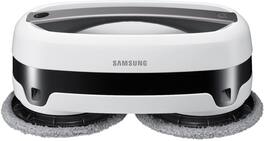
Sit back, relax and let the Samsung Jet Mop automatically clean your floors. Samsung’s Jet Mop automatically cleans all type of floors, like tile, vinyl, laminate or hardwood. This robotic mop features dual spinning fiber pads that easily and quickly remove dust and dirt. Now, you can simply take it easy as the intelligent Jet Mop does the hard work for you.
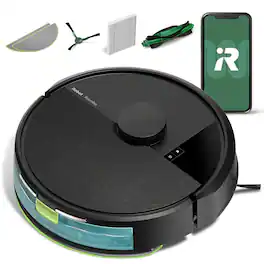
The Roomba 105 Combo Robot Vacuum is made for every kind of wet and dry floor-cleaning task. The 4-stage cleaning system delivers high-performance cleaning by combining 70X more intense power-lifting suction*, an edge-sweeping brush that cleans 20% better*, a multi-surface brush to pick up all kinds of dirt, and a washable, re-usable microfiber pad to wipe away spills. ClearView LiDAR quickly maps your home for precise coverage. Choose from 3 cleaning options - mop, vacuum, or vacuum-and-mop at the same time. Using water or cleaning solution**, choose the perfect amount of liquid for the job, and set SmartScrub to 2X deeper scrubbing*** of high-traffic areas the way you would to erase the messes of the day. Tap the app, push the robot's buttons or ask your preferred voice assistant**** for an on-demand clean.
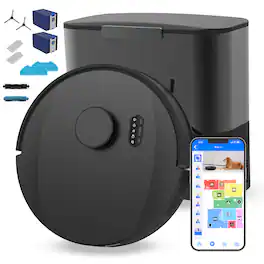
Meet UltraVision Pet, the ultimate cleaning powerhouse designed for pet owners who demand exceptional performance. With formidable 13,000 Pa suction power and tangle-free brushes, UltraVision Pet effortlessly tackles even the toughest messes—whether it’s rough pet hair, dander, food crumbs, litter, or the occasional chewed-up household mess. UltraVision Pet’s ultrapowerful suction and tandem sweeping technology provide deep cleaning across all surfaces, leaving your floors spotless. Engineered in the United States and Canada with advanced LiDAR navigation and Quantum Simultaneous Localization and Mapping (QSLAM), UltraVision Pet combines precision with power. He moves methodically in straight lines, covering every inch of your home efficiently. His real-time computing ensures that he continuously adapts to your space, maximizing coverage without missing a spot. The camera-enabled Low-height Object-aware Technology (LOT) further enhances its vigilance, allowing him to detect and avoid small items such as your pet’s favorite chewing toy. Rest assured, like other bObsweep bots, UltraVision Pet operates with your privacy as a top priority, never capturing or transmitting images of your home, and any personal data shared, such as your name and email, is never exported to foreign platforms. UltraVision Pet isn’t just about his ferocious suction power — his tangle-free soft brushes are designed to handle even the densest pet fur with ease, while his wet mop enables him to simultaneously vacuum and polish your floors. With his extra-large 6L dust collector, UltraVision Pet is built to handle the messes that come with living with pets. The dust bag, designed to hold up to 180 days' worth of debris, is reinforced with activated charcoal for odor filtration, ensuring a fresher environment by sealing smells and allergens.
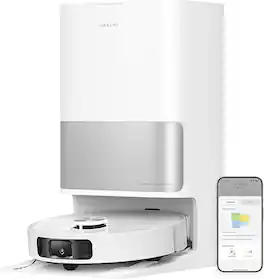
The Dreame L10s Ultra Gen 2 is a cutting-edge robot vacuum and mop combo that brings effortless, deep-cleaning power to your home. With up to 10,000 Pa Vormax suction, extendable “MopExtend™” mopping arms, and a fully automatic base station for dust self-emptying, mop washing, drying and solution refill, it handles carpet, hard floors and pet messes with precision. Smart 3D mapping and carpet-aware modes adapt to your space, while the hands-free maintenance system keeps you worry-free for up to 75 days—making high-end floor care genuinely effortless.
| Pros for Samsung - Jetbot Mop - White | |||
|---|---|---|---|
| There were no pros for this product— | Cleaning Performance, Navigation, Ease of Use, Mapping, Noise Level | Cleaning Performance, Navigation, Ease of Use, Suction Power, Hair Removal | Cleaning Performance |
| Cons for Samsung - Jetbot Mop - White | |||
| There were no cons for this product— | Dustbin Capacity, Battery Life | There were no cons for this product— | There were no cons for this product— |
Specs
Reviews
Customer Images
The vast majority of our reviews come from verified purchases. Reviews from customers may include My Best Buy members, employees, and Tech Insider Network members (as tagged). Select reviewers may receive discounted products, promotional considerations or entries into drawings for honest, helpful reviews.
- Rated 2 out of 5 stars
Manual mopping is faster
Pros Spinning action removes more than static pad Extremely quiet Doesn’t require setting up an account Easy to set up Cons Requires lots of manual attention Only allows water Needs barriers to set up in larger rooms Tends to clean small, long areas repeatedly Often misses areas Easily gets lost or stuck Rams into cabinets with foot kick recesses Tries to mop low shag carpet Status beeps sound too familiar No water sensor Design and Features The Jetbot Mop utilizes a very simple design. It has two rotating pads that have water reservoirs to allow wet mopping. It comes with both scrubbing and polishing pads. Included is a remote. It isn’t smart integrated or require any sort of an account to set up. It has a carrying handle with a power button integrated and it looks like two sensors on the side. The overall design is very simple and easy to understand. Performance and Operation The first thing the instructions recommend is washing the cleaning pads even though they are new. This is a good idea since they tend to leave more cleaning marks on the floor when new. Once you choose if you want the scrubbing or polishing pad all you have to do is fill up the water reservoir on each cleaning disk. The instructions specify to only use water, which severely limits the cleaning abilities. You can start cleaning directly by using the power button but it is really designed to be controlled via the remote so you can easily choose cleaning modes. The instructions give you very little detail as to all the differences in clean modes. For example, it has an Auto mode and a 50-minute mode. During usage, both the Auto mode and 50-minute mode ran the maximum runtime of 50 minutes. While in operation, it gives status updates for things like low battery, but the beeps used sound nearly the same which makes it hard to determine what beeps mean and the instructions offer no information. The status light only changes color for some things but the colors it changes don’t always match the instructions. During mopping, the Jetbot seems to wander around in random directions. Sometimes you can turn it on, and it will clean one small area and then go straight across the room and clean one small area over and over. In fact, the logic to the cleaning pattern seems to prefer long, small strips of flooring. In a large room with U shaped floor to clean, it would repeatedly start in the large area and quickly move to the small 1-foot wide strip of flooring and repeated clean that section of the remainder of the 50 minutes. It would barely clean the rest. No matter where it was placed it would find it way to that 1-foot wide strip and clean it until out of battery. Anything larger than a medium sized room will also require you to block off areas to clean. It can’t properly clean larger rooms in one pass requiring you to stage each area before cleaning. It also has a tendency to want to clean over low shag carpets which requires further blocking and preparation. It also has a flaw in that it cannot properly detect cabinets with floor kicks. The sensors are so low that it seems the space under the cabinet for your feet as where the wall is. This leads to the Jetbot slamming repeatedly into cabinets. More than likely this will cause marring to the cabinets over time, so you also have to protect your cabinets. If you have any furniture, such as a couch with just enough of a gap below, the Jetbot will repeatedly try to clean under that portion until it gets stuck under the couch. It seems to have no ability to detect the obstacle or that fact that it is getting stuck. The only place it seems to detect properly are standard baseboards where it works as intended and gently touches them and moves on. If you have basic rooms, it might still be a good choice but then the question is how well does it clean. The manual says to only use plain water which seems problematic. It means even cleaning something like light dirt takes several passes to pick up. Any dirt more stuck to the floor likely won’t get cleaned up as the water cannot release the stain from the floor. The other issue is that anything that has an odor, including most dirt, just gets spread around the room. Other people who would enter the room said it would just end up making the room smell unclean as it spread the smell around. There doesn’t seem to be any technical reason why the cleaning pads couldn’t use cleaning chemicals as this would solve half of the issues. Because of this, mopping also tends to leave streaks and cleaning marks on the floor making it look as though you cleaned with dirty water. Final Thoughts At first glance, the idea of robot floor cleaner that actually scrubs the hard floors seems great. Unfortunately, the effort to keep things simple Samsung seems to have gone too far. Except for very simply rooms, it would be quicker to just manually mop the floor yourself. It would be less of a fuss, come out cleaner in the end, and you wouldn’t have to prep the device and room beforehand. Manually you also wouldn’t need to stop every 50 minutes clean up again. Manually you could also use chemicals and clean the entire floor quickly and effectively while also avoiding mopping marks. Unless you have very basic rooms and just want keep basic dust and dirt off the floors, you are better off with cleaning the floors manually until Samsung revises the design and cleaning logic of the Jetbot.
This review is from Samsung - Jetbot Mop - White
CraigB Posted
- Rated 5 out of 5 stars
It's a great time-saver.
*Summary: The Samsung Jetbot Mop, with its dual spinning pads, does a pretty good job cleaning the floor and saving lots of time in the process. Setting it up for cleaning is easy and quick and no special soap or chemicals is required. The Jetbot gets confused sometimes over boundaries but it alters its course correctly most of the time. It can't completely replace all of your scrubbing and mopping scenarios, like for old or deep stains, but for regular maintenance and upkeep, it's a great cleaning robot servant to have around. _____ Pros: -It's a cool-looking little mopping machine. -Easy to set up and use. -No proprietary soap or chemical required. -A remote control is included so no smartphone app is needed. -Can start Jetbot without a remote control. -Quiet operation. -Didn't damage or scratch up my flooring. _____ Neutral: -Doesn't perform a dry sweep before mopping. -Takes a long time to fully recharge the battery (~2.5 hours). -It will continue to operate even after the water runs out. -No smartphone app to control Jetbot or check on any errors. -Only two sets of cleaning pads included. -Activating hand-held mode by double-pressing the button sometimes does not work. _____ Cons: -No separate avoidance devices or beacons are included to tell the Jetbot to avoid certain areas. -Once, it failed to backtrack and mopped the carpet. === Design, Build Quality, and Ease of Use === The Jetbot Mop is an interesting-looking robot that kind of reminds me of an oversized VR headset. I like its black and white color theme and I think it looks cool overall. The fit-and-finish and build quality live up to the Samsung branding, meaning it's constructed durably and feel solid, and getting it set up was a simple and easy process except for the first time I tried to take the discs off the Jetbot. The manual wasn't very clear on this but to take off the discs, you just need to pull them straight out without any rotations. With its 6 lb. weight, the Jetbot didn't cause any strain when I picked it up to use it as a wall scrubber. The double-tap to activate the hand-held mode, however, didn't always work reliably and I had to repeat the process a couple of times sometimes. The two water reservoirs each hold 55ml of water and I like that I don't need to purchase any proprietary or special chemicals for the Jetbot. Although the manual doesn't mention it, you can spray some cleaning chemicals on the bottom of the mopping pads to increase the Jetbot's cleaning effectiveness; just be sure to stay away from harsh or abrasive chemicals to protect your flooring. For those who don't want their robot servant to map the interior of your house and give away your location, you'll like that the Jetbot doesn't require any mobile apps. It's a double-edged sword, though, because without any beacons, you can't command the Jetbot to stay away from certain locations, check on its status for any errors, or perform smart AI assistant commands. At a price point of $300, I didn't expect smart functionality, but I was surprised nevertheless that Samsung didn't integrate the Jetbot within its SmartThings mobile app. === Performance === If you use the Jetbot for its designed purpose - routine maintenance and upkeep of your flooring and cleaning up mostly fresh spills - then you'll be happy with its performance and oodles of time it'll save you. With its eight different cleaning modes and two different mopping pads, it does an admirable job and you won't have to touch that mop again and deal with the dirty water basin. For older or deep stains, you'll have to scrub it away manually using good old elbow grease, par for the course with most robot mop machines regardless of the price. There is one cleaning mode - the Focus mode - that I wish I had more granular control over. As it is, Focus mode does not have a distance or radius limit; the Jetbot will continue in the Focus pattern for the entire room. So, if you want to spot clean a small area using Focus mode, then you'll have to remember to stop the Jetbot once it's done with the area you want to be cleaned. As expected from a non-hybrid mopping machine, the Jetbot is unable to vacuum crumbs or other small debris. It would've been nice, however, if it had the ability to perform a dry sweep of the area at least before water mopping. As it is, it's recommended that you sweep or vacuum the area before you set off the Jetbot on its mopping mission. The Jetbot comes with three sensors built-in (obstacle, wall-following, and cliff), and most of the time, it did a good job staying away from the carpeted area and getting itself unstuck in tight corners. The few times it did cross over onto the carpet, it quickly backtracked and resumed its duty on the wood flooring. But one time, it remained on the carpet and mopped it for about 20-30 minutes. XD If you have low carpeting, then I recommend keeping an eye on the Jetbot in case the same thing happens to you. Samsung's website says the noise level generated by the Jetbot is 63 dBA and to me, it sounded quieter than that. Compared to our other cleaning robots, the Jetbot is the quietest. === Is it a good buy? === Yes, if you value your time a lot and you dislike dealing with a dirty mop and dirty water. The Jetbot may not have lots of bells and whistles but at $300, and often going on sale for $250, it's a great value and a good robot that doesn't require much babysitting and maintenance.
This review is from Samsung - Jetbot Mop - White
optimummind Posted
- Rated 4 out of 5 stars
Simple but Surprisingly Effective
Pros: * Works surprisingly well. * Quiet. * Can be used on windows and tile walls, too. * Useful remote control. Cons: * Water reservoirs empty long before the battery drains. * Cannot easily restrict to individual rooms or spaces. * No “smarts.” Review: Robot floor cleaners have come a LONG way since the early days. They used to just randomly bump around and hope to cover everything. Now they can create and store maps of your whole home and be directed to work in individual rooms. Many can be restricted from rooms or zones based on those maps, too. Some can be triggered by schedules or voice commands. The fanciest of models even plan out the best routes to get everywhere as efficiently as possible. This robot mop harkens back to the early days of robotic cleaners. It doesn’t have any type of room mapping. There’s no WiFi connection to an app. No Alexa or Google Home integration. It does have a few sensors to detect a cliff or when it’s about to bump into something, but otherwise it just does various random patterns - hoping to clean everything… at least until it runs out of battery or you turn it off. It’s actually quite fun watching it go. Most robot floor cleaners have wheels of various configurations. This thing has two spinning discs that mop the floor and move it around. There are no drive wheels per se. The discs that clean the floor also propel it in various directions. This is not only effective but very quiet. I was surprised at how well it works. You’re not supposed to use any type of detergent, but the water and pads did a pretty good job anyway. There are few aspects that could use improvement, though. Each spinning disc has a dedicated water reservoir to keep that spinning pad moist. Those reservoirs each don’t hold much water. In fact, they ran dry long before the battery did, which is good for battery life but not so much for moist mapping pads. While the whole thing is kinda small, the unit is a bit on the tall side. It doesn’t fit under baseboards and can’t slip under many types of furniture. It’ll still get the walkways clean, but don’t expect it to get everywhere like some of its shorter competitors. Also, there is no way to easily constrain it to one room or area. You basically have to erect barriers with chairs or other objects if you want to keep in a space, or close doors, if you can, to keep it in a room. I put it down in my den which is connected to the rest of the house. When I came back to check on it a while later, it was in a completely different room of the house, just merrily wiping down the floors wherever it could reach. Overall, this robot mop is very effective for its lack of smarts. There are other brands of robot mops with more intelligence, but this one does the job quite well despite being simple. it just needs a bit more care and feeding but still gets the floors clean, and that’s what counts.
This review is from Samsung - Jetbot Mop - White
gadgeTT Posted