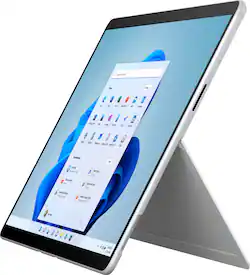
Surface Pro X – 13” Touch Screen – Microsoft SQ1 – 8GB Memory – 256GB SSD – Device Only - Platinum
- Key Specs
- Screen Size: 13 inches (Size of the screen, measured diagonally from corner to corner.)
- Screen Resolution: 2880 x 1920 (Screens come in a range of resolutions (measured in pixels, horizontal x vertical). The higher the resolution, the greater the picture quality.)
- Processor Model: Microsoft SQ1 (Your computer's processor is like its brain. Working in combination with system memory, the power of the processor determines the complexity of software you can run, how many programs you can have open at the same time, and how fast those programs will run. Most computers feature an AMD, Intel or Snapdragon processor.)
- Total Storage Capacity: 256 gigabytes
- Operating System: Windows 11 Home on ARM (The operating system manages all software and hardware, including files, memory and connected devices. Most importantly, it lets you interact with your device and your programs in a visual way; otherwise, you'd be typing computer code to get anything done.)
- Wireless Connectivity: Bluetooth, Wi-Fi (The manner in which a device sends data to another device over a short distance without the use of wires or cables.)
- Battery Chemistry: Lithium-ion
- 2-in-1 Design: true (A laptop and a tablet combined in one lightweight, portable device. Sometimes referred to as "convertible" or "hybrid" laptops, these devices deliver the processing power and keyboard of a laptop. When you're ready to play, either detach the screen or fold your 2-in-1 into tablet mode to comfortably watch movies, play games, read an e-book and more.)
- Security Features: Facial recognition
- General
- Brand: Microsoft
- Model Number: E7F-00001
- Product Name: Surface Pro X – 13” Touch Screen – Microsoft SQ1 – 8GB Memory – 256GB SSD – Device Only
- Color: Platinum
- Model Family: Microsoft Surface Pro
- Year of Release: 2021
- Display
- Display Type: LCD
- Screen Type: PixelSense
- Screen Size: 13 inches (Size of the screen, measured diagonally from corner to corner.)
- Screen Resolution: 2880 x 1920 (Screens come in a range of resolutions (measured in pixels, horizontal x vertical). The higher the resolution, the greater the picture quality.)
- Stylus Input: Built for Windows Ink (Active) (An active stylus/pen is able to communicate directly with a compatible device; active electromagnetic resonance (EMR) pens are powered via a device's screen and active electrostatic (AES) pens require an additional power source. A passive stylus does not have electronic features and is compatible with most capacitative touch screens.)
- High Dynamic Range (HDR): false (An HDR-compatible 4K TV or other HDR-compatible product displays HDR video content when it's available from sources like 4K Ultra HD Blu-ray Discs and 4K streaming services.)
- Processor
- Processor Brand: Snapdragon
- Processor Model: Microsoft SQ1 (Your computer's processor is like its brain. Working in combination with system memory, the power of the processor determines the complexity of software you can run, how many programs you can have open at the same time, and how fast those programs will run. Most computers feature an AMD, Intel or Snapdragon processor.)
- Storage
- Total Storage Capacity: 256 gigabytes
- Memory
- System Memory (RAM): 8 gigabytes (Random-access memory (RAM) is a computing device's short-term data storage, which allows active information to be accessed quickly. The size and type of RAM determines how efficiently the device can handle large amounts of information at one time. For example, gaming or video editing requires more RAM for optimal performance.)
- Type of Memory (RAM): LPDDR4X (Each type of RAM delivers a different level of speed, bandwidth, energy efficiency and performance.)
- Expandable Memory Compatibility: None
- Compatibility
- Operating System: Windows 11 Home on ARM (The operating system manages all software and hardware, including files, memory and connected devices. Most importantly, it lets you interact with your device and your programs in a visual way; otherwise, you'd be typing computer code to get anything done.)
- Operating System Compatibility: Windows
- Connectivity
- Wireless Connectivity: Bluetooth, Wi-Fi (The manner in which a device sends data to another device over a short distance without the use of wires or cables.)
- Network Connectivity: None (The manner in which a device sends data to another device over a long distance using a cellular network.)
- Compatible Wireless Standard(s): Wireless-AC (The wireless networking standard(s) the device is backwards compatible with. This includes networking protocols based on the IEEE 802.11 standard (alphabetically ascending) and the Wi-Fi Alliance standard (numerically ascending), both of which provide high-throughput wireless local area networks (WLANs). Devices designed to work with specific standard(s) will be backwards compatible with previous versions but may not run at optimal performance when using earlier iterations.)
- Headphone Jack: false (The device features an interface that allows for the connection of headphones.)
- Bluetooth Version: 5.0 (The Bluetooth specification formalized by the Bluetooth Special Interest Group. All versions of the Bluetooth standard are backwards compatible with previous versions.)
- GPS Enabled: true
- Power
- Charging Interface(s): Proprietary (The connection for transmitting power to charge the device.)
- Battery Life (up to): 15 hours (Battery life will vary depending on the product configuration, product model, applications loaded on the product, power management setting of the product and the product features used by the customer. As with all batteries, the maximum capacity of this battery will decrease with time and usage.)
- Battery Capacity: 5039 milliampere hours (The amount of energy stored in the battery.)
- Battery Chemistry: Lithium-ion
- Camera
- Front-Facing Camera: true
- Front Facing Camera Megapixels: 5 megapixels (The more megapixels, the more detail that the camera facing the user can capture.)
- Front Facing Camera Video Resolution: 1080p (Refers to the number of pixels, both horizontally and vertically, used by the camera facing the user to capture video. The higher the resolution the finer the video detail that can be seen.)
- Rear-Facing Camera: true
- Rear Facing Camera Megapixels: 10 megapixels (The more megapixels, the more detail that the camera facing away from the user can capture.)
- Rear Facing Camera Video Resolution: 1080p (Refers to the number of pixels, both horizontally and vertically, used by the camera facing away from the user to capture video. The higher the resolution the finer the video detail that can be seen.)
- Built-In Microphone: true
- Features
- 2-in-1 Design: true (A laptop and a tablet combined in one lightweight, portable device. Sometimes referred to as "convertible" or "hybrid" laptops, these devices deliver the processing power and keyboard of a laptop. When you're ready to play, either detach the screen or fold your 2-in-1 into tablet mode to comfortably watch movies, play games, read an e-book and more.)
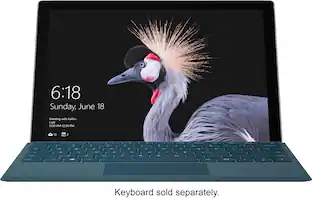
- Keyboard Included: false
- Security Features: Facial recognition
- Stylus Dock: None
- Dimensions
- Product Height: 8.2 inches (The out of box height of the item. Height is measured as the vertical distance from the bottom of the item to the top as it would be primarily used or placed.)
- Product Width: 11.3 inches (The out of box width of the item. Width is measured as the horizontal distance from one side of the item to the other as it would be primarily used or placed.)
- Product Depth: 0.28 inches (The out of box depth of the item. Depth is measured as the distance from the front of the item to the back as it would be primarily used or placed.)
- Product Weight: 27.2 ounces (The out of box weight of the item.)
- Certifications Listings & Approvals
- EPEAT Qualified: true (The Electronic Product Environmental Assessment Tool (EPEAT) was designed to provide an environmental assessment tool for purchasers. In order to qualify for EPEAT, a product must meet all 23 required criteria.)
- EPEAT Level: Gold (The Electronic Product Environmental Assessment Tool (EPEAT) was designed to provide an environmental assessment tool for purchasers. In order to qualify for EPEAT, a product must meet all 23 required criteria. Products are rated Bronze, Silver or Gold based on how many of 28 optional criteria they meet (below 50%, 50%, 75%).)
- Included
- Included Software: Windows 11 Home on ARM⁴ (Wi-Fi Only), Microsoft 365 Family 30-day trial³, Xbox Game Pass Ultimate one month trial (accessible through Xbox.com/Play)1¹²
- Stylus Included: false
- Warranty
- Warranty - Parts: 1-year limited hardware
- Warranty - Labor: 1 year
- Other
- UPC: 889842814323
Meet the totally mobile Pro. Always with you, instantly ready, and designed to light up the best of Windows 11. Keep up anywhere, at any angle, with a detachable Keyboard² with built-in Slim Pen storage and charging³ — plus fast connectivity and all-day battery life, with optional Gigabit LTE.⁴
- Mobile Pro: Always with you, instantly ready, and designed to light up the best of Windows 11. Keep up anywhere, at any angle, with a detachable Keyboard¹ with built-in Slim Pen storage and charging² — plus fast connectivity and all-day battery life, with optional Gigabit LTE.⁴
- Leave the charger at home: Up to 15 hours⁴ of unplugged power with battery life designed to last — plus Fast Charging when you do need to go from low to full without skipping a beat.
- 8-core performance, more experiences than ever: With a custom-built Microsoft processor, Surface Pro X delivers the best of the mobile platform. From photos to Photoshop,¹ applications optimized for Windows on ARM make the sky the limit.
- 13” PixelSense Display with 2880x1920 resolution: From sketching or studying to gaming and binge watching your favorite show on the high-resolution 13" touchscreen, Surface Pro X effortlessly adjusts to the position you need, when you need it.
- Internal Storage Capacity 8GB: Stores your music, movies, photos and more.
- Crystal-clear video calls and more: Stay connected in high definition. Capture, edit, and share footage in 4K. All thanks to the built-in 5.0MP front-facing camera with 1080p HD video and 10MP rear-facing camera with autofocus.
- Thinnest and lightest Pro: Starting at just 1.7 pounds (not including Keyboard, sold separately).⁶
- Surface Pro Signature Keyboard: Next-level versatility in the perfect, premium Keyboard, with large glass trackpad, luxurious Alcantara®, and secure storage and charging for Surface Slim Pen 2.¹
- Surface Slim Pen 2: Our best performing pen yet, with real-time writing, pin-point accuracy, and incredible shading thanks to a sharper pen tip and improved design.¹
- Instant productivity, endless entertainment: Whether you’re editing a photo in Adobe Lightroom, streaming Halo Master Chief Collection, or smashing through emails in Outlook, Surface Pro X with Windows 11 is built for what you do.¹
- Built for master multitaskers: Connect to 4K external monitors, charge your phone, or use a USB drive with two USB-C ports and an extra USB-A – all while charging Surface Pro X with the dedicated magnetic charging port.
- Focus on your voice, not the background noise: Dual far-field Studio Mics and optimized speakers deliver the best video calling experience yet on Surface Pro.
- Designed to do more: Meticulously engineered by Microsoft, Surface delivers the best of Windows. Add a Microsoft 365 subscription⁷ and the possibilities become endless.
- Don’t worry about competing for bandwidth: Optional Gigabit LTE keeps you connected with blazing fast, reliable, and consistent speeds so you can keep streaming, chatting, or working without interruption almost anywhere.⁴
Whats Included
- Surface Pro X
- Power Supply
- Quick Start Guide
- Safety and warranty documents
Q: Does this have headphone jack?
A: It does not nor does it have USB ports
Q: Hey is it like an ipad can you Bluetooth it
A: undefined
Q: Can you use any other keyboard with the surface pro?
A: Yes, you can use Bluetooth keyboards with Surface Pro 8.
Q: Does it link up with digital X-rays?
A: If it has to be plugged in in order to be used then it probably will not work. This computer does not have the additional outlets such USB port as other computers do. If the digital X-ray is bluetooth then I am sure it will work fine
Q: does this surface pro-x have a stylus pen?
A: No it doesn’t. I wish it did
People also viewed
 $949.99The price was $1,049.99
 $1,349.99The price was $1,639.98
 $1,019.99The price was $1,149.99

Today's top picks
 $199.99The price was $249.99
 $479.99The price was $729.99
 $789.99The price was $1,049.99
 $799.99The price was $1,199.99