Techtober SaleEnds Sunday. Limited quantities. No rainchecks.Shop now

Skip to contentGo to Product Search
Main Content

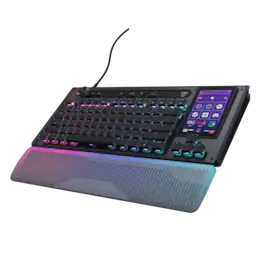
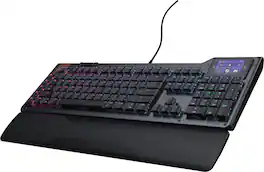
Turtle Beach - Command Series KB7 TKL Wired Hall-Effect Gaming Keyboard for PC - Black

Model: TBK-2004-01-US
SKU: 6676909
Sold byBest Buy

Customers are saying

Customers consistently note that the product features a rock-solid build quality that feels durable and reliable. Users also frequently praise its high-level performance and ergonomic design, which provides a comfortable typing experience. Additionally, many appreciate that the keyboard operates with a smooth and quiet noise level.

Generated by AI based on customer reviews.

Features

  • 4.3” Command Touch Display

    Take control without breaking focus. Customize profiles, trigger macros, monitor system stats, and manage audio or apps directly from the Command Touch Display.

  • Modular Command Series Design

    More than a keyboard, KB7 anchors the Command Series ecosystem, with dual modular rails designed to integrate seamlessly with the Command Series KP7 keypad.

  • Titan Low-Profile Hall-Effect Switches

    Lightning‑fast analog precision with adjustable actuation down to 0.1mm, Rapid Trigger support, pre‑lubed smoothness, and a 100‑million keystroke lifespan.

  • Premium Double Shot PBT Keycaps

    Premium double‑shot PBT keycaps resist shine and wear while delivering a refined tactile feel and balanced acoustics. Additional textured WASD keys provide added grip for confident control.

  • ReacTap SOCD

    The technology prioritizes the most recent directional input between two keys, enabling smooth, continuous movement with faster, more precise counter‑strafing and directional control.

  • True 8K Low‑Latency Performance

    True 8K polling rate and 0.125ms latency enable response up to 8x faster than standard keyboards for fast, precise, low‑latency input.

  • Low-Profile Design

    Low‑profile switches, stabilizers, and keycaps ensure smooth, precise input, paired with a reinforced 29mm/1.14in‑tall chassis, adjustable kickstands, and a detachable wrist rest.

  • Action Bar Controls

    Tactile control bar with a clickable volume dial, dedicated media buttons, and four fully mappable quick‑access keys for instant control.

  • Compact TKL Layout

    Tenkeyless form factor frees up desk space and allows greater mouse movement for improved accuracy and comfort.

  • Per‑Key RGB Illumination

    Fully customizable per‑key RGB lighting powered by Swarm II for a cohesive, personalized setup.

  • Advanced Customization with Swarm II Software

    Advanced customization for the Command Touch Display, profiles, RGB lighting, macros, and performance tuning.

Specifications

  • Lighting Type
    RGB
    Form Factor
    Tenkeyless (TKL)
    Keyboard Technology
    Hall-effect
    Key Switch Behavior
    Linear
    Connection Type
    Wired
Sponsored

Reviews

Customers are sayingCustomers consistently note that the product features a rock-solid build quality that feels durable and reliable. Users also frequently praise its high-level performance and ergonomic design, which provides a comfortable typing experience. Additionally, many appreciate that the keyboard operates with a smooth and quiet noise level.
This summary was generated by AI based on customer reviews.
  • Build Quality (22)
  • Performance (13)
  • Ergonomics (12)
  • Noise Level (7)

Customer Images

The vast majority of our reviews come from verified purchases. Reviews from customers may include My Best Buy members, employees, and Tech Insider Network members (as tagged). Select reviewers may receive discounted products, promotional considerations or entries into drawings for honest, helpful reviews.

  • Rated 5 out of 5 stars

    Great Keyboard for Gaming, Streaming, or Editing!!

    I love this keyboard. The ability to set up different profiles depending on what I am working on is great! The buttons feel great too!

    Posted by JackFry42

  • Rated 4 out of 5 stars

    Gaming Keyboard with Display? Sure, why not!

    The Turtle Beach KB7 TKL wired gaming keyboard is a unique gaming keyboard with a built-in display. This is a TKL keyboard, but with the display, it is slightly smaller than a full-sized keyboard. I found the display to be a bit gimmicky at first, but after using the display for some time, it grew on me. I found various ways to use the display to my advantage throughout my testing. I tested the keyboard in both a gaming and office setting, so I will cover both areas. This is my review of the Turtle Beach KB7 TKL Wired Gaming Keyboard. *TLDR at the bottom ==================== IN THE BOX/SET-UP: In the box, you receive a wrist pad, a USB-C to USB-C cable, a USB-C to double USB-A adapter, keycap puller, textured WASD keycaps, and some documentation. In terms of setup, the KB7 is plug-and-play unless you would like to dig into the keyboard’s settings. While the app is optional, I do recommend it, as it is necessary to be able to fully customize this keyboard. The app also provides your keyboard with firmware updates to patch any newly discovered bugs outside the box. The display has a built-in shortcut that will open a Run window on your computer and launch a website to download the software. ==================== BUILD QUALITY/COMFORT: In terms of build quality, the KB7 feels sturdy. The frame does have plastic, but it is reinforced by an aluminum chassis. The top plate is metal with a nice brushed finish. The media keys and the keys on the top row are plastic and feel like an afterthought compared to the rest of the keyboard. The keycaps don’t appear to be the most premium keycaps, but they certainly will last a long time due to them being double-shot PBT. The 4.3” display feels nice and responsive. It does have thick bezels, but they don’t stand out too much. One neat feature that would’ve been nice to have is a height-adjustable display. This way, the display is more easily accessible, especially if you are locked into a game or need access to constantly used shortcuts. I tried the keyboard with and without the wrist rest. While I do typically use my keyboards without wrist rests. This one did feel uncomfortable without it due to the raised height. The wrist pad places your hands in a more ergonomic position. In terms of typing, the keyboard is incredibly smooth. It is also quiet. The keys are more bunched up together compared to my previous keyboard, so it is taking me a while to get used to the spacing. The display’s location relative to the keyboard is also perfect if you are somebody that is wanting to use it as a number pad or for the special keys (Home, End, Del, etc.). ==================== FEATURES/SWARM II PC APP: The KB7 has plenty of features for the average gamer or office worker. The display offers many customization options, like an OBS app integration for those who use OBS to stream/record videos. I’ve used OBS to record videos in the past, and having shortcuts to start, pause, take screenshots, etc., is amazing. There are even templates to display your PC’s performance(CPU/GPU usage, etc.). For the office worker, the template that is an absolute godsend is the website template. Being able to launch frequently used websites is extremely convenient. Also, a tip for the display. If you scroll using the middle, you are bound to accidentally open an app. The best way to scroll between pages is by scrolling using the bottom empty space. There are also dedicated media keys and alternative keys (RGB lighting, profile switcher, etc.) on the top row. The rails on the side can be used to connect external accessories like a gaming number pad. The keyboard is incredibly customizable through the Swarm II app. The display’s widgets/pages, per-key actuation point configuration as low as 0.1 to as high as 3.2, remapping keys, and per-key RGB customization are some of the main customization options for this keyboard. While I love the customization options, the software has been too buggy, which makes the user experience frustrating. On top of that, the UI could be more user-friendly. There are icons with no labels, options that are hard to find, and a lack of description/tutorials on some settings (e.g., custom macros), which has made the software frustrating to use. On top of that, I have run into several software/hardware breaking bugs. In one instance, the space bar stopped working after deploying a display update. I had to unplug and replug the keyboard to get it to work again. In another instance, the software was non-responsive and would continually crash when launching. I had to force-close the app and restart it to get it working again. Luckily, the software can be updated on Turtle Beach’s end. I hope in 6 months to a year from now, some of these items get fixed or improved upon. This is a neat gaming keyboard that seriously would be a 5/5 if the software were more user-friendly. ==================== GAMING/OFFICE PERFORMANCE: The KB7 is marketed as a gaming keyboard, but it can absolutely be used as an office keyboard. I work in IT, and being able to customize the display, create macros, and set website/folder shortcuts on the display has been a godsend. I have to consistently navigate around different websites at work, and instead of clicking a shortcut or typing a website into the search bar, the shortcuts are easily available on the display at the click of a button (very neat). The volume knob and media controls are convenient, although the controls do require more effort when pressing down on them compared to previous keyboards I have used. They are also loud when clicking down (at least the keyboard itself is quiet). I would’ve preferred rubber buttons or some type of haptic feedback button. Also, if you are someone who is crunching numbers together, the display can be turned into a number pad. In terms of gaming, the KB7 is a great gaming keyboard. It is comfortable, and key travel is incredibly short. The ability to set the actuation point on a per-key basis is great, especially for those FPS games where a quick move can be the difference between a win or a loss. I also love the ability to update system volume from the display. Sometimes I like listening to music while gaming, and if I need to quickly turn the music down to hear dialogue in-game, I can simply swipe to the far left and use the slider on the display. Every once in a while I also like to see my PC’s performance during a game. The display can be customized with widgets that do just that. So, rather than having performance monitor take up space on your precious display space, the keyboard can display those performance stats. ==================== CONCLUSION/TLDR: In conclusion, the KB7 is a solid gaming keyboard that also doubles as an excellent office keyboard. For a gamer, the keyboard has everything you could want. From per-key actuation point customization options to creating/setting your custom macros, and the myriad of widgets that can be installed on the display (performance monitor, Discord shortcuts, system volume settings, etc.), there is plenty to be customized. For the office workers, the display can be turned into a number pad or a shortcut launcher for frequently used sites, folders, docs, etc. There is also a Teams/Zoom page available that can be used to run shortcuts within the app(e.g., mute mic, turn camera off). While the software is buggy and can be significantly improved, the keyboard itself is a great gaming/office keyboard. If Turtle Beach can clean up the bugs and improve the UI for the software, this keyboard would be a perfect 5/5. Overall, I would recommend the keyboard in its current state, but if you find buggy software frustrating, definitely wait it out for half a year or a year. Hopefully, by then, Turtle Beach would’ve cleaned up the bugs and UI.

    Posted by BarackObama

  • Rated 4 out of 5 stars

    Hardware makes conquering the software worth it!

    Bottom line up front: I liked the KB7 enough that I purchased the matching modular keypad, so my experience comes from someone who took the plunge to fully leverage the whole “modular command center” concept. That said, the criticisms of the Swarm II companion application you might see in other reviews are not completely without merit. Although it is incredibly powerful and flexible, giving you positively TOTAL control over every single key’s behavior with multiple functions per keystroke and multiple actuation points, Swarm II can feel a little sluggish and even frustrating at times. Still, if you muscle your way through the software usability issues (including a somewhat obtuse firmware update process), the hardware and typing experience you get in return is almost sublime. Let’s start with the keyswitches themselves. These are NOT clicky keys; for those of you used to the “feel” of mechanical keyswitches, know that there is no tactile feedback when you actuate the KB7’s keys other than the feeling of bottoming them out at the end of the keystroke. But, the movement is buttery smooth, and the long-lived hall-effect (magnetic sensors) switches allow you to customize actuation, rapid fire, or multiple functions per keystroke in increments of as little as 0.1mm! The keyswitch sound is a muted “thunk” that doesn’t ring loud enough to bother officemates (and I’m a REALLY hard typist who bottoms out every keystroke) which is why I’ve been using mine for 9 hours a day at work with no complaints from those around me. The keycaps themselves are low profile which I thought would feel more like a laptop’s chicklet keys than the full-sized keycaps I’ve been using for the past several decades, but it’s actually a really pleasant tactile sensation in part, I think, because each keycap is simply smaller and lighter than a standard full-size keycap. Whether YOU will like that sensation or not is another story, but at least in my head, I felt like I was able to get even faster keystrokes in than the Corsair and Logitech mechanical keyboards I’ve been using for ages. Like many modern keyboards, this one packs in a few dedicated multimedia controls including previous/next track buttons, a play/pause wheel that doubles as a volume control, and four triangular buttons that, frankly, feel a bit like afterthoughts. Don’t get me wrong, it’s definitely handy to have dedicated hard buttons for quick game-mode switches, onboard memory profile switches, and RGB on/off. The other triangle is a mute button, but not for playback, only for the mic. This feels like an odd choice, especially given that there is no dedicated audio mute button. Still, if you are using a headset that doesn’t have a mute button, or simply don’t want to reach elsewhere for a mute-mic control, it IS nice to have a dedicated key right up top. One other small design niggle--I wish the play/pause volume dial was limited to the outer ring of the play/pause button—as it is, the entire dial rotates which includes the play/pause graphic. It’s a small detail to be sure, but it looks OCD-weird to have all other controls on the keyboard oriented “normally,” but the play/pause button is hanging out upside-down or backwards based on the last volume adjustment. Within the Swarm II software, you can set literally limitless combinations of functions and actions for your specific use case. There are some gamer-specific functions that are especially welcome such as ReacTap. Other manufactures may call it something different, but it basically allows you to specify a set of keys where the most recent keypress is prioritized even over one that is being held down. This function will allow you, for example, to keep a directional key pressed while making a momentary counter movement with another key without having to lift your finger off the other key. Tired of spamming certain keys—you can set individual rapid-fire controls with a keystroke as little as 0.1mm. You can also customize actuation depth and return on a per-key basis allowing you absolutely mind-numbingly specific control over how your keyboard behaves whether you’re gaming or working. The Swarm II client also allows you to assign functions, macros, or various gaming and streaming-oriented plugins to pretty much any key you want. But the big star of the show here is the command screen, a full color touchscreen that is customizable with even MORE features and functions that you can adjust on the fly. The screen holds a total of 12 standard-sized “keys” per page, and there are three pages available for programming. This has come in very handy here at work when I really wanted a numpad for this TKL keyboard (before I bought the keypad module) or some shortcuts for often-repeated actions such as paste-text, undo/redo, or hardware monitoring (CPU temp, memory usage, etc.). You move between screens with a simple swipe action which allows you to store an impressive number of customized functions right at your fingertips. But what really surprised me was that you can also make the same sort of Swarm II customizations just using the keyboard’s built-in interface. From the command screen, you can set illumination levels, actuation points, turn ReacTap on and off, set rapid trigger, record macros, remap keys, and change the background. The settings are stored on the keyboard itself so you can take it with you to another PC and all your customizations will still be intact. Despite my own positive experiences with the KB7, there are some issues to be aware of. First, the Command Screen customization is fairly limited, at least at the moment. There are some graphical options and professional looking button displays (like a Steam icon or graphical buttons for Discord or OBS), but you can’t customize the buttons with your own graphics like you can with a Stream Deck or other macropod. And while it IS handy for the hotkey display to show the actual combination of keys in use, for example “(SHIFT+CTRL+V)”, you can’t customize the name of the function you’ve built to something that makes sense to YOU (“Paste Text”). Second, navigating the Command Screen isn’t always as easy as it should be. You must touch the screen to swipe between pages, but the screen’s design makes it so that there is virtually no place on the screen to touch that wouldn’t already be occupied by a control of some kind. So, unless you purposefully leave one area of the screen blank of a button/control, it’s VERY easy to accidentally press a button/control when all you wanted to do was change pages. I also noticed that while Num-lock and Caps-lock have an indicator on the Command Screen that they are active, Function-Lock does not—even the “permanent” FN-Lock key combination only gives you a momentary red “FN” icon on the display. More than once I wanted to press END or DEL only to bring up a developer menu or an oddball context menu instead. Finally, the Swarm II client really is a bit sluggish at times. Upon startup, the Swarm II display will show “Preparing” in the status window for the KB7 for what seems like an inordinately long time before you can actually jump into the program to start making changes. Changes to the Command Screen also flow one button at a time so you can’t build an entire page and sync it when you’re ready. Instead, it’s: make a change to one button, save—wait a moment to sync; now move on to the next button, make a change, save again—wait to sync; oops, I put that key in the wrong place--move a button, save, wait to sync, etc. etc. This makes customization tedious than necessary. The firmware update process also seems frustratingly unresponsive. The onscreen instructions might say you have to unplug and plug the keyboard back in to complete the update, but more than once I left the keyboard plugged in for the second half of a firmware update only to find that 5-10 minutes later, I still needed to unplug and plug the keyboard back in again to get the second update to “take.” And the very first time I ran Swarm II and the KB7 together, I had to update the firmware AND the Swarm II client which required a restart that wasn’t entirely self-evident. Still—I was eventually able to install all the updates and things have been working smoothly ever since. These minor annoyances aside, there really IS a lot to like about the KB7--it is a very powerful, infinitely customizable keyboard that slips effortlessly between work and play…and it lets you play HARD. Probably more than a casual gamer might need--but for content creators, serious gamers, and streamers who value versatility and appreciate the smaller footprint of a TKL keyboard without needing a separate macropod or Stream Deck-like appliance on the desktop, the KB7 offers you a LOT for your dollar. Well worth your time to check it out!

    Posted by WyldeBlue

  • Rated 4 out of 5 stars

    Almost Perfect: Feature Rich, Held Back By Sofware

    I consider myself a hardcore gamer, in the sense that I want the best peripherals, because I want to perform in the top percentiles. So, in a keyboard I want 8,000 Hz polling and Hall Effect keys. When I game with friends I want an easy mute key to mute my mic. I also tend to watch media while I game so having dedicated media keys is helpful. Last, I also use my computer for work. So having a num pad and other features is important. This keyboard somehow has all of the things I want. Which is why I was interested in it. And for the most part it does a brilliant job. But there are some things that I wish it did better. As if it were to do that it would be the perfect keyboard for me. TLDR: This is an excellent keyboard. One of my favorites due to the unique touchscreen, low profile titan hall effect switches, and 8,000 Hz. So the hardware is excellent. The software needs some work though. PROS: • 4.3” Command Touch Display: This is the main reason why I got this board. I think this is a brilliant addition. You can swipe between four different screens, three of which you can customize yourself (but that customization is limited and would like to see some expansion to it). This all works normally without software running (Swarm). o If you swipe left it brings you to the system volume where you have your master volume and then each application that you can move. This is amazing. o The next is the typical middle row of keys (print, delete, end, home, etc. o Swipe right again and you get a num pad (without +, enter, -, /, *). Then the last swipe right screen is more of a custom settings. Which I personally used to have a shortcut to record my gameplay making it very simple to get a replay. Which I loved. • Next on the top you have dedicated keys. From left to right you have a volume knob with a play/pause button in the middle. Turning the wheel feels good with dedicated steps but the play/pause button feels very cheap along with the rest of the buttons I’m about to mention which is forward, backward, game mode, profiles, mute mic (love this dedicated button!), and lighting (on or off). • The board has a top aluminum plate. Very little flex. But is very light making it feel cheap and plastic like. As everything else but that plate is plastic. There is a single step up on the back with some rubber feet. • Personally, I enjoy low profile keycaps. But that might not be every bodies cup of tea. • The Titan Low-Profile Hall Effect switches are nice. I’ve gotten spoiled with them from other keyboards. It allows you to adjust the actuation of the keys meaning that can be as low as 0.1 mm which does increase reaction time simply because you don’t have to move the switch as far. They do report adding “controller support” which means you can essentially get joystick maneuverability in the future. Which does help in racing type games or more finite control of your character as it goes based on how far you press the switch down kind of like how far you move a joystick to say the right. Which I have in another keyboard that I use a lot and enjoy. But that is a pending feature and you should never buy a product based on what is supposed to come. • Additionally, with the switches it allows you to reset a lot faster. So, quickly, normal key switch 4.0 mm. Activates at 1.5 mm. Resets after you go past that 1.5 mm mark. With this you can move 0.1 mm down and then another 0.1 mm up and it resets. This also allows for SOCD. Which can make more advanced movement easier, but is also banned in some games. • Modularity: You can connect extra command series equipment to the left or right. Which I think is pretty awesome. • TKL: The fact that it is TKL size I like a lot. Means more room for my mouse or tablet when I’m playing/working. But the touch screen allows me to have all the other features very close as well. While keeping full arrow keys. • The low profile design I like a lot. As I’ve always liked laptop keyboards and this is similar to that. While still having a more deeper typing experience. MEH: • RGB Is fine. It is mostly accurate color wise and equal shine through. But secondary keys (%^&* etc) are not lit up. It doesn’t get very bright. It is per-key which is appreciated. I think I like the underglow the best (especially with the rubber see through wrist pad) as it diffuses through that well. • They report keys are pre-lubed. But they still feel scratchy to me. • This isn’t really a con, but you have to either use 2 USB’s or a USB-C port to get this keyboard to work. Due to the features (polling rate, RGB, hall effect, touchscreen) all uses more power requiring a more advanced port (USB-C) or two USB-A ports. • The aesthetic design is very gamer like (which I don’t like). But also, kind of like rustic/utilitarian (which I like). Where I’m stuck almost really enjoying the look but also hating it. • If they add controller support (which I hope they do), these keys are 3.2 mm of travel instead of 4.0 mm on a normal keyboard. Which means it will be slightly less precise due to less distance. Where normal controllers have about 6 – 7.5 mm of distance from middle to edge. CONS: • There were times when I was playing that the keyboard didn’t respond or would give ghost inputs causing my character to behave oddly. This happened twice out of many hours of use. Also, I’ve had two updates in a short amount of time. So, I’m not too worried about this but is worth mentioning. • I could never get the linking of Discord to work, despite trying multiple times. Which means I couldn’t use any of those shortcut screens on the touch display. • They report this is an 8k keyboard. Technically, you need 8k polling and report rate for true 8k. I’m not sure if this has that. As they just say polling. Additionally, no where in the settings was I able to find a switch to toggle this. Allegedly they have it set to 8k polling all the time. But then if you plug this keyboard into some legacy devices that could make it not work. Granted with a touchscreen it may not work anyways. • Swarm II software: It doesn’t always detect the keyboard. Updating firmware takes a long time (they say up to 10 – 20 minutes) during which the keyboard doesn’t work. I was never able to get discord or other more advanced features to work. It isn’t very user friendly or intuitively laid out. I often have to hunt for settings, where sometimes I find it and sometimes I don’t. Despite it being very “simple”. It needs a lot more time in the oven before it is ready and complete. • This is a thin keyboard. But I don’t think it comes with any additional padding that a lot of the competition is now offering. Which improves the typing sound. The typing sound on this is “fine”. But if compared to other high quality keyboards is bad. There is no thock. Other keyboards are a lot more satisfying to type on. This one isn’t bad but for a flagship-like keyboard I would have liked more. • When you turn the volume knob it turns the play/pause button. Which irks the OCD part of me.

    Posted by SirGalahad

  • Rated 4 out of 5 stars

    Unique design with a lot of upside

    The Turtle Beach Command Series KB7 is a premium-feeling keyboard with a lot of unique features that I haven’t really encountered on other keyboards, most notably the LCD touchscreen that sits where you would normally expect to find a ten-key number pad. Feel-wise, I find this keyboard exceptionally comfortable. The layout is intuitive, the buttons across the top are minimal without feeling stripped down, and the keyboard still has a nice wide, stable feel sitting on the desk. It is extremely low profile, though. I actually found myself wishing I could tilt it up a little higher because I’m just not used to typing at such a low angle. The switches fall somewhere in the middle in terms of sound. They’re definitely not the loudest keyboard switches I’ve used, but they’re not particularly quiet either. I work from home and I’m really picky about keyboard noise because some boards can sound like a machine gun when I’m typing while I’m on the phone. I’ve used this for the last two full workdays, though, and nobody has complained or even mentioned hearing my typing through my microphone, so that’s a good sign. The LCD touchscreen and Swarm II software are really where this keyboard gets interesting. There is a huge amount of customization available, and I can absolutely see people nerding out over the possibilities as Turtle Beach adds more widgets and features. You can customize layouts, assign shortcuts, build macros, change backgrounds, and create multiple screens depending on what you’re doing. The software itself is actually pretty easy to understand. Setting up macros and working through the more advanced keyboard functions was much more intuitive than some other keyboard software I’ve used, where I never manage to figure out half of what the program supposedly does. That said, I’ve had a few software-related hiccups. A couple of times, changes I made to the LCD layout didn’t sync correctly until I closed the software or unplugged and reconnected the keyboard. I’ve also had the keyboard fail to respond once or twice after waking my computer, requiring me to unplug and reconnect it. I suspect that’s software-related as well. I also wish there were more customization options for the appearance of some of the built-in touchscreen buttons. Some widgets already have really nice styling and colors, while some of the more basic functions look fairly plain and don’t give you many options to change their appearance. You can change the background of the overall keypad layout, although even that took me a couple of attempts before the changes synchronized correctly. My biggest issue with the touchscreen, though, is switching between layouts. You swipe across the LCD to move between different screens, but there’s basically a button everywhere you could possibly touch. Almost every time I swipe, I accidentally press a number, launch the Snipping Tool, open a browser, or trigger something else I had no intention of doing. I really wish there were a small dial or wheel next to the screen that allowed you to quickly cycle through layouts without interacting directly with the touchscreen. And if you’re somebody who uses a traditional ten-key constantly, don’t assume the LCD is going to replace one. I have an accounting background and basically live on a ten-key when I’m working. The touchscreen version just doesn’t work for me as a true number pad because there isn’t enough room for the addition, subtraction, and other math keys that I need. I can type numbers on it, but I can’t operate it quickly or by feel the way I can with a physical ten-key. However, my 11-year-old son thinks this may be the greatest keyboard ever created. He absolutely loves the touchscreen. He’s been setting up shortcuts to launch games, websites, and other things he uses all the time, and watching him work with it really changed my perspective on the screen. You can practically see the wheels turning while he’s deciding what he wants each button to do. For someone who loves customization and shortcuts, I can completely understand why this feature is so appealing. The keyboard is also designed around the idea of being modular, and that’s something I’m becoming increasingly interested in. Turtle Beach sells a separate physical ten-key attachment, and I’m strongly considering getting one. For someone like me, I think adding that would dramatically change the entire experience because I could keep the touchscreen for shortcuts and widgets while still having a real ten-key for work. I didn’t spend much time using the included wrist rest because I’ve never been a big wrist-rest person. It’s made from a whitish translucent material that looks really cool when the RGB lighting is on in a darker room. During the daytime, though, it looks a little unusual, and I do wonder how well that translucent finish will hold up once it starts collecting normal hand oils and dirt over time. The RGB lighting itself looks good, although it’s not the brightest RGB keyboard I’ve ever used. Since this keyboard has to remain plugged in anyway, I actually expected Turtle Beach to go a little harder with the lighting effects because battery life isn’t something they have to worry about. Performance has been excellent. The 8,000Hz polling rate makes the keyboard feel extremely responsive, and I haven’t had any issues whatsoever while gaming, working, or just typing normally. Every keystroke has been accurate, and I haven’t experienced any double inputs or missed strokes. Overall, the Command Series KB7 is a really unique keyboard with a ton of potential. The LCD touchscreen is much more than a gimmick, especially if you’re somebody who loves shortcuts, macros, widgets, and creating a highly customized setup. The Swarm II software is easy to understand, although it still feels like it has a few bugs to work out, and I would really like to see a better way to switch between touchscreen layouts.

    Posted by CatCity

Compare similar products

Turtle Beach - Command Series KB7 TKL Wired Hall-Effect Gaming Keyboard for PC - Black
3.9(41)

The Turtle Beach Command Series KB7 isn’t just another keyboard. It’s your command center. At the core of the KB7 is an ultra-responsive 4.3” Command Touch Display that lets you switch profiles, trigger macros, monitor system stats, and manage key functions instantly. Adjust audio, launch apps, and control system or stream functions directly from the display, all while staying locked in. Titan low-profile Hall-Effect switches rated for 100 million clicks deliver fast, precise input with adjustable actuation. Built to last, KB5’s premium double‑shot PBT keycaps maintain a clean matte finish for a superior tactile feel. Additional textured WASD keys add enhanced grip and control. A slim aluminum‑reinforced chassis and a detachable wrist rest ensure lasting comfort and durability. True 8K polling, an integrated Action Bar, and per‑key RGB lighting elevate the experience even further. Dual modular rails expand functionality with Command Series accessories like the Command Series KP7 keypad, making the KB7 the centerpiece of the Command Series ecosystem.
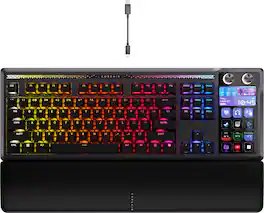
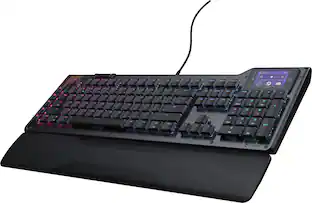
CORSAIR - GALLEON 100 SD Stream Deck-Integrated Mechanical Gaming Keyboard - Black

GALLEON 100 SD fuses iconic Stream Deck technology into a high-performance mechanical keyboard, giving you precise, real-time command of your entire gaming setup all from one device. Customizable shortcut keys and dials help you react faster without breaking focus, whether you're executing complex in-game combos or controlling apps like Discord and Spotify. Keep tabs on everything from hardware stats to your favorite Twitch channels on a fullcolor 5" LCD screen. The keyboard also delivers serious gaming performance with lightning-fast 8,000Hz hyperpolling, FlashTap SOCD, and smooth MLX Pulse switches. It’s more than just a keyboard—it’s a new era of input.
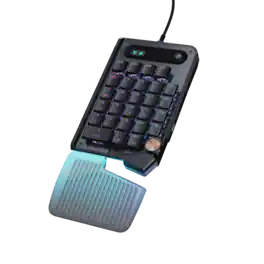
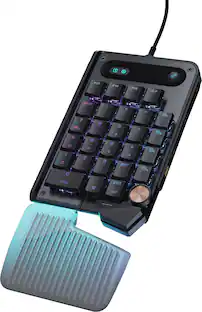
Turtle Beach - Command Series KP7 Wired Hall-Effect Gaming Keypad for PC - Black
4.5(28)

The Turtle Beach Command Series KP7 Modular Keypad is engineered for speed, precision, and adaptability across gaming, creation, and productivity workflows. Use it as a dedicated keypad, macro pad, or numpad, with seamless docking to the Turtle Beach Command Series KB7 Wired TKL Keyboard via dual modular rails, or as a standalone device. Titan low-profile Hall-Effect switches rated for 100 million clicks deliver fast, precise input with adjustable actuation and Rapid Trigger. True 8K wired performance ensures 0.125ms latency. A low‑profile chassis with kickstands, detachable wrist rest, programmable scroll wheel, extendable thumb bar when mounted to the right side of the Command Series KB7 or as a standalone, and per‑key RGB lighting completes a premium experience. The KP7 delivers a powerful, modular control solution for users who demand adaptability, performance, and workflow efficiency.
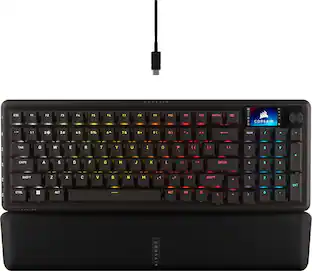
Turtle Beach - Command Series KB5 Full-Size Wired Mechanical Gaming Keyboard for PC - Black
4.3(34)

The Turtle Beach Command Series KB5 full-size mechanical keyboard puts total control at your fingertips with a 2.4” Command Touch Display that lets you customize profiles, trigger macros, and monitor key system stats while staying immersed in the game. Titan low-profile mechanical switches that actuate at just 1.2mm deliver fast, precise input. Premium double‑shot PBT keycaps maintain a clean matte finish for a superior tactile feel. Additional textured WASD keys add enhanced grip and control. Pre‑lubed switches, tuned stabilizers, and true 8K wired polling deliver smooth, ultra‑responsive keystrokes, while five dedicated macro keys and a top‑mounted clickable volume barrel provide fast, intuitive control. A low‑profile, aluminum‑reinforced chassis paired with a detachable palm rest ensures lasting comfort and durability. The KB5 isn’t just a keyboard, it’s your ultimate command center built for gaming, streaming, and beyond.

Pros for Turtle Beach - Command Series KB7 TKL Wired Hall-Effect Gaming Keyboard for PC - Black
Build Quality, Performance, Ergonomics, Noise LevelBuild Quality, Customization, Noise Level, Key Feel, Tactile FeedbackBuild Quality, Ergonomics, Performance, Customization, Noise LevelBuild Quality, Performance, Ergonomics, Noise Level, Ease of Setup
Cons for Turtle Beach - Command Series KB7 TKL Wired Hall-Effect Gaming Keyboard for PC - Black
There were no cons for this product—There were no cons for this product—Button LayoutThere were no cons for this product—

Specs

Be the first to ask a question.

We’ll try to get your question answered within 24 hours by a Best Buy customer or brand representative.

No content

Customers often buy these together

Sponsored