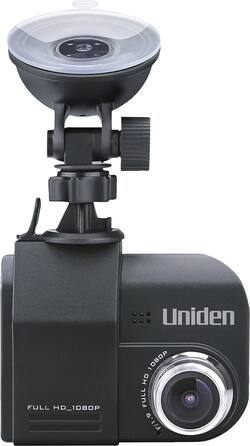
Uniden - DC4 Dash Camera - Black
- Key Specs
- Field of View: 148 degrees
- Automatic Incident Detection: true
- G-Sensor: true
- Recording Resolution: 1920 x 1080 (Refers to the number of pixels, both horizontally and vertically, used to capture video. The higher the resolution the finer the video detail that can be seen.)
- Compatibility: Universal
- Camera Mounting Location: Dash
- Vehicle Camera Type: Dashboard
- General
- Brand: Uniden
- Model Number: DC4
- Product Name: DC4 Dash Camera
- Color: Black
- Vehicle Camera Type: Dashboard
- Recording & Playback
- Field of View: 148 degrees
- Automatic Incident Detection: true
- G-Sensor: true
- Recording Resolution: 1920 x 1080 (Refers to the number of pixels, both horizontally and vertically, used to capture video. The higher the resolution the finer the video detail that can be seen.)
- Frame Rate: 30 frames per second (The frequency at which consecutive images can be captured. The higher the frame rate, the more detail that can be captured.)
- Loop-Cycle Recording: true
- Camera Power Source: Integrated battery
- Expandable Memory Compatibility: microSD
- Recording Feature: true
- Compatibility
- Compatibility: Universal
- Features
- Integrated Microphone: true
- Display
- Screen Included: true
- Screen Size: 2.4 inches (Size of the screen, measured diagonally from corner to corner.)
- Screen Resolution: 800 x 480 (Screens come in a range of resolutions (measured in pixels, horizontal x vertical). The higher the resolution, the greater the picture quality.)
- On-Screen Display Languages: English (The available language options for displayed text.)
- Mounting
- Camera Mounting Location: Dash
- Mount Included: true
- Mount Type: Other
- Screen Mounting Location: Other
- Input
- Number Of Auxiliary Inputs: 0
- Number of USB Port(s): 1
- Dimensions
- Product Height: 4.94 inches (The out of box height of the item. Height is measured as the vertical distance from the bottom of the item to the top as it would be primarily used or placed.)
- Product Width: 6.13 inches (The out of box width of the item. Width is measured as the horizontal distance from one side of the item to the other as it would be primarily used or placed.)
- Product Depth: 2.94 inches (The out of box depth of the item. Depth is measured as the distance from the front of the item to the back as it would be primarily used or placed.)
- Product Weight: 0.56 pounds (The out of box weight of the item.)
- Warranty
- Warranty - Parts: 1 year
- Warranty - Labor: 1 year
- Other
- UPC: 050633361153
Keep an extra eye on the road with this Uniden dash cam. The 2.4-inch LCD screen provides a clear display without distracting you while you're driving, and it records at a 148-degree angle for a wider picture. This Uniden dash cam is equipped with a G-sensor that provides collision detection and a lane departure warning for increased safety.
- 1080p Full HD recording: Allows to capture sharp footages at 30fps.
- 2.4" LCD display: Provides clear view.
- Built-in G-sensor: Supports collision detection feature when an accident happens.
- 148-degree wide-angle lens: Provides expansive shooting coverage with minimal edge-to-edge distortion.
- Lane departure warning and parking mode: Adds necessary functionality.
- Built-in microphone: Captures clear audio.
- Memory card slot: Allows you to store photos and videos on microSD cards (8GB card included).
- USB interface: For simple connectivity.
- Suction mount: Provides simple mounting.
Whats Included
- Uniden DC4 Dash Camera
- Suction Mount
- 8GB MicroSD card
A: Yes this is how it is. You can also remove the micro sd card and plug it to your computer. No need for the redundant usb connection. Leave the camera in the car and download the footage from the SD card.
Q: What's the biggest micro ad card I can install in it,32,64,or 128?
A: I experimented with a couple of different size micro SD cards, not knowing at the time what the max memory was that the Uniden DC4 dash cam could support. The sales associate told me I could put in any size micro SD card, but that is clearly not the case. Initially I purchased a class 10, 128GB. This didn't work at all, the DC4 cam couldn't even format the card without throwing an error or freezing. Videos would record but they appeared as dark images on the dash cam and would freeze the unit if I tried to play them. On a PC running Win 10 even VLC player couldn't play them, unsupported file type error. I then searched forums and degraded to a 32GB, class 10. No luck here either. I'm curious to hear from the others that posted here if they all are using a class 6 for speed. In my case, using the 32GB, class 10, the Uniden DC4 dash cam had no issues formatting the card, but after recording a few I tried replaying them and it would freeze the unit up. Placing the micro SD card into a PC resulted in unrecognizable file type errors, all showed extension of .mov. I tried converting them to different video formats as well, .avi and .mpeg but no success playing them either. So I've switched back to the original 8GB class 10 micro SD card that sold with the unit and it works. Windows 10 media player isn't playing the sound on any of the clips but using QuickTime Player on my MAC they work perfectly. This is a bummer and I'd love to hear more feedback from others using anything higher than the 8GB micro SD card.
Q: Does this camera come with a power cord?
A: Yes it did
A: It depends on your vehicle. The power port on some cars has power even when the car is turned off others do not. Our Buick and Blazer both have the power on but my old Chevy truck and GMC Van do not. The battery life on this unit is very short. Maybe 10 minutes at the most.
A: For the money it's not a bad price. At first I was having trouble getting the suction cup to stay on the windshield. It's stays fine now...but I'd caution a new (actually any) driver to not get all hyper if it falls off. Tell them to keep their eye on the road and pull into a parking lot to reaffix it. I was told I could replace the 8GB microSD card with a 64GB...but none of my 64GB's would format. Other than that.... It's not a bad cam...
A: Not designed to run in it own power. Will only last for about 10 minutes. Use the power cord it came with
Q: Why does card error always show up
A: undefined
People also viewed
 $159.99The price was $199.99
 $119.99The price was $149.99
Today's top picks
 $199.99The price was $249.99
 $479.99The price was $729.99
 $799.99The price was $1,199.99
 $789.99The price was $1,049.99