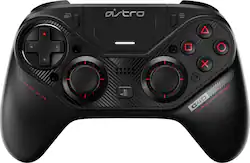
Astro Gaming - C40 TR Wireless Controller for PlayStation 4 and Windows PC
- Key Specs
- Wireless: true
- Battery Size: Battery pack (The battery size required for operation.)
- Compatible Platform(s): PlayStation 4, Windows
- General
- Product Name: C40 TR Wireless Controller for PlayStation 4 and Windows PC
- Brand: Astro Gaming
- Model Number: 940-000184
- Features
- Headset Jack: true
- Analog Joysticks: true
- Button Mapping: true
- Connectivity
- Wireless: true
- Power
- Rechargeable Battery: true
- Charging Interface(s): Micro-USB (The connection for transmitting power to charge the device.)
- Battery Size: Battery pack (The battery size required for operation.)
- Batteries Included: true (Indicates whether the product comes with the required batteries for its operation.)
- Compatibility
- Compatible Platform(s): PlayStation 4, Windows
- Other
- UPC: 097855146656
Take control of your gaming experience with this Logitech Astro USB controller. The highly durable construction is great for extended sessions, and the fully customizable layout lets you remap each button to mimic any console configuration. This Logitech Astro USB controller has extra-sensitive triggers that respond seamlessly without having to depress them fully. 
Whats Included
- Astro Gaming C40 TR Wireless Controller for PlayStation 4 and Windows PC
- C40 TR faceplate, C40 TR tool
- D-Pad module, D-Pad plus cover
- Owner's manual
- Travel case
- Two analog stick modules, two standard height concave caps
- Two standard height domed caps, one tall height concave cap, one tall height domed cap
- USB cable, USB wireless transmitter
Q: When will the next restock be?
A: fr i need this and its sold out everywhere
Q: Is this a Cheating controller Astro gaming C40TR wireless
A: What do you mean by, “cheating?” You can adjust the trigger stops and it has two buttons on the bottom that are programmable via pc, you can also adjust the responsiveness of your triggers to be more or less sensitive.
Q: I was just wondering how the payment plan works?
A: 6 months interest free financing when you use a Best Buy Credit Card
Q: Will the astro c40 controller be compatible with the new xbox series x.
A: No it will not
Q: Does a charger come with this controller once bought? Or do I have to buy it seperatly?
A: It comes with a usb cable that you can use to plug into your PlayStation or computer. The connection to the controller if far better than any that you’ll get out of a standard Dual Shock controller.
A: The 28th, Amazon is the 29th. If you pre-ordered, pick ups are the 28th or 29th if their shipment was on time. Shipped pre orders etill arrive between tomorrow and monday :D
Q: Will this controller be compatible with the PS5?
A: Nobody knows that yet.
Q: can i use this on nentendo switch ?
A: no it only for pc or the PS4














