Yale - Assure Lock 2 - Smart Lock Keyless Wi-Fi Deadbolt with APPLE HOME KEYS | Touchscreen Keypad Access - Satin Nickel
Yale - Assure Lock 2 - Smart Lock Keyless Wi-Fi Deadbolt with APPLE HOME KEYS | Touchscreen Keypad Access - Satin Nickel
Color
Satin NickelRelated Item

Highlights
- Key Specs
- Color Finish: Satin nickel
- Lock Type: Deadbolt
- Lock/Unlock Mechanism: Keypad, Electronic guest keys (There are several technologies used by smart locks to manage access, such as biometrics, Bluetooth, or NFC. Some locks allow codes to be entered via a keypad or touchscreen; digital keys can often be sent to multiple authorized devices or temporarily shared with guests.)
- Power Source: Battery-powered
- Installation Type: Replacement
- Wireless Connectivity: Wi-Fi (The manner in which a device sends data to another device over a short distance without the use of wires or cables.)
- General
- Brand: Yale
- Model Number: YRD450-N-WF1-619
- Product Name: Assure Lock 2 - Smart Lock Keyless Wi-Fi Deadbolt with APPLE HOME KEYS | Touchscreen Keypad Access
- Color: Satin Nickel
- Color Finish: Satin nickel
- Features
- Lock Type: Deadbolt
- Lock/Unlock Mechanism: Keypad, Electronic guest keys (There are several technologies used by smart locks to manage access, such as biometrics, Bluetooth, or NFC. Some locks allow codes to be entered via a keypad or touchscreen; digital keys can often be sent to multiple authorized devices or temporarily shared with guests.)
- Auto Unlock: true (Locks with this feature automatically unlock when certain conditions are met, such as coming within range of a home wireless network or when activated via a mobile app.)
- Unlock Notifications: true
- Shareable Keys: true (This feature allows a single key to be shared with multiple users or authorized devices.)
- Number of Keypad Codes Supported: 99 (Multiple keypad codes can be programmed to allow temporary access for guests, deliveries, and more while keeping primary codes secure.)
- Remote Monitoring Capabilities: true (Monitor)
- Power
- Power Source: Battery-powered
- Rechargeable Battery: false
- Battery Size: AA (The battery size required for operation.)
- Compatibility
- Installation Type: Replacement
- App Compatible: true (The product can be connected to a program or software application on a mobile device, which then receives collected data from the product.)
- Wireless Connectivity: Wi-Fi (The manner in which a device sends data to another device over a short distance without the use of wires or cables.)
- Operating System Compatibility: Apple iOS, Android
- Works With: Apple HomeKit, Siri (Compatible with or able to be connected to other smart devices or applications.)
- Voice Assistant Built-in: Siri (A digital assistant built into the device that uses voice commands to answer questions and control smart devices.)
- Warranty
- Warranty - Parts: Lifetime limited warranty on Finish and Mechanical. One year on Electronics
- Warranty - Labor: Lifetime limited warranty on Finish and Mechanical. One year on Electronics
- Other
- UPC: 081023115964
Tap. Unlock. You're Home. Yale Assure Lock 2 Plus makes key-free access easier and more secure than ever before. Using Apple home keys, a simple tap with your iPhone or Apple Watch is all it takes to lock or unlock your door- and for even faster access, add your Home Key to your Apple Wallet app with Express Mode enabled. Remotely let people in, lock up, send custom entry codes, and track who comes with real time notifications from anywhere through the Yale Access app. For added peace of mind, never worry about locking the door behind you with advanced Auto-Lock and advanced DoorSense technology. To use home keys, iPhone XS or later with iOS 15 or later and Apple Watch Series 4 or later with watchOS 8 or later are required.
- Tap and go with Home Keys: Add your Home Key to your Apple Wallet app and simply tap the lock with your iPhone or Apple Watch to unlock your door. To use home keys, iPhone XS or later with iOS 15 or later and Apple Watch Series 4 or later with watchOS 8 or later are required.
- Designed for your home: Compact, discreet and available in three finishes to match your door hardware.
- Security you can trust: Enhanced app security features ensure only those that need access, have it.
- Works with most entry doors: Compatible with standard US and Canada entryway doors.
- Never get locked out: If the battery dies, you can always get in by charging the keypad with a 9V
- Works with Apple Home: Control your Wi-Fi smart lock using voice commands with Siri, home automations, and more, when paired with Apple HomeKit. *Some features may require a HomeKit hub(not included)
- Anywhere. Anytime: Remotely let people in, lock up, share entry codes , track who comes and goes, and receive notifications from the Yale Access App.
- No more hiding keys: Create unique codes for guests with the Yale Access app.
- No battery, no problem: Use home keys on your iPhone for hours after your phone needs to be charged. To use home keys, iPhone XS or later with iOS 15 or later and Apple Watch Series 4 or later with watchOS 8 or later are required.
- Don't worry, it's locked: Enable Auto-Lock so your door automatically locks once DoorSense detects the door is closed.
- Always know: Track who comes and goes with Activity Feed using the Yale Access app.
- No locksmith needed: Replaces most standard deadbolts by using just a screwdriver.
- Emergency unlock feature: If the battery dies, you can use a 9V battery to charge the keypad.
Whats Included
- Assure Lock 2 - Smart Lock Keyless Wi-Fi Deadbolt with APPLE HOME KEYS | Touchscreen Keypad Access
Q: What is the warranty on the smart lock's electronics?
A: The electronics on the smart lock have a one-year warranty.
Q: What type of battery does the smart lock use?
A: The smart lock uses AA batteries.
Q: Does the smart lock have remote monitoring capabilities?
A: This smart lock has remote monitoring capabilities.
Q: Can the smart lock be used with Apple HomeKit?
A: This smart lock is compatible with Apple HomeKit.
Q: How many keypad codes can the smart lock support?
A: This smart lock supports 99 keypad codes.
Q: Is there a way to unlock the door should the battery die?
A: Thank you for your question. For keyless models, we recommend using a 9V battery and connecting the two prongs at the bottom of the keypad to charge the device. This will give you enough time to enter the entry code and regain access to the house. If you have additional questions, don't hesitate to contact [email protected] or call us at 855.213.5841.
Q: To use Apple home key, do you have to have a HomePod acting as a hub?
A: Hi Scott - No, you do not! Apple Home Key works via NFC, just like your Apple Wallet. No hub is needed.
Q: Does this model allow for fingerprint entry, as well?
A: undefined
Compare similar products

Tap. Unlock. You're Home. Yale Assure Lock 2 Plus makes key-free access easier and more secure than ever before. Using Apple home keys, a simple tap with your iPhone or Apple Watch is all it takes to lock or unlock your door- and for even faster access, add your Home Key to your Apple Wallet app with Express Mode enabled. Remotely let people in, lock up, send custom entry codes, and track who comes with real time notifications from anywhere through the Yale Access app. For added peace of mind, never worry about locking the door behind you with advanced Auto-Lock and advanced DoorSense technology. To use home keys, iPhone XS or later with iOS 15 or later and Apple Watch Series 4 or later with watchOS 8 or later are required.
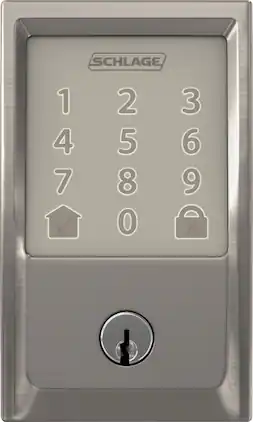
Manage access to your home with this Schlage Encode smart Wi-Fi deadbolt. Wi-Fi connectivity and the included app let you lock and unlock doors remotely, and Amazon Alexa integration offers convenient voice-controlled functionality. This Schlage Encode smart Wi-Fi deadbolt allows access to trusted visitors and uses integrated alarm technology to detect potential attacks.

YALE ASSURE LOCK 2 TOUCH. A LOCK AS UNIQUE AS YOU. Make coming home more seamless than ever with the Yale Assure Lock 2 Touch. Thanks to the new biometric keypad, a simple touch of your finger is all it takes. Explore multiple ways to access your home including your fingerprint, entry code on the keypad, hands-free Auto-Unlock, or using the app on your phone (at the door only). For added peace of mind, never worry about locking the door behind you with advanced Auto-Lock and DoorSense. The Yale Assure Lock 2 Touch can be upgraded with a Wi-F Smart Module whenever you’re ready, so unlike other smart locks, you won’t have to buy a new one if your smart home needs change.

Take front door protection to the next level with eufy's FamiLock S3 Max, allowing you to effortlessly and securely unlock your door with just a wave of the hand. The 3-in-1 smart lock features a 2K HD camera, video doorbell, and smart lock developed to meet your family's evolving access needs. With accurate, forgery-proof palm vein technology, FamiLock S3 Max recognizes the unique vein pattern on your hand's palm in just 0.1 seconds with up to 99.99999% accuracy. Ideal for the whole household, including kids and older relatives, each person's palm vein data is stored locally on-device, making it only accessible to you. The integrated color video screen on the inner lock provides a seamless, app-free alternative for monitoring who or what is at the front door. Providing peace of mind when older parents or kids arrive home, eufy FamiLock S3 Max keeps you connected and reassured. Gain sharp, clear views from the built-in 2K HD camera and f/1.6 lens that provides detailed footage even in twilight or sunset hours. Goodbye blind spots with the camera's 150° head-to-toe, wide-angle coverage. Innovative PowerDuo technology offers powerful charging options and superior flexibility. Enjoy up to 6 months of power with the 15,000mAH rechargeable battery; and an emergency set of four AAA batteries provide an extra month of charge in case of emergency power outages. Enjoy a robust, customized smart home ecosystem by adding HomeBase 3 for advanced AI features and enhanced security. The eufy app provides remote control and access from anywhere and sends real-time alerts when packages are delivered, or guests stop by. Matter compatibility provides easy, secure connection with Apple Home, Google Home, Alexa, and SmartThings.
| Pros for Yale - Assure Lock 2 - Smart Lock Keyless Wi-Fi Deadbolt with APPLE HOME KEYS | Touchscreen Keypad Access - Satin Nickel | |||
|---|---|---|---|
| Overall Performance, Ease of use, Installation, Design, Keypad | There were no pros for this product— | There were no pros for this product— | Overall Performance, Video Quality, Installation Ease, Palm Scanner Performance, Battery Life |
| Cons for Yale - Assure Lock 2 - Smart Lock Keyless Wi-Fi Deadbolt with APPLE HOME KEYS | Touchscreen Keypad Access - Satin Nickel | |||
| Battery Life, Wi-Fi | There were no cons for this product— | There were no cons for this product— | There were no cons for this product— |
Specs
Reviews
Customers are saying
Customers are delighted by the Assure Lock 2, particularly its ease of use and straightforward installation. The sleek design and responsive keypad are also well-received, along with the overall performance and enhanced security it provides. However, some customers have expressed concerns about the battery life and Wi-Fi connectivity.
Customer Images
The vast majority of our reviews come from verified purchases. Reviews from customers may include My Best Buy members, employees, and Tech Insider Network members (as tagged). Select reviewers may receive discounted products, promotional considerations or entries into drawings for honest, helpful reviews.
- Rated 5 out of 5 stars
Yale lock
Love it! So nice not fumbling with keys. I’m a contractor and use these often. So glad I went with this I can control from phone if needed. Easy to use. I actually purchased another one for another door. Nice and sleek looking
This review is from Yale - Assure Lock 2 - Smart Lock Keyless Wi-Fi Deadbolt with APPLE HOME KEYS | Touchscreen Keypad Access - Black Suede
JosephjC Posted
- Rated 5 out of 5 stars
Great product.
This product is awesome. It’s so easy to install and I was done in about 10 minutes. I love the app and being able to lock or unlock your front door from anywhere. The app also allows you to make different codes for other family members like your children. It’s nice being able to see when they access the front door after they get home from school. I would definitely recommend.
ChrisB Posted
- Rated 4 out of 5 stars
For Apple HomeKit experience, a good addition.
Review of Yale Assure Lock 2 The Yale Assure Lock 2, a Smart Lock Keyless Wi-FI Deadbolt with Apple Home Keys and Touchscreen Keypad Access includes features that makes easy to install and uniquely compatible to Apple HomeKit. Its size compared to other models, looks compact as its design is simplistic and compact framework. At least visually makes appealing appearance. But on hand, it is heavy (4 lbs), feels sturdy and secure as impression. To install (hardware side), 1. IF need to make new hole, the manual includes measurements and guidance on how to measure 2. IF existing door and has standard hole, it can skip the “1” above, and start immediately installing. It fits to existing door lock deadbolt as it is removed and replace. Afterward of either options, the process is straight forward. The only step where I struggled a bit was first finding the right screw that match the door thickness as the door lock includes three type of screws, and secondly connecting the cable between both parts, the exterior touchscreen keypad and the interior lock as it was bit challenging to identify which side match each other connectors. To setup (software side) First, I started by adding to the Apple Home Kit without downloading the Yale App, and without doing the Bluetooth connection to the phone. By scanning the code for HomeKit directly, it was added to HomeKit. And this process took me a bit of challenge as the code is inside the Interior Lock in vertical and the phone was not recognizing it at first attempt. However, to continue, it requires the Yale App and add the lock via Bluetooth, then all the corresponding setting has to be done from the Yale App. After this, at high-level, everything else are almost similar as adding any device to the phone, needing to change settings and personalize for security. The experience via HomeKit Using the default setting as is out of box, and having setup to integrate with HomeKit, it can control to open and lock without issues. The HomeKit add a wallet card, and with it, as approaching the phone to the door touchscreen lock, it immediate recognize and unlock/lock. It is like using Apple Pay. From the Home app, it has toggle button as move up/down lock/unlock. On the other hand, while watching Apple TV and anyone lock/unlock the door, a message pop on the tv screen about the status. Similarly, while I am away and kids at home open the lock/unlock the door, its status shows up on the phone screen, if not on iPad screen. Hence it works seamlessly across multiple apple devices. The result is same as the home key is shared to second user by adding via invite or as homeowner, and of course it is another apple device user. The experience of personalizing To personalize, for this it has to be done via Yale application. It allows to set alike Auto Lock, Auto Unlock, Door Ajar Timing, Door Sense, Smart Alert to mention some of their features. The Auto Lock/Unlock I find it most practical need to use in such case that when I come home automatically sense the device and unlock. What it does or made well At first attempt it does well: - Connect to iPhone via Bluetooth. - Adjustable deadbolt is long at least as it is for the door where has been installed. I don’t know the standard, but I think it is a good thing. - Noise while locking and unlocking is smoother sound compared to another model from different brand I have. -Interior Lock turning nob turns smoothly - The Yale Smart Module is a separate piece such can be added or removed. This allow the Wi-Fi connection and I think it is good to have the hardware option to connect or not to Wi-Fi due to the remote hacking concern. And removing it, it doesn’t allow to control remotely while being away from home. - Some of features are only available to change only by being next to the lock and cannot be modified remotely or being away. This add to the security aspect of the lock, I think. What I wish it would do better: 1 - Wire connector, it is hard to identify and match both sides. And it is hard to remove once it is connected. It takes a bit of hassle to disconnect. 2. - As Locking/Unlocking, it does the sound as if it is rotating twice. Feels like if it is locked, to unlock, lock and unlock again or internal motor turning full circle. This potentially is not efficient for battery’s duration. 3- Locking/Unlocking from the phone, it is not instant, there is latency from the moment initiate the action to actually lock/unlock, and I think it is more than reasonable time. Of course, there is several factors in between, but under same Wi-Fi Network with same phone, the process with other brand doesn’t feel that latency. This observation is from using it at front of the door lock. 4- Auto Lock/Unlock, it doesn’t recognize when the user is inside/exterior home. For instance, if I want the feature get activated when I am arriving home, from external side, and only work in this use case, I can’t. Or if there is a way of setting such way, I couldn’t find it, or it is not a simple settings process if there is such setting. 5- It requires to install Yale application. It is not included in the HomeKit once it is integrated or added to it. The become another app on the phone. The package reviewed here included: 1. Door Sense, 2. Smart Module, 3. Battery Cover, 4. Mounting Plate 5. Exterior Touchscreen Keypad 6. Interior Lock 7. 4 Batteries 8. Adjustable Deadbolt 9. Strike Plate 10. Screws, Reset Pin, and other needed accessories for installation. To finish, the Yale Assure 2 is for HomeKit is not very different to other models. Only difference and how it changes the experience is mostly the device added to Apple ecosystem and its user experience. The installation process is same as other platform, in the same setting the software side. But it is good and possibly save deadlock if need specific for Apple experience and doesn't want or convert or integrate through separate application.
MigDigital Posted