LG - UltraGear 34" WQHD 240Hz 1ms FreeSync Premium Gaming Monitor with DisplayHDR 400 (HDMI, DisplayPort, USB-C) - Black
Key Accessories:
- Microsoft - Office 365 Personal (1 Person) (12-Month Subscription) - Activation Required - Windows, Mac OS, Apple iOS, Android [Digital]$99.99
![Microsoft - Office 365 Personal (1 Person) (12-Month Subscription) - Activation Required - Windows, Mac OS, Apple iOS, Android [Digital]](https://pisces.bbystatic.com/image2/BestBuy_US/images/products/fa90dd84-caf2-4bbe-86e9-18b037ea6563.jpg;maxHeight=160;maxWidth=166)
More Buying Options
Related Item

Highlights
Compare similar products

Dominate the game with the 34” UltraGear WQHD (3340x1440) Gaming Monitor, built for speed, precision, and pure visual impact. The 21:9 UltraGear display gives you more room to play and multitask, with a virtually borderless design that keeps you locked into the action. React instantly with a blistering 240Hz refresh rate and 1ms response time—perfect for competitive gamers who live in the milliseconds. Vivid color pops with HDR10, DisplayHDR 400, and up to 95% DCI-P3 color gamut, while AMD FreeSync Premium and NVIDIA G-SYNC compatibility ensure buttery-smooth, tear-free visuals across PC and next-gen consoles. Split your screen with Picture-by-Picture mode, plug in with USB-C, HDMI (x2), DisplayPort, and USB-A (x2), and hear every detail with built-in speakers. Designed for battle and built for comfort—with a slim, adjustable stand that keeps your setup clean and dialed in.

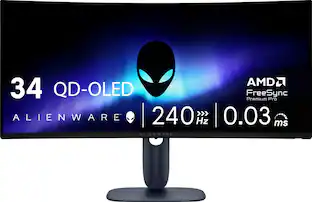
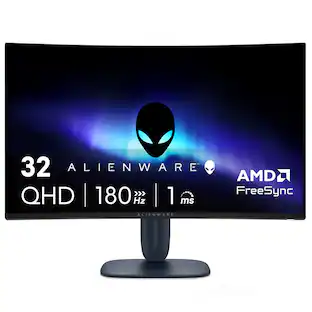
Alienware 34 240Hz QD-OLED Gaming Monitor - AW3425DW. Meet unmatched immersion with an ultrawide 34" QD-OLED, delivering greater speed and a striking new design.
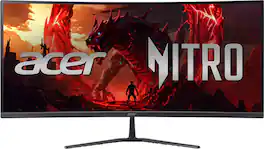
Acer's Nitro ED340CUR 34" curved panel monitor with Ultra Wide QHD resolution delivers the incredible. Through AMD FreeSync Premium technology, the game’s frame rate is determined by your graphics card, not the fixed refresh rate of the monitor, giving you a serious competitive edge. Smooth, tear-free gameplay!! Crisp, true-to-life colors come alive with the amazing 3440 x 1440 resolution, allowing you to enjoy High-Definition entertainment in the comfort of your home. The wide view angle technology lets you share what's on your screen with friends and family as colors stay true no matter what angle you're viewing from. Incredible 100,000,000:1 contrast ratio and rapid response time ensure your games, work and movies are smooth and look as epic as possible.

Odyssey G5’s lightning-fast 165Hz refresh rate ensures flawlessly smooth action scenes even in games with high frame rates. The Odyssey G5 range allows you to make the most out of the games you love to play, at a fantastic price point.
| Pros for LG - UltraGear 34" WQHD 240Hz 1ms FreeSync Premium Gaming Monitor with DisplayHDR 400 (HDMI, DisplayPort, USB-C) - Black | |||
|---|---|---|---|
| Refresh Rate, HDR Performance, Image Quality, Size, Design | Refresh Rate, HDR Performance, Color Quality, Contrast, Connectivity | Refresh Rate, Overall Performance, Screen Size, Immersion | There were no pros for this product— |
| Cons for LG - UltraGear 34" WQHD 240Hz 1ms FreeSync Premium Gaming Monitor with DisplayHDR 400 (HDMI, DisplayPort, USB-C) - Black | |||
| There were no cons for this product— | Speakers | There were no cons for this product— | There were no cons for this product— |
Specs
Reviews
Customers are saying
Customers are delighted by the UltraGear 34" WQHD gaming monitor, highlighting its excellent image quality. The monitor's build quality appears to be a strong selling point for users. There are no cons mentioned for this product.
- Image Quality (22)
- Refresh Rate (12)
- Size (7)
Customer Images
The vast majority of our reviews come from verified purchases. Reviews from customers may include My Best Buy members, employees, and Tech Insider Network members (as tagged). Select reviewers may receive discounted products, promotional considerations or entries into drawings for honest, helpful reviews.
- Rated 4 out of 5 stars
Great Monitor Overall! Dead Pixels, Though.
Ive had the product for about a month and it is very good. High refresh rate and no real noticeable ghosting. Very immersive for gaming and great for productivity. Unfortunately, I did end up finding dead pixels on the left portion of my screen. It was not noticable while gaming but very noticeable while writing a term paper or reading text with a white background. So i will be taking it back to Best Buy for a simple exchange for the same monitor. Because i like it so much. Of course the experience would be 5 stars if i didnt have the mild annoyance of taking it to a best buy store that is 1 hour away. Very good monitor. I would recommend for those who are primarily using for productivity and amature video editing but also want an amazing gaming experience when you decide to play.
Zach Posted
- Rated 5 out of 5 stars
Try Ultra Wide, You Might Love It
Introduction: This monitor is a 34” WQHD (3440x1440) VA panel with a 21:9 curved display. Color gamut is 95% DCI-P3, has a contrast ratio of 4000:1, and boasts a refresh rate of 240Hz. Having used it for a good couple of weeks, it has been hard for me to go back to a traditional 2 monitor setup when it comes to gaming. It’s all because of Situational Awareness. If the game supports ultrawide displays, you’ll be given a more immersive environment that can be advantageous to you versus another player using a standard 16:9. 21:9 doesn’t sound like much more than 16:9, but you’d have to see it to believe it yourself. I’m a Diablo 4 guy and this monitor has made me jump back into it again. Thank you, LG. I/O: The monitor does don a single DP1.4 as well as 2xHDMI2.1 It also has a built-in USB hub, which I really love. What was really nice to see was the inclusion of a USB-C connection that can service 15W power and data transmissions. I really love LG’s philosophy on I/O placement. It’s just right there, right behind the monitor where I can see it; I don’t have to feel or guess to try to plug in a cable from underneath. Honestly, this is a huge plus for me. Assembly and Setup: You will need a Phillips screwdriver to attach the base to the stem of the monitor; the panel simply snaps onto the stem without tools. Like my other LG monitors, this one sports its own power brick. It helps keep the monitors’ profile thin, but it is an extra power brick you have to cable manage. Windows immediately recognized the monitors’ aspect ratio and adjusted accordingly. If you’re familiar with LG’s On-Screen Display access, they place a joystick at the center of the south bezel. You pull the joystick towards you to scroll down, and push away to scroll up. Then the joystick left/right gives you access to the monitor settings that you choose. Look and Feel: The monitor is very minimalistic in my opinion, sporting thin bezels at west/north/east and a larger bottom bezel down south to make room for hardware like the speakers and whatnot, and to also sport the UltraGear name. The stand is very flat and simple, yet very stable, and thank goodness for height, tilt and swivel adjustments on this unit. You’d be surprised how many manufacturers don’t have the swivel portion. Performance: So if you’re not familiar with a VA panel (or a Vertical Panel), they shine in their contrast ratios, especially black levels, and color reproduction at a budget cost. VA sits between the TN and the IPS panels. If you’re sitting right smack dab center to the monitor, you’re in the Goldilocks zone. And that should be true for most of us who intend to use this solely for gaming and productivity. VA’s have bad viewing angles as the picture will get washed out. The curvature of the monitor aides with viewing angles, but only for a single user. Otherwise, I love this monitor a lot. It can handle 240Hz with ease and the image quality is very good. AMD FreeSync Premium is marketed here, with the absence of NVIDIA G-Sync branding. Honestly, I can’t tell the difference, and it probably helps with MSRP. Conclusion: The market is flooded with WQHD monitors, marketed with features that are always slightly different from another manufacturer. And things can get confusing. At its MSRP (and probably discounted as I type this review), I think this monitor is worthy and deserves a spot in your gaming room as a gaming monitor. If you’re not a gamer, then you don’t really need 240Hz refresh, or maybe you need to move up to IPS due to color accuracy. Take the time to research what you need before making a decision on this. But for everyone else in my boat, I highly recommend this monitor.
softwareEngineer Posted
- Rated 5 out of 5 stars
Bestbuyrocks
Better then advertised if you are thinking go with this amazing deal
AlexanderB Posted
Explore tech essentials Sponsored
 $249.99The price was $319.99
 $159.99The price was $179.99