Early Black Friday DealsNew Doorbusters through SundayShop now

Main Content

Samsung - 34” Odyssey G5 1000R Curved 1ms 165Hz QHD FreeSync Prem Gaming Monitor - Black

Model: LC34G55TWWNXZA
SKU: 6445082
$349.99
Save $50
Comp. Value: $399.99
or
$29.17/mo.
suggested payments with12-Month Financing
Show me how
Finance OptionsView your offers
Special OffersOn related products
Availability
Fulfillment Options
Pickup at
Act fast - Only 3 left at your store!
Sold by Best Buy
Standard Geek Squad Protection

Highlights

  • Key Specs
    • Refresh Rate: 165Hz (The number of frames per second the device can produce natively without enhancement. Higher rates help produce smooth, seamless pictures.)
    • Maximum Resolution: 3440 x 1440 (Maximum resolution refers to the highest number of pixels that a screen can process and display. Higher resolution signals produce more detailed images.)
    • Response Time: 1 milliseconds (The speed at which pixels can change colors is called response time. It is measured in milliseconds (ms).)
    • Panel Type: Not Applicable (Technology that affects response time and image quality.)
    • Synchronization Technology: FreeSync Premium (AMD Adaptive Sync) (Generally, these technologies allow syncing between a computer/console game's frame rate and the device's refresh rate for a smoother display without tearing.)
    • Screen Size: 34 inches (Size of the screen, measured diagonally from corner to corner.)
    • Display Connector(s): 1 x DisplayPort 1.4, 1 x HDMI 2.0 (The number and type of connectors used to connect to an external display.)
  • General
    • Product Name: 34” Odyssey G5 1000R Curved 1ms 165Hz QHD FreeSync Prem Gaming Monitor
    • Brand: Samsung
    • Operating System Compatibility: Not Applicable
    • Model Number: LC34G55TWWNXZA
    • Color: Black
  • Display
    • Refresh Rate: 165Hz (The number of frames per second the device can produce natively without enhancement. Higher rates help produce smooth, seamless pictures.)
    • Maximum Resolution: 3440 x 1440 (Maximum resolution refers to the highest number of pixels that a screen can process and display. Higher resolution signals produce more detailed images.)
    • Native Resolution: 3440 x 1440 (Native resolution of a screen refers to its single, fixed resolution. Sometimes screens must scale an image up or down in order to fit the native resolution. This can cause a loss of resolution or detail.)
    • Contrast Ratio: 2500:1 (Measured difference between a displayed image's brightest whites and darkest blacks. The larger the first number, the more detail and color that can be displayed.)
    • Response Time: 1 milliseconds (The speed at which pixels can change colors is called response time. It is measured in milliseconds (ms).)
    • Display Type: LED
    • Panel Type: Not Applicable (Technology that affects response time and image quality.)
    • Synchronization Technology: FreeSync Premium (AMD Adaptive Sync) (Generally, these technologies allow syncing between a computer/console game's frame rate and the device's refresh rate for a smoother display without tearing.)
    • Aspect Ratio: 21:9 (The measurement of the width of a screen compared to the height of a screen, expressed as a ratio.)
    • Curved Screen: true
    • Pixel Density: 109 pixels per inch (The number of pixels present per inch on the device's display. Higher pixel density improves the clarity and sharpness of the displayed image.)
    • Brightness: 250 candela per square meter (A measure of the total light output.)
    • Screen Size: 34 inches (Size of the screen, measured diagonally from corner to corner.)
    • High Dynamic Range (HDR): true (An HDR-compatible 4K TV or other HDR-compatible product displays HDR video content when it's available from sources like 4K Ultra HD Blu-ray Discs and 4K streaming services.)
    • High Dynamic Range Format: HDR 10 (There are a few HDR formats that tell the TV or other HDR-compatible product how to best utilize its capabilities to display HDR content. HDR technology can support one or multiple formats, each with various benefits to picture quality.)
    • Horizontal Viewing Angle: 178 degrees (The maximum angle at which the display can be viewed with acceptable visual performance from either side.)
    • Vertical Viewing Angle: 178 degrees (The maximum angle at which the display can be viewed with acceptable visual performance from above or below.)
    • Touch Screen: false (Touch-screen devices make navigating more intuitive. Using a touch-screen display, you can do things such as tap to select, hold and drag to move items, swipe to scroll, and pinch to zoom.)
  • Connectivity
    • Number of DisplayPort Inputs (Total): 1
    • Number of HDMI Inputs (Total): 1
    • Number of DVI Inputs: 0 (The number of digital cables carrying analog (VGA) video signals that can be connected to the product.)
    • Number of Mini DisplayPort Inputs: 0
    • Number of Thunderbolt Ports (Total): 0
    • Display Connector(s): 1 x DisplayPort 1.4, 1 x HDMI 2.0 (The number and type of connectors used to connect to an external display.)
    • Number of USB Ports (Total): 0
    • Headphone Jack: true (The device features an interface that allows for the connection of headphones.)
  • Compatibility
    • Wall Mountable: true (The product is able to be secured to a wall. Some products are designed ready to mount, while others may require additional hardware/accessories for installation.)
    • VESA Wall Mount Standard: 75mm x 50mm (VESA wall mount standards refer to the spacing of screw holes built into a TV in order to fit with standard TV wall mounts. These standards are implemented into most TVs and monitors.)
  • Features
    • Tiltable: true
    • Adjustable Stand Height: false
    • Eye Relief Features: Low blue light, Flicker free
    • Built-In Webcam: false
    • Integrated Speaker(s): false
    • Smart Capable: false (Smart, or smart-capable devices are able to connect directly to your home network in order to stream content from the Internet, run Internet-based apps, or connect to other smart devices.)
  • Dimensions
    • Product Height With Stand: 18.71 inches
    • Product Height Without Stand: 15.00 inches
    • Product Width: 31.76 inches (The out of box width of the item. Width is measured as the horizontal distance from one side of the item to the other as it would be primarily used or placed.)
    • Product Depth (With Stand): 10.73 inches
    • Product Depth Without Stand: 6.01 inches
    • Product Weight: 17.4 pounds (The out of box weight of the item.)
    • Stand Included: true
    • Cord Length: 59 inches
  • Power
    • Power Consumption: 50 watts
    • Power Saving/Off Mode: 0.3 watts (This mode will turn the display and/or the device off, or into a standby mode, after a preset length of time with no activity to conserve power.)
  • Certifications Listings & Approvals
    • ENERGY STAR Certified: false (Devices carrying the ENERGY STAR service mark, such as computer products and peripherals, kitchen appliances, and other products, generally use 20% to 30% less energy than required by federal standards.)
    • EPEAT Qualified: false (The Electronic Product Environmental Assessment Tool (EPEAT) was designed to provide an environmental assessment tool for purchasers. In order to qualify for EPEAT, a product must meet all 23 required criteria.)
  • Warranty
    • Warranty - Parts: 1 Year
    • Warranty - Labor: 1 Year
  • Other
    • UPC: 887276450797

Odyssey G5’s lightning-fast 165Hz refresh rate ensures flawlessly smooth action scenes even in games with high frame rates. The Odyssey G5 range allows you to make the most out of the games you love to play, at a fantastic price point.
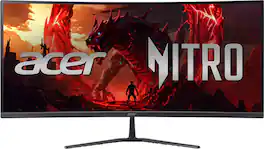
  • Optimal curve. True immersion.: Vivid scenes wrap around you. The all-encompassing 1000R display fills every part of your peripheral vision and draws you right into the character's shoes. Experience a level of gaming more heart-pounding than anything before.
  • Ultra WQHD: Boundary pushing graphics. Ultra-WQHD gives you a vast encompassing view of your game world, with true lifelike detail. The sheer size delivers pure immersion — eliminating the distracting middle bezel and messy cables of a dual monitor setup.
  • 165Hz refresh rate: Ready to conquer enemies, lag, and blur. The ultra-fast 165Hz refresh rate handles even the most exhilarating scenes and super-quick visuals.
  • 1ms MPRT response time: Make every move count with a 1ms MPRT response time. Jump on enemies as soon as you see them and stay ahead with precise mouse movements. Your on-screen performance is as swift as your own reflexes.
  • AMD FreeSync Premium: Effortlessly smooth gameplay. AMD FreeSync Premium features adaptive sync technology which reduces screen tearing, stutter, and input latency. Low framerate compensation ensures every scene flows seamlessly.
  • Truly realistic HDR: Awe-inspiring graphics with HDR10. A kaleidoscope of shades brings game scenes to life more vibrantly than ever before. Uncover the secrets hiding in the shadows with deep dark blacks, luminous whites, and outstandingly detailed.
Whats Included
  • Monitor
  • Stand
  • DP Cable

Q: Can I mount this monitor to a wall?

A: Yes, this monitor is wall-mountable and is compatible with a 75mm x 50mm VESA mount.

Q: Does this monitor have a curved screen?

A: Yes, the Odyssey G5 features a 1000R curved screen designed to provide a more immersive gaming experience.

Q: Does this Samsung monitor support HDR?

A: Yes, this monitor supports HDR content and utilizes HDR10 technology for a wider range of colors and more realistic visuals.

Q: What type of display technology does this monitor use?

A: This monitor utilizes LED display technology for vibrant colors and deep blacks.

Q: What is the refresh rate of the Odyssey G5 monitor?

A: The Odyssey G5 monitor features a 165Hz refresh rate for incredibly smooth gameplay, even in fast-paced action.

Q: What is the maximum resolution supported by this monitor?

A: The maximum resolution supported by this monitor is 3440 x 1440, providing stunningly detailed visuals.

Q: What is the response time of this monitor?

A: This monitor boasts a remarkable 1ms response time, ensuring that your actions translate instantly on screen.

Sponsored

Compare similar products

Samsung - 34” Odyssey G5 1000R Curved 1ms 165Hz QHD FreeSync Prem Gaming Monitor - Black

Odyssey G5’s lightning-fast 165Hz refresh rate ensures flawlessly smooth action scenes even in games with high frame rates. The Odyssey G5 range allows you to make the most out of the games you love to play, at a fantastic price point.

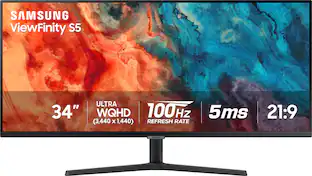
Samsung - 34” ViewFinity S5 Ultrawide QHD 100Hz AMD FreeSync Monitor with HDR10 (DisplayPort, HDMI) - Black

Samsung's 34" ViewFinity S50GC offers a wider workspace featuring a 21:9 ratio and lifelike detail with Ultra-WQHD resolution. AMD FreeSync and 100Hz refresh rate allow an ultra-smooth user experience. Avoid eyestrain with TUV-certified Intelligent Eye Care that automatically adjusts brightness. With HDR10 that displays over 1 billion colors compared to 16.7 million for typical SDR technology, dark colors are darker and the brightest are even brighter.

Acer - Nitro Gaming 34” Curved QHD 180Hz 1ms FreeSync Premium Gaming Monitor (DisplayPort, HDMI) - Black

Acer's Nitro ED340CU 34" curved panel monitor with Ultra Wide QHD resolution delivers the incredible. Through AMD FreeSync Premium technology, the game’s frame rate is determined by your graphics card, not the fixed refresh rate of the monitor, giving you a serious competitive edge. Smooth, tear-free gameplay!! Crisp, true-to-life colors come alive with the amazing 3440 x 1440 resolution, allowing you to enjoy High-Definition entertainment in the comfort of your home. The wide view angle technology lets you share what's on your screen with friends and family as colors stay true no matter what angle you're viewing from. Incredible 100,000,000:1 contrast ratio and rapid response time ensure your games, work and movies are smooth and look as epic as possible.
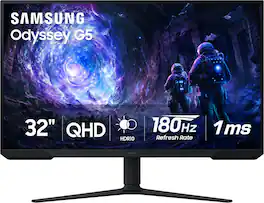
AOC - CU34G2XP 34" VA Curved Gaming Monitor, WQHD (3440x1440), 180Hz, 1ms, Freesync, HDR 400 - Black/Silver/Red

AOC CU34G2XP 34” Curved Gaming Monitor with WQHD 3440 x 1440 resolution delivers stunning visuals and world-class responsiveness, featuring FreeSync Premium tear-free immersion, VESA Certified DisplayHDR 400 mode visual enhancement, and 180Hz refresh rate and 1ms response time. The VA Wide View also allows for 178/178-degree viewing angles, and consistent image quality when viewing the monitor from all angles. In addition, this monitor comes with Low Blue Mode and Flick-Free technology to protect the user's eyes, as well as 2 HDMI, 2 DisplayPort and 4 USB 3.2 interface ports for convenient connectivity.

Pros for Samsung - 34” Odyssey G5 1000R Curved 1ms 165Hz QHD FreeSync Prem Gaming Monitor - Black
Screen Size, Quality, Refresh Rate, Resolution, CurvatureScreen Size, Quality, Resolution, Refresh Rate, Ease of useOverall Performance, Screen Size, Refresh Rate, Resolution, PriceOverall Performance, Screen Size, Refresh Rate, Resolution, Price
Cons for Samsung - 34” Odyssey G5 1000R Curved 1ms 165Hz QHD FreeSync Prem Gaming Monitor - Black
Stand, Speakers, Connectivity, Ghosting, HDMISpeakers, Stand, CurvatureConnectivity, Adjustability, HDRSpeakers, Buttons

Specs

Reviews

Customers are saying

Customers express satisfaction with the 34” Odyssey G5 monitor's screen size, quality, and curvature. Many appreciate the refresh rate, resolution, and graphics. Some customers find the stand unusual and wish it had speakers. A few have noted concerns about connectivity and ghosting.

This summary was generated by AI based on customer reviews.

Customer Images

The vast majority of our reviews come from verified purchases. Reviews from customers may include My Best Buy members, employees, and Tech Insider Network members (as tagged). Select reviewers may receive discounted products, promotional considerations or entries into drawings for honest, helpful reviews.

  • Rated 4 out of 5 stars

    Mixed feelings but good overall

    First thing I would like to start of with saying is the CURVE is must, I personally love it! With every other post I could find over this monitor, in which there are not many out yet. People considered this a huge turnoff. I honestly think it makes it easy on the eyes causing less strain as to perhaps a non-curve ultrawide. Again this is my first UW so what do I know as this is my personal opinion but the 1000R curved screen feels right. The previous monitor I had was a 2560x1440p 144hz 1ms. The difference is noticeable since this has a fresh rate of 165hz but nothing that is as exciting if one was to upgrade from a 60hz monitor. I do notice quite a bit of ghosting while dragging dark applications back and forth from one side to the other side of the monitor. This still has me on weather or not I should keep the monitor. In hope that samsung perhaps releases an update here soon to address this issue. Is this even possible to release a fix in terms of causing less ghosting? Playing games expect some of the cutscenes or menus to be cropped out. This is common as these developers do no keep us in mind :3. Although I barely noticed after an hour gaming session on Cold War but was brought back a few times into noticing it after matches ended and the game went back to the menu screen. The monitor has inbuilt menu with features that allow you to change a few things Refresh Rate: Adjust the rate in which the monitor updates with new images each second. The options given are 60Hz, 100Hz, and 165Hz. Black Equalizer: This gives the user the option to adjust the brightness of the dark areas. The values given from 1-20, The closer the value is 1 the brighter the backlight will be. Response Time: This accelerates the panel response rate to make video appear more vivid and natural. The options given here are as followed Standard, Faster, Fastest, and Fastest (MBR). MBR stands for *Motion Blur Reduction in which reduces blur by controlling LED behavior. I myself have left this to Fastest. The Fastest (MBR) dims your monitor and is not as appealing due to brightness being brought down to near pitch dark. I would assume this is meant for those who like to play in the dark? I have not tinkered with this feature much. FreeSync: This features disables and thus controls the Refresh Rate, Response Time, Low Input Lag, and Screen Size. Again I have not tinkered with this and personally have kept it off as I would like to control the features list above myself. Low Input Lag: This minimizes input lag for fast reactions by reducing the video processing time. Virtual Aim Point: This has a digital crosshair right in the center of your screen. This gives you a choice between 6 different crosshairs. varying in 2 sizes (Small & Medium) and 3 different colors (Red, Cyan, & White) Screen Size: You can select screen size and ratio. options given are Auto, Wide, 17"(4:3), 19"(4:3), 19" Wide(16:10), 21.5 Wide(16:9), 22" Wide(16:10) 23" Wide(16:9), 27" Wide(16:9), & 29" Wide (21:9). There also happens to be a picture category with subcategories to control and choose the liking of inbuilt preset Picture Modes. Other in depth features that can be changed are the Brightness, Contrast, Sharpness, Color, Black Level, Eye Saver Mode, & Screen Adjustment. Although with all these features I am able to control. I still have mixed feelings over the picture quality of the monitor. It seems no matter what tinkering I do to try to get less of a ghosting, the colors which seem a little dull with not much life to it, the saturation playing a big part as to if I want to see a blur and then all of a sudden with the switch of a value everything looks garish and unnatural. I am going to give it a few more days till my brain and eyes adjust to this new monitor to see what my motives are, but so far the most important part of a monitor is a let down with day to day tasks. While playing video games there is not much difference from what I could tell.

    Posted by YoungMessy

  • Rated 5 out of 5 stars

    Just the way i like it!!!!

    The Samsung Odyssey G5 34-inch 1000R gaming monitor has truly elevated my gaming experience. Its immersive 1000R curvature wraps me into the action, making every moment feel like a true adventure. The ultra-wide screen provides an expansive field of view, allowing me to spot even the tiniest details in my favorite games. The 165Hz refresh rate and 1ms response time ensure that every motion is fluid and smooth, giving me a competitive edge in fast-paced games. The QHD resolution delivers crisp and vibrant visuals, bringing games to life with stunning colors and clarity. The monitor's FreeSync technology eliminates screen tearing, while the sleek design adds a touch of elegance to my gaming setup. Overall, the Samsung Odyssey G5 34-inch 1000R gaming monitor is a powerhouse that has completely transformed how I experience games, making it an essential addition for any serious gamer.

    Posted by M3GAN

  • Rated 5 out of 5 stars

    This Beast is Beast

    Seamless speed and perfect display for any use. Make sure you have ample room for this beast. It’s like having three screens in one! Occasionally loses connectivity, but otherwise perfect for both gaming and for research projects and other assignments.

    Posted by Slagathor80

No content
Sponsored

Similar products from outside of Best Buy

sponsored

Finance Options

My Best Buy® Credit Card
Choose a benefit:
$29.17/mo.suggested payments with 12-Month Financing
Or
10% back in rewardson your first day of purchases when approved for the My Best Buy® Credit Card.
Buy Now, Pay Later
4 payments starting at $87.50
Lease to own
Apply today with no credit needed and enjoy flexible payment options.

Special Offers

Included with Purchase
2 free items with purchase: $29.99 value