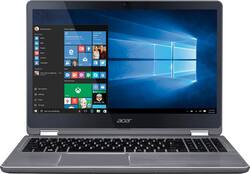
Acer - Aspire R 15 2-in-1 15.6" Touch-Screen Laptop - Intel Core i7 - 12GB Memory - NVIDIA GeForce 940MX - 1TB Hard Drive - Steel gray
- Key Specs
- Screen Type: Full HD Widescreen LED
- Screen Size: 15.6 inches (Size of the screen, measured diagonally from corner to corner.)
- Screen Resolution: 1920 x 1080 (Full HD) (Screens come in a range of resolutions (measured in pixels, horizontal x vertical). The higher the resolution, the greater the picture quality.)
- Touch Screen: true (Touch-screen devices make navigating more intuitive. Using a touch-screen display, you can do things such as tap to select, hold and drag to move items, swipe to scroll, and pinch to zoom.)
- Processor Model: Intel 7th Generation Core i7 (Your computer's processor is like its brain. Working in combination with system memory, the power of the processor determines the complexity of software you can run, how many programs you can have open at the same time, and how fast those programs will run. Most computers feature an AMD, Intel or Snapdragon processor.)
- System Memory (RAM): 12 gigabytes (Random-access memory (RAM) is a computing device's short-term data storage, which allows active information to be accessed quickly. The size and type of RAM determines how efficiently the device can handle large amounts of information at one time. For example, gaming or video editing requires more RAM for optimal performance.)
- 2-in-1 Design: true (A laptop and a tablet combined in one lightweight, portable device. Sometimes referred to as "convertible" or "hybrid" laptops, these devices deliver the processing power and keyboard of a laptop. When you're ready to play, either detach the screen or fold your 2-in-1 into tablet mode to comfortably watch movies, play games, read an e-book and more.)
- Backlit Keyboard: true (Integrated lights allow for visibility of the keys in low-light conditions.)
- General
- Product Name: Aspire R 15 2-in-1 15.6" Touch-Screen Laptop - Intel Core i7 - 12GB Memory - NVIDIA GeForce 940MX - 1TB Hard Drive
- Brand: Acer
- Model Number: R5-571TG-78G8
- Display
- Screen Type: Full HD Widescreen LED
- Screen Size: 15.6 inches (Size of the screen, measured diagonally from corner to corner.)
- Screen Resolution: 1920 x 1080 (Full HD) (Screens come in a range of resolutions (measured in pixels, horizontal x vertical). The higher the resolution, the greater the picture quality.)
- Touch Screen: true (Touch-screen devices make navigating more intuitive. Using a touch-screen display, you can do things such as tap to select, hold and drag to move items, swipe to scroll, and pinch to zoom.)
- Processor
- Processor Brand: Intel
- Processor Model: Intel 7th Generation Core i7 (Your computer's processor is like its brain. Working in combination with system memory, the power of the processor determines the complexity of software you can run, how many programs you can have open at the same time, and how fast those programs will run. Most computers feature an AMD, Intel or Snapdragon processor.)
- Storage
- Hard Drive Capacity: 1000 gigabytes (The amount of data that can be stored on the device's mechanical hard drive. Hard disk drives (HDDs) typically have larger capacities than solid state drives (SSDs) but may have slower speeds.)
- Hard Drive RPM: 5400 revolutions per minute (A hard drive's data is stored on disks, or platters, that spin while transferring information to the host system. The higher the RPM, the faster the hard drive's performance.)
- Memory
- System Memory (RAM): 12 gigabytes (Random-access memory (RAM) is a computing device's short-term data storage, which allows active information to be accessed quickly. The size and type of RAM determines how efficiently the device can handle large amounts of information at one time. For example, gaming or video editing requires more RAM for optimal performance.)
- Type of Memory (RAM): DDR4 SDRAM (Each type of RAM delivers a different level of speed, bandwidth, energy efficiency and performance.)
- System Memory RAM Speed: 2133 megahertz (How fast the information-storing hardware operates. The faster the RAM, the faster memory can be transferred to other system components. Ultimately, faster RAM improves operational efficiency.)
- System Memory RAM Expandable To: 12 gigabytes (Adding more random-access memory (RAM) to a computer speeds up performance and improves efficiency. Upgrades to memory are limited by the number of expansion slots for additional RAM and existing RAM installed on the device.)
- Compatibility
- Operating System: Windows 10 (The operating system manages all software and hardware, including files, memory and connected devices. Most importantly, it lets you interact with your device and your programs in a visual way; otherwise, you'd be typing computer code to get anything done.)
- Operating System Architecture: 64-bit (An operating system (OS) manages computer hardware, software resources, and programs in conjunction with the system's processor. 64-bit operating systems can handle more data at once than 32-bit systems, resulting in faster speeds, more effiency, and overall improved performance.)
- Power
- Battery Cells: 4-cell
- Battery Capacity: 3220 milliampere hours (The amount of energy stored in the battery.)
- Features
- 2-in-1 Design: true (A laptop and a tablet combined in one lightweight, portable device. Sometimes referred to as "convertible" or "hybrid" laptops, these devices deliver the processing power and keyboard of a laptop. When you're ready to play, either detach the screen or fold your 2-in-1 into tablet mode to comfortably watch movies, play games, read an e-book and more.)
- Backlit Keyboard: true (Integrated lights allow for visibility of the keys in low-light conditions.)
- Touchpad Type: Precision
- Media Card Reader: true (A hardware device that allows for access to data on a memory card and enables the transfer of its files to a computer. These devices may have one or multiple slots for various types of memory cards, and may be integrated into the computer or available as an external device.)
- Audio Technology: Acer TrueHarmony Plus technology
- Speaker Type: Stereo speakers, Subwoofer
- Stylus Dock: None
- Casing Material: Aluminum
- Dimensions
- Product Height: 0.8 inches (The out of box height of the item. Height is measured as the vertical distance from the bottom of the item to the top as it would be primarily used or placed.)
- Product Width: 14.6 inches (The out of box width of the item. Width is measured as the horizontal distance from one side of the item to the other as it would be primarily used or placed.)
- Product Depth: 10.1 inches (The out of box depth of the item. Depth is measured as the distance from the front of the item to the back as it would be primarily used or placed.)
- Certifications Listings & Approvals
- ENERGY STAR Certified: false (Devices carrying the ENERGY STAR service mark, such as computer products and peripherals, kitchen appliances, and other products, generally use 20% to 30% less energy than required by federal standards.)
- EPEAT Qualified: false (The Electronic Product Environmental Assessment Tool (EPEAT) was designed to provide an environmental assessment tool for purchasers. In order to qualify for EPEAT, a product must meet all 23 required criteria.)
- Included
- Stylus Included: false
- Other
- UPC: 888863868506
Only at Best Buy Acer Aspire R 15 Convertible 2-in-1 Laptop: Combine work and play with this Acer Aspire convertible laptop. Its 15.6-inch 360-degree hinged monitor and touch screen provide the freedom of a laptop and a tablet in a single device. This Acer Aspire convertible laptop comes with 12GB of RAM, an Intel Core i7 CPU and 1TB hard drive to accommodate high-end computing needs.
- Windows 10 operating system: Windows 10 brings back the Start Menu from Windows 7 and introduces new features, like the Edge Web browser that lets you markup Web pages on your screen. Learn more ›
- 15.6" Full HD 10-point multitouch screen: CineCrystal glossy screen technology maintains the vivid colors in your photos and videos. The 1920 x 1080 resolution boasts impressive color and clarity. IPS technology. LED backlight.
- 7th Gen Intel® Core™ i7-7500U mobile processor: Ultra-low-voltage platform. Dual-core processing performance. Intel Turbo Boost Technology delivers dynamic extra power when you need it.
- 12GB system memory for full-power multitasking: Plenty of high-bandwidth RAM to smoothly run your games and photo- and video-editing applications, as well as multiple programs and browser tabs all at once.
- 1TB hard drive for ample file storage space: Holds a sizeable collection of digital photos, music, HD videos and DVD-quality movies. 5400 rpm spindle speed for standard read/write times.
- 360° flip-and-fold design: Offers versatile functionality with laptop, audience, tabletop, presentation and tablet modes.
- NVIDIA GeForce 940MX graphics: Driven by 2GB DDR3 dedicated video memory to quickly render high-quality images for videos and games.
- Aluminum chassis: Offers a sleek look.
- Voice assistant capability: Software preinstalled so you can type by talking and control the laptop through voice commands.
- Bluetooth interface syncs with compatible devices: Wirelessly transfer photos, music and other media between the laptop and your Bluetooth-enabled cell phone or MP3 player, or connect Bluetooth wireless accessories.
- 3 USB 3.0 ports maximize the latest high-speed devices: Also includes 1 USB 2.0 port to connect more accessories and peripherals. The USB 3.0 ports are backward-compatible with USB 2.0 devices (at 2.0 speeds).
- HDMI output expands your viewing options: Connect to an HDTV or high-def monitor to set up two screens side by side or just see more of the big picture.
- Built-in media reader for simple photo transfer: Supports SD memory card formats.
- Dual-band wireless network connectivity: Built-in high-speed wireless LAN built into the screen, so it connects to your network or hotspots on all current Wi-Fi standards in both laptop and tablet modes.
- Built-in HD webcam with two microphones: Makes it easy to video chat with family and friends or teleconference with colleagues over Skype or other popular applications.
- Backlit keyboard: Allows you to enjoy comfortable and accurate typing, even in dim lighting.
- Additional port: Headphone/microphone combo jack.
Whats Included
- Acer Aspire R 15 R5-571TG-78G8
- 4-cell battery
- Power adapter
Q: can the hdd be switched out for a 1tb ssd? or can an ssd be added to the already installed hdd?
A: i've done a lot of digging on SSD upgrades for this model, since it's been difficult to get a very clear answer about exactly what i was asking haha! my goal was to use dual hard drives, the HDD for mass storage and the SSD as a boot drive (meaning, you install windows or your OS of choice onto the SSD to improve speed). SO! this is what i've found (note i am not a computer expert ,this has just been the result of like 2 weeks of research on this particular model for this particular use. im going to try and be as clear/straightforward with this, so that people with very little prior knowledge can know what to look for): -this model of laptop only has one hard drive slot, so normally to use SSD you would have to remove the HDD. typically this would sacrifice hard drive space for speed, unless you want to pay a whole lot to get a 1TB SSD. they are much cheaper than they used to be though! -what it does have, though, is an M.2 slot. lots of newer models appear to have these slots, but dont advertise that for some reason. -you can use an M.2 SSD in addition to the HDD which comes installed on purchase, so that you can take advantage of the SSD speed with the HDD storage space. -you need a 2280 SATA III M.2 SSD. -the 2280 refers to the size (22mm wide, 80mm long) and SATA refers to what type of slot is compatible (the other being PCI. this is compatible with SATA not PCI. i believe PCI is newer/faster) -lots of laptops are compatible with multiple lengths of M.2 SSDs (so you might see 2240 or 2260 or something) but this model appears to ONLY support 2280. -to install the M.2 SSD appears to be fairly straightforward, but requires a screw to mount it. the laptop DOES NOT come with the screw. depending on who you buy from, the M.2 SSD sometimes comes with a screw, and sometimes does not. pay attention to this when buying! i have no idea where to get the screw if it doesnt come with the SSD. the samsung model ones are easiest to find but i am fairly certain they DO NOT come with the screw. check in the reviews, customers usually say if it came with it or not. -to install, you have to open up the back, stick the M.2 SSD in the slot, and screw it in place. then, put the back back on. i have checked with acer and they said that this does not void the warranty as long as you do not damage the laptop in the process. they don't list the M.2 drive in the specs or anything, but i have verified with both best buy and the acer website that this laptop does, in fact, have the slot. the only reason i knew to check this was because of a reviewer on the slightly older model of this laptop (R5-571TG-78G6, also on best buy, you can check this review yourself). i'll add a compatible M.2 SSD that you can buy here at best buy as a recommended product, but keep in mind that you can find cheaper ones from different sellers, and can also have different sizes depending on your needs. also, once again, samsung DOES NOT appear to include the necessary screw. just linking the best buy one so people (like me) who are coming in with very little knowledge have an example. okay! i think that's everything. comment on this or whatever if i was unclear or made a mistake. just thought i'd add this here in case anyone else was having trouble, since it was such a struggle for me to gather this fairly simple info. for instructions on installation, there are a lot of videos readily available on youtube to show you how!
A: While there is an SSD slot under the battery on the bottom of the system, Acer does not support upgrades or offer the screw that is needed to secure the SSD to the mainboard. Our documentation does show the screw type as M2.0*3.5L #1 NY with torque of 2±0.2, if this may help you.
A: While this model has an SSD slot it is not considered user accessible since the back cover must be removed completely to get to the slot. We are unable to make recommendations on what drive to purchase but it supports M.2 2242/2260/2280 SATA Gen3x2 SSD in 128GB/256GB/512GB SSD sizes.
Q: Would this labtop be able to do online gaming ?
A: No issues for online gaming. However, I recommend upgrading to a SSD over the hard drive.
Q: Can these thin laptops still run if it's plugged into the wall and the battery is dead?
A: Yes it can and honestly the battery can be easily replaced if needed by just removing the 12 screws from the back of the laptop.
Q: how easy is it to replace the battery on this model? where can i get the battery?
A: The entire bottom case must be removed to access the battery. Removing the bottom case is not just a matter of removing screws and taking it off as there are several steps and methods needed to successfully remove it without damage. Because of this, Acer does not consider the battery as a user removable/replaceable part.
Q: Would this be a good college laptop that would last all 4 years?
A: I just purchased mine last month after a lot of review searching and looking at machines. This has all the bells and whistles ..RAM, Processor Speed, good graphics card, touch screen, lightup keyboard, a very nice touchpad and the ability to be used as a tablet or laptop. Thus far, the only thing I can say that I'm 'so so' about is that it's just a little bit heavier than I would like .. but then again, it's built very solid with an very nice metal case all around. I'd say go for it ...I'm really enjoying mine , it's a great machine. PS as with most laptop/tablets in this size, there is no DVD player built in.
Q: Does the USB-C port of this laptop support "DisplayPort Alternate Mode"?
A: No, the USB-C does not support DisplayPort.