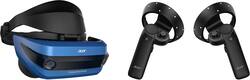
Acer - Mixed Reality Headset and Controllers for Compatible Windows PCs
- Key Specs
- Display Type: LCD
- Field of View: 100 degrees
- Sensors: Accelerometer Sensor, Geomagnetic Sensor, Gyro Sensor (Detects stimuli such as heat, light, sound, motion, or pressure and responds accordingly by operating a control or initiating a function of the device.)
- Wireless: true
- Wireless Connectivity: Bluetooth (The manner in which a device sends data to another device over a short distance without the use of wires or cables.)
- General
- Product Name: Mixed Reality Headset and Controllers for Compatible Windows PCs
- Brand: Acer
- Model Number: AH101-D8EY
- Display
- Display Type: LCD
- Field of View: 100 degrees
- Interpupillary Distance Adjustment: true (Adjusts the distance between the device's eyepieces to match the distance between the user's two pupils. This allows for optimal focus and viewing.)
- Features
- Controller(s): true
- Number Of Controllers Included: 2
- Interactive Buttons: true (Interact with virtual buttons to control or interact with various elements of virtual reality gameplay. // Use buttons on the device to control or interact with various elements of virtual reality gameplay.)
- Sensors: Accelerometer Sensor, Geomagnetic Sensor, Gyro Sensor (Detects stimuli such as heat, light, sound, motion, or pressure and responds accordingly by operating a control or initiating a function of the device.)
- Compatibility
- Operating System: Windows 10 (The operating system manages all software and hardware, including files, memory and connected devices. Most importantly, it lets you interact with your device and your programs in a visual way; otherwise, you'd be typing computer code to get anything done.)
- Connectivity
- Wireless: true
- Wireless Connectivity: Bluetooth (The manner in which a device sends data to another device over a short distance without the use of wires or cables.)
- Connector Ports Required: HDMI 1.4/2.0, USB 3.0
- Other
- UPC: 191114374870
Mesh real life with virtual experiences with this Acer mixed-reality headset, which attaches by cable to your Windows-Creator-enabled PC. The headset and wireless left and right controls offer full range of motion response to immerse you in sights. This Acer mixed-reality headset is lightweight and adjustable for comfortable gaming wear.
- Compatible OS: Must be connected by a cable to a PC running Windows 10 Creators Update.
- Required connectors: One USB 3.0 port and compatible HDMI 1.4 for 60 Hz HMD Mode or HDMI 2.0 for 90 Hz HMD Mode.
- Windows mixed-reality headsets and motion controllers: Give you the freedom to create the content you imagine with full rotational and positional tracking built into the headset.
- Built-in audio out and microphone support: Through 3.5mm combo audio jack.
- Freedom of movement: Experience complete freedom and improved portability.
Whats Included
- 2 x wireless motion controllers
- Acer Mixed Reality Headset for Compatible Windows PCs
- Cable
Q: Full compatibility with Steam VR games?
A: Yes, you can use the Windows Mixed reality SteamVR Preview on steam to play steam vr games, but they may not be fully adapted and there may be some bugs.
A: The controllers are visually tracked by the cameras on the headset. So, yes, you move the controllers in the air to simulate movement. Golf swings, punching, etc. Only drawback is the headset can only see the controllers when pretty much in front of it. So, if out of field of view of cameras on the headset, the controllers won't be tracked.
A: Yes it is, there are a few patchs but yes. I tested it on my computer with 765m and 1060. Yeah the 1060 is better for the boss games, but just getting into the experience the 765m card works. BTW both were asus laptops.



















