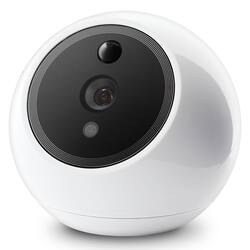
Amaryllo - Apollo Biometric Auto-Tracking Indoor Security Camera - White
- Key Specs
- Field Of View: 85 degrees (The area of a target, measured as an angle from the location of viewing, that can be observed.)
- Night Vision: true
- Number Of Cameras Included: 1
- Camera Power Source: AC/DC Power (plug-in)
- Maximum Operating Temperature: 95 degrees fahrenheit (The highest recommended ambient (surrounding) temperature in which the product can ideally operate stated by the manufacturer. Generally long-term exposure of the product to temperatures more than the maximum can result in ineffective operation.)
- Storage Type: Memory card
- Indoor Or Outdoor Use: Indoor (Indicates the appropriate environment product was designed to be used in.)
- Minimum Operating Temperature: 32 degrees fahrenheit (The lowest recommended ambient (surrounding) temperature in which the product can ideally operate stated by the manufacturer. Generally long-term exposure of the product to temperatures less than the minimum can result in ineffective operation.)
- General
- Brand: Amaryllo
- Model Number: ACR1501R15W
- Product Name: Apollo Biometric Auto-Tracking Indoor Security Camera
- Color: White
- Camera
- Camera Resolution: 1080 (Refers to the number of pixels, both horizontally and vertically, used to capture video/images. The higher the resolution the finer the detail that can be seen.)
- Field Of View: 85 degrees (The area of a target, measured as an angle from the location of viewing, that can be observed.)
- Night Vision: true
- Number Of Cameras Included: 1
- Power
- Camera Power Source: AC/DC Power (plug-in)
- Voltage: 100 volts (Amount of power needed to support an electrical current.)
- Compatibility
- Compatibility: iOS: 10.0 and up / Android: 5.0 and up
- Operating System Compatibility: Apple iOS, Android
- Connectivity
- Camera Connectivity: Wireless, Wireless (Security system cameras can be set up in several ways. Wired cameras require cables for power and footage transmission, while wire-free cameras don't need cables for either. Wireless cameras still require cables for receiving power but are able to transmit footage via a wireless network.)
- Recording & Playback
- Streaming Video: true (The ability to transmit a live video feed from the product.)
- Records Audio: true
- Performance
- Maximum Operating Temperature: 95 degrees fahrenheit (The highest recommended ambient (surrounding) temperature in which the product can ideally operate stated by the manufacturer. Generally long-term exposure of the product to temperatures more than the maximum can result in ineffective operation.)
- Indoor Or Outdoor Use: Indoor (Indicates the appropriate environment product was designed to be used in.)
- Minimum Operating Temperature: 32 degrees fahrenheit (The lowest recommended ambient (surrounding) temperature in which the product can ideally operate stated by the manufacturer. Generally long-term exposure of the product to temperatures less than the minimum can result in ineffective operation.)
- Storage
- Storage Type: Memory card
- Memory Card Type: microSD
- Lighting
- Lighting Type: None
- Features
- Auto-On Detection: Motion
- Mount Type: Wall mount, Ceiling mount
- Dimensions
- Product Height: 3.54 inches (The out of box height of the item. Height is measured as the vertical distance from the bottom of the item to the top as it would be primarily used or placed.)
- Product Width: 3.54 inches (The out of box width of the item. Width is measured as the horizontal distance from one side of the item to the other as it would be primarily used or placed.)
- Product Depth: 3.94 inches (The out of box depth of the item. Depth is measured as the distance from the front of the item to the back as it would be primarily used or placed.)
- Product Weight: 0.55 pounds (The out of box weight of the item.)
- Sensor
- Sensors: Motion sensor, Sound sensor (Detects stimuli such as heat, light, sound, motion, or pressure and responds accordingly by operating a control or initiating a function of the device.)
- Included
- Cable(s) Included: true
- Other
- UPC: 888244001287
The Amaryllo Apollo Biometric Auto-Tracking Security Camera is small and discreet enough to sit on a table in your home or office, or be mounted to any wall. This advanced biometric security camera can auto track moving objects 360° and recognize family members within seconds. Receive motion, audio, and face alert notifications that can help keep your home and family safe and secure! Take action to protect your home, even when you aren’t around. Sound the alarm or use the 2-way communication to warn unrecognized persons away from your property while you contact the authorities. From the free smartphone app, you can live stream, review footage and upgrade your subscription plan to unlock biometric features such as fire, human, vehicle, and pet recognition! Professional monitoring is also available.
- Biometric Features : Fire Warning; Heat Mapping; Path Tracking; Facial Recognition; Human, Vehicle and Pet Detection.
- Auto Tracking: Embedded multi-core CPUs and motion PIR sensors allows for 360° self-pan to automatically track intruders over 40 ft.
- Data Security: The only company to be certified by Microsoft Skype for 256-bit military grade encryption to ensure that your cameras are virtually impossible to hack!
- Advanced Facial Recognition: Includes 4 free faces with the ability to store up to 10 when subscribed to a service plan.
- Audio Features: Built-in Speaker and Microphone allows for 2-way communication and alarms to warn intruders.
- Wireless: Embedded Wi-Fi (2.4G) 802.11 b/g/n.
- Multiple Wi-Fi Access Points: Connect up to 4 Wi-Fi Networks.
- Mounting Options: Simply place it on a desktop or mount it to your walls or ceiling using the included mounting brackets.
- Storage: Supports up to 128 GB microSD Card for local storage.
- Lights: 6 Front-facing warning LED lights and 8 hidden infrared LEDs to protect even in the dark.
- Frame Rate: 1920 x 1080 up to 30 fps.
- Resolution: 2M Pixels FHD.
- Video Resolution: 1080p, 720p, 480p, 360p.
Whats Included
- Power Adapter
- Mounting Bracket
- Screws
- Anchors
- Quick-setup guide
A: Hi there! Thank you for your interest in Amaryllo cameras. Our cameras will record continuously so you won't miss any event. You can choose to store the videos on the MicroSD cards only (sold separately) and playback the video through our app, or have them backed up in the cloud for 7/30/90/180/365 days depending on your needs. You can also choose if you only wish to backup event triggered footage (these will be in 5 minute segments). If you have more questions, you can always contact our support team at [email protected]. Cheers!
A: Hi ASlias, yes, you're absolutely correct. Apollo, and like many other Amaryllo camera models, is able to automatically track moving objects. You do not need to manually pan/tilt the camera to follow a person (though you still can). We understand that other camera brands may use similar languages, but rest assure, our cameras is able to continue to track a person even if you're not there controlling the camera 24/7! You can check out one of our demo videos here: https://www.youtube.com/watch?v=YOicBbNDwDQ
Q: Can i add this camera to a zeus base (socket)
A: Hello! Thank you for the question. This camera cannot be added to a Zeus base unfortunately. However, you could purchase the Zeus camera and have the option to remove the base when you need the camera placed on a flat surface, or use it with the base to install into a recessed lighting fixture. Let us know if you have more questions or concerns! Cheers!
Q: Does this camera have a setting so it will record all motion events with notifications?
A: Hi Melissa, thanks for the question. Apollo is able to continuously record and store the footage locally in a MicroSD card. You would be able to replay the timeline from our app, and should there be an event, it will be indicated in the timeline for easier scrolling. We also have service plans available that allows you to view 10-second video alerts when motion occurs. Or you can choose to backup your footage in our cloud for a much longer duration. You would be able to choose if you'd like the camera to backup videos only when motion occurs, or to backup everything. Should you have more questions, you can find our online chat support on our website, or email us at [email protected]. Cheers!
A: Hi ThomAs, you are correct in that the higher resolution chosen during live streaming, the higher the upload speed is required. Most cameras that you see with video latency occurs because the upload speed was too low and the live view resolution the user had set was too high. We have resolved this issue by implementing an automatic resolution adjustment technology where if the camera detects a low upload speed, it will lower the live view resolution temporarily for smooth streaming, and adjust accordingly to the fluctuations. Our streaming quality and recording quality are separate. Meaning you can set the recording quality to 1080p while having the live streaming resolution set at 720p. One will not affect the other. Hope this helps answer your questions!