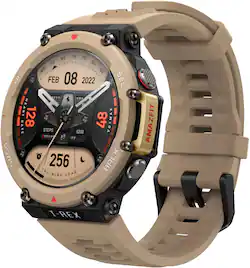
Amazfit - T-Rex 2 Outdoor Smartwatch 35.3mm Polymer Alloy - Desert Khaki
- Key Specs
- Screen Size: 35.3 millimeters (Size of the screen, measured diagonally from corner to corner.)
- Touch Screen: true (Touch-screen devices make navigating more intuitive. Using a touch-screen display, you can do things such as tap to select, hold and drag to move items, swipe to scroll, and pinch to zoom.)
- Operating System Compatibility: Android, Apple iOS
- Operating System: Zepp OS (The operating system manages all software and hardware, including files, memory and connected devices. Most importantly, it lets you interact with your device and your programs in a visual way; otherwise, you'd be typing computer code to get anything done.)
- App Compatible: true (The product can be connected to a program or software application on a mobile device, which then receives collected data from the product.)
- Global Positioning: GPS, GLONASS, Galileo (A system of satellites which enables a mobile receiver to determine its precise location based on signals received from satellites such as the US Global Positioning System (GPS), the Russian Global Navigation Satellite System (GLONASS), the European Global Navigation Satellite System (Galileo), or the Japanese Quasi-Zenith Satellite System (QZSS).)
- Metrics Measured: Blood oxygen, Distance traveled, Calories burned
- Protective Qualities: Water resistant
- Maximum Depth of Water Resistance: 338 feet (Measurement of the maximum depth of water in which the product is able to resist some degree of water penetration.)
- Band Material: Silicone
- General
- Product Name: T-Rex 2 Outdoor Smartwatch 35.3mm Polymer Alloy
- Brand: Amazfit
- Product Type: Smartwatch, Activity tracker
- Form Factor: Wristwatch (The size, arrangement, and physical configuration of the product.)
- Model Family: Amazfit
- Model Number: W2170OV3N
- Color: Desert Khaki
- Design
- Band Color: Khaki
- Clasp Type: Buckle
- Rotating Bezel: false (Rotating the bezel controls the various functions of the device.)
- Display
- Display Screen: true
- Screen Size: 35.3 millimeters (Size of the screen, measured diagonally from corner to corner.)
- Touch Screen: true (Touch-screen devices make navigating more intuitive. Using a touch-screen display, you can do things such as tap to select, hold and drag to move items, swipe to scroll, and pinch to zoom.)
- Display Type: AMOLED
- Color Display: true
- Clock Display: true
- Backlit Display: true (Integrated lights allow for visibility of the display in low-light conditions.)
- Adjustable Brightness: true
- Customizable Watch Faces: true
- Compatibility
- Operating System Compatibility: Android, Apple iOS
- Operating System: Zepp OS (The operating system manages all software and hardware, including files, memory and connected devices. Most importantly, it lets you interact with your device and your programs in a visual way; otherwise, you'd be typing computer code to get anything done.)
- App Compatible: true (The product can be connected to a program or software application on a mobile device, which then receives collected data from the product.)
- Works With: Amazon Alexa (Compatible with or able to be connected to other smart devices or applications.)
- Connectivity
- Data Plan Required: false
- Internal Carrier: Not Applicable
- Wireless Connectivity: Bluetooth (The manner in which a device sends data to another device over a short distance without the use of wires or cables.)
- Features
- GPS Enabled: true
- Global Positioning: GPS, GLONASS, Galileo (A system of satellites which enables a mobile receiver to determine its precise location based on signals received from satellites such as the US Global Positioning System (GPS), the Russian Global Navigation Satellite System (GLONASS), the European Global Navigation Satellite System (Galileo), or the Japanese Quasi-Zenith Satellite System (QZSS).)
- Mobile Notifications: true
- Alert Type: Vibration, Visual, Audible
- Silent Alarm: true
- Activity
- Metrics Measured: Blood oxygen, Distance traveled, Calories burned
- Multi-Sport Tracking: true
- Sensors: Accelerometer, Barometer, Optical heart rate (PPG) sensor, Pulse oximeter (Sp02) sensor, Geomagnetic sensor (Detects stimuli such as heat, light, sound, motion, or pressure and responds accordingly by operating a control or initiating a function of the device.)
- Performance
- Protective Qualities: Water resistant
- Maximum Depth of Water Resistance: 338 feet (Measurement of the maximum depth of water in which the product is able to resist some degree of water penetration.)
- Dimensions
- Product Width: 1.85 inches (The out of box width of the item. Width is measured as the horizontal distance from one side of the item to the other as it would be primarily used or placed.)
- Product Length: 1.85 inches (The out of box length of the item. Length is measured as the longest dimension of the item.)
- Maximum Wrist Size: 204.98 millimeters
- Band Size: Adjustable
- Power
- Rechargeable: true
- Battery Strength Indicator: true
- Charging Interface(s): Other (The connection for transmitting power to charge the device.)
- Replaceable Battery: false
- Material
- Band Material: Silicone
- Case Material: Polymer Alloy
- Camera
- Integrated Camera: No
- Other
- UPC: 850037656646
Amazfit T-Rex 2 Outdoor Smartwatch is designed to explore your instinct. Military-grade toughness with 10 ATM Water-resistance, 70°C heat resistance, -40°C cold resistance, 240 hours humidity resistance, and 96 hours salt spray resistance. Witness endurance that braves the elements with ease. Get a high-level exploration partner that boasts Five Global Navigation Satellite systems, a weather tracker, a sunrise and sunset monitor, a current moon phase display, a compass, and a barometric altimeter. Ultra-long 24-day battery life with typical use, and over 150 different sports modes to track your every move. Protect your health and keep fit with heart rate, sleep quality monitoring, and blood-oxygen saturation measurement, and get personalized evaluations via built-in health assessment system PAI. This is a fitness watch that strikes the perfect balance between practicality and comfort–features an always-on 1.39-inch HD amoled color screen for smoother touch operation and richer & brighter color, a skin-friendly silicone strap with a sweat-wicking design to ensure it stays dry and comfortable.
- 24- Day Long-Lasting Battery Life: Eliminate the worry of frequent charging and enjoy uninterrupted energy. With a long-lasting battery, this device can last up to 24 days with regular usage, 45 days in battery saver mode, or 10 days during heavy usage.
- Call & Text Notifications: Stay effortlessly connected as this watch delivers real-time calls and text notifications directly to your wrist. Never miss a beat and stay in control of your communication wherever you are.
- Built-In Alexa: Ask Alexa questions, control your smart home devices, get translations, set alarms, create shopping lists, check the weather and more.
- 150+ Sports Modes: Achieve your athletic potential with over 150 sports modes on the versatile T-Rex 2. It tracks and analyzes your performance, helping you conquer fitness goals, with automatic recognition of 8 sports for added convenience.
- Personalized Watch Faces: Express your unique style with over 80 personalized watch faces or your own photos. Find the perfect design to match your mood, from classic to modern, and make a statement that's uniquely you, all with a flick of your wrist.
- 24H Heart Rate Monitoring: This 24-hour high-precision heart rate monitoring function supports industry-leading in-depth tracking of heart health. Warnings of an abnormally elevated heart rate are also provided.
- Blood Oxygen Saturation Measurement: Discover the power of health monitoring at your fingertips. Experience the convenience of accurate blood oxygen saturation measurement, empowering you to take charge of your well-being with just a glance at your wrist.
- Sleep Quality Monitoring for Optimal Performance: The T-Rex 2 can assess your sleep breathing quality throughout the light, deep and REM sleep stages of your sleep cycle. It also supports daytime nap identification to record your complete sleep information.
- Military Grade: The T-Rex 2 offers military-grade toughness with 10 ATM water-resistance, 70°C heat resistance, -40°C cold resistance, 240 hours humidity resistance, and 96 hours salt spray resistance.
- PAI Health Assessment System: The PAI score is calculated by processing data about your heart rate and other complex health information. This single-value score provides a customized health evaluation for each user based on their unique health data.
- Breathing Exercises: Discover tranquility and find your inner balance with personalized breathing exercises. With a variety of guided breathing techniques tailored to your needs, this watch empowers you to reduce stress, improve focus, and achieve a sense of calm anytime, anywhere.
- Display: Features a large 1.39" HD AMOLED screen, making it easier to see the data that is vital to your adventure. Personalize your display by selecting from dozens of watch faces with matching always-on display.
- Function: Embrace the ultimate toughness of the Amazfit T-Rex 2. Passed through 15 military-grade tests, this watch is ready to accompany you on your daring adventures, whether through humid rainforests, up mountains, or in freezing temperatures.
- Compatibility.: Compatible with Android and IOS devices
Whats Included
- Smartwatch
- Manual
- Charger
Q: Does this watch have a blood pressure monitor?
A: Hi there, The Watch doesn't support that feature currently. Kieron | Amazfit support
A: You can read all the messages.
A: Unfortunately the T-Rex 2 doesn't have a speaker ,as the developers focused on GPS features and increasing ruggedness and a speaker would leave holes that can disrupt in the strength for the 10ATM Water proofing
A: Hi there, Yes the T-Rex 2 has a 10 ATM Water proof rating used for pool and outdoor swimming . Kieron | Amazfit Support
Q: Does the watch issue a SOS if the wearer should fall?
A: Hi there , No, the Watch doesn't support Fall detection or the ability to call out , however may see this feature in future models. Kieron | Amazfit Support
Q: Does this watch track your altitude when hiking or running trails?
A: Yes , in the barometer app on the watch
A: Hi there, we are sorry that your watch is not charging anymore. Please try cleaning the contact points and make sure nothing is blocking it. Also try different USB power sources to make sure the watch is receiving power. Lastly please try a new charging cable to see if that might be causing the issue. We recommend to press and hold down the power button for at least 10 seconds or more when plugged into the charger to see if there is any responses from the watch. If the issue persists then please contact us at [email protected] and we will be happy to further assist you. Michael | Amazfit Support




















