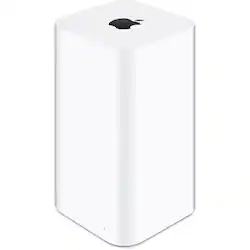
Apple - AirPort® Time Capsule® 2TB Wireless Hard Drive & 802.11ac Wi-Fi Base Station - White
- Key Specs
- Storage Drive Type: SSD (Traditional, mechanical hard disk drives are the most common type of storage because they're relatively inexpensive and offer huge capacities. However, they also generate both noise and heat. Solid state drives, also known as SSDs, are many times faster than hard disk drives and have no moving parts to wear out, but typically offer less capacity for the same price.)
- Interface(s): Wi-Fi (Refers to the types of connections that devices use to interact and communicate with each other.)
- General
- Product Name: AirPort® Time Capsule® 2TB Wireless Hard Drive & 802.11ac Wi-Fi Base Station
- Brand: Apple
- Model Number: ME177LL/A
- Performance
- Storage Drive Type: SSD (Traditional, mechanical hard disk drives are the most common type of storage because they're relatively inexpensive and offer huge capacities. However, they also generate both noise and heat. Solid state drives, also known as SSDs, are many times faster than hard disk drives and have no moving parts to wear out, but typically offer less capacity for the same price.)
- Compatibility
- Internal Or External: External
- External Hard Drive Type: Desktop (Physical characteristics of the hard drive, including size, weight and how you connect to your device.)
- Interface(s): Wi-Fi (Refers to the types of connections that devices use to interact and communicate with each other.)
- Minimum System Requirements: Mac with OS X Lion v10.7.5 or later and AirPort Utility 6.3 iOS device with iOS 6 or later and AirPort Utility 1.3
- Features
- Usage: Backup
- Dimensions
- Product Height: 3.9 inches (The out of box height of the item. Height is measured as the vertical distance from the bottom of the item to the top as it would be primarily used or placed.)
- Product Width: 3.9 inches (The out of box width of the item. Width is measured as the horizontal distance from one side of the item to the other as it would be primarily used or placed.)
- Product Weight: 3.3 ounces (The out of box weight of the item.)
- Other
- UPC: 885909707683
The all-new AirPort Time Capsule works with OS X to automatically and wirelessly back up everything on your Mac to its 2TB hard drive.1 And it doubles as a full-featured Wi-
Whats Included
- AirPort Time Capsule, Printed documentation, Power cord
Q: Is this device like a modem&router in 1 plus hard drive?
A: It is a powerful router, I had to buy a separate modem. It gave my wifi on all 3 levels if my house plus my backyard. Also it can back up you MAC. Super easy to hook up! I highly recommend
A: It's possible. The biggest concern is security. Please make sure the drive along with your router is secure. If not, anybody can easily hack in and get your info.
Q: So I can push photos and videos from my iPhone to this?
A: Yes you can even move the operating system to it if you choose
A: Yes I use it to back up a Windows 10 machine as well as 2 macbook airs.... you will need to download the timecapsh l software and set it up on the Windows 10 machine.
A: Yes, all four can use this device.
Q: Will this work as a backup station for my MacBook Pro with TouchBar when I get the MacBook?
A: Yes
A: I have a Comcast router connected to mine and don't have any issues. You can chose to extend your Comcast wireless network or establish a separate wireless network. I cannot comment on the external drive question, other than I am backing up two Windows 10 computers as well as two Apple computers to this device. There is a USB port to add additional storage, but I don't know how you need to format that drive.

















