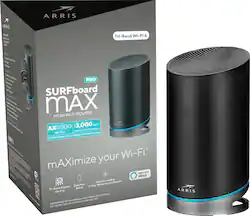
ARRIS - SURFboard mAX Pro Wireless-AX11000 Tri-Band Mesh Wi-Fi 6 Router - Black
- Key Specs
- Wi-Fi Mesh System: true (A single wireless network consisting of a main router (connected directly to a modem) that connects to a series of satellite modules or nodes placed around the home. Routers with this capability promote stronger, faster wireless signals as well as increase Wi-Fi coverage by reducing interference and eliminating dead zones.)
- Number of Wi-Fi Satellites Included: 0 (Quantity of Wi-Fi satellite modules/nodes for a Wi-Fi Mesh System that come with the product.)
- Number Of LAN Ports: 4 (Number of devices able to be connected to the Local Area Network (LAN). LAN ports allow wired connections to other networking devices (wireless access points, range extenders, etc.) in order to share the internet connection received through a WAN port.)
- Wi-Fi Speed: 1.1 gigabits per second (The maximum rate at which data is transferred between a network device and wireless router.)
- Works With: Amazon Alexa (Compatible with or able to be connected to other smart devices or applications.)
- General
- Product Name: SURFboard mAX Pro Wireless-AX11000 Tri-Band Mesh Wi-Fi 6 Router
- Brand: ARRIS
- Model Number: W31
- Color: Black
- Security
- Data Encryption: true
- Encryption Type: WPA2 (The security protocols or certification programs that protect the Wi-Fi network.)
- Firewall Type: Other (The method the firewall uses to filter and process data to increase network security, primarily by blocking malicious traffic requests while allowing legitimate traffic through.)
- Security Features: Guest Wi-Fi Network
- Parental Controls: true (Allows user to block unwanted content, signals, channels, networks, etc. from being received or accessed.)
- Network
- Band Technology: Tri (Refers to the number of frequency bands used to wirelessly transmit an internet signal. For example, dual-band devices may use one 2.4 and one 5 GHz band, while tri-band devices may use one 2.4 and two 5 GHz bands. Multiple bands also provide more flexibility for designating connected devices to specific band use.)
- Ethernet Standard: 10/100/1000 (Each standard is a variation of the IEEE 802.3 set of computer networking technologies known as Ethernet. New versions evolved to include higher bandwidth, different physical media, and other new and improved features. Standards are often denoted by speeds (in Megabits per second). For example, a 10/100/1000 Ethernet port transmits at 10 Mbps, 100 Mbps, and 1000 Mbps (1 Gbps).)
- Frequency Band: 2.4 GHz, 5.0 GHz (Bands may be grouped into categories such as low- and high-band VHF (Very High Frequency), low- and high-band UHF (Ultra High Frequency), or certain frequency channels (measured in MHz or GHz). Generally, higher frequencies transmit information faster but have shorter range than lower frequencies.)
- Wireless Networking Standard: Wi-Fi 6 (The wireless networking standard used by the device. Each iteration of the standard developed by the Wi-Fi Alliance corresponds to an existing IEEE 802.11 protocol; for example, standard 802.11ac (or AC) is termed Wi-Fi 5. Refers specifically to the standard the device is designed to use, but ultimately determines product interoperability and backward compatibility including previous versions.)
- Wireless Standard: AX (The wireless networking protocol used by the device. Each iteration of the protocol is based on the 802.11 standard developed by the Institute of Electrical and Electronics Engineers (IEEE) Standards Association. Denoted by letters following 802.11 (802.11a, 802.11ac, etc.), each version, published in alphabetical order, encompasses all previous versions.)
- Number of 2.4Ghz Streams: 1 (A router's streams are like lanes on a highway. The more streams a router has, the less traffic congestion. Because the 2.4 GHz band is used to transmit wireless signals to a wide variety of devices, there is often high amounts of traffic on that stream. But with multiple streams, each can be designated to a specific device for optimal performance. For example, if one 2.4 GHz stream is assigned to one device, such as a desktop computer, it leaves the remaining streams open for guest users, devices that use more data, or devices with specific band compatibility.)
- Number of 5.0Ghz Streams: 2 (A router's streams are like lanes on a highway. The more streams a router has, the less traffic congestion. The 5.0 GHz band provides high speed, short-range data transmission and typically has less traffic than the 2.4 GHz band. With multiple streams, each can be designated to a specific device for optimal performance. For example, if one 5.0 GHz stream is assigned to one device, such as a streaming media player, it leaves the remaining streams open for guest users, devices that need less data, or devices with specific band compatibility.)
- Wi-Fi Mesh System: true (A single wireless network consisting of a main router (connected directly to a modem) that connects to a series of satellite modules or nodes placed around the home. Routers with this capability promote stronger, faster wireless signals as well as increase Wi-Fi coverage by reducing interference and eliminating dead zones.)
- Number of Wi-Fi Satellites Included: 0 (Quantity of Wi-Fi satellite modules/nodes for a Wi-Fi Mesh System that come with the product.)
- Number of Wi-Fi Satellites Supported: 3 (Maximum quantity of Wi-Fi satellite modules/nodes that are able to be connected to the main router in a Wi-Fi Mesh System.)
- Ethernet Switch: true (Connects multiple devices to expand the Local Area Network (LAN).)
- Certifications Listings & Approvals
- ENERGY STAR Certified: false (Devices carrying the ENERGY STAR service mark, such as computer products and peripherals, kitchen appliances, and other products, generally use 20% to 30% less energy than required by federal standards.)
- Features
- App Compatible: true (The product can be connected to a program or software application on a mobile device, which then receives collected data from the product.)
- App Name: SURFboard mAX Manager
- Beamforming: true (A signal processing technique that enables a router to focus a Wi-Fi signal in a specific direction. The router determines where a connected device in the network is located and projects a stronger signal in that specific direction. This can result in faster and higher quality data transfer as well as reduced signal interference.)
- Integrated Modem: false
- Wireless: true
- Ports
- Number Of WAN Ports: 1 (Number of devices able to be connected to the Wide Area Network (WAN). This type of port may simply be labeled "Internet," and it allows the device to share its internet connection with all devices connected to it via LAN ports.)
- Port Type(s): RJ-45 (USB 2.0 connects external drives, gaming controllers, smartphones, MP3 players and other accessories.USB 3.0 transfers data faster than USB 2.0, but only when used with USB 3.0 devices.USB Type-C provides fast speeds and versatile power, featuring connectors with identical ends that plug in upside down or right side up. Adapters allow for video as well as backward compatibility.Thunderbolt provides ultra-high bandwidth for fast data transfer between devices featuring a Thunderbolt or MiniDisplayPort connection.HDMI allows you to connect a projector or display HD media on your HDTV or monitor.Media card slots allow you to transfer photos from your digital camera or camcorder.)
- Number Of LAN Ports: 4 (Number of devices able to be connected to the Local Area Network (LAN). LAN ports allow wired connections to other networking devices (wireless access points, range extenders, etc.) in order to share the internet connection received through a WAN port.)
- Speed
- Wired Speed: 1000 megabits per second (The maximum rate at which data is transferred between a network device and router using an Ethernet cable.)
- Wi-Fi Speed: 1.1 gigabits per second (The maximum rate at which data is transferred between a network device and wireless router.)
- Gigabit Ethernet Speed: true (Supports the gigabit Ethernet networking standard, which has a data rate of at least one gigabit per second, or 1,000 Mbps.)
- Compatibility
- Works With: Amazon Alexa (Compatible with or able to be connected to other smart devices or applications.)
- Warranty
- Manufacturer's Warranty - Parts: 1 year
- Manufacturer's Warranty - Labor: 1 year
- Other
- UPC: 612572215326
Get the most of your internet with this ARRIS SURFboard mAX Pro router. The tri-band Wi-Fi 6 mesh system delivers high-speed networking to every room in your home, providing multiple gigabit connectivity for 4K televisions, online gaming and VR. Manage and set up this ARRIS Surfboard Max Pro router easily with the SURFboard mAX Manager app.
- Whole-home Wi-Fi coverage: Upstairs, downstairs, inside and outside. The SURFboard mAX™ Pro Mesh Wi-Fi Router has you covered, providing up to 3,000 square feet of coverage. For expanded coverage, add additional SURFboard mAX units as your needs grow.
- Wi-Fi 6 provides the fastest speeds: The newest technology, Wi-Fi 6 (802.11ax), provides total system speeds of up to 11 Gbps. Get the most out of your gigabit speed internet plan.
- Capacity to handle high-bandwidth applications: 12 streams of Wi-Fi enable simultaneous streaming of multiple 4K videos, online gaming, smart home automation and more.
- Smart mesh networking: Smart mesh algorithms automatically select the optimal access point, band & channel for best performance of connected clients.
- Works with Amazon Alexa: Use your existing Echo device to control your SURFboard mAX with commands like "Alexa, ask SURFboard to enable guest Wi-Fi."
- Intuitive set-up: Securely and easily set up and manage your mesh network with step-by-step guidance using the SURFboard Manager app. Set up parental controls to limit your kids' internet activity by scheduling times for internet access.
- Securely manage your network: Assign static IP addresses, set port-forwarding rules, enable UPnP, modify DNS & WAN IP configurations, with more features coming in future updates.
Whats Included
- ARRIS SURFboard mAX Pro Wireless-AX11000 Tri-Band Mesh Wi-Fi 6 System
A: Hi Minnow, You can manage the network using the SURFboard mAX App only . The network can be managed both by connecting to the local network as well as remotely
A: Hello - the answer depends on many factors, including the size of your home. As you may know, Wi-Fi is subject to interference from many devices, walls, etc. However, generally speaking this router should support Wi-Fi coverage up to 3,000 sq ft. It is a mesh-ready router so if you find that it isn't covering all of the areas you require Wi-Fi, you have the option to add another SURFboard mAX router to your network and they will work together to provide Wi-Fi coverage throughout your home.
A: Hi Isiah, To use this Wi-Fi router you would need to have an internet subscription along with a compatible modem. You can connect this router with your existing modem/gateway. Once you have everything in place and the network setup, you can use the Wi-Fi for as long as the setup is on.
Q: Does this work with T-Mobile?
A: This router will connect to any modem through an ethernet connection.
Q: Does this work with verizon 5G home internet?
A: Dear user, this is a mesh system that can connect to your modem.
Q: Does this work with Xfinity?
A: This product is supported most of the US Cable Service providers. Please check with your specific service provider to ensure this product is supported and matches your service tier.
Q: What is the DOCSIS standard of this device?
A: Please note that this is a wireless router only, it does not have a built in cable modem, so the DOCSIS specification is not applicable for this device




















