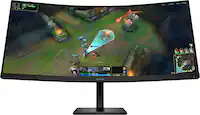
ASUS - TUF Gaming 32" FHD VA 250Hz 0.5ms Curved Gaming Monitor with FreeSync Premium and HDR (DisplayPort, HDMI) - Black
Screen Size
32"More Buying Options

Highlights
- Key Specs
- Refresh Rate: 250Hz (The number of frames per second the device can produce natively without enhancement. Higher rates help produce smooth, seamless pictures.)
- Maximum Resolution: 1920 x 1080 (Maximum resolution refers to the highest number of pixels that a screen can process and display. Higher resolution signals produce more detailed images.)
- Response Time: 0.5 milliseconds (The speed at which pixels can change colors is called response time. It is measured in milliseconds (ms).)
- Panel Type: VA (Technology that affects response time and image quality.)
- Synchronization Technology: G-SYNC Compatible (NVIDIA Adaptive Sync), FreeSync Premium (AMD Adaptive Sync) (Generally, these technologies allow syncing between a computer/console game's frame rate and the device's refresh rate for a smoother display without tearing.)
- Screen Size: 32 inches (Size of the screen, measured diagonally from corner to corner.)
- Display Connector(s): 1 x DisplayPort 1.2, 2 x HDMI 2.0 (The number and type of connectors used to connect to an external display.)
- General
- Brand: ASUS
- Model Number: VG32VQM5B
- Product Name: TUF Gaming 32" FHD VA 250Hz 0.5ms Curved Gaming Monitor with FreeSync Premium and HDR (DisplayPort, HDMI)
- Color: Black
- Operating System Compatibility: Windows, Mac, Chrome, Linux
- Display
- Refresh Rate: 250Hz (The number of frames per second the device can produce natively without enhancement. Higher rates help produce smooth, seamless pictures.)
- Maximum Resolution: 1920 x 1080 (Maximum resolution refers to the highest number of pixels that a screen can process and display. Higher resolution signals produce more detailed images.)
- Native Resolution: 1920 x 1080 (Native resolution of a screen refers to its single, fixed resolution. Sometimes screens must scale an image up or down in order to fit the native resolution. This can cause a loss of resolution or detail.)
- Contrast Ratio: 3500:1 (Measured difference between a displayed image's brightest whites and darkest blacks. The larger the first number, the more detail and color that can be displayed.)
- Response Time: 0.5 milliseconds (The speed at which pixels can change colors is called response time. It is measured in milliseconds (ms).)
- Display Type: LED
- Panel Type: VA (Technology that affects response time and image quality.)
- Synchronization Technology: G-SYNC Compatible (NVIDIA Adaptive Sync), FreeSync Premium (AMD Adaptive Sync) (Generally, these technologies allow syncing between a computer/console game's frame rate and the device's refresh rate for a smoother display without tearing.)
- Aspect Ratio: 16:9 (The measurement of the width of a screen compared to the height of a screen, expressed as a ratio.)
- Curved Screen: true
- Brightness: 300 candela per square meter (A measure of the total light output.)
- Screen Size: 32 inches (Size of the screen, measured diagonally from corner to corner.)
- High Dynamic Range (HDR): true (An HDR-compatible 4K TV or other HDR-compatible product displays HDR video content when it's available from sources like 4K Ultra HD Blu-ray Discs and 4K streaming services.)
- High Dynamic Range Format: HDR 10 (There are a few HDR formats that tell the TV or other HDR-compatible product how to best utilize its capabilities to display HDR content. HDR technology can support one or multiple formats, each with various benefits to picture quality.)
- Horizontal Viewing Angle: 178 degrees (The maximum angle at which the display can be viewed with acceptable visual performance from either side.)
- Vertical Viewing Angle: 178 degrees (The maximum angle at which the display can be viewed with acceptable visual performance from above or below.)
- Touch Screen: false (Touch-screen devices make navigating more intuitive. Using a touch-screen display, you can do things such as tap to select, hold and drag to move items, swipe to scroll, and pinch to zoom.)
- On-Screen Display Languages: English (The available language options for displayed text.)
- Display Surface: Anti-glare
- Connectivity
- Number of DisplayPort Inputs (Total): 1
- Number of HDMI Inputs (Total): 2
- Display Connector(s): 1 x DisplayPort 1.2, 2 x HDMI 2.0 (The number and type of connectors used to connect to an external display.)
- Headphone Jack: true (The device features an interface that allows for the connection of headphones.)
- Compatibility
- Wall Mountable: true (The product is able to be secured to a wall. Some products are designed ready to mount, while others may require additional hardware/accessories for installation.)
- VESA Wall Mount Standard: 100mm x 100mm (VESA wall mount standards refer to the spacing of screw holes built into a TV in order to fit with standard TV wall mounts. These standards are implemented into most TVs and monitors.)
- Features
- Tiltable: true
- Adjustable Stand Height: false
- Anti-Glare: true (Product has features, such as a matte finish, that reduce the likelihood for screen glare.)
- Eye Relief Features: Flicker free, Low blue light
- Built-In Webcam: false
- Integrated Speaker(s): true
- Dimensions
- Product Height With Stand: 19.96 inches
- Product Width: 27.95 inches (The out of box width of the item. Width is measured as the horizontal distance from one side of the item to the other as it would be primarily used or placed.)
- Product Depth (With Stand): 8.43 inches
- Product Weight: 14.99 pounds (The out of box weight of the item.)
- Stand Included: true
- Power
- Power Consumption: 28.6 watts
- Power Saving/Off Mode: 0.5 watts (This mode will turn the display and/or the device off, or into a standby mode, after a preset length of time with no activity to conserve power.)
- Certifications Listings & Approvals
- ENERGY STAR Certified: false (Devices carrying the ENERGY STAR service mark, such as computer products and peripherals, kitchen appliances, and other products, generally use 20% to 30% less energy than required by federal standards.)
- EPEAT Qualified: false (The Electronic Product Environmental Assessment Tool (EPEAT) was designed to provide an environmental assessment tool for purchasers. In order to qualify for EPEAT, a product must meet all 23 required criteria.)
- Warranty
- Warranty - Parts: 3 years
- Warranty - Labor: 3 years
- Other
- UPC: 197105957961
TUF Gaming VG32VQM5B is a 31.5-inch Full HD(1920 x 1080) 1500R curved gaming monitor with overclock to 250 Hz refresh rate and 0.5ms response time (minimum) for extremely immersive gameplay. It features exclusive Extreme Low Motion Blur technology and AMD FreeSync Premium™ to eliminate ghosting and tearing. In addition, it also covering 120% sRGB color gamut for great contrast and lifelike colors.
- 250Hz Refresh Rate (OC) and 0.5ms (min.) Response Time: With 250Hz refresh rate (OC) decimates lag and motion blur to give you the upper hand in first person shooters, racers, real-time strategy, and sports titles
- Adaptive-Sync: AMD FreeSync Premium technology supported through DP and HDMI ports providing variable refresh rates for low latency, stuttering-free and tearing-free while gaming
- High Dynamic Range: With HDR technology to deliver more vivid colors and higher contrast levels compared to traditional monitors
- Extreme Low Motion Blur: ELMB Sync* software that enables ELMB to work simultaneously with adaptive-sync technology to eliminate ghosting and tearing for extraordinarily sharp, high-frame-rate gaming. *Ideal for Fast-paced games , works better over 85Hz
- Variable Overdrive: Integrated ASUS Variable Overdrive technology allows the display to dynamically alter its overdrive setting as frame rates fluctuate, ensuring optimal results for any game
- Extensive Connectivity: A multitude of connectivity options, including two HDMI 2.0, plus DisplayPort™ 1.2, ensures wide compatibility with a variety of input sources
- 250Hz Refresh Rate (OC) and 0.5ms (min.) Response Time: With 250Hz refresh rate (OC) decimates lag and motion blur to give you the upper hand in first person shooters, racers, real-time strategy, and sports titles
- Adaptive-Sync: AMD FreeSync Premium technology supported through DP and HDMI ports providing variable refresh rates for low latency, stuttering-free and tearing-free while gaming
- High Dynamic Range: With HDR technology to deliver more vivid colors and higher contrast levels compared to traditional monitors
- Extreme Low Motion Blur: ELMB Sync* software that enables ELMB to work simultaneously with adaptive-sync technology to eliminate ghosting and tearing for extraordinarily sharp, high-frame-rate gaming. *Ideal for Fast-paced games , works better over 85Hz
- Variable Overdrive: Integrated ASUS Variable Overdrive technology allows the display to dynamically alter its overdrive setting as frame rates fluctuate, ensuring optimal results for any game
- Extensive Connectivity: A multitude of connectivity options, including two HDMI 2.0, plus DisplayPort™ 1.2, ensures wide compatibility with a variety of input sources
Whats Included
- VG32VQM5B Monitor
- DisplayPort Cable
- L-Shaped Screwdriver
- Power Cord
- Quick Start Guide
- Warranty Card
- VG32VQM5B Monitor
- DisplayPort Cable
- L-Shaped Screwdriver
- Power Cord
- Quick Start Guide
- Warranty Card
Q: Does this gaming monitor have a headphone jack?
A: Yes, this gaming monitor includes a headphone jack.
Q: Is the screen of this monitor curved?
A: Yes, the screen of this monitor is curved.
Q: Does this monitor have built-in speakers?
A: Yes, this monitor has integrated speakers.
Q: What type of panel is used in this monitor?
A: This monitor uses a VA panel type.
Q: Can this monitor be mounted on a wall?
A: Yes, this monitor is wall mountable.
Q: What is the refresh rate of this gaming monitor?
A: The gaming monitor has a refresh rate of 250Hz.
Q: Are there HDMI ports available on this monitor?
A: Yes, there are two HDMI ports available on this monitor.
Q: What mounting arm would be compatible with this monitor?
A: undefined
Compare similar products
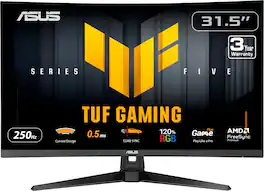
TUF Gaming VG32VQM5B is a 31.5-inch Full HD(1920 x 1080) 1500R curved gaming monitor with overclock to 250 Hz refresh rate and 0.5ms response time (minimum) for extremely immersive gameplay. It features exclusive Extreme Low Motion Blur technology and AMD FreeSync Premium™ to eliminate ghosting and tearing. In addition, it also covering 120% sRGB color gamut for great contrast and lifelike colors.
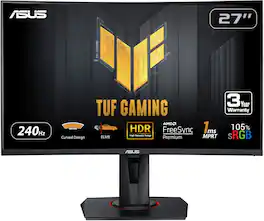
Enjoy a smooth gaming experience with this 27-inch ASUS Full HD monitor. The Shadow Boost feature increases clarity in dark scenes, and the ultrafast response times minimize blurring and streaking for seamless gameplay. This ASUS Full HD monitor has an ergonomic design that allows tilting, swiveling and pivoting as needed.

Enjoy a smooth gaming experience with this 31.5-inch ASUS LED monitor. The Shadow Boost feature increases clarity in dark scenes, and the ultrafast response times minimize blurring and streaking for seamless gameplay. This ASUS LED monitor has an ergonomic design that allows tilting, swiveling and pivoting as needed.
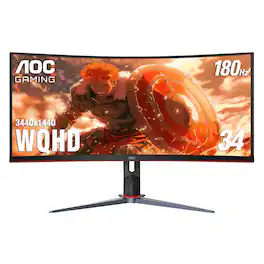
AOC CU34G2XP 34” Curved Gaming Monitor with WQHD 3440 x 1440 resolution delivers stunning visuals and world-class responsiveness, featuring FreeSync Premium tear-free immersion, VESA Certified DisplayHDR 400 mode visual enhancement, and 180Hz refresh rate and 1ms response time. The VA Wide View also allows for 178/178-degree viewing angles, and consistent image quality when viewing the monitor from all angles. In addition, this monitor comes with Low Blue Mode and Flick-Free technology to protect the user's eyes, as well as 2 HDMI, 2 DisplayPort and 4 USB 3.2 interface ports for convenient connectivity.
| Pros for ASUS - TUF Gaming 32" FHD VA 250Hz 0.5ms Curved Gaming Monitor with FreeSync Premium and HDR (DisplayPort, HDMI) - Black | |||
|---|---|---|---|
| Picture Quality | Overall Performance, Refresh Rate, Screen Size, Curvature, HDR | Screen Size, Overall Performance, Refresh Rate, Resolution, HDR | Overall Performance, Screen Size, Refresh Rate, Resolution, Curvature |
| Cons for ASUS - TUF Gaming 32" FHD VA 250Hz 0.5ms Curved Gaming Monitor with FreeSync Premium and HDR (DisplayPort, HDMI) - Black | |||
| There were no cons for this product— | Resolution | Speakers, Stand | Speakers, Buttons |
Specs
Reviews
Customer Images
The vast majority of our reviews come from verified purchases. Reviews from customers may include My Best Buy members, employees, and Tech Insider Network members (as tagged). Select reviewers may receive discounted products, promotional considerations or entries into drawings for honest, helpful reviews.
- Rated 5 out of 5 stars
New monitor
I love the monitor it give a great picture. The curve make it took really good!
Posted by BigkatB
- Rated 5 out of 5 stars
Fast responsive monitor for gaming and more
This Asus Tuf Gaming 32" FHD Curved monitor is fast and responsive with it's 250Hz refresh rate and .5ms response time. I have been loving my gaming sessions with this monitor as it feels like the right size for my viewing needs as I sit about 2 feetaway from my monitor usually. The LED display is quite nice and the 1920 x 1080p resolution works out well for the various FPS, driving, and action games that I've played so far. Asus Extreme Low Motion Blur Sync ensures that there is very little ghosting or motion blur during the fast paced action, and no screen tearing. The wide viewing angle of 178 degrees allows for easy viewing on the VA panel. The curvature of the screen on this monitor makes it feel more immersive in the gaming sense, and also for daily usage activities. The monitor is also covering 120% sRGB for lifelike colors that make the scenes in games feel more vibrant. The adaptive sync technology in the monitor keeps the games looking clear andsmooth without any stutter or tears. HDR10 technology is consistently delivering bright color and vivid lifelike scenes with a very high contrast. I like the anti glare screen as well because sometimes if there are lights turned on in my room I don't worry about them disturbing my gaming monitor and action. This monitor has a wide stable base, and it has a tiltable feature, but no vertical adjustment. The Variable Overdrive technology is a way the monitor will dynamically alter its overdrive setting as frame rate fluctuates to that you get optimal results in the heat of the moment of your game. There are also many other helpful features such as low blue light technology that helps to reduce harmful blue light and the four different settings will allow you to pick the setting that suits your preference. Eye strain on standard monitors is a big challenge for me due to heavy flickering, but the Asus Tuf Gaming monitor is utilizing flicker free technology to help minimize eyestrain for gaming session that last hours or working on a spreadsheet. There are seven available pre set display modes for easy access to adjust the screen settings based on the type of game you're playing, so the lighting and contrast get better based on the general game type. The GamePlus features is an added bonus that offers some in game enhancements to better the experience of the game and allows me to improve my gaming skills with some added features. The Shadow Boost features is perfect to give me a more precise picture of what's happening in darker scenes in the game whether it's a night scene or a dark area in a map. The downloadable Display Widget Center software will allow for easy changes to the monitor settings. In the box you'll get the curved monitor, the power cord, the DP cable, a small screwdriver, 4 screws, base stand, and the quick start guide. I really like the monitor for it's easy to use setup, and the extremely fast response time. This feels like the right size at 32" and the curved monitor makes it feel more personal and immersive. The special gaming features added into this monitor make it a must have for gamers to help assist and make gaming more enjoyable.
Posted by JKinSYR
- Rated 5 out of 5 stars
A Solid 32 Inch Gaming Monitor That Delivers
I have had this monitor for about a week now, and so far it has been pretty solid. For the price point, this is a really good gaming monitor. It offers a curved 32-inch screen, full HD 1920 x 1080 resolution, two HDMI ports, one DisplayPort, an earphone jack, and built-in speakers. Inside the box you get the monitor, a stand, a DisplayPort cable, a power cable, and a small screwdriver. The monitor settings include quite a lot of customization. You get overclocking options, variable refresh rates, GameVisual, Shadow Boost, and my favorite feature, GamePlus. GamePlus gives you several useful tools such as multiple crosshair choices, an FPS counter, a stopwatch, and display alignment helpers. It is a nice set of features for anyone who likes to fine tune their setup. The size of the monitor feels perfect for gaming. I think 32 inches is the sweet spot because it fills your field of view without causing eye fatigue the way a large TV can when you are constantly looking from corner to corner. The refresh rate is excellent at 250Hz (60Hz out of the box), and the response time comes in at only 0.5 milliseconds. The monitor includes a lightweight stand with a tilt function. It cannot raise or lower, but it is VESA mount compatible if you want more flexibility. Adaptive sync works well and keeps up with the graphics card with no issues. The buttons on the back make it easy to access gaming settings quickly if you want to make changes on the fly. I do wish the circular knob button was located on the bottom of the monitor since that would make it a little easier to reach. I was also surprised to see built-in speakers, which I feel are becoming more rare in monitors today. They sound good, although I still prefer to wear a headset while gaming. Overall, I am really enjoying this monitor. It gets the job done without the high price tag of a 4K curved display. Games run smoothly and look great, and I have not had a single issue so far. I am a big fan of ASUS gaming products. I have the tower, keyboard, and now this monitor, and they all sync together perfectly with RGB and the Aura Wallpaper through the Armoury Crate app. The entire setup looks clean and unified. ASUS did a great job with this monitor. It is a perfect introductory gaming monitor at this size and spec, and I am glad I picked it up.
Posted by RogueWave