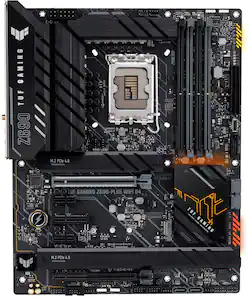
ASUS - TUF GAMING Z690-PLUS WIFI Socket LGA 1700 USB 3.2 Intel Motherboard
- Key Specs
- Form Factor: ATX (The size, arrangement, and physical configuration of the product.)
- Processor Socket: Socket LGA 1700 (Type of pin configuration that connects a CPU to a computer’s motherboard.)
- Number Of Memory Slots: 4
- General
- Product Name: TUF GAMING Z690-PLUS WIFI Socket LGA 1700 USB 3.2 Intel Motherboard
- Brand: ASUS
- Model Number: TUF GAMING Z690-PLUS WIFI
- Compatibility
- Form Factor: ATX (The size, arrangement, and physical configuration of the product.)
- Processor Socket: Socket LGA 1700 (Type of pin configuration that connects a CPU to a computer’s motherboard.)
- Processor Compatibility: Intel Core i9, Intel Core i7, Intel Core i5, Intel Core i3, Intel Pentium, Intel Celeron
- Slot
- Number Of Memory Slots: 4
- Dimensions
- Product Length: 305.05 millimeters (The out of box length of the item. Length is measured as the longest dimension of the item.)
- Product Width: 244.09 millimeters (The out of box width of the item. Width is measured as the horizontal distance from one side of the item to the other as it would be primarily used or placed.)
- Other
- UPC: 195553438773
ASUS TUF GAMING Z690-PLUS WIFI takes all the essential elements of the latest Intel® processors and combines them with game-ready features and proven durability.
- Processor compatibility: Intel® LGA 1700 socket: Ready for 12 Gen Intel® Core™ processors
- Intelligent Control: ASUS-exclusive software and firmware utilities that simplify setup and improve performance: AI Overclocking, AI Cooling, AI Networking and Two-Way AI Noise-Cancelation
- Graphics: Integrated Graphics Processor
- Memory: 128GB, DDR4
- Audio: ROG SupremeFX 7.1 Surround Sound High Definition Audio CODEC
- Expansion slots: Intel® 12th Gen Processors. Intel® Z590 Chipset.
- AI Networking: GameFirst VI optimizes and organizes network bandwidth, effectively reducing jitter and eliminating spike lag to ensure smooth online gameplay
- Operating System: Windows® 10 64-bit
Q: does this motherboard also support DDR4?
A: It only supports DDR4. Motherboards are not interchangeable when it comes to DDR4 vs. DDR5.
A: Yes, DDR4 3600 MHZ ram works. That’s what I am currently using. Once everything is installed you’ll need to go into the bios and activate “xmp” or something similar to overclock your ram.
A: The difference is that the ROG MAXIMUS XIII HERO uses the Intel 1200 socket CPU. Which you can get any of the Intel Ix's processor that are 10th/11th generation. With the TUF GAMING Z690-PLUS WIFI it uses Socket LGA 1700. It the newest board for the 12th generation Intel processor. You can't use the 10th or 11th generation processor. If you want the latest then the any of the Z690 board will be the way to go but you also have to check because due to most Z690 board are DDR5 memory. The DDR5 shortage will be a problem because they are hard to get and expensive. That is the reason why I got the Tuf because it was a Z690 with DDR4 memory not DDR5. You should be fine with a 11th gen processor and the board you have. I Hope this answer your question.
Q: Is there a TUF DDR5 version I can buy?
A: yes, https://www.asus.com/Motherboards-Components/Motherboards/TUF-Gaming/TUF-GAMING-Z690-PLUS-WIFI/
Q: Typos on the description page. This is an Intel Z690 motherboard.
A: Thank you for pointing this out. So that we're on the same page this motherboard is designed to work with Intel® Socket LGA1700 for 12th Gen Intel® Core™.
Q: Will this board be able to safely use 32gb of ram?
A: undefined
Q: Does this board support water cooling?
A: Yes! Just make sure the size of your radiator fits inside your case too c:
A: You will need to flash a bios unless you have a 12th gen cpu. Everything I’ve read though the flash is easy and takes 10 minutes.


















