Avid - PhotoScore Ultimate 7 and AudioScore Ultimate 7 Bundle - Windows, Mac OS
- Key Specs
- Operating System Compatibility: Windows, Mac OS
- Software Format: Physical (Physical software requires a disc, cartridge, etc. be inserted into the gaming console or computer to download and/or operate the software. Digital software allows for downloading and/or playing the software on the gaming console or computer without a physical disc, cartridge, etc. Physical (Download Code Only) software is purchased in physical form with a code that allows for downloading and/or playing the software on the gaming console or computer without a physical disc, cartridge, etc.)
- General
- Brand: Avid
- Model Number: 631807
- Product Name: PhotoScore Ultimate 7 and AudioScore Ultimate 7 Bundle
- Publisher: Avid
- Features
- Software Subject: Photo editing
- Compatibility
- Operating System Compatibility: Windows, Mac OS
- Software Format: Physical (Physical software requires a disc, cartridge, etc. be inserted into the gaming console or computer to download and/or operate the software. Digital software allows for downloading and/or playing the software on the gaming console or computer without a physical disc, cartridge, etc. Physical (Download Code Only) software is purchased in physical form with a code that allows for downloading and/or playing the software on the gaming console or computer without a physical disc, cartridge, etc.)
- Other
- UPC: 884088619886
You have a solid starting point for building your next musical masterpiece. Maybe it's the handwritten score that you scribbled down in your college days. Maybe it's a CD copy of an experimental recording session. But getting to the next step can be a cumbersome task when you don't have an easy way to work with the material. Whether you want to edit a written score on your computer screen or convert an audio file into notes on a page, your creative process becomes faster and smoother with help from PhotoScore Ultimate 7 and AudioScore Ultimate 7.
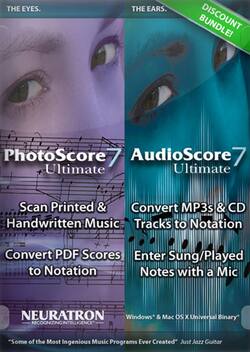
When inspiration strikes, there's no time to waste. With PhotoScore Ultimate 7, the task of accessing a score for transposition is as easy as scanning a piece of music into your computer. In a matter of seconds, PhotoScore Ultimate 7 transfers virtually any handwritten, printed or PDF score from the page to the computer screen, giving you the flexibility to transpose, edit or arrange every aspect of the music. Every detail, down to the slightest hairpins, slurs, lyrics and dynamics, is accurately re-created on screen, as if you'd entered it yourself. When you're done transposing, you can play back your changes, save audio files and print the parts you want with ease. Do you have a CD track or MP3 file that you're longing to put in print? AudioScore Ultimate 7 takes the hard work out of transcription, using its intelligent audio-recognition engine to convert sounds into barlines and staves. Even large arrangements can be transcribed with ease, broken down into as many as 16 different instrument parts. Once your music is in black-and-white, send it directly to your Sibelius software to refine it into a professional score.
- Bundle: includes a PhotoScore Ultimate 7 installation CD-ROM, AudioScore Ultimate 7 installation CD-ROM and installation guide
- PhotoScore Ultimate: Quickly and easily scan handwritten or printed music for transpositions using
- PhotoScore Ultimate: reads notes, slurs, dynamics, lyrics, guitar tab, chord diagrams, hairpins and other details with exceptional accuracy, and features improved PDF support for expanded options
- AudioScore Ultimate: Transcribe CD tracks, MP3 files and other audio to printable scores on your computer with the included software
- AudioScore Ultimate: converts up to 16 simultaneous instruments/notes into staves with up to four voices each, capturing rich musical detail
- Sibelius: Send transcriptions directly to your software for further editing and refining ( software not included)