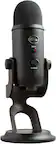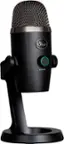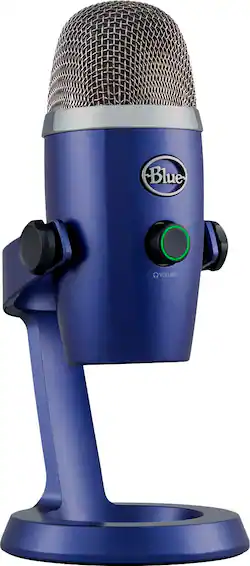
Blue Microphones - Blue Yeti Nano Premium Wired Multi-Pattern USB Condenser Microphone - Vivid Blue
- Key Specs
- Polar Pattern: Cardioid, Omnidirectional
- Microphone Type: Condenser microphones
- Wireless: false
- General
- Brand: Blue Microphones
- Model Number: 988-000089
- Product Name: Blue Yeti Nano Premium Wired Multi-Pattern USB Condenser Microphone
- Color: Vivid Blue
- Dimensions
- Product Height: 8.3 inches (The out of box height of the item. Height is measured as the vertical distance from the bottom of the item to the top as it would be primarily used or placed.)
- Product Length: 4.3 inches (The out of box length of the item. Length is measured as the longest dimension of the item.)
- Product Width: 3.8 inches (The out of box width of the item. Width is measured as the horizontal distance from one side of the item to the other as it would be primarily used or placed.)
- Product Weight: 1.39 pounds (The out of box weight of the item.)
- Cord Length: 78.72 inches
- Audio
- Polar Pattern: Cardioid, Omnidirectional
- Phantom Power: false (Powers devices with onboard electronics that require minimal electricity, such as microphones. DC power is returned to the device via the same cable that carried the signal from it.)
- Minimum Frequency Response: 20 hertz (Describes the maximum range of frequencies or musical tones a product can reproduce, from very low tones to very high treble tones. The minimum frequency or musical tone the speaker can reproduce. High treble tones have higher frequencies while low tones and deep bass have lower frequencies.)
- Maximum Frequency Response: 20 kilohertz (Describes the maximum range of frequencies or musical tones a product can reproduce, from very low tones to very high treble tones. The maximum frequency or musical tone the speaker can reproduce. High treble tones have higher frequencies while low tones and deep bass have lower frequencies.)
- Features
- Microphone Type: Condenser microphones
- Wireless: false
- Mute Function: true
- Compatibility
- Camera/Camcorder Compatible: false
- Included
- Number of Microphones Included: 1
- Warranty
- Warranty - Parts: 2 years
- Warranty - Labor: None
- Other
- UPC: 836213000298
Yeti Nano is a broadcast-quality USB mic for gaming, streaming, podcasting, YouTube videos and more. Yeti Nano features Blue VO!CEeffects, 24-bit sound quality and plug ’n play operation with Mac or PC. With a no-latency headphone output and onboard controls, Yeti Nano is the essential mic for today’s streamers.
- Legendary Blue broadcast sound: Yeti Nano features 2 custom mic capsules to give your voice exceptional presence and detail for professional-level recording and streaming.
- Blue VO!CE software: Elevate your streamings and recordings with clear broadcast vocal sound and entertain your audience with enhanced effects, advanced modulation and HD audio samples.*
- Multiple pickup patterns: The cardioid pattern is perfect for recording and streaming, while omni puts you “in the room” for conference calls.
- No-latency monitoring: Monitor your audio recordings with precision thanks to the onboard headphone output and volume control, ensuring great sound every time.
- Professional Gaming Microphone: Give your game stream the production value it deserves. With the Yeti USB microphone, you’ll be heard loud and clear every time.
- Plug 'n play on computer microphone: Instantly start recording and streaming on Mac or PC.
- Compact footprint and aesthetic: Fits great on any desktop and looks great on camera, simply plug 'n play on your Mac or PC and start recording instantly.
- Onboard Controls: Quickly adjust headphone volume, mic mute and pickup pattern so you can focus on your performance and connect directly to your computer or laptop via the included USB cable.
- More sustainable: Certified carbon neutral: the carbon impact of the product and packaging has been reduced to zero.
- Legendary Blue broadcast sound: Yeti Nano features 2 custom mic capsules to give your voice exceptional presence and detail for professional-level recording and streaming.
- Blue VO!CE software: Elevate your streamings and recordings with clear broadcast vocal sound and entertain your audience with enhanced effects, advanced modulation and HD audio samples.*
- Multiple pickup patterns: The cardioid pattern is perfect for recording and streaming, while omni puts you “in the room” for conference calls.
- No-latency monitoring: Monitor your audio recordings with precision thanks to the onboard headphone output and volume control, ensuring great sound every time.
- Professional Gaming Microphone: Give your game stream the production value it deserves. With the Yeti USB microphone, you’ll be heard loud and clear every time.
- Plug 'n play on computer microphone: Instantly start recording and streaming on Mac or PC.
- Compact footprint and aesthetic: Fits great on any desktop and looks great on camera, simply plug 'n play on your Mac or PC and start recording instantly.
- Onboard Controls: Quickly adjust headphone volume, mic mute and pickup pattern so you can focus on your performance and connect directly to your computer or laptop via the included USB cable.
- More sustainable: Certified carbon neutral: the carbon impact of the product and packaging has been reduced to zero.
Whats Included
- Yeti Nano microphone including desktop stand
- USB cable
- 1/4-inch to 5/8-inch adapte
- Quick-start guide
- 2-year manufacturer’s guarantee
- Yeti Nano microphone including desktop stand
- USB cable
- 1/4-inch to 5/8-inch adapte
- Quick-start guide
- 2-year manufacturer’s guarantee
Product Manuals
A: Hello Richard, the $99 model is the Yeti Nano, while the $129 model is the original Yeti. There are a few differences between the two models. The biggest difference is that the Yeti is a 3 capsule design that can go between 4 different polar patterns: Cardioid (in front of the mic), Bi-Directional (front and back), Omnidirectional (all around), Stereo (Left/Right). The Yeti Nano has 2 capsules and can switch between Cardioid and Omnidirectional polar patterns. For interviews, you would use the Omnidirectional pattern on the Nano and Omnidirectional or Bi-Directional patterns on the Yeti.
A: There is no way to connect this microphone to an iPad.
Q: Can I plug headphones into the mic?
A: Yes, you can plug headphones into the mic.
A: Yes. It's a click button on the front of the microphone, which is also the volume adjuster. It has an LED ring that is red when muted, and green when active.
Q: Why don't you make this compatible with windows 10 PCs?
A: I'm using this with Windows 10 and no problems so far.
Q: Does this mic come with a USB cord and adapter?
A: Yes. It's a USB-A to Micro-USB cable, 2 meters in length. The Micro-USB end is for the mic, while the USB-A end is for the computer or other device you're connecting to.
Q: Is there a way for me to use this to record my voice and minimize those of my loud keyboard?
A: There are two things that could help. First is making sure your microphone is on the cardiod mode. While this mode is enabled, make sure to position your microphone with the volume knob facing your mouth. Your voice will sound the clearest this way BUT also ignoring any sounds directly behind your microphone. So the best position for the microphone will be in-between you and your keyboard. Secondly, buying a microphone arm holder will be great to minimize noise. What this allows you to do is position your microphone very close to your mouth, 1-5 inches away. This will let you turn down your microphone’s sensitivity (otherwise known as gain) which will pickup less noise around the blue yeti nano, such as your keyboard. I hope this helps.
Q: Will this work for singing and playing the guitar while using zoom for our church service music?
A: Yes it’s great for live-streaming a small music group. Just use the Omni Directional setting when recording live music for a fuller room live sound.