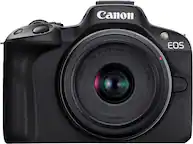
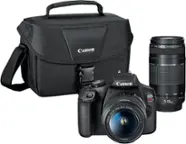
Canon - EOS R50 V 4K Video Mirrorless Camera with RF-S14-30mm F4-6.3 IS STM PZ Lens - Black
Product Set
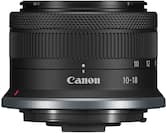
EOS R50 V RF-S14-30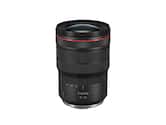 Canon - RF15-35mm F2.8L IS USM Ultra-Wide-Angle Zoom Lens for EOS R-Series Cameras - BlackWinter Sale Deal$2,099.00$2,599.00
More Buying Options
Related Item

Specifications
- Image Sensor SizeAPS-C (23.6 x 15.7 mm)Effective Pixels24 megapixelsStandardized Video Resolution4K (2160p)
- Key Specs
- Image Sensor Size: APS-C (23.6 x 15.7 mm)
- Effective Pixels: 24 megapixels (The actual number of pixels which make up the viewable image.)
- Standardized Video Resolution: 4K (2160p) (An approximated measurement of the product’s video resolution. This may not be the exact resolution of the product, which may be slightly more or less when using a pixel-by-pixel measurement.)
- General
- Brand: Canon
- Model Number: 6895C012
- Product Name: EOS R50 V 4K Video Mirrorless Camera with RF-S14-30mm F4-6.3 IS STM PZ Lens
- Color: Black
- Product Set: EOS R50 V RF-S14-30
- Camera Model Family: Canon R50V
- Digital Camera Type: Mirrorless Camera with Lens
- Imaging
- Image Sensor Type: CMOS (CCD and CMOS are the two main technologies used in image sensors. CCD, the older of the two types, turns analog light signals into digital pixels. This conversion happens without distortion, resulting in high-quality images. Newer CMOS sensors use transistors at each pixel to move electrical charges. CMOS sensors are typically less expensive, but also require more light to create distortion-free images.)
- Image Sensor Size: APS-C (23.6 x 15.7 mm)
- Total Pixels: 24.2 megapixels (Generally, the more pixels, the higher the image resolution and the finer the detail that can be seen.)
- Zoom Capability: true (This function allows for magnification of the subject.)
- Digital Zoom: 10x (A digital zoom is accomplished electronically, with no adjustment of the camera's optics, and no optical resolution gained in the process. The existing data is not enhanced or added to, merely displayed at a lower resolution, thereby giving an illusion of an enlarged image.)
- In-Camera Image Stabilization: true (This feature helps reduce image blurring from camera motion. In-camera stabilization means the image sensor itself moves to counteract detected motion.)
- Low Light/High Sensitivity: true (High sensitivity digital imaging devices are designed to work in low light conditions to produce a high dynamic range image.)
- Image File Format(s): JPEG, HEIF, RAW, MP4 (Standardized software format(s) of storing digital images. The type of format chosen for capturing and compressing the image can determine quality, level of detail, and storage space required.)
- Focus
- Autofocus: true (Allows the camera to automatically focus through the lens, rather than by adjusting the lens manually.)
- Eye Autofocus (Eye AF): true (Automatically seeks out and focuses on the subject's eye and holds it as the camera and subject move and as the photographer shoots at high frame rates.)
- Number of Autofocus Points (Up To): 4503
- Exposure Control
- Shutter Speeds: Electronic 1st-curtain shutter: 1/4000th sec – 30 seconds, in 1/3-step increments. Electronic shutter: 1/8000th sec – 30 seconds, in 1/3-step increments. (The length of time the shutter remains open when the shutter release is activated, expressed in fractions of seconds. The longer the shutter is open, the more light that is able to be captured by the camera sensor.)
- Minimum Aperture: f/36 (The smallest opening of a lens, typically expressed in f-numbers. The larger the number, the smaller the aperture and the less light that can enter the lens. A smaller aperture creates a larger depth of field, which keeps both foreground and background in focus.)
- Maximum Aperture: f/4 (The limit to how wide a lens can be open, typically expressed in f-numbers. The smaller the number, the larger the aperture and the more light that can enter the lens. A larger aperture creates a shallower depth of field, helpful for keeping subjects in focus and blurring background details.)
- Minimum ISO: 100 (ISO is the measurement of a camera image sensor's light sensitivity. When there is plenty of light, using the lowest ISO setting available will typically result in a higher quality image.)
- Maximum ISO: 32000 (ISO is the measurement of a camera image sensor's light sensitivity. In low-light environments, using a higher ISO setting helps to capture a sharp, bright image.)
- Maximum Expandable ISO: 51200 (ISO is the measurement of a camera image sensor's light sensitivity. Expandable ISO settings use software to simulate brighter images than the device's native ISO range is capable of capturing.)
- Brightness Control: true (Allows the camera to adjust the brightness of a captured image for optimal exposure.)
- Burst Mode: true (Also referred to as continuous shooting. This feature captures multiple shots in rapid succession.)
- Burst Rate: 15 frames per second
- Self Timer: true
- Self-Timer Delay: 2 seconds, 10 seconds, Continuous shooting
- White Balance Modes: (1) Auto (Ambience priority/White priority) (2) Daylight (3) Shade (4) Cloudy (5) Tungsten light (6) White fluorescent light (7) Flash (8) Manual (9-12) Color temperature 1-4 (Settings that calibrates how the color white is rendered in an image/video, reducing the appearance of unnatural contrasts caused by various light sources.)
- Effective Pixels: 24 megapixels (The actual number of pixels which make up the viewable image.)
- Lens
- Lens Mount Compatibility: Canon RF
- Lens Type: Ultra-Wide Angle Zoom
- Minimum Focal Length: 14 millimeters (The minimum distance between the lens and the image sensor that allows the subject to be in focus. The shorter the focal length, the greater the area of scene captured.)
- Maximum Focal Length: 30 millimeters (The maximum distance between the lens and the image sensor that allows the subject to be in focus. The greater the focal length, the smaller the area of scene captured.)
- In-Lens Image Stabilization: true (This feature helps reduce image blurring from camera motion. Lens stabilization means an element within the lens moves automatically to counteract detected motion.)
- Lens Series: Canon RF-S (The product group that the lens belongs to, based on similar shared features.)
- Lens Model Number: 6916C002
- Flash
- Integrated Flash: false
- External Flash Mount: Hot Shoe (A cold shoe is a mounting point on top of a camera to securely attach a flash unit or other compatible accessories. A hot shoe is a cold shoe with an electrical connection that insures communication and synchronization between camera and accessory.)
- Display
- Display Type: TFT-LCD
- Screen Size: 3 inches (Size of the screen, measured diagonally from corner to corner.)
- Aspect Ratio: 3:2 (The measurement of the width of a screen compared to the height of a screen, expressed as a ratio.)
- Viewfinder Type: Electronic (A viewfinder is the part of a camera (or attachment) that allows you to see and focus a scene in frame. Optical viewfinders let you view the scene directly through the lens. Electronic viewfinders display the image on a screen in its approximate final form.)
- Touch Screen: true (Touch-screen devices make navigating more intuitive. Using a touch-screen display, you can do things such as tap to select, hold and drag to move items, swipe to scroll, and pinch to zoom.)
- Varying Angle Screen: true (The camera's screen can be flipped out and adjusted to rotate, tilt, and/or swivel.)
- Video
- Standardized Video Resolution: 4K (2160p) (An approximated measurement of the product’s video resolution. This may not be the exact resolution of the product, which may be slightly more or less when using a pixel-by-pixel measurement.)
- Video Resolution(s) and Frame Rate(s): 4K (2160p) up to 29.97 Frame Rate; 4K Crop up to 59.94 FPS. Full HD up to 120 FPS. (Refers to the number of pixels, both horizontally and vertically, and the frame rate used to capture the video. The higher the resolution the finer the video detail that can be seen. The faster the frame rate the smoother the playback for higher motion activities like sports.)
- Maximum Video Frame Rate: Up to 120 fps (The maximum frequency at which consecutive images can be captured by a video recording device.)
- HDR Mode: true (HDR Mode uses multiple photos taken at different exposures to add more dynamic range to photographs. HDR technology displays content with greater contrast between bright and dark, resulting in clearer and more lifelike images.)
- Slow Motion Recording: true
- HD Movie Mode Focus: Automatic
- Storage
- Number of Memory Card Slots: 1
- Compatibility
- Tripod/Monopod Mountable: true (A support function that allows the device to be mounted to monopods and tripods for leveling and stability.)
- Socket Size: 1/4 in.
- Memory Card Compatibility: Secure Digital, Secure Digital Extended Capacity (SDXC), Secure Digital High Capacity (SDHC) (The type of memory card(s) recommended for use with the product.)
- Remote Compatible: true
- Features
- Face Detection: true (A function that automatically detects human faces and then sets focus and appropriate exposure to capture them.)
- Integrated GPS: No
- Records Audio: true
- Connectivity
- Wireless Connectivity: WiFi, Bluetooth (The manner in which a device sends data to another device over a short distance without the use of wires or cables.)
- Output(s): 3.5mm audio, Micro HDMI Type D, USB-C
- Microphone Input: true (The device features an input for connecting an external microphone.)
- Headphone Jack: true (The device features an interface that allows for the connection of headphones.)
- PictBridge Enabled: false (PictBridge allows digital cameras, camcorders and other image capture devices to connect and print directly to photo printers and other output devices without using a computer.)
- Power
- Rechargeable Battery: true
- Removable Battery: true
- Battery Model: Battery Pack LP-E17 (The model number of the battery necessary for operation of the device.)
- Number of Batteries Required: 1
- Included
- Number of Lenses Included: 1
- Camera Bag/Case Included: false
- Batteries Included: true (Indicates whether the product comes with the required batteries for its operation.)
- Memory Card Included: false (Indicates whether a memory card is included.)
- Dimensions
- Product Height: 3.4 inches (The out of box height of the item. Height is measured as the vertical distance from the bottom of the item to the top as it would be primarily used or placed.)
- Product Width: 4.6 inches (The out of box width of the item. Width is measured as the horizontal distance from one side of the item to the other as it would be primarily used or placed.)
- Product Depth: 5.4 inches (The out of box depth of the item. Depth is measured as the distance from the front of the item to the back as it would be primarily used or placed.)
- Product Weight: 1.2 pounds (The out of box weight of the item.)
- Filter Diameter: 58 millimeters
- Camera Body Weight: 0.71 pounds
- Warranty
- Warranty - Parts: 1 year
- Warranty - Labor: 1 year
- Other
- UPC: 013803382174
Step up to interchangeable lens video creation with the versatile EOS R50 V. This APS-C Mirrorless EOS V Series camera lets you take control of your next video production by blending some of the best features of the Cinema EOS and EOS camera lines together. This EOS R50 V lens kit comes with our RF-S14-30mm F4-6.3 IS STM PZ lens – A lightweight, travel friendly, ultra-wide angle to standard zoom lens created with power zooming capability to create beautiful videos.
- UI designed for the creator: The EOS R50 V was designed through creator feedback to solve many of the pain points of creators. Its’ exterior was completely redesigned to be bold, modern, and untraditional in appearance. An appearance that clearly indocates that this camera is meant to be taken with you wherever your videos take you! The convenience and power of this camera goes far beyond portability.
- Vertically versatile: As a product made for today’s video content creator, it comes equipped with both a vertical and horizontal tripod mount. These are available on the side of the camera’s grip, and also on the bottom of the camera body. When in Movie mode, the on-screen menu’s automatically rotate based on the camera’s orientation.
- Always ready, and never surprised: Since many creators spend a lot of time in-front of the camera, two Record buttons are available, one on the front of the camera so you can start your recording with confidence when vlogging, and another in the traditional Shutter button position when you’re behind the camera.
- Ready to create: The EOS R50 V comes equipped with a zoom lever allowing Power Zoom lenses such as the RF14-30mm F4-6.3 IS STM PZ lens to be controlled at the camera body. Control of the zoom speed can be fully customized in the camera’s menu allowing separate control of the speed for before recording, and separately for during recording. The camera also comes equipped with Mic, Headphone, and an E3 Remote port.
- Pro look settings simplified: A new mode dial experience now features 7-different video focused modes at your fingertips. Newcomers to video can utilize the fully Automatic video exposure mode functionality, including the Scene mode featuring a dedicated video mode for “close-up demos” perfect for Video, or Small Business Creators doing E-commerce product demonstrations.
- Control time with Slow & Fast mode: New to the EOS R50 V mode dial is the Slow and Fast mode – selecting this mode allows creative control of both the video frame rate and playback speed separately and in-camera, for slow-motion recordings, or fast-motion time-lapse sequences.
- Create the color you want: The EOS R50 V camera is built not just for newcomers to video, but also for advanced creators. High-end features like Canon Log 3, HLG, PQ and Canon709 recording to deliver rich color at up to 4:2:2 10 bit. A new Color Filter mode has also been added providing 14 different color options, accompanying the well-known Picture Style menu.
- Cinema View mode: Now creating cinematic aspect ratio video is easier than ever with the new Cinema View mode, which creates a “letterboxed” cinematic 2.35:1 aspect ratio video.
- Focused on you: The EOS R50 V comes with Canon’s powerful Dual Pixel CMOS AF II focusing system, providing tenacious tracking that follows you or your subject when recording or taking photos. Easy to use Subject Detection modes include People, Animals, Vehicles, and Auto mode, allowing high precision autofocus with ease and reliability. The EOS R50 V even has the Register People Priority Autofocus mode found in our flagship EOS R1, EOS R3 and EOS R5 Mark II mirrorless cameras.
- For the stills photographer: As an EOS V-series product, optimized for video, you might think that we forgot about still photography features, but rest assured, we packed lots of incredible image capturing capabilities into this very travel friendly camera. It has a full-fledged “Photo” mode with a host of manual and automatic shooting modes available.
- Go LIVE to connect to your audience: This camera also offers tremendous networking capability – offering 5 and 2.4Ghz Wi-Fi, Bluetooth, and built-in Wireless Livestreaming capability via both the Canon Camera Connect app, and the Live Switcher Mobile app.
- UI designed for the creator: The EOS R50 V was designed through creator feedback to solve many of the pain points of creators. Its’ exterior was completely redesigned to be bold, modern, and untraditional in appearance. An appearance that clearly indocates that this camera is meant to be taken with you wherever your videos take you! The convenience and power of this camera goes far beyond portability.
- Vertically versatile: As a product made for today’s video content creator, it comes equipped with both a vertical and horizontal tripod mount. These are available on the side of the camera’s grip, and also on the bottom of the camera body. When in Movie mode, the on-screen menu’s automatically rotate based on the camera’s orientation.
- Always ready, and never surprised: Since many creators spend a lot of time in-front of the camera, two Record buttons are available, one on the front of the camera so you can start your recording with confidence when vlogging, and another in the traditional Shutter button position when you’re behind the camera.
- Ready to create: The EOS R50 V comes equipped with a zoom lever allowing Power Zoom lenses such as the RF14-30mm F4-6.3 IS STM PZ lens to be controlled at the camera body. Control of the zoom speed can be fully customized in the camera’s menu allowing separate control of the speed for before recording, and separately for during recording. The camera also comes equipped with Mic, Headphone, and an E3 Remote port.
- Pro look settings simplified: A new mode dial experience now features 7-different video focused modes at your fingertips. Newcomers to video can utilize the fully Automatic video exposure mode functionality, including the Scene mode featuring a dedicated video mode for “close-up demos” perfect for Video, or Small Business Creators doing E-commerce product demonstrations.
- Control time with Slow & Fast mode: New to the EOS R50 V mode dial is the Slow and Fast mode – selecting this mode allows creative control of both the video frame rate and playback speed separately and in-camera, for slow-motion recordings, or fast-motion time-lapse sequences.
- Create the color you want: The EOS R50 V camera is built not just for newcomers to video, but also for advanced creators. High-end features like Canon Log 3, HLG, PQ and Canon709 recording to deliver rich color at up to 4:2:2 10 bit. A new Color Filter mode has also been added providing 14 different color options, accompanying the well-known Picture Style menu.
- Cinema View mode: Now creating cinematic aspect ratio video is easier than ever with the new Cinema View mode, which creates a “letterboxed” cinematic 2.35:1 aspect ratio video.
- Focused on you: The EOS R50 V comes with Canon’s powerful Dual Pixel CMOS AF II focusing system, providing tenacious tracking that follows you or your subject when recording or taking photos. Easy to use Subject Detection modes include People, Animals, Vehicles, and Auto mode, allowing high precision autofocus with ease and reliability. The EOS R50 V even has the Register People Priority Autofocus mode found in our flagship EOS R1, EOS R3 and EOS R5 Mark II mirrorless cameras.
- For the stills photographer: As an EOS V-series product, optimized for video, you might think that we forgot about still photography features, but rest assured, we packed lots of incredible image capturing capabilities into this very travel friendly camera. It has a full-fledged “Photo” mode with a host of manual and automatic shooting modes available.
- Go LIVE to connect to your audience: This camera also offers tremendous networking capability – offering 5 and 2.4Ghz Wi-Fi, Bluetooth, and built-in Wireless Livestreaming capability via both the Canon Camera Connect app, and the Live Switcher Mobile app.
Whats Included
- EOS R50 V Mirrorless Camera Body
- RF-S14-30mm F4-6.3 IS STM PZ Lens
- Camera Cover R-F-5
- Battery Pack LP-E17
- Battery Charger LC-E17
- Neck Strap EM-200DG
- Lens Cap E-58 II
- Lens Dust Cap RF
- EOS R50 V Mirrorless Camera Body
- RF-S14-30mm F4-6.3 IS STM PZ Lens
- Camera Cover R-F-5
- Battery Pack LP-E17
- Battery Charger LC-E17
- Neck Strap EM-200DG
- Lens Cap E-58 II
- Lens Dust Cap RF
Product Manuals
Q: Does this camera have built-in image stabilization?
A: Yes, the EOS R50 V has in-camera image stabilization.
Q: What type of autofocus system does the EOS R50 V use?
A: The EOS R50 V uses Canon's Dual Pixel CMOS AF II focusing system.
Q: Does the EOS R50 V support wireless live streaming?
A: Yes, the EOS R50 V has built-in wireless live streaming capabilities via the Canon Camera Connect app and the Live Switcher Mobile app.
Q: What is the maximum frame rate for video recording on the EOS R50 V?
A: The EOS R50 V can record Full HD video at up to 120 frames per second.
Q: Can I use a remote control with the EOS R50 V?
A: Yes, the EOS R50 V is compatible with a remote control.
Q: How many memory card slots does the EOS R50 V have?
A: The EOS R50 V has one memory card slot.
Q: What lens comes with the EOS R50 V in this kit?
A: This EOS R50 V lens kit comes with the RF-S14-30mm F4-6.3 IS STM PZ lens.
Q: What flashes are compatible with this camera?
A: undefined
Compare similar products
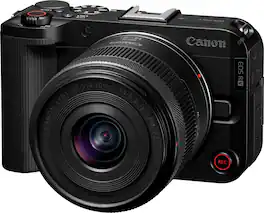
Step up to interchangeable lens video creation with the versatile EOS R50 V. This APS-C Mirrorless EOS V Series camera lets you take control of your next video production by blending some of the best features of the Cinema EOS and EOS camera lines together. This EOS R50 V lens kit comes with our RF-S14-30mm F4-6.3 IS STM PZ lens – A lightweight, travel friendly, ultra-wide angle to standard zoom lens created with power zooming capability to create beautiful videos.
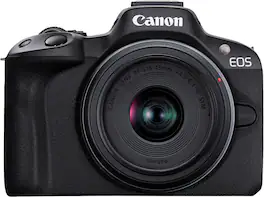
Capture the Moment Just as You Imagine It: The EOS R50 camera makes photography fun, simple, and convenient with intuitive photo functions that capture beautiful images automatically, just as you imagine them. A host of video functions such as 6K oversampled 4K 30p capture and Dual Pixel CMOS AF II makes the EOS R50 a great camera for movie recording and vlogging as well. The 24.2 Megapixel APS-C size CMOS Image sensor and DIGIC X image processor ensure high image quality in a compact and lightweight form factor.
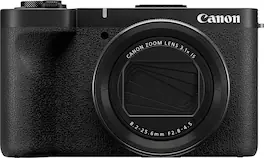
Welcome to the PowerShot V1, a powerful video-first camera with all the features you are looking for content creation, in an all-in-one design. This new sleek design features an ultra-wide-angle zoom lens, advanced autofocus, a built-in cooling fan, and impressive stabilization. The PowerShot V1 will let you focus on your creativity without worrying about time limits getting in the way of your videos.

Experience the fun of RF mount content creation with the smallest and lightest EOS R series camera¹, the Canon EOS R100. Excellent still-image capabilities start with its 24.1 Megapixel APS-C size CMOS Image sensor and DIGIC 8 processor, along with Dual Pixel CMOS AF with the ability to detect human faces and focus on their eyes. The EOS R100 also can record Full HD video at up to 60 frames per second, and detailed, high-res 4K from the central area of the sensor at 24 frames per second. The versatility and small size of the RF-S18-45mm F4.5-6.3 IS STM lens gives you the flexibility you desire without taking up your whole camera bag.
| Pros for Canon - EOS R50 V 4K Video Mirrorless Camera with RF-S14-30mm F4-6.3 IS STM PZ Lens - Black | |||
|---|---|---|---|
| Portability, Weight, Video Quality, Autofocus, Grip | Camera Quality, Ease of use, Overall Performance, Weight, Battery Life | Portability, Picture Quality | Camera Quality, Ease of use, Overall Performance, Weight, Size |
| Cons for Canon - EOS R50 V 4K Video Mirrorless Camera with RF-S14-30mm F4-6.3 IS STM PZ Lens - Black | |||
| Battery Life | Grip, Overheating | Flash | Battery Life, Screen |
Specs



Reviews
Customers are saying
Customers are delighted by the EOS R50 V's superb video quality and autofocus capabilities, praising its sharp images and reliable performance. Many appreciate the camera's portability and lightweight design, finding it easy to use and transport. While some users noted the battery life could be improved, the overall experience is overwhelmingly positive.
Customer Images
The vast majority of our reviews come from verified purchases. Reviews from customers may include My Best Buy members, employees, and Tech Insider Network members (as tagged). Select reviewers may receive discounted products, promotional considerations or entries into drawings for honest, helpful reviews.
- Rated 5 out of 5 stars
Love it!!!
Excellent camera, the video quality is exceptional and the photos too. The only thing I didn't like is that it doesn't have an integrated flash light, but I already knew it before I bought it. Ignoring that detail, it's perfect!!!
This review is from Canon - EOS R50 V 4K Video Mirrorless Camera with RF-S14-30mm F4-6.3 IS STM PZ Lens - Black
Posted by RuthA
- Rated 5 out of 5 stars
Camera canon good choice
That’s a gift for my husband and he loved it . It arrived at time, I recommended it
Posted by LaivkaL
- Rated 5 out of 5 stars
Canon's Got a Winner With This One!!!
First off, I am not a “professional” movie maker or a “complete” spec geek. I also do not like to read instruction manuals BUT…. I do make really good videos for my organization, such as training highlights and promotional shorts. It is critical that I get it right, and it looks top-notch. I also have both photographed friends' weddings and simultaneously shot the video of their weddings, put all the post-production and editing together and am well versed in all of the Adobe CC suite. …so I am not a complete novice either. I take pride in my work and enjoy the creative process and sharing it with friends, family, and coworkers. I also am on the verge of jumping into the podcasting world, and nowadays it’s not enough to just audio record. You must have a professional video presence as well to have any hope of traction in the market. That’s what I love about some of these new “Vlog” cameras by the big names, and I love what Canon is doing in this space. What attracted me to this camera specifically was the interchangeable lens platform. That’s really a huge plus. I already have some Canon lenses that were just sitting in my gear bag with my old Rebel T1i. NOTE: If you have the EF or EFS lenses, you will need to get the EF-EOS R Mount Adapter. The interchangeable lens opens up the creative possibilities that an integrated lens just can’t support. Really awesome!! Speaking of lenses…. The RF-S 14-30 that comes with it is impressive. It’s an ultra-wide, image-stabilizing, powered zoom dynamo that really gets the job done for me. The zoom is butter smooth and responsive to the actuator. Press the actuator harder, and it zooms in faster and conversely, the same for a slow press. Another feature I really appreciated was the combination of the onboard image stabilization of the lens and the digital stabilization of the camera. It does a great job if you are not on a tripod or getting some walk-and-talk footage. The crop on the digital is not too bad. I was also impressed with the Canon Log 3, I mostly shoot in Rec 709 for the ease but there are sometimes when the details matter. Rec 709 loses some of the shadows and highlights. So when the shot needs to be the best it can be, shooting in C-Log 3 and capturing all the detail is awesome, but you will need to spend more time to color grade it to bring it to life. It is worth a note that C-Log 3 is faster than C-Log 2, though. If this is your first vlog camera…. You will really need to read the advanced instructions or spend some time on the web watching videos. Again, I hate reading instruction manuals and I do not like that Canon does not give you an actual instruction manual but you will need to utilize it to get up to speed. They do give you a QR code, and you can download it, but I like paper when it comes to these types of things. Another feature I was really intrigued by was the vertical mount. The camera body has two mounts, a traditional bottom mount and one on the right-hand side of the camera. I have used the heck out of the side mount. Instagram, Snapchat, and TikTok ready! Speaking of the right-hand side of the camera, it has the classic front grip for the four fingers, and the rear has a wonderful step for your thumb!!! This really makes holding the camera feel solid and firm and downright comfortable!!! It's big enough that the hold works great, lens front-facing me for a quick solo front shot, or when I am behind the camera. Very Very Cool design!!!!! It’s also surprisingly light. The LCD is awesome, and the red border for recording with a front record button is nice. Pretty standard on the VLOG cameras, but it works very well on the Canon! On board sound is ok. For work-related videos with sound or anything that needs to be polished, a microphone is still the standard. You can slap one on the shoe and plug it into the mic jack located on the left side, along with the USB-C and HDMI out. I also like that the USB C can charge the camera as it acts as a webcam for streaming. I love that. Battery time was about an hour for me, and it has a two-hour auto shut-off. No heat issues!! I also love the scene modes. I don’t have much use for the smooth skin mode, but can see it would really help with speeding up post-production time. You can also increase or decrease the effect in settings. I do absolutely love the close-up demo mode!!! When I shot video of a new tool in our organization, it was always a pretty boring standard shot…. With the Canon R50 50 V, you can really get in there and it brings the product to life in a larger-than-life fashion!!! This is gonna really up my game on product demos. The background is perfectly blurred and the item, which can be as small as a coin, bursts from the screen!!!! Also has all the color filters, which are nice and fast, and slow modes are great for cool transitions or slowing down the motion. I also liked the Camera Connect app. I can easily import images onto my phone and remotely record using my phone as a monitor and remote. Very handy. This camera is great for what I need….I am not shooting the next great art house movie, but I need high-quality content, and the Canon R50 V 4K does just that!!! I am a quasi-novice, but I want to hit a few classes above my weight, and with this camera, I can do just that! Really awesome camera and a reminder why Canon is the tip of the spear in this space! Such a versatile, powerful creation tool!!!
Posted by JC1503