Contour Design - Unimouse Ergonomic Wireless Mouse for Left-Handed - Wireless - Black
Contour Design - Unimouse Ergonomic Wireless Mouse for Left-Handed - Wireless - Black
More Buying Options

Specifications
- Number of Buttons (Total)7Connection TypeWireless
- Key Specs
- Number of Buttons (Total): 7
- Connection Type: Wireless
- General
- Brand: Contour Design
- Model Number: CDUMBK11002
- Product Name: Unimouse Ergonomic Wireless Mouse for Left-Handed
- Color: Black
- Features
- Mouse Type: Standard
- Performance
- Mouse Operation: Tilt wheel
- Handedness: Left-handed
- Tracking Method: Optical (There are several types of computer mice, optical and laser being among the most common. Optical mice detect less detail and provide more precise and accurate movement. Laser mice detect more detail and can be used on a wider variety of surfaces, but are more sensitive to small movements.)
- Number of Buttons (Total): 7
- Number of Programmable Buttons: 6
- Connectivity
- Connection Type: Wireless
- Wireless Connectivity: None (The manner in which a device sends data to another device over a short distance without the use of wires or cables.)
- Operating System Compatibility: Not Applicable
- Plug and Play Operation: true
- Power
- Mouse Power Source: Battery-powered
- Rechargeable Battery (Mouse): true
- Dimensions
- Product Height: 2.2 inches (The out of box height of the item. Height is measured as the vertical distance from the bottom of the item to the top as it would be primarily used or placed.)
- Other
- UPC: 743870001141
Unimouse is designed with your comfort in focus. The ergonomic shape reduces the strain on your hands and wrists, allowing you to work without discomfort. With the patented articulated hinge, you can adjust the angle of the Unimouse to any position from 35 to 70 degrees. The friction-based locking system is easy to use and stable in any position.
- Wireless connection: This mouse connects to your computer using a wireless USB receiver
- Optical technology: LED lights scan the surface beneath the mouse to detect movement with a fair amount of accuracy
- 7-button design with back button: Features back button and 6 programmable buttons
- Right-hand design: Can be used comfortably you're right-handed
- Compatible with most Windows and Mac computers: Works across a wide array of computers
Q: What is the maximum angle you can adjust the mouse to?
A: The Unimouse can be adjusted to any angle between 35 to 70 degrees. This is made possible by the patented articulated hinge.
Q: What is the warranty period for the mouse?
A: The manufacturer's warranty for both parts and labor is two years.
Q: Does the mouse have a tilt wheel?
A: This mouse does have a tilt wheel.
Q: How many buttons does the mouse have?
A: This mouse has a total of seven buttons.
Compare similar products
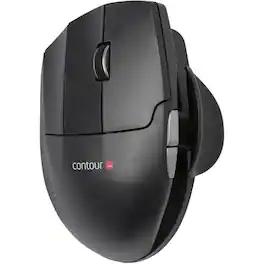
Unimouse is designed with your comfort in focus. The ergonomic shape reduces the strain on your hands and wrists, allowing you to work without discomfort. With the patented articulated hinge, you can adjust the angle of the Unimouse to any position from 35 to 70 degrees. The friction-based locking system is easy to use and stable in any position.

Desk life getting you down? Lift yourself up with Lift Vertical Ergonomic Mouse – a comfy and intuitive wireless mouse with quiet clicks crafted specially for small-to-medium hands. Available in right and left. Lift’s unique 57-degree angle elevates your wrist to give a feeling of relief — and sends a wave of comfort through the forearm and upper body. Scrolling feels second nature with SmartWheel, which easily shifts from precision to speed-scroll. Customize Lift ergo mouse using intuitive Logi Options+ Software.

Desk life getting you down? Lift yourself up with Lift Vertical Ergonomic Mouse – a comfy and intuitive wireless mouse with quiet clicks crafted specially for small-to-medium hands. Available in right and left. Lift’s unique 57-degree angle elevates your wrist to give a feeling of relief — and sends a wave of comfort through the forearm and upper body. Scrolling feels second nature with SmartWheel, which easily shifts from precision to speed-scroll. Customize Lift ergo mouse using intuitive Logi Options+ Software.

Kensington SlimBlade Trackball Mouse: Comfortably navigate features on your PC or Mac with this ambidextrous trackball mouse, which keeps wrist movement to a minimum to reduce stress. Navigation, media and view modes allow flexible use.
| Pros for Contour Design - Unimouse Ergonomic Wireless Mouse for Left-Handed - Wireless - Black | |||
|---|---|---|---|
| There were no pros for this product— | Ergonomics, Ease of use, Size, Battery Life, Bluetooth | There were no pros for this product— | There were no pros for this product— |
| Cons for Contour Design - Unimouse Ergonomic Wireless Mouse for Left-Handed - Wireless - Black | |||
| There were no cons for this product— | Wrist Pain, Click Noise, Price | There were no cons for this product— | There were no cons for this product— |
Specs
Reviews
This product doesn't have any reviews yet.