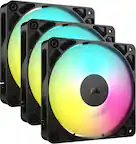
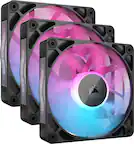
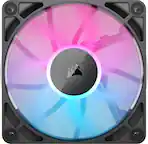
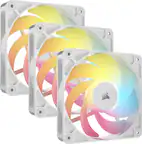
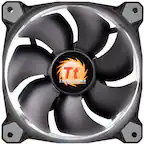
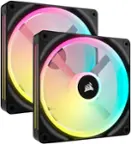
CORSAIR - LL Series RGB 120mm Computer Case Fan Kit with RGB Lighting Controller (3-pack) - Black
- Key Specs
- Airflow Volume: 43.25 cubic feet per minute
- Cooling System: Air (A computer's CPU generates heat while operating and requires a cooling system to keep internal components functioning properly. Air cooling uses fans to draw in cool air and exhaust hot air, while liquid cooling uses coolant-filled tubes and water blocks to regulate internal temperature more efficiently.)
- Fan Size: 120 millimeters
- Fan Speed: 1500 revolutions per minute
- Noise Level: 24.8 decibels adjusted
- Number of Fans Included: 3
- Lighting Type: RGB
- Product Height: 24.9 millimeters (The out of box height of the item. Height is measured as the vertical distance from the bottom of the item to the top as it would be primarily used or placed.)
- Product Width: 119.88 millimeters (The out of box width of the item. Width is measured as the horizontal distance from one side of the item to the other as it would be primarily used or placed.)
- General
- Brand: CORSAIR
- Model Number: CO-9050072-WW
- Product Name: LL Series RGB 120mm Computer Case Fan Kit with RGB Lighting Controller (3-pack)
- Color: Black
- Cooling
- Airflow Volume: 43.25 cubic feet per minute
- Cooling Fan Type: Case
- Cooling System: Air (A computer's CPU generates heat while operating and requires a cooling system to keep internal components functioning properly. Air cooling uses fans to draw in cool air and exhaust hot air, while liquid cooling uses coolant-filled tubes and water blocks to regulate internal temperature more efficiently.)
- Fan Size: 120 millimeters
- Fan Speed: 1500 revolutions per minute
- Noise Level: 24.8 decibels adjusted
- Number of Fans Included: 3
- Bearing Type: Hydraulic bearing
- Fan/Cooling System Connector: 4-pin PWM fan connector (The configuration of the connector as it connects a computer component to a fan or cooling system.)
- Features
- Lighting Type: RGB
- Customizable Lighting: true
- Power
- Power Consumption: 0.3 watts
- 12-Volt Rated: true
- Dimensions
- Product Height: 24.9 millimeters (The out of box height of the item. Height is measured as the vertical distance from the bottom of the item to the top as it would be primarily used or placed.)
- Product Width: 119.88 millimeters (The out of box width of the item. Width is measured as the horizontal distance from one side of the item to the other as it would be primarily used or placed.)
- Product Length: 119.88 millimeters (The out of box length of the item. Length is measured as the longest dimension of the item.)
- Product Weight: 17.28 ounces (The out of box weight of the item.)
- Warranty
- Warranty - Parts: 2 years
- Warranty - Labor: 2 years
- Other
- UPC: 843591032438
Upgrade a desktop computer's looks and cooling with this CORSAIR LED fan set. Sixteen independent RGB LEDs allow color customization, and the specially engineered fan blades keep the heat down with minimal noise. This CORSAIR LED fan set's speed and lighting controls ensure full command of your rig's cooling performance and style.
- Compatible with most cases: For wide-ranging use.
- 120mm cooling fans: To transfer heat from components.
- Hydraulic bearing design: Ensures long-lasting operation.
- 43.25 cfm airflow volume: Ensures efficient cooling.
- 24.8dBA noise level: Ensures quiet operation.
- 600-1500 rpm operating speed: For fast cooling.
- LED illumination: Adds a stylish look.
- Compatible with most cases: For wide-ranging use.
- 120mm cooling fans: To transfer heat from components.
- Hydraulic bearing design: Ensures long-lasting operation.
- 43.25 cfm airflow volume: Ensures efficient cooling.
- 24.8dBA noise level: Ensures quiet operation.
- 600-1500 rpm operating speed: For fast cooling.
- LED illumination: Adds a stylish look.
Whats Included
- CORSAIR LL Series 120mm Case Cooling Fan Kit with RGB lighting
- CORSAIR LL Series 120mm Case Cooling Fan Kit with RGB lighting
Product Manuals
Q: Does this come with the controller?
A: Yes, it comes with everything needed to operate the fans with a required download of Corsair iCue. Be aware, that buying these fans individually(Not as the 3 pack set) will not include controllers.
Q: Are the fans compatible with the MPG Z390 Gaming Pro Carbon AC mother board.
A: Yes. They connect to the 4 pin fan ports on the board but the lighting wire gets plugged onto a corsair icue hub which is included. The hub Connects to your board by a USB 2.0 plug. Sadly, Corsair's lighting program "icue" will only run the lights on Corsair products. The lighting software that came with your board (mystic light?) will run the rgb lights on it as well as anything non Corsair you have plugged into the rgb ports on the board. So you have to run 2 programs at the same time.
Q: Can I use these to replace a fan on a small radiator?
A: Absolutely. I installed these on my NZXT Kraken 360mm radiator and they work great.
A: Hi Ineedhelp101, This is the fans and the controller to adjust the RGB lighting, you would still need a PC to install this set into. -Brian
Q: Can I use this with my omen 30l.
A: Hi, It would appear that system only officially supports two 120mm fans. It is possible to swap out the existing 120mm fans for our LL120 RGB fans. As for the lighting controller, it would connect to that system's "MUSB" header on the motherboard (for lighting control via iCUE) and a SATA power connector (for lighting power). The fans themselves will also connect to the controller and a PWM fan header on your system's motherboard, which they will have. If you have any additional questions, please feel free to reach out: help.corsair.com -Albert
Q: Do you need two light node core hubs if you want to install 6 fans in your computer
A: A single Lighting Node Core can accommodate 6 RGB fan connections. If you'd like help with your setup, please contact our support team: support.corsair.com -Brian
A: Yes. There's 2 wires per fan. The 4 pin power wire goes into your motherboard and the lighting wire goes into the icue hub which is included. Then the hub gets plugged into a usb 2.0 socket on the motherboard and into your psu. Then you download the icue software and you're done. Really easy.
A: A normal fan header works great