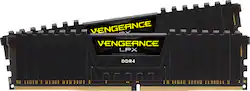
CORSAIR - Vengeance LPX 32GB (2PK x 16GB) 2400MHz DDR4 C16 DIMM Desktop Memory - Black
- Key Specs
- Type of Memory (RAM): DDR4
- Form Factor: Desktop (The type of computer the memory is configured to fit in.)
- Speed: 2400 megahertz
- Latency: 16-16-16-39 (Refers to the amount of time between the moment a memory request is initiated and the moment the request is retrieved by a processor, commonly written as a series of 4 numbers, or timings. Each timing measures the performance of the module according to a specific parameter. Generally, the lower the numbers, the faster the RAM can respond to requests.)
- CAS Latency: 16 (Column Address Strobe (CAS) Latency refers to the number of clock cycles (for synchronous DRAM) or nanoseconds (for asynchronous DRAM) between the moment an instruction or command is initiated and the moment the data result is available. Generally, the lower the numbers, the better.)
- Memory Capacity (per Module): 16 gigabytes (Refers to the maximum amount of data that can be stored on the memory module.)
- Memory Capacity (Total): 32 gigabytes (Refers to the maximum total amount of data that can be stored on all included memory modules.)
- General
- Product Name: Vengeance LPX 32GB (2PK x 16GB) 2400MHz DDR4 C16 DIMM Desktop Memory
- Brand: CORSAIR
- Memory Capacity (per Module): 16 gigabytes (Refers to the maximum amount of data that can be stored on the memory module.)
- Number Of Modules: 2
- Memory Capacity (Total): 32 gigabytes (Refers to the maximum total amount of data that can be stored on all included memory modules.)
- Model Number: CMK32GX4M2A2400C16
- Color: Black
- Compatibility
- Type of Memory (RAM): DDR4
- Pin Configuration: 288
- Memory Format: DIMM (Memory module size that determines what size device the memory stick will fit.)
- Form Factor: Desktop (The type of computer the memory is configured to fit in.)
- Operating System Compatibility: Windows
- Speed
- Memory Speed Rating: PC4-19200 (The RAM's bandwidth rating. The numbers refer to generation and transfer speed and are typically separated with a hyphen. For example, PC3-12800 would indicate that the module is 3rd generation and has a theoretical bandwidth of 12,800 megabytes per second (MBs). The higher the second number, the faster the speed.)
- Speed: 2400 megahertz
- Latency: 16-16-16-39 (Refers to the amount of time between the moment a memory request is initiated and the moment the request is retrieved by a processor, commonly written as a series of 4 numbers, or timings. Each timing measures the performance of the module according to a specific parameter. Generally, the lower the numbers, the faster the RAM can respond to requests.)
- CAS Latency: 16 (Column Address Strobe (CAS) Latency refers to the number of clock cycles (for synchronous DRAM) or nanoseconds (for asynchronous DRAM) between the moment an instruction or command is initiated and the moment the data result is available. Generally, the lower the numbers, the better.)
- Features
- Buffered or Registered: Unbuffered (Registered (buffered) memory modules are classified by the addition of a register between the memory controller and DRAM modules. When compared to conventional unbuffered (unregistered) memory, this type provides more stability with less electrical load on the controller, making it a common choice for use in robust applications, such as servers.)
- Data Integrity Check: Non-ECC (Error-correcting code (ECC) memory helps to maintain data integrity within a computer system, protecting it from potential crashes as well as losses or changes to data due to undetected errors. Systems that use ECC have an additional chip on the RAM that acts as the error check.)
- Memory Channels: Dual (Multi-channel memory increases the rate of data transfer between the DRAM memory and memory controller by adding more channels of communication. The more channels, the more memory bandwidth.)
- Power
- Voltage: 1.2 volts (Amount of power needed to support an electrical current.)
- Other
- UPC: 843591085564
Achieve peak overclocking performance with this 32GB Corsair Vengeance LPX memory kit. Unique aluminum heat spreaders keep the DDR4 modules cool under pressure, and XMP 2.0 ensures you get reliable performance without any lockups. This Corsair Vengeance LPX memory kit has a small form factor, so it fits inside slimmer cases.
- Kit of two 16GB DDR4 SDRAM memory modules: For 32GB total memory.
- 288-pin DIMM: For capable system operation. DIMM is dual in-line memory module.
- Up to 2400MHz operating speed: For excellent multitasking capability.
- 8 Layers PCB heatspreader: Keeps memory cool for efficient operation.
Whats Included
- CORSAIR Vengeance LPX 32GB (2PK 16GB) 2.4GHz PC4-19200 DDR4 DIMM Unbuffered Non-ECC Desktop Memory Kit
Q: Hello! Will this fit my ASUS Desktop PC M32CD? Thanks!
A: Hi Rik, From what I'm seeing online, yep! If you have anything else we can help with, please reach out: support.corsair.com -Art
Q: I have a HP Pavilion Gaming Desktop 690-0020 computer. Will this set of Ram Cards fit my computer?
A: Hi Ron, According to your motherboard specifications, it should support this memory kits capacity. -Brian
A: Hi, It is not, please check your manual instead of the site if you cannot locate any information. You would definitely need a SO-DIMM kit, I'm seeing it does use DDR4 and up to 32gb so one of our CMSX kits would work best. If you have any other questions, please contact us: support.corsair.com
Q: Compatible with LENOVO 510/510A Desktop running Intel i3 3600Ghz????
A: Hi Buck, It looks like your system should support the speed and capacity of this memory kit. We do always recommend that your check with your system manufacturer to determine what the max supported speed and capacity of memory that your system supports. -Brian
A: Hi Nathan, We recommend that you contact Dell to ensure that your system is support the speed and capacity of this memory kit. -Brian
A: Hi, This is a desktop memory kit - you would require a laptop memory kit as they have entirely different dimensions. Based on your provided details, this memory kit would be suitable: https://www.bestbuy.com/site/corsair-vengeance-series-16gb-2pk-8gb-2-4ghz-ddr4-laptop-memory-black/6063100.p?skuId=6063100. If you have any additional questions, we'd be happy to help: support.corsair.com -Albert
Q: Hello, Will this memory be compatible with a ASUS computer with a Intel I5-7400 CPU? Thanks
A: I see no reason that it would not. Just to be sure download CPU-Z. Google it then download. Run CPU-Z and go to memory SPD tab and see what speed the ram is running at. Now just select that speed when you purchase your new RAM. Another Good rule of thumb. If you are going right to a blue screen the RAM (or how you have configured it) is Too High. Ex. Trying to run 3200 in a motherboard that supports only 2400MBs.






















