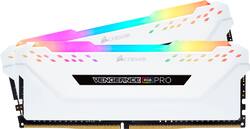
CORSAIR - VENGEANCE PRO 32GB (2PK x 16GB) 3200MHz DDR4 C16 DIMM Desktop Memory with RGB lighting
- Key Specs
- Type of Memory (RAM): DDR4
- Form Factor: Desktop (The type of computer the memory is configured to fit in.)
- Speed: 3200 megahertz
- Latency: 16-20-20-38 (Refers to the amount of time between the moment a memory request is initiated and the moment the request is retrieved by a processor, commonly written as a series of 4 numbers, or timings. Each timing measures the performance of the module according to a specific parameter. Generally, the lower the numbers, the faster the RAM can respond to requests.)
- CAS Latency: 16 (Column Address Strobe (CAS) Latency refers to the number of clock cycles (for synchronous DRAM) or nanoseconds (for asynchronous DRAM) between the moment an instruction or command is initiated and the moment the data result is available. Generally, the lower the numbers, the better.)
- Lighting Type: RGB
- Memory Capacity (per Module): 16 gigabytes (Refers to the maximum amount of data that can be stored on the memory module.)
- Memory Capacity (Total): 32 gigabytes (Refers to the maximum total amount of data that can be stored on all included memory modules.)
- General
- Product Name: VENGEANCE PRO 32GB (2PK x 16GB) 3200MHz DDR4 C16 DIMM Desktop Memory with RGB lighting
- Brand: CORSAIR
- Memory Capacity (per Module): 16 gigabytes (Refers to the maximum amount of data that can be stored on the memory module.)
- Number Of Modules: 2
- Memory Capacity (Total): 32 gigabytes (Refers to the maximum total amount of data that can be stored on all included memory modules.)
- Model Number: CMW32GX4M2E3200C16W
- Compatibility
- Type of Memory (RAM): DDR4
- Pin Configuration: 288
- Form Factor: Desktop (The type of computer the memory is configured to fit in.)
- Operating System Compatibility: Windows
- Speed
- Speed: 3200 megahertz
- Latency: 16-20-20-38 (Refers to the amount of time between the moment a memory request is initiated and the moment the request is retrieved by a processor, commonly written as a series of 4 numbers, or timings. Each timing measures the performance of the module according to a specific parameter. Generally, the lower the numbers, the faster the RAM can respond to requests.)
- CAS Latency: 16 (Column Address Strobe (CAS) Latency refers to the number of clock cycles (for synchronous DRAM) or nanoseconds (for asynchronous DRAM) between the moment an instruction or command is initiated and the moment the data result is available. Generally, the lower the numbers, the better.)
- Features
- Memory Channels: Triple (Multi-channel memory increases the rate of data transfer between the DRAM memory and memory controller by adding more channels of communication. The more channels, the more memory bandwidth.)
- Lighting Type: RGB
- Power
- Voltage: 1.35 volts (Amount of power needed to support an electrical current.)
- Other
- UPC: 840006620075
CORSAIR VENGEANCE RGB PRO Series DDR4 memory lights up your PC with mesmerizing dynamic multi-zone RGB lighting, while delivering the best in DDR4 performance and stability. Every module boasts ten individually controlled RGB LEDs, while wire-free design makes installation simple. Take control with CORSAIR iCUE software and completely customize every module’s lighting to match your system, or easily synchronize lighting across all your CORSAIR products with Light LINK. A custom designed PCB provides the highest signal quality for the best level of performance and stability on the latest AMD and Intel DDR4 motherboards, while specially screened ICs unlock superior overclocking.
- Dynamic Multi-Zone RGB Lighting: 10 Ultra-bright RGB LEDs per module
- Next Generation Software: Take control in CORSAIR iCUE software and synchronize lighting with other CORSAIR RGB products, including CPU coolers, keyboards and fans
- Create and Customize: Choose from a wide variety of pre-set lighting profiles, and experiment with of user adjustable effects and colors to perfectly match your system
- Maximum Bandwidth and Tight Response Times: Optimized for peak performance on the latest Intel and AMD DDR4 motherboards
- No Wires Required: Requires no extra wires or cables for a clean and seamless install
- Custom Performance PCB: Provides the highest signal quality for the greatest level of performance and stability
- Tightly Screened Memory: Carefully screened ICs for extended overclocking potential
- Aluminum Heat Spreader: Improves thermal conductivity for superb memory cooling even when overclocked.
- XMP 2.0 Support: A single BIOS setting is all that’s required to set your memory to its ideal performance settings, for for optimum performance
- Limited Lifetime Warranty: For complete peace-of-mind
A: TLDR: Geeksquad can do it, but it is not worth it. Just install yourself, as it is a quick and easy swap. Long Answer: Yes, Bestbuy GeekSquad can install it. I would not have them install it as installing RAM is a very simple process and Geeksquad will charge you way to much to do it. Things could have changed, but I remember when I was a kid and i had a laptop whos harddrive i wanted replace took it to GeekSquad to put in for me as the material from the Harddrive itself said to use professional service. Me, being a kid was worried I would break something in my laptop and thus took it to Bestbuy. They undid 4 screws, put it in and wanted to charge me $60. It was a process that took quite literally, and i mean literally 1 minute of time. I then spent the next ten minutes arguing if I knew it was that simple and if the info material didnt say Professional install, i could have done it myself. In the end still paid $20 for someone to undo 4 screws, clip in the new drive, and put 4 screws back. What you want to do to ensure that the memory works is to google your motherboard in your system and see what it supports. This information will be located in the Tech Specs. Under the Memory section, it will list what RAM is compatible. Or you can also go to PCPartPicker and select your motherboard there and then pick out the RAM you want,. PCPartPicker will tell you if it isnt compatible. Once you have the RAM, to install is simple. Turn off and unplug your computer, undo the side panel of your computer, take out the old RAM (usually located right next to your CPU) (Which the place with the giant heatsink). Dont just pull RAM out as you need to first release the RAM from the slot by pressing down on the tabs. Once that is done that you just put the new RAM in. There is a certain way to install the RAM to get the best use of it and it is very simple. That is generally to put in alternating RAM slots (if you only have 2 RAM sticks). Meaning if you have 4 places for RAM next to each other you will leave 1 empty between RAM. So RAM, Skip, RAM. If your truly worried, just google how to install desktop RAM and you will see how easy it is. Or if you have the money to burn, I guess you can have GeekSquad do it. Just ask them before hand how much they will charge, because it is truly a 30 second procedure and should be free IMO if you buy the RAM from their store. Yes, I am bias against GeekSquad from my past experience. Like the store, just not GeekSquad. This also happened to me like 12 years ago so many things could have changed.
Q: Is this compatible with PC model number BB99OTi?
A: Hi there, We recommend that you contact iBuyPower to ensure that your system supports this memory kit. -Brian
Q: Will this work with corsairs icue tech?
A: Yes, this RAM is compatible with the iCue software



















