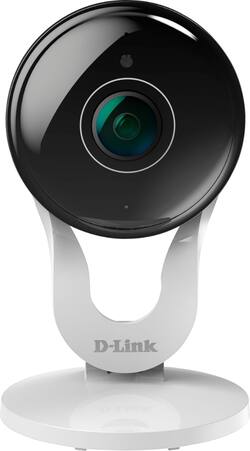
D-Link - DCS Indoor 1080p Wi-Fi Network Surveillance Camera
- Key Specs
- Video Camera Resolution: Full HD (1080p) (Refers to the number of pixels, both horizontally and vertically, used to capture video/images. The higher the resolution the finer the detail that can be seen.)
- Field Of View: 137 degrees (The area of a target, measured as an angle from the location of viewing, that can be observed.)
- Night Vision: true
- Number Of Cameras Included: 1
- Works With: Amazon Alexa, Google Assistant (Compatible with or able to be connected to other smart devices or applications.)
- Wireless Connectivity: Wi-Fi (The manner in which a device sends data to another device over a short distance without the use of wires or cables.)
- Maximum Operating Temperature: 104 degrees fahrenheit (The highest recommended ambient (surrounding) temperature in which the product can ideally operate stated by the manufacturer. Generally long-term exposure of the product to temperatures more than the maximum can result in ineffective operation.)
- Storage Type: Memory card
- Indoor Or Outdoor Use: Indoor (Indicates the appropriate environment product was designed to be used in.)
- Minimum Operating Temperature: 32 degrees fahrenheit (The lowest recommended ambient (surrounding) temperature in which the product can ideally operate stated by the manufacturer. Generally long-term exposure of the product to temperatures less than the minimum can result in ineffective operation.)
- Audio Communication: 2-way (1-way communication devices allow a user to hear detected audio, while 2-way communication adds the ability for a user to talk back through the device.)
- General
- Product Name: DCS Indoor 1080p Wi-Fi Network Surveillance Camera
- Brand: D-Link
- Model Number: DCS-8300LH-BB
- Camera
- Video Camera Resolution: Full HD (1080p) (Refers to the number of pixels, both horizontally and vertically, used to capture video/images. The higher the resolution the finer the detail that can be seen.)
- Camera Resolution: 1920 x 1080 (Refers to the number of pixels, both horizontally and vertically, used to capture video/images. The higher the resolution the finer the detail that can be seen.)
- Effective Pixels: 2 megapixels (The actual number of pixels which make up the viewable image.)
- Field Of View: 137 degrees (The area of a target, measured as an angle from the location of viewing, that can be observed.)
- Night Vision: true
- Night Vision Distance: 16 feet
- Number Of Cameras Included: 1
- Frame Rate: 30 frames per second (The frequency at which consecutive images can be captured. The higher the frame rate, the more detail that can be captured.)
- Day/Night Mode: true (Captures images/video with optimal clarity by automatically adjusting settings to various light levels.)
- IP Camera: true (An Internet Protocol (IP) camera is able to record and display image/video data via the internet, without need for a local recording device.)
- Minimum Required Illumination: 0 lux (Refers to the minimum amount of light needed to view objects. Generally, the lower the number, the better the camera can detect objects in little to no light.)
- Camera Iris: Automatic (The iris is the opening on a camera that controls how much light reaches its image sensor, which in turn affects image/video clarity. Fixed and manual irises are generally suited for locations with consistent levels of light. Automatic and "P" (precise) irises automatically adjust in response to changing levels of light and are suited for a wider variety of environments. "P" irises feature additional capabilities for improving footage clarity.)
- Image Sensor Type: CMOS (CCD and CMOS are the two main technologies used in image sensors. CCD, the older of the two types, turns analog light signals into digital pixels. This conversion happens without distortion, resulting in high-quality images. Newer CMOS sensors use transistors at each pixel to move electrical charges. CMOS sensors are typically less expensive, but also require more light to create distortion-free images.)
- Compatibility
- App Compatible: true (The product can be connected to a program or software application on a mobile device, which then receives collected data from the product.)
- Compatibility: Universal
- Operating System Compatibility: Android, Apple iOS
- Works With: Amazon Alexa, Google Assistant (Compatible with or able to be connected to other smart devices or applications.)
- Voice Assistant Built-in: No (A digital assistant built into the device that uses voice commands to answer questions and control smart devices.)
- Connectivity
- Camera Connectivity: Wireless (Security system cameras can be set up in several ways. Wired cameras require cables for power and footage transmission, while wire-free cameras don't need cables for either. Wireless cameras still require cables for receiving power but are able to transmit footage via a wireless network.)
- Wireless Connectivity: Wi-Fi (The manner in which a device sends data to another device over a short distance without the use of wires or cables.)
- Wireless Standard: N (The wireless networking protocol used by the device. Each iteration of the protocol is based on the 802.11 standard developed by the Institute of Electrical and Electronics Engineers (IEEE) Standards Association. Denoted by letters following 802.11 (802.11a, 802.11ac, etc.), each version, published in alphabetical order, encompasses all previous versions.)
- Recording & Playback
- Streaming Video: true (The ability to transmit a live video feed from the product.)
- Records Audio: true
- Performance
- Maximum Operating Temperature: 104 degrees fahrenheit (The highest recommended ambient (surrounding) temperature in which the product can ideally operate stated by the manufacturer. Generally long-term exposure of the product to temperatures more than the maximum can result in ineffective operation.)
- Indoor Or Outdoor Use: Indoor (Indicates the appropriate environment product was designed to be used in.)
- Minimum Operating Temperature: 32 degrees fahrenheit (The lowest recommended ambient (surrounding) temperature in which the product can ideally operate stated by the manufacturer. Generally long-term exposure of the product to temperatures less than the minimum can result in ineffective operation.)
- Storage
- Storage Type: Memory card
- Features
- Audio Communication: 2-way (1-way communication devices allow a user to hear detected audio, while 2-way communication adds the ability for a user to talk back through the device.)
- 3-Axis Adjustable: false
- Auto-On Detection: Motion
- Mount Type: Freestanding
- Dimension
- Product Height: 4.3 inches (The out of box height of the item. Height is measured as the vertical distance from the bottom of the item to the top as it would be primarily used or placed.)
- Product Width: 2.4 inches (The out of box width of the item. Width is measured as the horizontal distance from one side of the item to the other as it would be primarily used or placed.)
- Product Depth: 2.4 inches (The out of box depth of the item. Depth is measured as the distance from the front of the item to the back as it would be primarily used or placed.)
- Product Weight: 0.2 pounds (The out of box weight of the item.)
- Sensor
- Sensors: Motion sensor, Sound sensor (Detects stimuli such as heat, light, sound, motion, or pressure and responds accordingly by operating a control or initiating a function of the device.)
- Motion Detection Range: 16 feet
- Display
- Color Display: true
- Included
- Cable(s) Included: false
- Warranty
- Manufacturer's Warranty - Parts: 1 year
- Manufacturer's Warranty - Labor: 1 year
- Other
- UPC: 790069437649
Keep an eye on what matters most with this D-Link Wi-Fi camera. It transmits video in Full HD for a high-resolution picture, and its wide-angle lens provides a full-range view of the room it's been placed in. This D-Link Wi-Fi camera has night vision capability for added peace of mind.
- Activity zones and alerts: Set up to 25 different activity zones and customize them for motion and sound sensitivity.
- Full HD clarity, day and night: Check in any time with Full HD 1080p video and night vision - even in complete darkness.
- Infrared night vision lets you see in the dark: Keep an eye on things up to 16' away when there's little to no light.
- 137° field of view: Captures a wide area of your property for high-level security at all times.
- Local and cloud recording options: View, save, and share video from the cloud or your own MicroSD card. Free cloud recording and paid subscriptions available.
- CMOS image sensor: Captures high-resolution video footage up to 1080p (1920 x 1080).
- Zoom in on details: The 10x zoom magnification lets you focus on specific parts of your home.
- Stream and cast: Stream live video from your camera to a TV or any video hub from Amazon or Google.
- See the entire room: Pan and tilt to see the whole room or have the camera do it automatically with saved viewpoints.
- Rich notifications: Take action right from your lock screen. See snapshots, view live video, and speed dial a preset contact for help.
- Two-way audio: Hear what's happening and talk with people through the camera and your phone.
- Smart home compatible: Works with Amazon Alexa and Google Assistant. Create custom automations with IFTTT.
- Simple installation and setup: Place it where you need it and set up in minutes with the mydlink app.
Whats Included
- D-Link DCS Indoor 1080p Wi-Fi Network Surveillance Camera
- Power adapter
A: I have a problem with my camera and it stops constantly. I do not like it, as a matter a fact, I want to take it back because it does not help the reason that I purchased it!! I will not get another one under that brand.. ever since I've had it, I have been calling support back to back... I'm sorry but it's a problem not a solution!!! Thank you
A: I only have it loaded on my phone and tablet. However, I just went on the website and logged into my account to see if I could use the camera from my laptop. The following came directly from the site: This device works with the mydlink app. On your mobile device, download and install the mydlink app from the App Store or Google Play. Sorry, does not appear that laptop/desktop will work.
Q: Is this a stand-alone item or does it require a hub?
A: Requires an accessible WiFi connection and use of the MyDlink app on a compatible platform to control the device settings and view events.
A: This camera does not distinguish between motion of any kind. It just let you know if something is moving in front of it.
A: I believe it's constantly streaming. My wife receives messages on her i-phone that Camera X has gone off line or Camera X is back on line whenever our crummy Verizon internet wi-fy network goes up/down
Q: Does it record things throughout the day, and allow you to go back to view them?
A: The camera will record motion events. If there is motion that is detected in the area that you define, the camera will record a clip, about 30 seconds. The camera does not store a continuous recording. The free cloud service will store a video clip for 24 hours.
Q: Is it work with MYDLINK apps? Is it a Cloud Camera?
A: Yes, it works with mydlink. This model did not work with mydlink lite. You can choose to save to the cloud or an sd card.
Q: Does it work with Verizon routers
A: Our home internet is through Verizon. We have a cantana antenna with a wireless Verizon router. The cameras work perfectly, but our Verizon internet OFTEN goes down requiring reboots of their hardware. The cameras ALWAYS work again without doing anything to them.


















