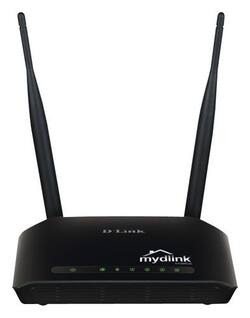
D-Link - N300 Cloud 802.11g/n Router with 4-Port Switch - black
- Key Specs
- Wi-Fi Range: 2.4835 GHz (The device will provide a Wi-Fi connection to this approximate area.)
- Wi-Fi Mesh System: false (A single wireless network consisting of a main router (connected directly to a modem) that connects to a series of satellite modules or nodes placed around the home. Routers with this capability promote stronger, faster wireless signals as well as increase Wi-Fi coverage by reducing interference and eliminating dead zones.)
- Wi-Fi Speed: 300 megabits per second (The maximum rate at which data is transferred between a network device and wireless router.)
- General
- Product Name: N300 Cloud 802.11g/n Router with 4-Port Switch
- Brand: D-Link
- Model Number: DIR-605L
- Security
- Data Encryption: true
- Encryption Type: WPA, WPA2 (The security protocols or certification programs that protect the Wi-Fi network.)
- Firewall Type: NAT, SPI (The method the firewall uses to filter and process data to increase network security, primarily by blocking malicious traffic requests while allowing legitimate traffic through.)
- Parental Controls: true (Allows user to block unwanted content, signals, channels, networks, etc. from being received or accessed.)
- Network
- Ethernet Standard: 10/100/1000 (Each standard is a variation of the IEEE 802.3 set of computer networking technologies known as Ethernet. New versions evolved to include higher bandwidth, different physical media, and other new and improved features. Standards are often denoted by speeds (in Megabits per second). For example, a 10/100/1000 Ethernet port transmits at 10 Mbps, 100 Mbps, and 1000 Mbps (1 Gbps).)
- Number of Antennas: 2
- Frequency Band: 2.4 GHz (Bands may be grouped into categories such as low- and high-band VHF (Very High Frequency), low- and high-band UHF (Ultra High Frequency), or certain frequency channels (measured in MHz or GHz). Generally, higher frequencies transmit information faster but have shorter range than lower frequencies.)
- Wireless Standard: N (The wireless networking protocol used by the device. Each iteration of the protocol is based on the 802.11 standard developed by the Institute of Electrical and Electronics Engineers (IEEE) Standards Association. Denoted by letters following 802.11 (802.11a, 802.11ac, etc.), each version, published in alphabetical order, encompasses all previous versions.)
- Wi-Fi Range: 2.4835 GHz (The device will provide a Wi-Fi connection to this approximate area.)
- Wi-Fi Mesh System: false (A single wireless network consisting of a main router (connected directly to a modem) that connects to a series of satellite modules or nodes placed around the home. Routers with this capability promote stronger, faster wireless signals as well as increase Wi-Fi coverage by reducing interference and eliminating dead zones.)
- Certifications Listings & Approvals
- ENERGY STAR Certified: false (Devices carrying the ENERGY STAR service mark, such as computer products and peripherals, kitchen appliances, and other products, generally use 20% to 30% less energy than required by federal standards.)
- Features
- App Compatible: true (The product can be connected to a program or software application on a mobile device, which then receives collected data from the product.)
- App Name: mydlink
- Auto Detecting: true
- Wireless: true
- Ports
- Port Type(s): Other (USB 2.0 connects external drives, gaming controllers, smartphones, MP3 players and other accessories.USB 3.0 transfers data faster than USB 2.0, but only when used with USB 3.0 devices.USB Type-C provides fast speeds and versatile power, featuring connectors with identical ends that plug in upside down or right side up. Adapters allow for video as well as backward compatibility.Thunderbolt provides ultra-high bandwidth for fast data transfer between devices featuring a Thunderbolt or MiniDisplayPort connection.HDMI allows you to connect a projector or display HD media on your HDTV or monitor.Media card slots allow you to transfer photos from your digital camera or camcorder.)
- Speed
- Wi-Fi Speed: 300 megabits per second (The maximum rate at which data is transferred between a network device and wireless router.)
- Auto Speed Sensing: true
- Compatibility
- System Requirements: PC: Windows XP (SP3), Vista or 7; Mac: OS X 10.5 or higher; Linux; Ethernet or wireless network interface; Internet Explorer 7, Mozilla Firefox 3.5, Google Chrome 8.0 or Safari 4 or higher (The software that a product must have for it to be able to integrate with another product.)
- Dimensions
- Product Height: 1.1 inches (The out of box height of the item. Height is measured as the vertical distance from the bottom of the item to the top as it would be primarily used or placed.)
- Product Length: 5.9 inches (The out of box length of the item. Length is measured as the longest dimension of the item.)
- Product Width: 4.4 inches (The out of box width of the item. Width is measured as the horizontal distance from one side of the item to the other as it would be primarily used or placed.)
- Product Weight: 0.5 pounds (The out of box weight of the item.)
- Warranty
- Manufacturer's Warranty - Parts: 1 year limited
- Manufacturer's Warranty - Labor: No
- Other
- UPC: 790069372889
Keep busy online with this D-Link router, whether you’re working, playing, or both. Download the QRS mobile app for easy setup, and the mydlink Lite app to manage and control the router from anywhere.
- Wireless-N: Check email, browse the Web, and connect to friends and family online with data speeds of up to 300 Mbps.
- 2 fixed antennas: Get coverage in every corner. Extend your Wi-Fi range and connect in more places with a far-reaching wireless signal.
- QRS mobile app: Enjoy intuitive router setup. The simple interface and step-by-step instructions will have you online fast. Download for iOS and Android devices.
- mydlink Lite app: Enhance your connected home. Control your network from anywhere when you download this app on your iOS or Android mobile device.
- Built-in Ethernet connections: Connect multiple wired devices to your network with 4 fast Ethernet ports.
- Protected access: Secure your information with WPS and WPA/WPA2 encryption, and double firewall (SPI and NAT) features.
- System requirements: Backward compatibility with 802.11 g/n networks means your old devices won't be left behind. Supports Windows and Mac OS.
Whats Included
- D-Link N300 Cloud 802.11g/n Wireless Router with 4-Port Switch
Q: do I need a wifi provider with these r do I get wifi from one of these
A: The wireless comes from the device. You will need local wireless ability on your other devices such as smart phones and laptops. You will need to attach the wireless device to a cable modem or other internet service provider. Local wireless (802.xx) is different and distinct from cell wireless. Best regards, Minnesota Mike
Q: Will this work with Windows 10 and with several tablets and such desktop on at same time?
A: Yes, this router is compatible with Windows 10 operating system and tablets.
Q: I'm trying to get internet access with my new laptop.
A: It is most likely on the tag on the bottom of the router.
Q: Does this device connect to the ISP modem via ethernet (i. e., cat 5)?
A: Yes. The d-link used a standard ethernet cable. Cat 5 cable.
A: Yes, that printer has WiFi that can be used with this configuration.
Q: Will this handle several devices running at the same time with out slowing down
A: This will handle several devices.
Q: what do the numbers next to the N mean
A: The numbers are the model.













