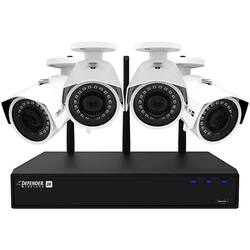
Defender - 4-Channel, 4-Camera Wireless 4.0MP 1TB NVR Surveillance System - Black/White
- Key Specs
- Field Of View: 127 degrees (The area of a target, measured as an angle from the location of viewing, that can be observed.)
- Night Vision: true
- Number Of Cameras Included: 4
- Number Of Channels: 4
- Storage Type: DVR
- Minimum Operating Temperature: -22 degrees fahrenheit (The lowest recommended ambient (surrounding) temperature in which the product can ideally operate stated by the manufacturer. Generally long-term exposure of the product to temperatures less than the minimum can result in ineffective operation.)
- Maximum Operating Temperature: 140 degrees fahrenheit (The highest recommended ambient (surrounding) temperature in which the product can ideally operate stated by the manufacturer. Generally long-term exposure of the product to temperatures more than the maximum can result in ineffective operation.)
- General
- Product Name: 4-Channel, 4-Camera Wireless 4.0MP 1TB NVR Surveillance System
- Brand: Defender
- Model Number: W2K1T4B4
- Camera
- Field Of View: 127 degrees (The area of a target, measured as an angle from the location of viewing, that can be observed.)
- Night Vision: true
- Night Vision Distance: 100 feet
- Number Of Cameras Included: 4
- Frame Rate: 30 frames per second (The frequency at which consecutive images can be captured. The higher the frame rate, the more detail that can be captured.)
- Number of IR LEDs: 18 (Quantity of infrared (IR) LED lights for emitting IR light and allowing the camera to detect objects in low light.)
- Camera Infrared Distance: 100 feet (The distance over which the camera's infrared, or night vision, capabilities can detect objects.)
- Image Sensor Type: CMOS (CCD and CMOS are the two main technologies used in image sensors. CCD, the older of the two types, turns analog light signals into digital pixels. This conversion happens without distortion, resulting in high-quality images. Newer CMOS sensors use transistors at each pixel to move electrical charges. CMOS sensors are typically less expensive, but also require more light to create distortion-free images.)
- Camera Mount Type: Other
- Compatibility
- Camera Compatibility: Not Available
- Connectivity
- Camera Connectivity: Wireless (Security system cameras can be set up in several ways. Wired cameras require cables for power and footage transmission, while wire-free cameras don't need cables for either. Wireless cameras still require cables for receiving power but are able to transmit footage via a wireless network.)
- Recording & Playback
- Number Of Channels: 4
- Video Compression Type: H.264
- Storage
- Storage Type: DVR
- DVR Storage Capacity: 1000 gigabytes
- Internal Storage Capacity Upgradeable Upto: 6000 gigabytes
- Performance
- Minimum Operating Temperature: -22 degrees fahrenheit (The lowest recommended ambient (surrounding) temperature in which the product can ideally operate stated by the manufacturer. Generally long-term exposure of the product to temperatures less than the minimum can result in ineffective operation.)
- Maximum Operating Temperature: 140 degrees fahrenheit (The highest recommended ambient (surrounding) temperature in which the product can ideally operate stated by the manufacturer. Generally long-term exposure of the product to temperatures more than the maximum can result in ineffective operation.)
- Features
- Auto-On Detection: Motion
- Output
- DVR Output(s): HDMI, VGA, USB
- Included
- Camera(s) Included: true
- DVR Included: true
- Warranty
- Manufacturer's Warranty - Parts: 1 year
- Manufacturer's Warranty - Labor: 1 year
- Other
- UPC: 061783268094
Keep your home on guard 24/7 with this Defender 2K Wireless video security system. Four 4-megapixel Wi-Fi cameras with wide-angle lenses, night vision and motion detection option capture critical events in great detail. The four-channel network video recorder of this Defender 2K Wireless video security system stores 1TB of footage.
- Motion-activated design: Automatically records once motion is detected.
- Monitor your property with 4 cameras: Also includes DVR.
- Set and forget with hard drive storage: Record continuously from 4 channels with a 1TB hard drive.
- High-resolution technology captures superior footage: 4-megapixel cameras use advanced image sensors to record clear full-screen video with up to 2K @ 30fps resolution.
- Infrared night vision lets you see in the dark: Keep an eye on things up to 100' away when there's little to no light.
- Viewing angle up to 127°: Expertly captures a wide angle of your property for exceptional security at all times.
- HDMI and VGA outputs: Connect to a wide range of compatible displays for versatile viewing, including your HDTV, LCD or plasma TV. USB connectivity makes it easy to transfer stored footage.
Whats Included
- Defender 4-Channel, 4-Camera Wireless 4.0MP 1TB NVR Surveillance System
Product Manuals
Q: IS this Android compatible?
A: Yes, it is Android compatible.
Q: To buy an additional camera would it be the W2KCB1?
A: This unit will only allow 4 cameras. It cannot handle more. Since it came with four I can't add on.
Q: Is this compatible with google assistant?
A: Great question NOLANHOUSE2005. The system is currently not compatible with the Google Assistant. Defender Support
Q: are cameras 700 P or how many?
A: undefined
Q: Does this support the apple iPhone To view on your apple phone
A: Thank you for your question, Jackcool1989! The SmartSignal is compatible with the iPhone and can be found in your app store.
Q: Is there a six camera system available?
A: Great Question! All Defender wireless systems can have up to 4 cameras. If you are looking for more cameras please check out our wired 4K sysytem!
A: You can zoom in but there is no ability for 2 way communication.
Q: What is the maximum distance the cameras can be mounted from the receiver?
A: Hi AgDry, the range is 100ft with clear line of sight. Thank you for your interest in Defender!