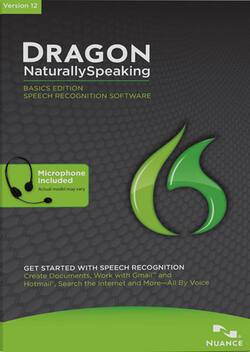
Nuance - Dragon NaturallySpeaking Version 12 Basics Edition - Windows
- Key Specs
- Operating System Compatibility: Windows
- Software Format: Physical (Physical software requires a disc, cartridge, etc. be inserted into the gaming console or computer to download and/or operate the software. Digital software allows for downloading and/or playing the software on the gaming console or computer without a physical disc, cartridge, etc. Physical (Download Code Only) software is purchased in physical form with a code that allows for downloading and/or playing the software on the gaming console or computer without a physical disc, cartridge, etc.)
- General
- Brand: Nuance
- Model Number: K309A-G00-12.0
- Product Name: Dragon NaturallySpeaking Version 12 Basics Edition
- Publisher: Nuance Communications
- Features
- Language(s) Supported: English
- Voice Commands: Navigate programs and folders
- Voice Transcription: true
- Cloud Based Software: true
- Compatibility
- Operating System Compatibility: Windows
- Software Format: Physical (Physical software requires a disc, cartridge, etc. be inserted into the gaming console or computer to download and/or operate the software. Digital software allows for downloading and/or playing the software on the gaming console or computer without a physical disc, cartridge, etc. Physical (Download Code Only) software is purchased in physical form with a code that allows for downloading and/or playing the software on the gaming console or computer without a physical disc, cartridge, etc.)
- Number Of Discs: 1
- Other
- UPC: 780420126091
Harness the power of your voice with Dragon NaturallySpeaking — the software that accurately turns talk into text, so you can sit back and watch as your spoken words appear on your screen without any spelling or formatting errors. Now, you can transform your rapidly evolving ideas into text at the speed of thought — and since you don't have to keep your eyes glued to your screen or keyboard, you'll be more comfortable and free to move as you'd like.
Dragon NaturallySpeaking can be used with many PC applications, so you can dictate and format documents in Microsoft Word, OpenOffice Writer and Corel WordPerfect, manage your Web-based e-mail accounts in Gmail and Hotmail, search the Web using a compatible browser, network with loved ones in Facebook and Twitter, command your PC and much, much more. With the ability to control applications using simple voice commands like "open Microsoft Word" and edit and format text by saying things like "delete the previous two words" — you'll be able to comfortably and naturally work on your PC. For a more customized experience, Dragon will adapt to your own personal vocabulary, consisting of abbreviations, numbers and more, by detecting your format corrections with Smart Format Rules, so your dictated speech looks the way you want it to every time. Worried about navigating Dragon NaturallySpeaking? You don't have to be thanks to the new interactive tutorial that assists you in quickly learning good dictation, correction and editing techniques. Now, making corrections or revisions to your dictated text is easy thanks to a range of simple commands. Start controlling your digital world with just the power of your voice with Dragon NaturallySpeaking.