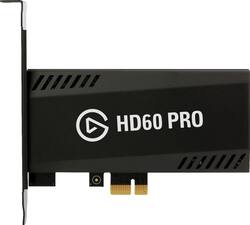
Elgato - Game Capture HD60 Pro
- Key Specs
- Video Input(s): HDMI
- Video Output(s): HDMI
- Maximum Supported Resolution (Video Capture): 1080p (Full HD) (The highest video resolution supported by the device to capture video from another source.)
- General
- Product Name: Game Capture HD60 Pro
- Brand: Elgato
- Device Type: PC Card
- Model Number: 10025025
- Connectivity
- Video Input(s): HDMI
- Audio Input(s): HDMI
- Video Output(s): HDMI
- Audio Output(s): HDMI
- Display
- Maximum Supported Resolution (Video Capture): 1080p (Full HD) (The highest video resolution supported by the device to capture video from another source.)
- Warranty
- Manufacturer's Warranty - Parts: 1 year
- Manufacturer's Warranty - Labor: 1 year
- Other
- UPC: 813180020238
Capture every moment of your game with this Elgato HD60 Pro game recorder. It fits inside your computer on a PCIe slot and offers 1080p60 video and can also be used in conjunction with your PS4 or your Xbox. Stream and record simultaneously to show off your skills with this Elgato HD60 Pro game recorder.
- Perfect streaming: The built-in Live Streaming feature gets you up and running on Twitch or YouTube in a snap. Also HD60 Pro features Instant Gameview, feeding your stream with low latency technology.
- Excellent recording: HD Pro uses advanced hardware H.264 encoding to capture your gameplay in stunning 1080p Full HD, while keeping the file size low.
- High performance: Simultaneously save a full resolution 1080p 60 recording, with separate tracks of your webcam and live commentary.
- Easy connection: Available inputs for PlayStation 4, Xbox One and unencrypted HDMI helps to stream and record from your device with ease.
- Universal PC interface: HD60 Pro is PCIe x1 compatible.
Whats Included
- 6.5' HDMI Cable
- Elgato Game Capture HD60 Pro
- High and Low profile bracket
A: You can record PC gameplay with this card by connecting the graphics output to your elgato input via HDMI cable and then route the elgato output to one of your monitors. For this setup to make any sense, you'd definitely want two monitors. However, if your PC can handle it, you can record games without a capture card. Google obsproject.
Q: This works with a docked nintendo switch right?
A: Yes it does
Q: Does this work with the Xbox series x
A: Hi, Yes, the HD60 Pro is compatible with the Xbox Series X as long as you have this properly set up in a PC. Feel free to let us know if you have any more questions: support.elgato.com -Albert
A: Hi, You'd need the 4K60 Pro for that purpose. This one doesn't support 4K input or pass-through. If you have anything else we can help with, please reach out: support.corsair.com -Art
Q: Is the Hd60 pro compatible with the (cyberpowerpc GMA4000BST)??
A: It just needs an empty PCIe slot
Q: Can I record ps4 and Xbox one s gameplay with just one monitor with this? If so how do I do that?
A: Hi, Please get in touch with us, so we may find out further details on your configuration and goals, then we'll provide setup guidance: support.elgato.com -Albert
Q: Can you still play games at 240hz and stream at 60hz??
A: Hi MrLG, Please contact our support team, we'd be happy to help you with your setup: support.elgato.com -Brian
Q: IS this game card compatible for gaming desktops>?
A: Hi Cam, Yes, this would work on desktop computers. If you'd like further help with compatibility and setup, please feel free to reach out to our support team: support.elgato.com -Brian
















