
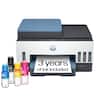
Epson - EcoTank Pro ET-5150 Wireless All-in-One Supertank Printer - White
Epson - EcoTank Pro ET-5150 Wireless All-in-One Supertank Printer - White
FREE shipping to
Related Item

Specifications
- NetworkingWirelessPrinter TypeAll In OneISO Color Print Speed9.5 pages per minuteISO Mono Print Speed17 pages per minuteTouch ScreenYes
- Key Specs
- Networking: Wireless
- Printer Type: All In One
- ISO Color Print Speed: 9.5 pages per minute (The number of color pages able to be printed per minute in the device's default single-side mode, as tested by the International Standards Organization (ISO).)
- ISO Mono Print Speed: 17 pages per minute (The number of black ink (grayscale) pages able to be printed per minute in the device's default single-side mode, as tested by the International Standards Organization (ISO).)
- Touch Screen: true (Touch-screen devices make navigating more intuitive. Using a touch-screen display, you can do things such as tap to select, hold and drag to move items, swipe to scroll, and pinch to zoom.)
- General
- Brand: Epson
- Model Number: C11CJ89201
- Product Name: EcoTank Pro ET-5150 Wireless All-in-One Supertank Printer
- Color: White
- Display Screen: true
- Display Screen Size: 2.4 inches
- Dimensions
- Product Height: 13.6 inches (The out of box height of the item. Height is measured as the vertical distance from the bottom of the item to the top as it would be primarily used or placed.)
- Product Width: 14.8 inches (The out of box width of the item. Width is measured as the horizontal distance from one side of the item to the other as it would be primarily used or placed.)
- Product Depth: 13.7 inches (The out of box depth of the item. Depth is measured as the distance from the front of the item to the back as it would be primarily used or placed.)
- Product Weight: 16.1 pounds (The out of box weight of the item.)
- Features
- Automatic Document Feeder: true
- Photo Printing: true
- Automatic Two-Sided Printing: true
- Tray Capacity: 250
- Connectivity
- Wired Connectivity: Ethernet, USB-A
- Wireless Connectivity: Wi-Fi (The manner in which a device sends data to another device over a short distance without the use of wires or cables.)
- Ink
- Ink Cartridges Required: None (The quantity and color of ink cartridges required for the printer to operate.)
- Ink Cartridges Included: None (The quantity and color of ink cartridges included.)
- Ink Bags/Bottles Required: 1 x Black, 1 x Cyan, 1 x Magenta, 1 x Yellow (The quantity and color of ink bags/bottles required for the printer to operate.)
- Ink Bags/Bottles Included: 1 x Black, 1 x Cyan, 1 x Magenta, 1 x Yellow (The quantity and color of ink bags/bottles included.)
- Paper Info
- Automatic Document Feeder Capacity: 35 sheets
- Paper Handling: Front Cassette: 250 sheets plain Letter/A4 size paper or 50 sheets Legal size, 250 sheets plain Letter/A4 size paper or 50 sheets Legal size, 10 envelopes (#10 size), Rear Feed: 1 sheet only of supported paper types
- Performance
- Printer Resolution (Color): Up to 4800 x 1200 (Refers to the number of pixels/dots, both horizontally and vertically, of the image produced by the printer in colored ink. Generally, the higher the resolution, the sharper and cleaner the produced image.)
- Other
- UPC: 010343961944
The EcoTank Pro ET-5150 all-in-one supertank printer offers fast Cartridge-Free Printing, ideal for high-volume environments. Save up to 80 percent with low-cost replacement ink bottles vs. standard-capacity color laser toner cartridges – that’s about 2 cents per color ISO page versus 14 cents with cartridges1. Engineered for high productivity in a small footprint, the ET-5150 delivers professional-quality prints face down for greater privacy. Epson DURABrite ET pigment ink ensures vibrant borderless prints. This hardworking printer offers demanding businesses reliability they can count on, including a 2-year limited warranty with registration and permanent printhead designed to last the life of the printer. Plus, there’s zero cartridge waste
- Save a ridiculous amount on ink with revolutionary Cartridge-Free printing: Save up to 80 percent with low-cost replacement ink bottles vs. standard-capacity color laser toner cartridges — that’s about 2 cents per color ISO page vs. 14 cents with color laser toner
- Built for speed: Up to 17 black/9.5 color ISO ppm print speedƚ; no warmup time; fast first page out
- Professional-quality color prints: Epson DURABrite ET pigment inks for crisp, vibrant prints in black-and-white and color; borderless prints up to 8.5" x 11"
- Engineered for high-volume business environments: Reliability you can count on with a 2-year limited warranty with registration2; PrecisionCore® permanent printhead designed to last the life of the printer
- Less waste: Zero-cartridge waste with high-yield ink bottles
- Bonus Black ink bottle included: Get up to 7,500 additional pages black right out of the box; plus, get up to 7,500 pages black/6,000 color with each replacement set of bottles you purchase
- Get more done with powerful productivity features: Auto 2-sided printing, 250-sheet paper tray, 2.4" color touchscreen, Ethernet, ADF, face-down output
- Easy control from your mobile device: The Epson Smart Panel app lets you set up, operate and monitor your printer using your mobile device
- Compact, space-saving design, plus exclusive EcoFit ink bottles: Uniquely keyed bottles for easy filling of each color; auto start/stop design
- Security features and easy connectivity: Full suite of embedded features protects your data; connect wirelessly with Wi-Fi Direct; also features voice-activated printing
Product Manuals
Q: Can I print wirelessly with this printer?
A: Yes, you can connect wirelessly using Wi-Fi Direct and voice-activated printing.
Q: Does this printer offer double-sided printing?
A: Yes, the printer has an automatic 2-sided printing feature.
Q: What is the print speed of this Epson printer?
A: This Epson printer has a print speed up to 17 black/9.5 color ISO ppm.
Q: What are the ink bottles compatible with this Epson printer?
A: The compatible ink bottles for this model are Epson T502.
Q: What is the warranty on this Epson printer?
A: This Epson model comes with a 2-year limited warranty upon registration.
A: Hi Robert, The EcoTank ET-5150 has a more capable scanner than the ET-4850. Using the flatbed. the maximum resolution of the ET-5150 is 1200 x 3200 dpi, maximum for the ET-4850 is 1200 x 2400 dpi. The ET-5150's auto document feeder holds 35 sheets, the ET-4850's auto document feeder holds 30 sheets. Regards, Mark - The Epson Team.
A: Hi Thomas69, Your Epson Pro ET-5150 does have scan to text capabilities. Once you receive it, download the Drivers and Utilities Combo Package Installer from the Epson support site for the ET-5150 and install it. It includes software and an optical character reading utility. Then use Epson ScanSmart or Epson Scan 2 to scan a document and save as a searchable PDF. Regards, Mark - The Epson Team.
A: Hi Thomas69, The EcoTank Pro ET-5150 DOES DO scan to text. The Epson OCR (Optical Character Recognition) component is available for free download for Windows and Mac OS X. You can use Epson Scan 2 or ScanSmart to scan documents and save them as searchable PDFs. Regards, Mark - The Epson Team.
Compare similar products
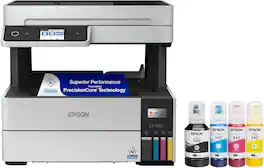
The EcoTank Pro ET-5150 all-in-one supertank printer offers fast Cartridge-Free Printing, ideal for high-volume environments. Save up to 80 percent with low-cost replacement ink bottles vs. standard-capacity color laser toner cartridges – that’s about 2 cents per color ISO page versus 14 cents with cartridges1. Engineered for high productivity in a small footprint, the ET-5150 delivers professional-quality prints face down for greater privacy. Epson DURABrite ET pigment ink ensures vibrant borderless prints. This hardworking printer offers demanding businesses reliability they can count on, including a 2-year limited warranty with registration and permanent printhead designed to last the life of the printer. Plus, there’s zero cartridge waste
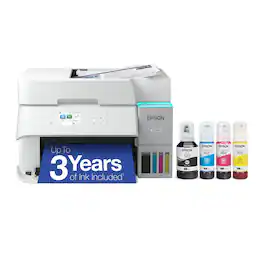
Introducing the EcoTank ET-3950 — The Perfect Printer for Busy Families. Say goodbye to expensive cartridges with the Epson EcoTank ET-3950, the newest innovation from a recognized leader in photographic printing. Combining simplicity with a modern design, the ET-3950 features advanced technology that enhances both performance and print quality, making it an ideal choice for home office printing—including content created by AI. Powered by PrecisionCore Heat-Free technology, the ET-3950 offers a duty cycle that’s twice as robust as its predecessor (1). And unlike conventional thermal inkjet printers, its unique permanent printhead is engineered to last the life of the printer. Designed to be simple and error-free, refilling ink is a breeze with large ink tanks and uniquely keyed EcoFit bottles—no mess, no stress and no ink bottle mix-ups. And with enough ink in the box to last up to three years (2), you'll enjoy affordable color printing without the hassle of frequently replacing cartridges. Featuring Ethernet and Wi-Fi for seamless connectivity, along with the user-friendly Epson Smart Panel app (3), you can easily print, scan, and more directly from your computer or mobile device (4). Choose Epson EcoTank, the #1 Best-Selling Supertank Printer (5). With more than 100 million units sold globally (6) across seven generations of innovation, EcoTank consistently delivers affordable, photo-quality prints, making it a reliable choice for all your printing needs.

Employ high-quality printing with this Epson EcoTank Pro all-in-one printer. The 550-sheet paper tray capacity handles a large volume of work without interruption, while Wi-Fi, Ethernet and Bluetooth connectivity lets you print from various devices. This Epson EcoTank Pro all-in-one printer has a 4.3-inch touch screen for easy menu navigation, and the print speed of up to 25 ISO ppm produces documents quickly.
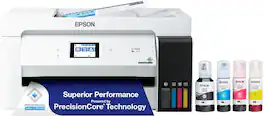
The EcoTank ET-15000 wireless all-in-one offers Cartridge-Free Printing with easy-to-fill supersized ink tanks. Save up to 90 percent on ink with low-cost replacement bottles (1). This all-in-one delivers vibrant prints up to 13" x 19" (through rear-feed tray) and scans up to 8.5" x 14" (via the ADF). Print for up to 2 years with each included or replacement ink bottle set (2) — each replacement set includes enough ink to print up to 7,500 pages (3). That’s equivalent to about 80 individual cartridges (4). And, there’s zero cartridge waste. The ET-15000 features a 250-sheet front tray paper capacity and rear specialty-paper feed, plus a 2.7" color touchscreen and hands-free voice-activated printing (5).
| Pros for Epson - EcoTank Pro ET-5150 Wireless All-in-One Supertank Printer - White | |||
|---|---|---|---|
| There were no pros for this product— | Print Quality, Noise Level, Setup Ease, Connectivity, Size | Print Quality, Noise Level, Ease of use, Overall Performance, Setup | There were no pros for this product— |
| Cons for Epson - EcoTank Pro ET-5150 Wireless All-in-One Supertank Printer - White | |||
| There were no cons for this product— | Control Panel, Paper Tray | Size, WiFi Connectivity, Price | There were no cons for this product— |
Specs



Reviews
Customer Images
The vast majority of our reviews come from verified purchases. Reviews from customers may include My Best Buy members, employees, and Tech Insider Network members (as tagged). Select reviewers may receive discounted products, promotional considerations or entries into drawings for honest, helpful reviews.
- Rated 5 out of 5 stars
Epson Eco Tank, the real Deal.
Best printer I have ever had. I have been a true fan of hp products, but I'm jumping ship,Epson Eco Tank is a game changer everything about Epson from set up to everyday use it's a joy to use, and you don't get those annoying request to sign up for auto ink with HP what a RIP OFF, if you've been on the fence back and forth about the initial investment, it's well worth it you won't regret it, maybe you can catch a Black Friday DEAL.
This review is from Epson - EcoTank Pro ET-5150 Wireless All-in-One Supertank Printer - White
MajorM Posted
- Rated 5 out of 5 stars
The Best printer.
The Epson EcoTank Pro ET-5150 Wireless Printer is top of the line when it comes to home printers. It comes compact in a nice box where everything is packaged for protection, The instructions included for set up are easy to follow and understand, and within no time you are ready to start printing. This is the first ecotank printer I have ever owned, and I am impressed with how easy Epson has made filling and changing the ink, by taking the top off the bottle and clipping it into place to fill the ink tank there is no fear of any spilling. The ink indicators on the front of the printer are easy to read to know when they are full and also to know when it's time to refill. Setting up the Epson EcoTank Pro ET-5150 Wireless Printer was almost too easy, The step-by-step instructions are a nice touch for even the non-tech savvy persons, a lot of the setup can be done from the LED screen right on the printer. The wireless connection is convenient for not having to worry about where in the house my computer and/or laptop are when it's time to print, making using this printer for work and home my number one choice. Even setting up the alignment was done in just a few quick steps, From opening up the box to printing it only took me about 20 minutes. A few fun pro's are that there is only one cord needed for power, if you have an android it has voice commands from your phone, and it only weighs 16 lbs so it's easy to pick up and move if you ever need to. Between those few things and the ease of setting up, this printer already looks great but now let's talk about performance! I've been using this printer for a few days now, and I am so pleased with its performance, between working from home and being a busy mom to 4 young kids, I am always printing or copying something. I print out a lot of Graphs and Charts for work and with the vibrancy and sharpness of the Epson Ecotank Pro ET-5150 the lines do not get lost, So my associates and Clients can read them perfectly. For at-home use, my children are loving how colorful and bright their new chore charts are! On top of all the Pros for Printing there are also Pros for copying, starting with how easy and convenient changing over to copying is, it's literally just the touch of the button, it scans your page and copies in no time. Also, don't forget you can use the EcoTank Pro ET-5150 to scan any documents you have into your computer or mobile device. It truly is all-in-one! If you are in the market for a new printer for your home or office then I highly recommend giving this one a try, It truly does go above and beyond every expectation I have had and it is the best choice for printing regardless of what you are printing. Between the convenience of wireless printing, the ease of all in one, and the speed of completion for the Epson EcoTank Pro Et-5150 Wireless printer, you can get through with your work and back to enjoying the things in life that matter. I am so excited to continue using this printer with Work and Home! This is a review for the Epson EcoTank Pro ET-5150 Wireless Printer that I received free of charge to do a beta test and review.
This review is from Epson - EcoTank Pro ET-5150 Wireless All-in-One Supertank Printer - White
Gpettyjohn Posted
- Rated 1 out of 5 stars
Not good enough
Updated on month 3rd. So slow printing, sometimes it’s not connected my computer. Wait so long to process print orders.
This review is from Epson - EcoTank Pro ET-5150 Wireless All-in-One Supertank Printer - White
SalTay Posted







