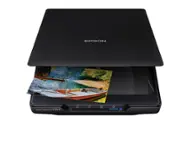
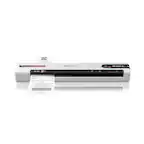
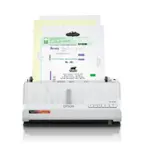
Epson - WorkForce ES-60W Wireless Mobile Color Sheetfed Document Scanner - Black
More Buying Options
Related Item

Specifications
- NetworkingWirelessScan MethodOtherDuplex Scan FunctionYes
- Key Specs
- Networking: Wireless
- Scan Method: Other
- Duplex Scan Function: true
- General
- Brand: Epson
- Model Number: B11B253201
- Product Name: WorkForce ES-60W Wireless Mobile Color Sheetfed Document Scanner
- Color: Black
- Connectivity
- Scanner Connectivity: USB 2.0, Wi-Fi
- Minimum System Requirements: Microsoft Windows 7 (32/64 bits) SP1, Windows 8 (32/64 bits), Windows 8.1 (32/64 bits), Windows 10 (32/64 bits)
- Dimensions
- Product Height: 1.3 inches (The out of box height of the item. Height is measured as the vertical distance from the bottom of the item to the top as it would be primarily used or placed.)
- Product Width: 10.7 inches (The out of box width of the item. Width is measured as the horizontal distance from one side of the item to the other as it would be primarily used or placed.)
- Maximum Document Length: 70.9 inches
- Maximum Document Width: 8.5 inches
- Product Weight: 0.7 pounds (The out of box weight of the item.)
- Features
- Automatic Document Feeder Included: false
- Scanner Type: Sheetfed
- Scanner Resolution: Up to 600 x 600 (Refers to the number of pixels/dots, both horizontally and vertically, of the image produced by the scanner. Generally, the higher the resolution, the sharper and cleaner the produced image.)
- Document Size: Letter
- Image Scanner Type: Contact Image Sensor (CIS)
- Included
- Included Software: EPSON Scan 2, EPSON ScanSmart
- Certifications Listings & Approvals
- ENERGY STAR Certified: true (Devices carrying the ENERGY STAR service mark, such as computer products and peripherals, kitchen appliances, and other products, generally use 20% to 30% less energy than required by federal standards.)
- TWAIN Compliant: true (Products with this label are compliant with standards set by the TWAIN Working Group for regulating communication between software and digital imaging devices. Devices that are TWAIN compliant are compatible for use with each other without requiring additional software, even if they have different capabilities.)
- Warranty
- Warranty - Parts: 1 year
- Warranty - Labor: 1 year
- Other
- UPC: 010343945074
Create digital copies of paper documents with this Epson WorkForce wireless scanner. It provides fast operation to effortlessly handle a large volume of forms or receipts, and the LCD screen displays the connection and battery level status. Nuance OCR converts outputs from this Epson WorkForce wireless scanner into searchable, editable versions for efficient file management.
- Up to 600 x 600 dpi optical resolution (1200 x 1200 dpi interpolated resolution): To capture every word and image detail with clarity.
- 8.5" x 70.9" maximum scan size: Enables you to capture entire pages.
- Portable design: Enables you to easily take the scanner on the go.
- High-speed USB 2.0 interface: Offers easy connectivity.
- Built-in Wi-Fi: Lets you upload images instantly to your laptop, desktop or mobile device.
- Up to 600 x 600 dpi optical resolution (1200 x 1200 dpi interpolated resolution): To capture every word and image detail with clarity.
- 8.5" x 70.9" maximum scan size: Enables you to capture entire pages.
- Portable design: Enables you to easily take the scanner on the go.
- High-speed USB 2.0 interface: Offers easy connectivity.
- Built-in Wi-Fi: Lets you upload images instantly to your laptop, desktop or mobile device.
- Up to 600 x 600 dpi optical resolution (1200 x 1200 dpi interpolated resolution): To capture every word and image detail with clarity.
- 8.5" x 70.9" maximum scan size: Enables you to capture entire pages.
- Portable design: Enables you to easily take the scanner on the go.
- High-speed USB 2.0 interface: Offers easy connectivity.
- Built-in Wi-Fi: Lets you upload images instantly to your laptop, desktop or mobile device.
Whats Included
- EPSON Scan 2, EPSON ScanSmart
- Epson ES-60W Wireless Mobile Color Sheetfed Document Scanner
- USB cable
- EPSON Scan 2, EPSON ScanSmart
- Epson ES-60W Wireless Mobile Color Sheetfed Document Scanner
- USB cable
- EPSON Scan 2, EPSON ScanSmart
- Epson ES-60W Wireless Mobile Color Sheetfed Document Scanner
- USB cable
Q: Is the Epson scanner portable?
A: Yes, the Epson scanner has a portable design so you can take it with you.
Q: Does this scanner have Wi-Fi?
A: Yes, this Epson scanner has built-in Wi-Fi for direct uploads.
Q: How is this Epson scanner powered?
A: This scanner uses a high-speed USB 2.0 interface for connectivity.
Q: What is the optical resolution of this Epson scanner?
A: This Epson scanner has an optical resolution of up to 600 x 600 dpi.
Q: What is the maximum scan size of this Epson scanner?
A: The Epson scanner has a maximum scan size of 8.5" x 70.9".
Q: Can the battery be replaced by the user or is it sealed in (like the battery in an iPhone)?
A: The battery is sealed in the unit.
Q: Does this scanner have automatic feed fuctionality?
A: Hello Charlie. Yes, the ES-60W has an Automatic Feeding Mode. The scanner automatically accepts each new sheet as it’s inserted. This also allows you to combine multi-page scans and save them into one file. Regards, Kevin - The Epson Team.
Q: hi . Does anyone know if this is compatible with Mac?
A: Yes it does, but is has some bugs. However, if you want to use their receipt software, you will need to pay an additional $100
Compare similar products

Create digital copies of paper documents with this Epson WorkForce wireless scanner. It provides fast operation to effortlessly handle a large volume of forms or receipts, and the LCD screen displays the connection and battery level status. Nuance OCR converts outputs from this Epson WorkForce wireless scanner into searchable, editable versions for efficient file management.

Create digital copies of important documents with this Epson WorkForce scanner. Its versatile document-handling capability accommodates standard paper, ID cards and receipts, and the included Nuance OCR software converts output into editable files or searchable PDFs for efficient archiving. This Epson WorkForce scanner’s small, lightweight design offers portability, and the USB interface provides easy connectivity.
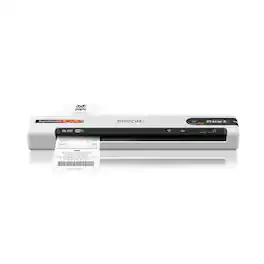
Unleash the power of AI¹ with the Epson RapidReceipt RR-70W mobile business scanner. Driven by Epson ScanSmart AI PRO technology, you’ll quickly and intelligently convert scanned information into smart digital data – making your documents AI-ready for Microsoft Copilot, Apple Intelligence, ChatGPT workflows and more. Going beyond simple document capture, the RapidReceipt RR-70W mobile scanner utilizes an extensive data model of various invoices and receipts to quickly turn stacks of unorganized paperwork into categorized digital data that easily integrates into financial applications such as QuickBooks and TurboTax². The lightest wireless mobile single-sheet document scanner in its class³, the RapidReceipt RR-70W helps increase your productivity with scan speeds up to 15 ppm⁴ and the ability to create searchable and editable PDFs. Plus, this portable scanner can be charged via USB or battery for added convenience. One of the smartest investments you can make for your business, the Epson RapidReceipt RR-70W mobile business scanner, powered by ScanSmart AI PRO, enables you and your business to stay organized and efficient by unleashing the power of AI.
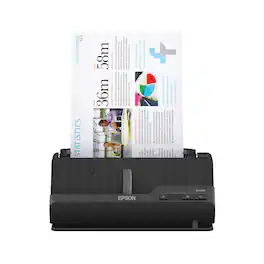
A compact modern wonder, the WorkForce ES-C220 keeps things simple with its intuitive design and exceptional flexibility. With the ES-C220, you can organize stacks of documents and make keeping piles of paperwork for your records a thing of the past. Ideal for the home or office, this easy-to-use scanner is the definition of innovation, saving 60% of desk space and scanning two sides at once as fast as 30 ppm/60 ipm. Offering a robust solution to managing your workflow, the included Epson ScanSmart software allows you to preview, email and upload your scans. In addition, help save valuable time with automatic file name suggestion for streamlined file management. The scanner features a 20-page Auto Document Feeder that makes it easy to scan in batches. In addition, the versatile ES-C220 scans papers of varying sizes up to 8.5" x 120". Maintain amazing quality with intelligent image adjustments such as cropping, paper skew correction and dirt detection. The ES-C220 proves bigger isn’t always better.
| Pros for Epson - WorkForce ES-60W Wireless Mobile Color Sheetfed Document Scanner - Black | |||
|---|---|---|---|
| Ease of use, Size, Overall Performance, Scan Speed, Battery Life | Ease of use, Size, Overall Performance, Scan Quality, Speed | Ease of use, Scanning Speed, Size, Software, Wireless | Scanning Speed, Ease of use, Size, Overall Performance, Software |
| Cons for Epson - WorkForce ES-60W Wireless Mobile Color Sheetfed Document Scanner - Black | |||
| Connectivity, Software, Duplex, USB Port | Software, Connectivity, Compatibility, Paper Handling | Performance | Connectivity |
Specs
Reviews
Customers are saying
Customers have good things to say about the WorkForce ES-60W Wireless Mobile Color Sheetfed Document Scanner, especially its ease of use and fast scanning speed. The compact size and lightweight design are also appreciated, along with its long battery life and overall performance. However, some customers have expressed concerns regarding connectivity issues, software functionality, and the design of the USB port.
- Ease of use (208)
- Scan Speed (126)
- Size (77)
- Connectivity (27)
- Software (7)
- Duplex (4)
Customer Images
The vast majority of our reviews come from verified purchases. Reviews from customers may include My Best Buy members, employees, and Tech Insider Network members (as tagged). Select reviewers may receive discounted products, promotional considerations or entries into drawings for honest, helpful reviews.
- Rated 4 out of 5 stars
BEWARE - THE SPECS ARE WRONG
As a frequent BestBuy consumer and Total Tech member, I want to give a "shout-out" to BestBuy and Epson to **correct the details** in this product's write-up. I want to say right at the start that this review is NOT a "slam" against Epson, because I think they make very good products overall, and this product is no different. But I purchased this product **SPECIFICALLY** for mobile duplex function, because the BestBuy write-up says that it has a duplex function (see the photo below). The wireless feature was a bonus, and wasn't a deal-breaker for me. After setting it up, I discovered it was not duplex-scanning. The scan settings had no option to turn a duplex mode on. I emailed Epson's OWN support center, and they confirmed that this product is NOT capable of duplex scanning. The only mobile scanner that they currently offer that has a native duplex function is the DS-320 which, while listed as a mobile scanner, is larger than the ES-60W. My trial of the ES-60W revealed that the product does indeed run very quickly and efficiently and is easy to operate. It has a more compact form factor than similar mobile scanners from another major brand, which may be a factor for some people. The software, though taking a bit to get the hang of it, is comprehensive. The added wireless feature is full-featured, allowing you to connect the scanner to your PC or laptop and scan wirelessly - AND SEAMLESSLY, which is more than I can say for that other major brand of mobile scanner. So, if you don't want and/or "need" native duplex function in a low-footprint sheet-fed mobile scanner, I would wholeheartedly recommend this scanner over others. But if you're looking for an Epson-brand scanner that CAN perform native duplex function, then you need to pass on this model. I wrote this review not to be entered in any "sweepstakes", or to "slam" BestBuy or Epson. Again, this review is simply to call out the glaring error in the product write up on the BestBuy website/app, with the hope that the relevant people at BestBuy and Epson will work quickly to ensure that it's corrected so that customers have accurate information on which to base their purchasing decisions.
BereanPK Posted
- Rated 3 out of 5 stars
wireless does not work for me, no duplex
Wireless requires a 2.4GHz router which is not listed on its spec and I don't have. Duplex listed on its spec is actually not available. I got the searchable pdf (ocr) set up which is a good but the instruction was not that obvious. The package has a booklet in Spanish only. I had to find the English manual online. Sorry, I cannot give a better rating. Have to send it back.
star Posted
- Rated 3 out of 5 stars
Good product - horrible MicroUSB recharge port
As one reviewer already mentioned regarding the recessed microUSB port: "- Uses micro-USB cable to charge. Can’t use any micro-USB cable due to port being recessed within a small area. Most cables won’t fit through the small opening, therefore you have to carry around the EPSON micro-USB cable to charge. Seems to be a bad design flaw in my opinion. " This is an inexcusably awful design, especially for a device designed to be portable on taken on travel. There are fins in the recessed area that severely limits the size of the connecting cable. I finally lost or misplaced Epson's cable that came with the device and was unable to recharge. So I went to my toolbox and ripped the fins and even the bottom of the recessed area out to allow my microUSB cables to work. If I were on travel and didn't bring the special Epson microUSB cable... A really stupid design - minus 3 stars just for this senseless imposition. Otherwise it works fine with my Android device.
DiverDude Posted
Discover lifestyle innovations Sponsored
- $379.99The price was $449.99
- $119.99The price was $129.99
- $559.99The price was $629.99