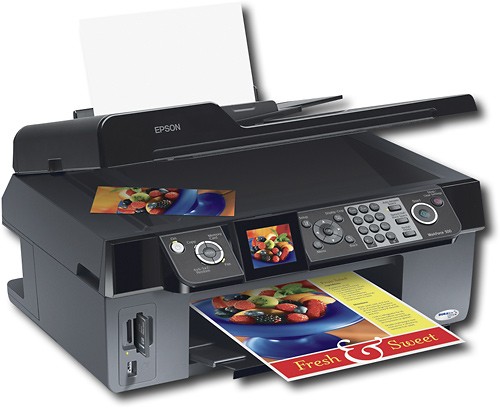

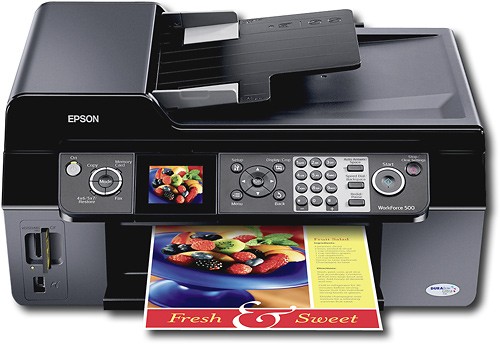
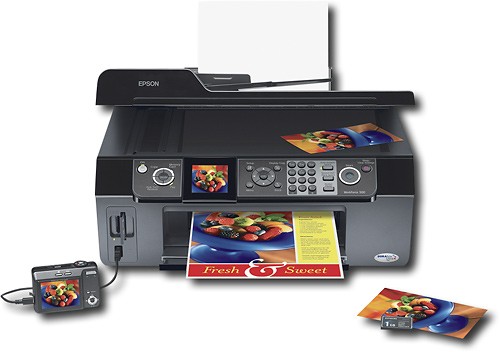
Epson - WorkForce Multifunction Photo Printer/ Copier/ Scanner/ Fax
This item is no longer available in new condition.
See similar items below.
Description
Features
Up to 5760 x 1440 optimized dpi resolution
Borderless printing; borderless print sizes up to 8.5" x 11"
2.5" color LCD screen supports Auto Photo Correction with advanced face detection; crop, rotate and enlarge photos
Memory card slots support CompactFlash, Microdrive, Memory Stick Duo, MagicGate Memory Stick, MagicGate Memory Stick Duo, Memory Stick Pro, Memory Stick Pro Duo, Secure Digital, Secure Digital High Capacity, miniSD, miniSDHC and microSD formats
Card slots also support microSDHC, MultiMediaCard, xD-Picture Card, xD-Picture Card Type-M, xD-Picture Card Type-M+ and xD-Picture Card Type-H
Copies up to 31 cpm* in black, up to 31 cpm* in color
Flatbed scanner with 48-bit color; scan resolution up to 1200 x 2400 dpi (9600 x 9600 dpi interpolated)
Flatbed design lets you scan or copy books and magazines; scan old photos and restore their faded colors with one click
Prints on a variety of paper, including plain, matte and glossy, plus envelopes and transparencies; 100-sheet input capacity; 50-sheet output capacity
High-speed fax with 33.6 Kbps modem, 60 speed dials and up to 180-page fax memory
Auto Photo Correction with advanced face detection and red-eye removal
Advanced MicroPiezo technology with DURABrite Ultra ink for smudge-, water- and fade-resistant documents and photos and microscopic droplets as small as 3 picoliters
High-speed USB 2.0 interface; PC and Mac compatible
30-page auto document feeder; double-sided printing
Web to Page, Epson Scan, ArcSoft Print Creations and ABBYY FineReader OCR software included
*Note: Print speeds vary with use. See mfg. for info on print speeds.
Other
- Energy Star CompatibleYes
- <a href="javascript:winopengld('1087340571468','pcmcat38200050027','cat12080')">Print Speed (B&W)</a>Up to 33 ppm (Print speeds vary with use. See mfg. for info on print speeds.)
- <a href="javascript:winopengld('1087340571541','pcmcat38200050027','cat12080')">Print Speed (Color)</a>Up to 33 ppm (Print speeds vary with use. See mfg. for info on print speeds.)
- Print Speed (Photo)4" x 6" photo in as little as 26 sec. (Print speeds vary with use. See mfg. for info on print speeds.)
- <a href="javascript:winopengld('1087340571577','pcmcat38200050027','cat12080')">Black Printer Resolution</a>Up to 5760 x 1440 optimized dpi
- <a href="javascript:winopengld('1087340571611','pcmcat38200050027','cat12080')">Color Printer Resolution</a>Up to 5760 x 1440 optimized dpi
- <a href="javascript:winopengld('1087340571658','pcmcat38200050027','cat12080')">Media Types</a>Plain paper, Epson bright white paper, photo paper glossy, premium photo paper glossy, ultra premium photo paper glossy, premium photo paper semi-gloss, presentation paper matte, premium presentation paper matte, premium presentation matte double-sided
- <a href="javascript:winopengld('1087340571708','pcmcat38200050027','cat12080')">Media Sizes</a>3.5" x 5", 4" x 6", 5" x 7", 8" x 10", 8.5" x 11", 8.5" x 14", A4, B5, A5, A6, half letter, executive, custom (3.5" - 44") and envelopes (#10, DL, C6, plain paper, bond paper, air mail)
- <a href="javascript:winopengld('1087340571743','pcmcat38200050027','cat12080')">Input Paper Capacity</a>Up to 100 sheets
- <a href="javascript:winopengld('1087340571783','pcmcat38200050027','cat12080')">Output Paper Capacity</a>Up to 50 sheets
- <a href="javascript:winopengld('1087340571851','pcmcat38200050027','cat12080')">Type of Interface</a>USB 2.0
- <a href="javascript:winopengld('1087340572115','pcmcat38200050027','cat12080')">Total Ink Tanks/Cartridge</a>1 black, 1 cyan, 1 magenta, 1 yellow (included)
- <a href="javascript:winopengld('1087340572232','pcmcat38200050027','cat12080')">Drop Size</a>3 picoliters
- <a href="javascript:winopengld('1087340572271','pcmcat38200050027','cat12080')">Print Quality</a>For photos and documents
- PC-Free PrintingYes
- Two-Sided PrinterYes
- <a href="javascript:winopengld('1087340809619','pcmcat38200050027','cat12080')">Scanner Resolution (dpi)</a>Up to 1200 x 2400 dpi (9600 x 9600 dpi interpolated)
- <a href="javascript:winopengld('1087340809653','pcmcat38200050027','cat12080')">Bit Depth</a>48
- Scanner TypeFlatbed
- <a href="javascript:winopengld('1087340809696','pcmcat38200050027','cat12080')">Scan Method</a>Flatbed
- <a href="javascript:winopengld('1087340809772','pcmcat38200050027','cat12080')">Copier Speed (B&W)</a>Up to 31 cpm (Copier speeds vary with use. See manufacturer for info on copier speeds.)
- <a href="javascript:winopengld('1087340809806','pcmcat38200050027','cat12080')">Copier Speed (Color)</a>Up to 31 cpm (Copier speeds vary with use. See mfg. for info on copier speeds.)
- <a href="javascript:winopengld('1087340809851','pcmcat38200050027','cat12080')">Multiple Copies</a>Up to 99
- <a href="javascript:winopengld('1087340809918','pcmcat38200050027','cat12080')">Reduction/ Enlargement</a>25-400%
- <a href="javascript:winopengld('1087340809999','pcmcat38200050027','cat12080')">Automatic Document Feeder</a>Yes
- <a href="javascript:winopengld('1087340810042','pcmcat38200050027','cat12080')">Automatic Document Reduction</a>Yes
- <a href="javascript:winopengld('1087340810077','pcmcat38200050027','cat12080')">Fax Transmission Speed</a>Approx. 3 sec./page at 33.6 Kbps
- <a href="javascript:winopengld('1087340810112','pcmcat38200050027','cat12080')">Fax Memory</a>Up to 180 pages
- Fax TypeBlack-and-white and color (when sending to or receiving from other color fax machines)
- Document Feed Type and CapacityAutomatic; 30 pages
- <a href="javascript:winopengld('1087340810204','pcmcat38200050027','cat12080')">Number of Speed Dials</a>60
- Automatic RedialYes
- Additional FeaturesFit-to-page, adjustable copy density
- Accessories IncludedOne 69 black, one 69 cyan, one 69 magenta and one 69 yellow ink cartridges, power cord, telephone cable, software CD-ROM
- Software IncludedEpson printer driver, Web to Page, Epson Scan, ArcSoft Print Creations, ABBYY FineReader OCR
- Minimum System RequirementsWindows 2000, XP, XP Professional x64 or Vista; Mac OS X 10.3.9, 10.4.x or 10.5.x
- Wireless NetworkingNo
- UPC010343869455
Customer reviews
Rating 3.1 out of 5 stars with 19 reviews
(19 customer reviews)to a friend
Customers are saying
Customers express satisfaction with the ease of use and setup of the product. However, a significant number of negative comments focus on the print quality, citing issues such as smudging, banding, and excessive ink consumption. The printer's noise level also received some negative feedback. Overall, while ease of use is praised, concerns regarding print quality and noise are prevalent.
This summary was generated by AI based on customer reviews.
- Cons mentioned:Noise level, Print quality
Rated 2 out of 5 stars
Not so Good!
Posted .This reviewer received promo considerations or sweepstakes entry for writing a review.Purchased this printer for a great price(79.99), it was easy to set-up and printed a great photo. The negative's are it used alot of ink, I printed maybe two dozen pages of black and white and one color photo. Somehow after three weeks it told me all four cartridges were empty. It is also very noisy and I had problems getting the paper to feed correctly at times. I returned this unit and purchased a HP All-in-one (c5580) which is a thousand times quieter and very easy to use. However I had to pay more for the printer (149.99), however I'm alot happier.
No, I would not recommend this to a friend - Pros mentioned:Ease of useCons mentioned:Print quality
Rated 2 out of 5 stars
easy to access bad quality
Posted .This reviewer received promo considerations or sweepstakes entry for writing a review.well, out of 30 papers 3 came out perfect ,the rest were either smudged,blurry,or off centered.also the paper kept jamming and krinkled up,had to shut off the printer and unjam 12 times,tried 2 to 3 papers still jammed.the problem is the roller inside is too seperated from the other roller and catches onto the other roller witch causes the paper to roll up and jam.aweful printer,great features,easy to set up.i went into best buy bought this with no researching and it cost me another trip back,im returning it for a canon.reviews have canon the best so im gonna stick with the reviews over the money..get what you pay for!!
No, I would not recommend this to a friend - Pros mentioned:Ease of useCons mentioned:Noise level
Rated 5 out of 5 stars
Great for personal use!
Posted .This reviewer received promo considerations or sweepstakes entry for writing a review.I really like this printer it was on sale for 80 when i bought it! I was looking for just a printer but after seeing this 4 in 1 was just as cheap I bought it. I love that I can put in my memory card and print photos right off of there. The controls are easy to work with and I have not had a problem with ink loss or layout so far! It is a bit noisy and a bit bulky but I don't really have a problem with either one. Anyway I'm sure these bad reviews are mostly from people who use their printer heavily, I believe that if you just need a printer to print out a few documents every so often this is an excellent choice! Plus I can get everything I need done straight from my home from printing a document to faxing it and even to scan in old pictures and print out duplicates of it! I would recommend and am extremely pleased with the price and quality! :)
I would recommend this to a friend - Cons mentioned:Print quality
Rated 3 out of 5 stars
Not Good For Business Use
Posted .This reviewer received promo considerations or sweepstakes entry for writing a review.If you are looking for an all in one printer/fax for business use, the Workforce 500 is not for you. Because it's a high quality printer, it uses lots of ink. I went through one black ink catridge in one week using medium quality printing (Text Mode). The next quality grade down is Draft Mode and it prints everything light grey (hard to read and you can not fax this). There is no setting in between these two modes to save on ink. Also, Epson's ink catridges are not refillable and they do not have a recycling program for their ink catridges.
No, I would not recommend this to a friend Rated 4 out of 5 stars
Great deal
Posted .This reviewer received promo considerations or sweepstakes entry for writing a review.When I installed Windows 7 on my computer my Mustek Bearpaw scanner would no longer work. Mustek would not provide update drivers (never buy from them again). I almost replaced this with a Canon lide scanner till I saw the Espson for $59.99. How can you go wrong at that price? I now also had a printer, fax, card reader... to boot. I am always worried about the cartridge replacement cost but I primarily needed a scanner and won't do much printing. I have had an Epson photo quality printer before and the results were superb. I printed a photo on this one on plain paper and the result was great. The software is great and it scans quickly. Printing is also fast. I still have to try the fax function, which would rarely be used but you never know. A phone plugs into the other jack on it. For me incredible value for an all in one.
I would recommend this to a friend- Cons mentioned:Noise level, Print quality
Rated 1 out of 5 stars
Don't buy this one
Posted .This reviewer received promo considerations or sweepstakes entry for writing a review.If you're looking for a plug and print computer, stay away from this one. From the first print job, I was unable to print webpages - print would cut off and only one page would print. I went to the EPSON site and found I had to download software to correct the problem. No surprise the software did nothing. I spent hours trying to get a single web page to print and after a fruitless e-mail to EPSON tech. support, we decided to return the printer. I'm using my old faithful Lexmark until I find a more functional printer. By the way, it's really noisy too.
No, I would not recommend this to a friend - Cons mentioned:Print quality
Rated 1 out of 5 stars
Disappointing All-in-One
Posted .This reviewer received promo considerations or sweepstakes entry for writing a review.Disappointed because I have 3 other Epson printers which I use and love! But Epson missed the mark with this Workforce 500. (1) When choosing Epson Scan from desktop shortcut it causes problems with my desktop display. (2) The print quality is poor -- with smudges, and horizontal banding within the first 10 pages printed. (3) The scanning speed from the autodoc feeder is very, very slow. (4) Dislike Epson's new feature where the printer stops mid-page if it detects the ink level in one cartridge is too low.
No, I would not recommend this to a friend - Cons mentioned:Print quality
Rated 1 out of 5 stars
Had to take it back
Posted .This reviewer received promo considerations or sweepstakes entry for writing a review.I am returning this product after only one month. While trying to copy, the paper feeder constanlty jammed. The paper feed for the printer is on the side and the paper has to stand up. It eventually folds over and curls. Every page printed crooked. In addition you will need more room than the dimensions state since the paper feed is on one side and the print outs come out the other side so you will need additional room on each for this.
No, I would not recommend this to a friend
Be the first to ask a question.
We’ll try to get your question answered within 24 hours by a Best Buy customer or brand representative.
Ask a Question