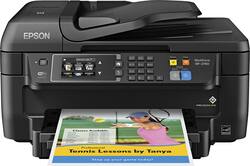
Epson - WorkForce WF-2760 Wireless All-In-One Printer - Black
- Key Specs
- Networking: Wired, Wireless
- ENERGY STAR Certified: true (Devices carrying the ENERGY STAR service mark, such as computer products and peripherals, kitchen appliances, and other products, generally use 20% to 30% less energy than required by federal standards.)
- Printer Type: All In One
- ISO Color Print Speed: 7.3 pages per minute (The number of color pages able to be printed per minute in the device's default single-side mode, as tested by the International Standards Organization (ISO).)
- ISO Mono Print Speed: 13.7 pages per minute (The number of black ink (grayscale) pages able to be printed per minute in the device's default single-side mode, as tested by the International Standards Organization (ISO).)
- Output Tray Capacity: 150
- Touch Screen: true (Touch-screen devices make navigating more intuitive. Using a touch-screen display, you can do things such as tap to select, hold and drag to move items, swipe to scroll, and pinch to zoom.)
- General
- Product Name: WorkForce WF-2760 Wireless All-In-One Printer
- Brand: Epson
- Display Screen: true
- Display Screen Size: 2.7 inches
- Model Number: C11CF77201
- Dimensions
- Product Height: 9.1 inches (The out of box height of the item. Height is measured as the vertical distance from the bottom of the item to the top as it would be primarily used or placed.)
- Product Width: 16.7 inches (The out of box width of the item. Width is measured as the horizontal distance from one side of the item to the other as it would be primarily used or placed.)
- Product Depth: 16.7 inches (The out of box depth of the item. Depth is measured as the distance from the front of the item to the back as it would be primarily used or placed.)
- Product Weight: 14.6 pounds (The out of box weight of the item.)
- Features
- Automatic Document Feeder: true
- Photo Printing: false
- Automatic Two-Sided Printing: true
- Tray Capacity: 150
- Duty Cycle: Up to 3,000 (The maximum number of pages per month that the device can produce without failing, as specified by the manufacturer.)
- Certifications Listings & Approvals
- EPEAT Qualified: false (The Electronic Product Environmental Assessment Tool (EPEAT) was designed to provide an environmental assessment tool for purchasers. In order to qualify for EPEAT, a product must meet all 23 required criteria.)
- Scanner Info
- Scanner Type: Flatbed
- Scanner Resolution: Up to 1200 x 2400 (Refers to the number of pixels/dots, both horizontally and vertically, of the image produced by the scanner. Generally, the higher the resolution, the sharper and cleaner the produced image.)
- Fax Info
- Integrated Fax: true
- Ink
- Compatible Cartridges: T220 Ink Family
- Ink Subscription Service Available: false (The printer monitors ink usage and alerts the subscription provider when levels are low. A purchased subscription provides refills of ink based on usage.)
- Memory
- Memory Card Slot: false
- Paper Info
- Automatic Document Feeder Capacity: 30 sheets
- Maximum Document Length: 47.2 inches
- Maximum Document Width: 8.5 inches
- Supported Paper Sizes: ANSI A, Legal, A4, A6, Custom Size, US No 10
- Paper Feeder: Tray loader
- Paper Handling: Input tray-150 sheets, ADF-30 sheets
- Compatible Media Types: Envelopes, Plain paper, Bond paper, Glossy photo paper, Matte paper
- Copier Info
- Maximum Number Of Copies: 99
- Copier Resolution (Black): Up to 360 x 360 (Refers to the number of pixels/dots, both horizontally and vertically, of the image produced by the copier in black ink. Generally, the higher the resolution, the sharper and cleaner the produced image.)
- Copier Resolution (Color): Up to 360 x 360 (Refers to the number of pixels/dots, both horizontally and vertically, of the image produced by the copier in colored ink. Generally, the higher the resolution, the sharper and cleaner the produced image.)
- Performance
- Printer Resolution (Black): Up to 4800 x 1200 (Refers to the number of pixels/dots, both horizontally and vertically, of the image produced by the printer in black ink. Generally, the higher the resolution, the sharper and cleaner the produced image.)
- Printer Resolution (Color): Up to 4800 x 1200 (Refers to the number of pixels/dots, both horizontally and vertically, of the image produced by the printer in colored ink. Generally, the higher the resolution, the sharper and cleaner the produced image.)
- Connectivity
- Minimum System Requirements: MS Windows Server 2003, MS Windows XP Professional x64 Edition, MS Windows XP SP3, MS Windows Server 2008, MS Windows Server 2008 R2, MS Windows Server 2003 R2, MS Windows Server 2012, Windows 8, MS Windows Server 2012 R2
- Other
- UPC: 010343928848
Print from your computer or smartphone with this Epson Workforce all-in-one printer. Its wireless connectivity lets you send documents to print from anywhere in your office. This Epson Workforce all-in-one printer also has scan and fax options, so you can respond to emails and send signed forms to colleagues in minutes.
- Easy Replenish: With a printer set up for Easy Replenish, you'll automatically receive shipments of the ink you need. The printer monitors its own ink levels, so you'll only receive ink when you need it.
- Prints up to 13.7 ISO ppm* in black, up to 7.3 ISO ppm* in color: To generate documents quickly.
- 4-in-1 functionality: Copies, faxes, prints and scans to accommodate your business and personal needs.
- Wireless and mobile printing capability: Connect this printer to your home or office network with built-in Ethernet or wireless LAN.
- Compatible with Google Cloud Print ready: For simple printing from your smartphone or tablet.
- Up to 4800 x 1200 dpi (dots per inch) color resolution: High resolution for producing incredible quality and detail in documents and photos.
- 4 individual print cartridges are economical: Only replace ink cartridges (black, cyan, magenta and yellow) when a color runs out.
- Supported media sizes: ANSI A, Legal, A4 and A6.
- 2.7" touch screen: Makes operation simple.
- USB 2.0 port for simple connectivity: High-speed USB 2.0 port offers a standard connection to your PC or a simple way to plug in and print with a USB drive, camera or other device.
- Built-in duplex printing: Print on both sides of the page without turning it over manually, to minimize your printing costs and help the environment.
- More print, copy and scan solutions: Automatically print 2-sided documents, scan documents to your computer or directly to e-mail and more.
- Copies up to 11 cpm* in black, up to 5.5 ISO cpm* in color: To ensure efficient performance.
- High-speed fax: With 33.6 Kbps modem, 100 speed dials and automatic redial to meet your office needs.
- Scanner with color CIS (contact image sensor): Allows you to scan documents in up to 1200 x 2400 dpi optical resolution and up to 9600 dpi interpolated resolution, so you can enjoy faithful document reproduction.
- NFC capability: Allows wireless printing via compatible mobile devices with a simple touch.
Whats Included
- Epson WorkForce WF-2760
- Cartridge - black
- Cartridge - cyan
- Cartridge - magenta
- Cartridge - yellow
Q: Does it have Windows 10 drivers?
A: This item will work with Windows 10.
Q: Does automatically prints double side or you have to manually flip the page? Thanks
A: It will print both sides but you will have to choose this function in the menu that comes up when you print a document. You do not have to turn the page manually. There may be a very brief delay before it prints the other side as it waits to let the ink dry on the fist side.
Q: does it come with supplied ink???
A: It does come with small starter cartridges BUT black does not last long and it doesn't give you much time once you get the notification that it is low on ink before it shuts down printing altogether (screen notification appeared on a Thursday - Printer was not used Sat. & Sun and by Monday it would not perform any printer functions). All non-printing function are still available. Best to go ahead and pre order full ink cartridges to have on hand before ink runs out.
A: Yes, it can print/copy/scan/fax.
Q: is it mac compatiable the computer is a year old, or is HP better match?
A: The printer will work with either Macs or PCs. You need to download the appropriate latest printer driver software from Epson when you are setting up the printer.
Q: will the printer work if you do not have color ink?
A: Yes, you should be able to print if you are out of color. Know that the empty color cartridges must still be inserted.
A: you can adjust the paper tray to any size you want. It has several presets you can adjust to, but you could make any size work fairly easily.
Q: Do I need a USB cord to set up this printer?
A: Not necessarily. It depends on the type of setup you are trying to accomplish. I did a wireless set up and did not need to use a USB cord. However it is an option in the instructions booklet, if you want to go that route.