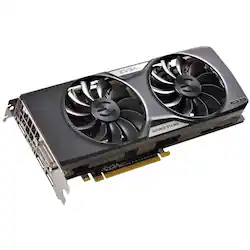
EVGA - NVIDIA GeForce GTX 960 4GB GDDR5 PCI Express 3.0 Graphics Card - Black
- Key Specs
- Maximum Resolution: 2048 x 1536 (The highest display resolution that the graphics card(s) can support.)
- Maximum Number of Displays Supported: 4
- Product Height: 4.4 inches (The out of box height of the item. Height is measured as the vertical distance from the bottom of the item to the top as it would be primarily used or placed.)
- Product Length: 10.1 inches (The out of box length of the item. Length is measured as the longest dimension of the item.)
- Graphics Processing Unit (GPU): NVIDIA GeForce GTX 960 (Often referred to as a graphics card, a graphics processing unit (GPU) is the electronic circuitry responsible for manipulating and processing computer graphics/images and accelerating video decoding. Ultimately, a powerful GPU will provide a boost for anything involving visuals, including games, graphic design, and video editing.)
- General
- Product Name: NVIDIA GeForce GTX 960 4GB GDDR5 PCI Express 3.0 Graphics Card
- Brand: EVGA
- GPU Chipset Manufacturer: NVIDIA
- Graphics Processing Unit (GPU): NVIDIA GeForce GTX 960 (Often referred to as a graphics card, a graphics processing unit (GPU) is the electronic circuitry responsible for manipulating and processing computer graphics/images and accelerating video decoding. Ultimately, a powerful GPU will provide a boost for anything involving visuals, including games, graphic design, and video editing.)
- Model Number: 04G-P4-3967-KR
- Performance
- Cooling System: Fan (A computer's CPU generates heat while operating and requires a cooling system to keep internal components functioning properly. Air cooling uses fans to draw in cool air and exhaust hot air, while liquid cooling uses coolant-filled tubes and water blocks to regulate internal temperature more efficiently.)
- Display
- Maximum Resolution: 2048 x 1536 (The highest display resolution that the graphics card(s) can support.)
- Maximum Number of Displays Supported: 4
- Compatibility
- Operating System Compatibility: Windows
- Features
- Included Software: EVGA Precision X; EVGA OC Scanner X
- Dimensions
- Product Height: 4.4 inches (The out of box height of the item. Height is measured as the vertical distance from the bottom of the item to the top as it would be primarily used or placed.)
- Product Length: 10.1 inches (The out of box length of the item. Length is measured as the longest dimension of the item.)
- Other
- UPC: 843368037031
Enjoy graphics with efficient, powerful performance from the EVGA GTX960 graphics card. It operates 26 percent cooler and provides 36 percent more GPU power. Additionally, the dB noise inverter ensures virtually silent operation while you game. With double ball gearings, the EVGA GTX960 lasts four times longer than other graphics cards.
- Powered by the NVIDIA GeForce GTX 960 graphics processing unit (GPU):
With a 1279MHz clock speed and 1342MHz boost clock speed to help meet the needs of demanding games. - 4GB GDDR5 (128-bit) on-board memory:
Plus 1024 CUDA processing cores and up to 112.16GB/sec. of memory bandwidth provide the memory needed to create striking visual realism. - PCI Express 3.0 interface:
Offers compatibility with a range of systems. Also includes DVI, HDMI and 3 x DisplayPort outputs for expanded connectivity. - NVIDIA SLI-ready:
Transmits synchronization, display and pixel data for reliable connection between GPUs (additional graphics cards not included). - NVIDIA CUDA technology:
Harnesses the power of the graphics processing unit (GPU) to optimize computing performance. - NVIDIA Adaptive Vertical Sync:
Disables VSync when frame rates fall below the locked rate, and re-enables it when they return to the locked rate, to significantly reduce stutter and prevent screen tearing. - OpenCL, OpenGL 4.4 and DirectX 12 support:
Enhances gameplay by delivering ultrarealistic images, detail and texture and improved lighting effects that create lifelike interactivity.
Q: what min power supply will this card require
A: The recommended PSU for tthis GPU is 400W or greater power supply.
A: undefined
Q: Is this card the superclocked version of the gtx 960 4gb
A: undefined
A: Hello Wessman, On paper, it seems like the card should work with your computer. I know there have been people with an HP P7 trying to upgrade just like you, but they were unsuccessful with their PC actually running the GPU. They were able to install the GPU, the GPU fans would spin when PC was turned on, but the PC would not run the GPU. There might be a problem with the old BIOS that you need to upgrade. I'm not sure if these people tried this or if it worked. I'd make sure that there is an updated BIOS that allows the GPU to be detected by your PC before making the purchase.
Q: Does this card fit into my dell Xps 9800 ? And if so is it easy to install by a beginner ?
A: If you're planning on installing this card on a Dell XPS 8900 then you will be fine. Just make sure that your stock PSU is atleast 450W. Most are, but it's good to just make sure. There are youtube videos on how to install the graphics card. I'd recommend using an anti-static wristband during installation to prevent any damage to your tech. The card is a tad bit hard to fit into your PC but once you get it in there, it's perfection. I installed it in my XPS 8900 and I had no problems.




















