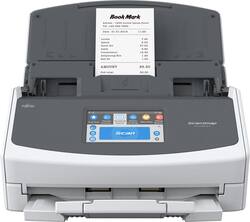
Fujitsu - ScanSnap iX1500 Color Duplex Document Scanner with Touch Screen with Web Connectivity - White/Gray
- Key Specs
- Networking: Wireless
- Scan (Color) Speed: 30 copies per minute (The number of color pages able to be scanned per minute.)
- Scan Method: Other
- Duplex Scan Function: true
- General
- Product Name: ScanSnap iX1500 Color Duplex Document Scanner with Touch Screen with Web Connectivity
- Brand: Fujitsu
- Model Number: PA03770-B005
- Connectivity
- Scanner Connectivity: Wi-Fi
- Minimum System Requirements: Microsoft Windows 7 (32/64 bits), Windows 8.1 (32/64 bits), Windows 10 (32/64 bits), Apple macOS 10.12, Apple macOS 10.13, Apple macOS Mojave 10.14
- Dimensions
- Product Height: 11.5 inches (The out of box height of the item. Height is measured as the vertical distance from the bottom of the item to the top as it would be primarily used or placed.)
- Product Width: 6.3 inches (The out of box width of the item. Width is measured as the horizontal distance from one side of the item to the other as it would be primarily used or placed.)
- Maximum Document Length: 118.1 inches
- Maximum Document Width: 8.5 inches
- Product Weight: 7.5 pounds (The out of box weight of the item.)
- Features
- Automatic Document Feeder Capacity: 50 sheets
- Automatic Document Feeder Included: true
- Scanner Type: Other
- Scanner Resolution: Up to 600 x 600 (Refers to the number of pixels/dots, both horizontally and vertically, of the image produced by the scanner. Generally, the higher the resolution, the sharper and cleaner the produced image.)
- Image Scanner Type: Dual CIS
- Scanner Info
- Scan (Monochromatic) Speed: 30 copies per minute (The number of monochromatic grayscale pages able to be scanned per minute.)
- Included
- Included Software: ABBYY FineReader for ScanSnap, Nuance Power PDF Standard, ScanSnap Home, Nuance PDF Converter for Mac
- Certifications Listings & Approvals
- ENERGY STAR Certified: false (Devices carrying the ENERGY STAR service mark, such as computer products and peripherals, kitchen appliances, and other products, generally use 20% to 30% less energy than required by federal standards.)
- Other
- UPC: 097564309168
Digitize documents quickly with this Fujitsu ScanSnap cloud-enabled scanner. A 4.3-inch touchscreen offers easy operation, while speeds of up to 30 pages per minute let you finish scanning tasks quickly. Wi-Fi connectivity and the ScanSnap Cloud software lets this Fujitsu ScanSnap cloud-enabled scanner access and upload images directly to popular cloud services.
- Up to 600 x 600 dpi optical resolution: To capture every word and image detail with clarity.
- 8.5" x 118.1" maximum scan size: Enables you to capture entire pages.
- Up to 30 ppm scan speeds: For rapidly preserving a variety of files. Duplex scanning helps you get the job done quickly.
- 4.3" touch screen TFT display: Displays clear information and lets you navigate features with ease.
- High-speed USB 3.1 Gen 1 interface: Offers easy connectivity.
- Built-in Wi-Fi: Lets you upload images instantly to your laptop, desktop or mobile device.
- ENERGY STAR certified: Designed to use less energy and meets strict energy efficiency guidelines set by the Environmental Protection Agency and U.S. Department of Energy.
Whats Included
- Fujitsu ScanSnap iX1500
- USB 3.1 cable
- Receipt guide
- ABBYY FineReader for ScanSnap, Nuance Power PDF Standard, ScanSnap Home, Nuance PDF Converter for Mac
Q: Will the scanner scan a color document
A: Absolutely!
A: Yes, this unit works with Catalina.
A: The iX1500 can scan plastic ID cards, but it cannot scan a passport booklet. The only Fujitsu scanner that can scan a passport booklet through its feeder is the fi-800R. The other option is to use a flatbed scanner, like the fi-7240 or fi-7260. Regards, Eric
Q: Can this scanner scan business cards?
A: Yes, the iX1500 scans business cards and stores the data in a repository under the business card class. You can then sort the cards by company name or personal name. If you view a card there are up to 3 mini icons that you can click on; one opens an e-mail to the person on the card, the other opens the company's web site, and the 3rd icon opens a map showing the location of the person's office. Regards, Eric
A: Yes scans both sides and leaves out any blank pages. It is fast about one sec per doc. You can change the settings if you don't like the defaults to scan better. I think you will love it! I want to scan photos also but right now working on documents for a non-profit.
A: I never had the Fujitsu ix500, but I can say that the ix1500 is a really nice scanner. Great true wireless scanning, mobile scanning, scan to multiple locations (even to a cloud service), The unit has a snap-in connection that makes it easier to scan both regular size sheets (8.5x11), receipts (even long ones), pictures, and business cards. I really love this product.
Q: Can this scanner be setup and used with a chromebook, i.e. requires no other computer?
A: Thank you for contacting PFU Canada. the IX1500 does not support Chromebook with the USB connector. The IX1500 does have Wifi connectivity to upload documents to the cloud without a computer to Dropbox, Google Drive etc.
Q: Can you use the scanner with an ipad. No computer involved?
A: Thank you for your interest in Fujitsu products. Yes, the IX1500 can be used with an IPAD or IPAD using IOS. Here's a link on how to use it and setup. http://www.pfu.fujitsu.com/imaging/downloads/manual/ssca-ios/English/ssca/topic/top_basic.html














