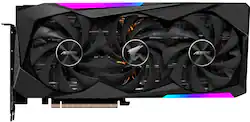
GIGABYTE - NVIDIA GeForce RTX 3070 AORUS MASTER 8GB GDDR6 PCI Express 4.0 Graphics Card
- Key Specs
- Advanced Graphics Rendering Technique(s): Ray tracing, DLSS (Deep Learning Super Sampling) (Imaging technology designed to improve graphics rendering.)
- Graphics Processing Unit (GPU): NVIDIA GeForce RTX 3070 (Often referred to as a graphics card, a graphics processing unit (GPU) is the electronic circuitry responsible for manipulating and processing computer graphics/images and accelerating video decoding. Ultimately, a powerful GPU will provide a boost for anything involving visuals, including games, graphic design, and video editing.)
- General
- Product Name: NVIDIA GeForce RTX 3070 AORUS MASTER 8GB GDDR6 PCI Express 4.0 Graphics Card
- Brand: GIGABYTE
- GPU Chipset Manufacturer: NVIDIA
- Graphics Processing Unit (GPU): NVIDIA GeForce RTX 3070 (Often referred to as a graphics card, a graphics processing unit (GPU) is the electronic circuitry responsible for manipulating and processing computer graphics/images and accelerating video decoding. Ultimately, a powerful GPU will provide a boost for anything involving visuals, including games, graphic design, and video editing.)
- Model Number: GV-N3070AORUS M-8GD
- Display
- Advanced Graphics Rendering Technique(s): Ray tracing, DLSS (Deep Learning Super Sampling) (Imaging technology designed to improve graphics rendering.)
- Compatibility
- Operating System Compatibility: Windows
- Other
- UPC: 889523025093
Get the ultimate gaming performance with GIGABYTE RTX 3070 Graphics Cards. Powered by NVIDIA's 2nd gen RTX architecture and refined with WINDFORCE cooling technology, the GIGABYTE GeForce RTX 3070 AORUS 8G brings stunning visuals, amazingly fast frame rates, and AI acceleration to games and creative applications with its enhanced RT Cores and Tensor Cores.
- NVIDIA GeForce RTX 3070: With a 1845MHz boost clock speed to help meet the needs of demanding games.
- 8GB GDDR6 (256-bit): 8GB GDDR6 (256-bit)Video Memory.
- PCI Express 4.0: PCI Express 4.0 and earlier PCI Express 3.0. Offers compatibility with a range of systems.
- Cooling Solution: The Max-Covered cooling features 3x 100mm unique blade stack fans with wind claw design and alternate spinning, so the air pressure can completely cover the heatsink.
- API (Application Programming Interface) Support: RGB Fusion 2.0 - With 16.7M customizable color options and numerous lighting effects, you can choose lighting effects or synchronize with other AORUS devices.
- Display Support: 3x Display Port, 3x HDMI Port
Q: When does this product arrive again? I'm so interested with this gpu
A: You just missed a few today. Try getting on Discord and follow the StockDrops server. You can find them on Twitter to help you get started: @BotRtx I purchased a 6800 and a 3060 ti FE for two builds by following them on Discord. Good community also.
Q: IS THIS CARD LHR OR NON LHR
A: NON LHR
A: Considering the scalpers reselling them on ebay for over 1K, it may be a while. Best case scenario right now the market starts to cool in July, then wait for catch up and aflood of used cards from abandoned mining rigs.
Q: Why does it say in stock, but when i click to buy one it says not in stock?
A: If you don't manage to add this to your cart within the first minute of the drop you aren't going to get it. When you add to cart there is a queue you are placed in, don't refresh the page and just patiently wait for the icon to pop up again. Once it goes yellow again try to add it and check out as soon as possible to secure your card
A: In my experience, Open box is generally good from Best Buy. If it doesn't work as expected you're able to return the card within a 15 day return period for standard members.
Q: when will this be back in stock?
A: Never














