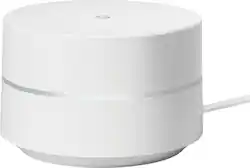
Google - Wifi AC1200 Dual-Band Mesh Wi-Fi Router
- Key Specs
- Wi-Fi Mesh System: true (A single wireless network consisting of a main router (connected directly to a modem) that connects to a series of satellite modules or nodes placed around the home. Routers with this capability promote stronger, faster wireless signals as well as increase Wi-Fi coverage by reducing interference and eliminating dead zones.)
- Number of Wi-Fi Satellites Included: 1 (Quantity of Wi-Fi satellite modules/nodes for a Wi-Fi Mesh System that come with the product.)
- Number Of LAN Ports: 2 (Number of devices able to be connected to the Local Area Network (LAN). LAN ports allow wired connections to other networking devices (wireless access points, range extenders, etc.) in order to share the internet connection received through a WAN port.)
- General
- Product Name: Google Wifi AC1200 Dual-Band Mesh Wi-Fi Router
- Brand: Google
- Model Number: NLS-1304-25 1-PACK
- Security
- Data Encryption: true
- Encryption Type: WPA2 (The security protocols or certification programs that protect the Wi-Fi network.)
- Firewall Type: None (The method the firewall uses to filter and process data to increase network security, primarily by blocking malicious traffic requests while allowing legitimate traffic through.)
- Security Features: WPA2-PSK Automatic security updates Infineon SLB 9615 Trusted Platform Module
- Parental Controls: true (Allows user to block unwanted content, signals, channels, networks, etc. from being received or accessed.)
- Network
- Band Technology: Dual (Refers to the number of frequency bands used to wirelessly transmit an internet signal. For example, dual-band devices may use one 2.4 and one 5 GHz band, while tri-band devices may use one 2.4 and two 5 GHz bands. Multiple bands also provide more flexibility for designating connected devices to specific band use.)
- Ethernet Standard: 10/100/1000 (Each standard is a variation of the IEEE 802.3 set of computer networking technologies known as Ethernet. New versions evolved to include higher bandwidth, different physical media, and other new and improved features. Standards are often denoted by speeds (in Megabits per second). For example, a 10/100/1000 Ethernet port transmits at 10 Mbps, 100 Mbps, and 1000 Mbps (1 Gbps).)
- Number Of Connected Devices: 0
- Number of Antennas: 0
- Frequency Band: 2.4 GHz, 5.0 GHz (Bands may be grouped into categories such as low- and high-band VHF (Very High Frequency), low- and high-band UHF (Ultra High Frequency), or certain frequency channels (measured in MHz or GHz). Generally, higher frequencies transmit information faster but have shorter range than lower frequencies.)
- Wireless Standard: AC, N (The wireless networking protocol used by the device. Each iteration of the protocol is based on the 802.11 standard developed by the Institute of Electrical and Electronics Engineers (IEEE) Standards Association. Denoted by letters following 802.11 (802.11a, 802.11ac, etc.), each version, published in alphabetical order, encompasses all previous versions.)
- Wi-Fi Mesh System: true (A single wireless network consisting of a main router (connected directly to a modem) that connects to a series of satellite modules or nodes placed around the home. Routers with this capability promote stronger, faster wireless signals as well as increase Wi-Fi coverage by reducing interference and eliminating dead zones.)
- Number of Wi-Fi Satellites Included: 1 (Quantity of Wi-Fi satellite modules/nodes for a Wi-Fi Mesh System that come with the product.)
- Wired Backhaul: true (Also known as Ethernet backhaul or backbone, this capability can be enabled to directly wire a secondary router or satellite to the main router via Ethernet cable. This connection allows for faster and more stable data upload.)
- Ethernet Switch: true (Connects multiple devices to expand the Local Area Network (LAN).)
- Transport Protocol: true (The protocol used for connection-oriented transmissions, flow control, etc. within the transport layer of the network.)
- Certifications Listings & Approvals
- ENERGY STAR Certified: false (Devices carrying the ENERGY STAR service mark, such as computer products and peripherals, kitchen appliances, and other products, generally use 20% to 30% less energy than required by federal standards.)
- Features
- App Compatible: true (The product can be connected to a program or software application on a mobile device, which then receives collected data from the product.)
- App Name: Google Wifi companion
- Beamforming: true (A signal processing technique that enables a router to focus a Wi-Fi signal in a specific direction. The router determines where a connected device in the network is located and projects a stronger signal in that specific direction. This can result in faster and higher quality data transfer as well as reduced signal interference.)
- Integrated Modem: true
- Auto Connect: true
- Auto Detecting: true
- Wireless: true
- Ports
- Number Of WAN Ports: 2 (Number of devices able to be connected to the Wide Area Network (WAN). This type of port may simply be labeled "Internet," and it allows the device to share its internet connection with all devices connected to it via LAN ports.)
- Port Type(s): RJ-45 (USB 2.0 connects external drives, gaming controllers, smartphones, MP3 players and other accessories.USB 3.0 transfers data faster than USB 2.0, but only when used with USB 3.0 devices.USB Type-C provides fast speeds and versatile power, featuring connectors with identical ends that plug in upside down or right side up. Adapters allow for video as well as backward compatibility.Thunderbolt provides ultra-high bandwidth for fast data transfer between devices featuring a Thunderbolt or MiniDisplayPort connection.HDMI allows you to connect a projector or display HD media on your HDTV or monitor.Media card slots allow you to transfer photos from your digital camera or camcorder.)
- Number Of LAN Ports: 2 (Number of devices able to be connected to the Local Area Network (LAN). LAN ports allow wired connections to other networking devices (wireless access points, range extenders, etc.) in order to share the internet connection received through a WAN port.)
- Speed
- Wired Speed: 1000 megabits per second (The maximum rate at which data is transferred between a network device and router using an Ethernet cable.)
- Gigabit Ethernet Speed: true (Supports the gigabit Ethernet networking standard, which has a data rate of at least one gigabit per second, or 1,000 Mbps.)
- Auto Speed Sensing: true
- Compatibility
- System Requirements: Android device (4.0 or higher) or iOS device (iOS 8 or higher), Google Account (The software that a product must have for it to be able to integrate with another product.)
- Bluetooth Enabled: true (The device is capable of communicating with another device via Bluetooth, provided they are within the required range of each other. A Bluetooth-enabled device must also be the same Bluetooth version or higher than the accessory it is intended to pair with.)
- Dimensions
- Product Height: 2.7 inches (The out of box height of the item. Height is measured as the vertical distance from the bottom of the item to the top as it would be primarily used or placed.)
- Product Length: 4.17 inches (The out of box length of the item. Length is measured as the longest dimension of the item.)
- Product Width: 4.17 inches (The out of box width of the item. Width is measured as the horizontal distance from one side of the item to the other as it would be primarily used or placed.)
- Product Weight: 0.75 pounds (The out of box weight of the item.)
- Warranty
- Manufacturer's Warranty - Parts: 1 year
- Manufacturer's Warranty - Labor: 1 year
- Other
- UPC: 842776100610
Enjoy a consistent connection to the web with this Google Wi-Fi setup. The single access point is ideal for use in smaller homes of less than 1,500 square feet, giving you the ability to connect your tablets, laptops or phones. This Google Wi-Fi system provides a reliable signal that can be shared by multiple devices at once.
- Compatible with 802.11ac: Backward compatible with 802.11a/b/g/n networks, so you can easily upgrade.
- Up to 1.2 Gbps data transfer speed: For fast, efficient operation.
- TX Beamforming technology: Focuses signals directly to compatible wireless devices to help ensure dependable connectivity.
- 2 Gigabit Ethernet ports: Offer a high-speed wired network connection and can be configured as WAN or LAN.
- Wi-Fi protected access: Protects your network against hackers and eavesdroppers.
- Manage your family's Internet use: Keep track of your family's screen time - pause the Internet on your kids' devices at bedtime or during homework hours.
- Google Wifi app: Makes it simple to share your password with guests and prioritize devices on your network. (Download required)
- Compatible with Android and iOS devices: Including Android OS 4.0 or higher, Apple iOS 8 or higher.
Whats Included
- Google Wifi AC1200 Dual-Band Wi-Fi Router
- 6.5 ft. Ethernet cable
- Power adapter
- Quick start guide
Q: What is needed for the google wifi to work? What is the monthly fee?
A: You still need to buy high speed internet from the local ISP of your choice so the monthly fee I believe you are asking about is the fee for internet access and that is paid to whatever internet service provider you are already using. This device is simply a new wireless router made by Google that you use with your existing modem and existing internet service (Google or otherwise) to spread your wifi signal evenly throughout your house. They are not selling the actual internet SERVICE from Google here- you can use this with the internet service you already have or if Google internet service is available in your area, you could of course choose to use this with Google internet service (although you'd have to pay the purchase price of this router plus the monthly fee for whatever Google (or other brand) internet service plan you choose. I think this is what you were asking about regarding a monthly fee as it seems that likely due to the name of this device, a number of people seem to think that this device also includes internet service when in fact it is a new router to use with your existing internet service or the internet service you order separately. I hope this answers your question.
A: Yes you can. No need to yell.
Q: Can I split this to two houses ? Can I use 2 in one house and One in another house ?
A: Yes, you can place each unit in separate houses. Basically, each hub can operate independently of one another, so essentially when you purchase this system you are purchasing three identical routers. So depending on your situation you will need to configure the system differently. ~If the two buildings are beyond the reach of the wifi signal you will need to connect each unit to its own broadband modem or link them via an ethernet cable, which may not be practical. ~If the buildings are close enough for the WiFI signal to reach, then you can configure the system as normal. ~If you plan on purchasing two units for your home and then give one to a friend, then each of you will set up your respective units independently. I hope this was helpful.
Q: What level Ethernet cable comes included: 5e or 6?
A: There is only one cable. Its a flat profile but it does not say whether its a 5e or 6. Markings are AWM E212689 STYLE 21811
A: This can replace your router, but it is NOT a modem. If you rent a modem from Comcast, you'd need to either keep that and plug this into the ethernet port on the bottom of the Google WiFi, or purchase yourself a new Modem and return yours to Comcast. If you have one of Comcast's Gateways (Modem/router combined (sounds like you may)) then you can keep that as well (and may need to if you use their phone service), again, just plug this into one of the 4 ethernet ports on the back of your Comcast Gateway. Their Gateway is required by them to get their TV/Phone/Internet service when you have a bundle. If you have the Gateway, you can also call Comcast tech support to disable the wireless portion of it if needed. Hope this helps.
A: It's a wireless router. One is plugged into your ISP modem, and the others act as wireless bridges that extends your wireless coverage. They all talk together in a Mesh network. So far my system has been solid with awesome coverage and speed. nice features with parental control too. Combines 2.4ghz and 5ghz to a single SSID which is nice.
A: No. The system is supposed to switch you automatically between different wifi devices, but all of them will be under one ID. You will have one ID for your network, regardless of how many of these devices you have.
A: Short answer yes. Especially could be useful if your wired ethernet is gigabit and if you have a segment of your house that is walled off with wifi blocking materials. Here is the response from google technical support: Thank you for contacting Google Wifi Care. My name is Brian and I will be happy to help you out with this! You can connect Google Wifi points via Ethernet if you want. In most use cases it probably doesn't matter whether they are wired or wireless. There certainly wouldn't be a disadvantage to use wired over wireless (unless it means not locating the access point in the best location). Whether there is an actual advantage depends on what the connected devices are, what they're doing and the speed of the Internet itself. If you have the Ethernet cables available in the ideal location for a wireless access point, you should use them. If not, then you shouldn't. It is accurate that to setup multiple Google Wifi points you start off wirelessly. Then move them to their desired locations and connect by Ethernet. They'll then use the best connection available. If I can be of any further assistance or you have any other questions, please let me know by replying directly to this email. You can also reach us at 844-442-3693. We are here to help 24/7! Thanks, Brian Wifi Care
















