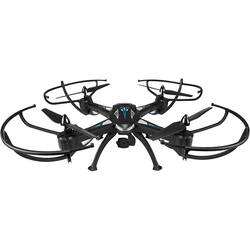
GPX - Sky Rider Condor Pro Drone with Remote Controller - Black
- General
- Product Name: Sky Rider Condor Pro Drone with Remote Controller
- Brand: GPX
- Recommended Minimum Age: 14 years
- Recommended Maximum Age: 14 years
- Model Number: DRW876
- Color: Black
- Color Category: Black
- Flight
- Autonomous Flight Modes: Other
- Obstacle Avoidance Technology: false
- Maximum Altitude (Above Sea Level): 300 feet
- Number of Rotors: 4
- Camera
- Integrated Camera: true
- First Person View (FPV): true
- Field of View: 110 degrees
- Image Stabilization: None (This feature helps reduce image/video blur or distortion that may occur from unsteady motion.)
- Burst Mode: false (Also referred to as continuous shooting. This feature captures multiple shots in rapid succession.)
- Image File Format(s): JPEG (Standardized software format(s) of storing digital images. The type of format chosen for capturing and compressing the image can determine quality, level of detail, and storage space required.)
- Environmental
- Indoor Or Outdoor Use: Indoor and outdoor (Indicates the appropriate environment product was designed to be used in.)
- Minimum Operating Temperature: 30 degrees fahrenheit (The lowest recommended ambient (surrounding) temperature in which the product can ideally operate stated by the manufacturer. Generally long-term exposure of the product to temperatures less than the minimum can result in ineffective operation.)
- Maximum Operating Temperature: 110 degrees fahrenheit (The highest recommended ambient (surrounding) temperature in which the product can ideally operate stated by the manufacturer. Generally long-term exposure of the product to temperatures more than the maximum can result in ineffective operation.)
- Compatibility
- Operating System Compatibility: Android, Apple iOS
- Features
- Integrated GPS: No
- Landing Gear/Legs Included: Landing Gear
- Storage
- Memory Card Compatibility: None (The type of memory card(s) recommended for use with the product.)
- Memory Card Included: false (Indicates whether a memory card is included.)
- Power
- Charging Interface(s): USB (The connection for transmitting power to charge the device.)
- Charging Time: 150 minutes
- Number Of Controller Batteries Required: 4
- Controller Batteries Included: false
- Controller Battery Size: AA
- Warranty
- Manufacturer's Warranty - Parts: 30 days
- Manufacturer's Warranty - Labor: 30 days
- Other
- UPC: 047323876004
Capture videos and pictures with this Condor Pro drone. With a control distance of up to 300 feet and an altitude hold mode, this quadcopter makes taking aerial photos easy. The four-channel direction control and the six-axis gyroscope on this Condor Pro drone assist in performing 360-degree flips and tricks for great video effects.
Fly Responsibly:
Before takeoff, update all software and firmware, and read the instructions thoroughly.
See the FAA website for registration requirements and information about flying a drone safely: https://www.faa.gov/uas/getting_started/. Additional state or local requirements may apply. Check your local jurisdiction. The following websites may help you make informed decisions about flying your drone: www.knowbeforeyoufly.org and www.modelaircraft.org.
- Multidirectional controls: Offer easy maneuverability and flexible navigation with 360° flips & tricks. Choose from 3 speeds for the customized control.
- Real-time, first-person view of your flight: Beam what your drone sees through its camera straight to your phone or tablet and VR Goggles so you can go on a virtual flight and set up great photographs.
- Control the drone from up to 300' away: The built-in rechargeable lithium-polymer battery provides up to 8 minutes of flight time per charge.
- 6-axis gyroscope: Keeps the drone stable in all conditions.
- Remote control: Wirelessly control the drone.
- Fly Responsibly:: The following website may help you make informed decisions about flying your drone: KnowBeforeYouFly.org. Additional state or local requirements may apply. Check your local jurisdiction.
Whats Included
- GPX Sky Rider Condor Pro Drone with Remote Controller
- Phone holder
- AC/DC power adapter
- 4 replacement rotors
- Screwdriver
- Owner's manual
A: Flip the drone upside down. At the base of the prop motor unscrew and remove the motor cap to gain access to the gear assembly. The large gear is attached to the shaft, pressing this gear into position will allow the screws to align perfectly with the shaft.
Q: Does the drone have a gimbal
A: Yes
A: The DRW876 drone is 25.74 x 25.74 x 7.41 inches.
Q: What is the range of this unit? (How far out can it go before I lose signal and control?)
A: The controller range is 300ft.
A: To view the live camera connect your smart phone or tablet to the drone using the Skyrider app.
Q: Can I get a replacement operator manual?
A: undefined
Q: Can you fly drone without protecters
A: undefined