Year-End SaleEnds 1/1/26. Limited quantities. No rainchecks.

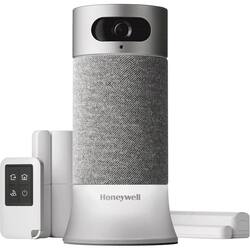
Master your domain with this Honeywell smart home security starter kit. Motion sensors facilitate automatic recording when activity is detected at your chosen point of entry, and built-in Amazon Alexa functionality ensures convenient voice controls. This Honeywell smart home security starter kit has 24-hour cloud storage so you can review footage from anywhere.
Customers have good things to say about the camera quality and ease of setup of the Wireless Home Automation Kit, with many praising its straightforward installation and clear video. Positive feedback also highlights the long battery life and user-friendly app. However, some customers express concerns regarding the system's price point and the performance of features like facial recognition and motion detection.
The vast majority of our reviews come from verified purchases. Reviews from customers may include My Best Buy members, employees, and Tech Insider Network members (as tagged). Select reviewers may receive discounted products, promotional considerations or entries into drawings for honest, helpful reviews.
As the review title indicates, there are a lot of good things to like about this DIY home security system, but at the price point, I want to (and need to) love it, and I’m not there yet. The cost is a lot for what is a bit of a middling security experience. Packaged components out of the box are the base station, keyfob remote, a pair of sensors and power cord. Bear in mind this is a starter kit, and after installing the two door sensors, it feels short for my small house in terms of parts. The base unit itself is a stationary 1080p camera on top of an Alexa Z-wave hub and speaker unit, including a light feature base (colors and strobing for various modes and functions) and decently loud siren functionality. Well-constructed and sleek, but with its own shortcomings (see below). The key fob has four buttons covering the basic security modes- a little large for a keychain, and too small to be a real remote, this unit lies somewhere between. The door/window sensors are well made, and were easy to apply to both a standard front door and a sliding patio door. The setup was a breeze after downloading the intuitive looking app and essentially identifying and registering all of the aforementioned pieces. Everything went as advertised, and within no more than 10 minutes, we were ready to experiment and learn the system. This is where we started to identify what felt like shortcomings for the end user. This base unit is great looking, but as a stationary camera unit, the only place that made any sense for security purposes in my house was on top of a china cabinet, where it could capture both front and rear door. I love the 140+ degree angle of view, it really does well getting the whole house front to back in, but as a cylinder-based design, this really begged for some ability to pan or move the camera. I have a much lower end camera in my basement to watch my dog when we are at work, and for less than $40, I can pan almost a full 360 in most directions. This at least could look at left-to-right action. Night vision and motion detection were pretty spot on, although I was getting more than a few random motion alerts during the day with no corresponding video capture of anything of use, indicating a false alarm. The live-streaming was a good experience, but the feed would have difficulty loading about 25% of the time. Overall ability to review 15000 video clips over 30 days for free is great. In general, we loved the capability to peek in during the day while at work, whether to check on the house or see my kids get home from school. The two way mic works good as well, good for a quick hello to a child just home from school. The sensors worked spot on every time, and although the alerts seemed cumbersome to me at first (you can customize when and what type of alerts you get…), I really started to get a sense of personal security while away when I received indication that the front door opened and closed just when I expected the kids home from school, or my wife home from work. Facial recognition was not the opportunity it should have been, and isn’t close to there yet. It (mostly) recognizes my face, not so much my wife, and only allows for two profiles in total. I could set up the kids, but the odd ability to only use the facial recognition for a two hour window has me ignoring the feature completely at this point. At the price point, it should be a home run feature, not a lingering unfinished detail. Another great feature is the Geofencing ability, which creates a circular zone around your phone location to auto-enable the away mode once you get out of a certain range. This starts with a 60 second countdown (beeps) before arming that allows family members without phones (kids) to hit the fob and let the system know they are still home. My only issue with this feature is that the smallest zone is still a little too large, I can be out at the convenience store getting milk and I’m still ‘home’. I also happen to own an Amazon Alexa tall speaker, and was really hoping to retire that one to another room, but the Alexa functionality in this unit is so limited (at this time, Honeywell has promised it is seeking to expand this) it really offers no real reason to get rid of the other one yet. Outside of the basic command functions that allow you to set the level of security you want, it is otherwise really basic in scope, and misses some real opportunities with SMS, music streaming, etc. Some of those to come, from what I have read, but it doesn’t live up to the price point. Some real shortcomings out of the box that may have you reconsider your choices is a lack of professional monitoring as an option, or cellular backup. It is really a simple self-contained solution, but one that is really small in its offering for the asking price, and a bit of a mixed bag for what you get. To feel complete for a small house, I will need another camera for a separate level, an exterior camera and at least two more sensors for other doors to complete a ‘base’ package, but that would bump the costs to almost $900. There are too many vendors offering similar parts and pieces or entire packages for less that are more feature-rich, I’m not sure that the benefits exist yet with this particular system to justify the costs. Honeywell could provide some software updates that unlock some of this potential and erase some of the doubt over lack of features, or polish to the features it has, but it isn’t there yet. I like it enough to use it, but I should love it at the cost required to get in the door. Not recommending at this time, but I'm hoping time and updates to the overall software allow me to revisit my first impression. It really is a great base to start from, but not at the asking cost and 'alpha test phase' feeling. Needs some maturing.
Posted by jestro88
I’ve had the opportunity to work with lots of different home security set-ups. Some of them are just simple cameras and other include motion sensors for windows. I’ve tried to make my home as secure as possible with the aide of smart devices and connected apps. Since I’ve had a lot of experience with home security systems, I was excited to test out the new Honeywell Smart Home Security Starter Kit. The starter kit is made up of: a camera base station with Amazon Alexa built-in, remote control key fob, two access sensors for windows and doors, mobile app with video and alerts. The Camera Base Station features a 2MP HD camera with 1080p image sensor, 147º wide-angle view, night vision, and motion detection. Audio is captured using a 5W omnidirectional speaker and 3 microphone arrays and 2-way audio and an 85dB alarm are also included on the camera base station. The base station is the brain for the rest of the system. Any motion detected from the sensors are filtered through the base station, which sends the notifications to your phone. It connects to devices through Z-Wave. One of the unique features of the Honeywell system is facial recognition and scheduling. You can program the camera to recognize certain faces and when they should be appearing. For example, if your child gets home from school the same time every day, you can tell the camera to notice that time and face as ‘safe’. That way when they arrive at home when you are gone, the system doesn’t alert you to potential invaders. On the other hand, if your child comes home from school with a friend, the camera will see that person as a foreign face and send an alert to your phone. Setting up the system is pretty painless. First you download the Honeywell Home app. One of the things I noticed right away was that the app will ask for access to your HomeKit data if you are using an iOs device. This is because the app controls all of Honeywell’s smart home products — some of which are HomeKit compatible. The Smart Home Security Starter Kit is not compatible with HomeKit, but it will connect with Amazon Alexa and Google Assistant. Once you have the app downloaded and your account set-up, you connect the camera base by showing it a QR code generated in the app. This is the easiest way I’ve experienced to connect a smart device to an app. This process took a total of about 2 minutes. The door/window sensors are installed with the help of 3M tape. These are quite a bit larger than some other sensors I’ve used, but their battery is supposed to last up to 4 years without needing to change the batteries. The key fob can set the alarm system to one of its four modes — Home, Away, Night, and Off. This is a big convenience when you don’t want to pull your phone out of your bag or pocket when you’ve already got your keys out. Once I had the system set-up, I found that it worked pretty well. I had the camera set up in my living room and I was constantly getting notifications for movement. The door/window sensors also worked well although I did notice that when the door sensor was tripped, I had approximately 30 seconds to disarm the system, while the window sensor caused the alarm to immediately sound. I also thought that the camera provided a very clear image and video captured from the motion that was caught by the camera. I love being able arm the system by telling the voice assistant to do it. It’s a very easy way to make sure your system is ready for any unwelcome guests. My final opinion is that it’s a great do-it-yourself security system but it’s a bit pricey at $450 for the starter kit. I can recommend the system based on its ease of use and successful testing.
Posted by nickcal
This is an excellent DIY wireless all-in-one home security system. The best part about this system is that there is no long-term contract or monthly fees. With this method, you purchase the starter kit system, do the self-monitoring, and add additional easy to connect devices. The starter kit system contains the basics: the camera base station (hub), two access sensors for windows & doors, and a remote-control key fob. The setup is straightforward and only took a few minutes. I just plugged the camera base station, download the app, follow the app instructions to complete the installation and connect the other sensors, cameras, and devices. All sensors are battery operated, so more struggles with wires or plugs. I had to create a Honeywell Home account to complete the setup. The app has a feature to invite additional users to the security system by just entering their email. The other users must also download the app and create a Honeywell Home account to gain access and manage the security system. The hub is the crucial component and comes integrated with Amazon's Alexa and allows the system to be automated. Its wide-angle camera produces HD quality videos and records sounds. I was impressed that while viewing the camera video, I can zoom in and out. The apps allow two-way audio communication to your home. The hub has both a speaker and a mic, but I am not sure if the additional motion viewer cameras come with a speaker or mic. You can ask Alexa for weather, news, and other information but it does not play Amazon's music (not supported on this device). The hub allows connection to other Honeywell smart products and third-party z-wave products so that you can connect a thermostat, leak sensor, lights, locks, garage openers and more. The hub lit up that can be seen from the outside, and it helps deter a break-in. The alarm is loud enough to scare away an intruder. Overall, I am satisfied with this DIY smart home security system. It is simple to use, does an excellent job of protecting your home and is a good smart device to upgrade home. The best part of this self-monitoring system is that there is no long-term contracts or fees.
Posted by SimpleLiving












