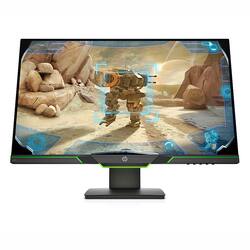
HP - 27" IPS LED AMD FreeSync Gaming Monitor
- Key Specs
- Refresh Rate: 144Hz (The number of frames per second the device can produce natively without enhancement. Higher rates help produce smooth, seamless pictures.)
- Maximum Resolution: 2560 x 1440 (Maximum resolution refers to the highest number of pixels that a screen can process and display. Higher resolution signals produce more detailed images.)
- Panel Type: IPS (Technology that affects response time and image quality.)
- Synchronization Technology: FreeSync (AMD Adaptive Sync) (Generally, these technologies allow syncing between a computer/console game's frame rate and the device's refresh rate for a smoother display without tearing.)
- Screen Size: 27 inches (Size of the screen, measured diagonally from corner to corner.)
- General
- Product Name: 27" IPS LED AMD FreeSync Gaming Monitor
- Brand: HP
- Operating System Compatibility: Not Applicable
- Display
- Refresh Rate: 144Hz (The number of frames per second the device can produce natively without enhancement. Higher rates help produce smooth, seamless pictures.)
- Maximum Resolution: 2560 x 1440 (Maximum resolution refers to the highest number of pixels that a screen can process and display. Higher resolution signals produce more detailed images.)
- Contrast Ratio: 1000:1 (Measured difference between a displayed image's brightest whites and darkest blacks. The larger the first number, the more detail and color that can be displayed.)
- Display Type: LCD
- Panel Type: IPS (Technology that affects response time and image quality.)
- Synchronization Technology: FreeSync (AMD Adaptive Sync) (Generally, these technologies allow syncing between a computer/console game's frame rate and the device's refresh rate for a smoother display without tearing.)
- Aspect Ratio: 16:9 (The measurement of the width of a screen compared to the height of a screen, expressed as a ratio.)
- Curved Screen: false
- Brightness: 350 candela per square meter (A measure of the total light output.)
- Screen Size: 27 inches (Size of the screen, measured diagonally from corner to corner.)
- High Dynamic Range (HDR): false (An HDR-compatible 4K TV or other HDR-compatible product displays HDR video content when it's available from sources like 4K Ultra HD Blu-ray Discs and 4K streaming services.)
- Connectivity
- Number of HDMI Inputs (Total): 1
- Compatibility
- Wall Mountable: false (The product is able to be secured to a wall. Some products are designed ready to mount, while others may require additional hardware/accessories for installation.)
- Features
- Built-In Webcam: false
- Integrated Speaker(s): true
- Dimensions
- Product Width: 24.06 inches (The out of box width of the item. Width is measured as the horizontal distance from one side of the item to the other as it would be primarily used or placed.)
- Product Weight: 16.17 pounds (The out of box weight of the item.)
- Stand Included: true
- Certifications Listings & Approvals
- ENERGY STAR Certified: false (Devices carrying the ENERGY STAR service mark, such as computer products and peripherals, kitchen appliances, and other products, generally use 20% to 30% less energy than required by federal standards.)
- EPEAT Qualified: false (The Electronic Product Environmental Assessment Tool (EPEAT) was designed to provide an environmental assessment tool for purchasers. In order to qualify for EPEAT, a product must meet all 23 required criteria.)
- Warranty
- Manufacturer's Warranty - Parts: 1 year
- Manufacturer's Warranty - Labor: 1 year
- Other
- UPC: 194441018691
Ensure even the most action-packed moments are smooth, crisp, and free of motion blur with a 144Hz refresh rate and 4ms response time. Every gamer deserves perfectly smooth gameplay and peak performance. Get fluid, artifact-free performance at virtually any frame rate with HP X27i with AMD Radeon FreeSync technology in AMD graphics cards. Immerse yourself in your entertainment or gaming experience with HP X27i with IPS panel technology. The ultra-wide 178° viewing angles and accurate color reproduction combined with 2K (2560 x 1440) resolution accentuate every detail.
- 144Hz refresh rate: Get smooth gaming, sharper objects, and cleaner details with a gaming display that refreshes frames 144 times a second – over twice the refresh rate of standard displays.
- 4ms response time with Overdrive: How fast your pixels can react to changing frames is critical for fast-paced gaming, and a 4ms response time ensures gameplay is fluid, crisp, and free of motion blur.
- AMD FreeSync technology: See and feel the difference of fluid, responsive gameplay. By synchronizing the refresh rate with your GPU, AMD FreeSync™ makes display stutter, input lag, and screen tears ancient history.
- Height adjustment stand: Easily adjust your display to the most comfortable position with 100mm range of travel.
- 3-sided Micro-edge: With 3-sided micro-edge bezels encircling the display, an ultra-wide viewing experience provides for seamless multi-monitor set-ups.
Product Manuals
A: The monitor is designed to operate at 144hz refresh rate.
Q: What type of Cable do I use to get 1080p 144hz
A: Depending on what kind of video output your system has, you'll need either an HDMI or DisplayPort cable. The monitor has both of those inputs, so you can use the one that matches up with your system.
Q: Will this support 1440P, 120hz and Freesync over hdmi?
A: I have this one and it does not work with a ps4 do I need a different hdmi
Q: Is there any possible way to change the led lighting on the bottom of the monitor from green?
A: Hello, this light color is not able to be changed but you are able to disable to light if it bothers you through these instructions: Press F10 on power up every second, you get to the BIOS/Set-up Utility. Go to, "Advanced", "Device Options", and "Chassis Lighting Bar". Change that from "Enable" to "Disable", save & exit Utility. When it reboots, green lighting bar will turn off. (Same steps to turn it back on). Thank you for being an HP customer!
Q: How can I remove on screen menu locked
A: Thank you for the question about the X27i Gaming Monitor. The OSD lock can be enabled or disabled by pressing and holding the Menu button on the front panel for 10 seconds. If the OSD is locked, the warning message OSD Lock displays for ten seconds. If the OSD is locked, press and hold the Menu button for 10 seconds to unlock the OSD. If the OSD is unlocked, press and hold the Menu button for 10 seconds to lock the OSD.














