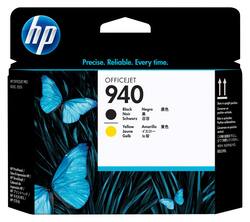
HP - 940 Printhead - Black/Yellow
- General
- Product Name: 940 Printhead
- Brand: HP
- Model Number: c4900a
- Features
- Cartridge Color(s): Multicolor
- Included
- Total Number Of Cartridges: 2
- Warranty
- Manufacturer's Warranty - Parts: Limited
- Manufacturer's Warranty - Labor: Limited
- Other
- UPC: 884420567530
Increase your printing productivity with this HP c4900a 940A printhead that features HP high-impact printhead technology and black and yellow ink to deliver rich text and vibrant color with precise results.
- Compatible with select HP Officejet Pro printers: Including OfficeJet Pro 8000, OfficeJet Pro 8000 Wireless, OfficeJet Pro 8000 Enterprise, OfficeJet Pro 8500, OfficeJet Pro 8500 Wireless, OfficeJet Pro 8500 Premium and OfficeJet Pro 8500a.
- Black and yellow inks: Deliver rich, dark text and brilliant color with precise results.
- Smart technology: Ensures professional results.
- High-impact printhead technology: Produces reliable results at fast print speeds for low-maintenance, trouble-free printing.
Whats Included
- 940 Printhead
Q: looking for the black & cyan also............
A: The HP Officejet printers use two combination print-heads black/yellow and magenta/cyan. I have replaced both at the same time as one will quickly follow the other in replacement need unless you do little color printing.
Q: What printhead would I need for an HP OfficeJet Pro 8610?
A: Thank you for your question! You would need part number CR322A. Please reach out to HP Support for further assistance by visiting https://support.hp.com.
Q: Is this compatible with the Officejet 7650 all in one printer?
A: This will not work for an Officejet 7650 printer.
A: You need 950 printhrad for thst model printer you have
A: Thats weird, usually it wont let you print at all if one of the colors is totally out of ink. I did have to replace the black print head but that was because it was printing white streaks within the printed area. try cleaning the print heads a few times, it did get better and there is also a diagnostic way to check the print heads in the menu. good luck.
Q: printerheads officejet pro 80000
A: Replacing the printheads on the HP Officejet Pro 8500A is a simple task to do yourself. First open the door for the print cartridges and remove each one. Then open the access door and remove the two dual-printhead units by pulling them straight up using the attached blue tabs. Shake the new print head cartridges side to side 6 times to activate the chemicals, open the sealed wrapper, remove the two orange-colored plugs. (DO NOT touch the print head contact points. Using the blue tabs, insert the new print heads into the proper location (black/yellow or cyan/magenta), pushing firmly. When both sets of printheads are in, close the cover and replace the 4 ink cartridges. Using the printer's maintenance software, indicate "Align new printhead". This task will take some time. If the initial print page doesn't look right ask for the deep cleaning. Congratulations, you just saved the cost of the new printer over the cost of the print heads and the cost of paying a technician.














