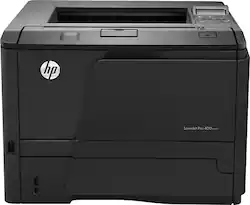
HP - LaserJet Pro M401n -and-White Printer - Black
- Key Specs
- Networking: Wired/Wireless
- Printer Type: Printer
- Duty Cycle: Up to 50,000 (The maximum number of pages per month that the device can produce without failing, as specified by the manufacturer.)
- ISO Mono Print Speed: 35 pages per minute (The number of black ink (grayscale) pages able to be printed per minute in the device's default single-side mode, as tested by the International Standards Organization (ISO).)
- Monochromatic/Color: Monochromatic
- General
- Product Name: LaserJet Pro M401n Black-and-White Printer
- Brand: HP
- Model Number: m401n
- Dimensions
- Product Height: 10.5 inches (The out of box height of the item. Height is measured as the vertical distance from the bottom of the item to the top as it would be primarily used or placed.)
- Product Width: 14.4 inches (The out of box width of the item. Width is measured as the horizontal distance from one side of the item to the other as it would be primarily used or placed.)
- Product Weight: 22.2 pounds (The out of box weight of the item.)
- Certifications Listings & Approvals
- EPEAT Qualified: false (The Electronic Product Environmental Assessment Tool (EPEAT) was designed to provide an environmental assessment tool for purchasers. In order to qualify for EPEAT, a product must meet all 23 required criteria.)
- Paper Info
- Automatic Document Feeder Capacity: 500 sheets
- Maximum Document Length: 14 inches
- Maximum Document Width: 8.5 inches
- Paper Feeder: Tray loader
- Paper Handling: Up to 300 sheets
- Supported Paper Sizes: Letter, legal, executive, 8.5" x 13"
- Tray Capacity: 250
- Ink
- Compatible Cartridges: HP 80A Black LaserJet Toner Cartridge, CF280A; HP 80X Black LaserJet Toner Cartridge, CF280X
- Ink Subscription Service Available: false (The printer monitors ink usage and alerts the subscription provider when levels are low. A purchased subscription provides refills of ink based on usage.)
- Performance
- Printer Resolution (Black): Up to 1200 x 1200 (Refers to the number of pixels/dots, both horizontally and vertically, of the image produced by the printer in black ink. Generally, the higher the resolution, the sharper and cleaner the produced image.)
- Connectivity
- Minimum System Requirements: PC: Up to 1GHz processor; Microsoft Windows XP (32-bit) or Vista or 7 (32- or 64-bit); up to 2GB RAM; 400MB hard drive space; Mac: PowerPC G4, G5 or Intel Coreprocessor; OS X 10.5, 10.6 or 10.7; USB or Network port
- Other
- UPC: 886112362751
HP LaserJet Pro M401n Printer: With a 300-sheet input tray, this printer makes it easy to complete large projects. You can print on a variety of paper types, card stock, transparencies, labels and envelopes.
- Laser printers are best for high-volume printing: They handle large volumes quickly and at a low cost per page. Toner (powder) is used instead of ink, so you get smudge-free images and text.
- Easily connect to your home or office network: Network-ready with built-in 10/100/1000 Gigabit Ethernet interface.
- 1200 x 1200 dpi (dots per inch) for excellent print quality: Medium resolution for producing sharp text.
- Large paper tray for your high-volume printing: Reload less often with the 300-sheet input capacity.
- 2-line backlit LCD screen makes operation simple: Features OK, cancel, menu and back buttons and attention and ready LED indicator lights.
- 1 USB port for simple connectivity: 1 high-speed USB 2.0 port offers a standard connection to your computer.
Whats Included
- LaserJet Pro M401n Black-and-White Printer
- HP 80A black LaserJet toner cartridge
- Power cord
- Software CD-ROMs
- Owner's manual
Q: does the paper load face down?
A: Yes.
Q: Can I print wirelessly from my laptop?
A: Yes. Both your laptop and HP wireless printer must be connected to the same wireless network for wireless printing to work
Q: chromebook
A: I've often set my Samsung Chromebook on top of this printer... especially when I'm in a hurry. It has yet to fall off, so it appears the pair abide by most of the standard rules of physics (particularly gravity) to which we've become accustomed. With this in mind, I'd say they work together very well.
Q: How many envelopes can be loaded at once?
A: This HP PC can load 10 envelopes.
Q: How do we install this with Mac OSX 7.0 or higher?
A: Go to HP's website and down load print drivers for Mac OS X.
Q: what is the largest paper size it prints
A: It will not print 11x17. The largest it will print is 8.5 x 13
Q: How can I make my printer print darker?
A: I've used a Sharpie to blacken out the flashy logos on the case of the printer... makes it look somehow both fast and menacing. I'm considering putting some electrician's tape over the illuminated ON button, but I'm waiting to first find some matte black electrician's tape, as all I have now is glossy.



















