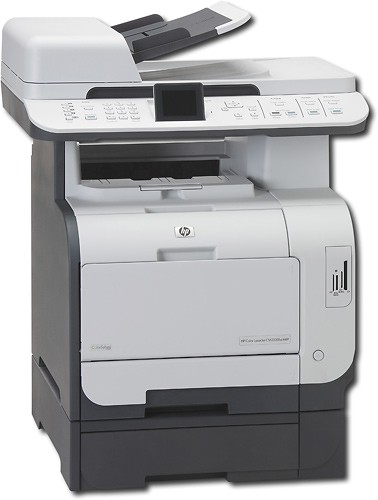
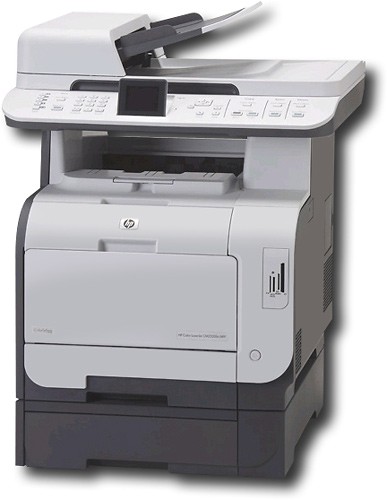
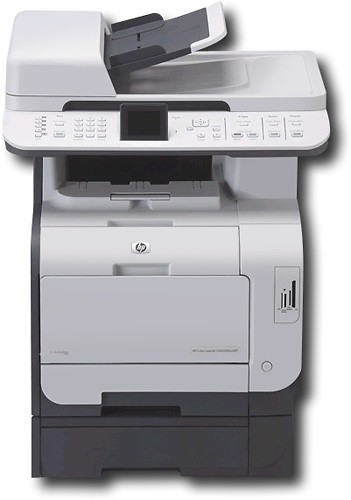
HP - Network-Ready Color All-in-One Laser Printer
This item is no longer available in new condition.
See similar items below.
Description
Features
From our expanded online assortment; not available in all Best Buy stores
Prints up to 21 ppm* in black and white and color
To generate documents quickly.
Up to 600 x 600 optimized dpi resolution
Produces clear, vibrant images.
Network-ready with built-in 10/100 Ethernet interface
For simple Internet and network connection.
Copies up to 21 cpm* in black and white and color
To generate copies quickly.
Copier resolution up to 600 x 600 dpi in black and white and color
For clear, clean copies.
Flatbed scanner with 42-bit color
Plus a scan resolution up to 1200 x 1200 dpi to reproduce exact colors and large documents.
Fax speed approximately 3 seconds per page
To meet all your office needs.
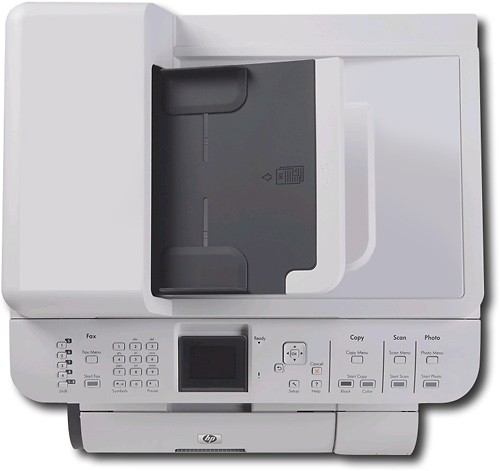
50-page document feeder
For unattended faxing, scanning and copying of multiple-page documents.
HP ColorSphere toner
For reliable, consistent, high-gloss, quality color prints.
HP ImageREt 3600 technology
Creates smooth colors, sharp images and crisp text.
USB connectivity
For simple connection to your computer.
*Print speeds vary with use. See manufacturer for info on print speeds.
What's Included
HP Network-Ready Laserjet Multifunction Printer/ Scanner/ Copier/ Fax
4 individual cartridges
Owner's manual
Other
- Energy Star CompatibleYes
- <a href="javascript:winopengld('1087340571468','pcmcat38200050027','cat12080')">Print Speed (B&W)</a>Up to 21 ppm (Print speeds vary with use. See manufacturer for info on print speeds.)
- <a href="javascript:winopengld('1087340571541','pcmcat38200050027','cat12080')">Print Speed (Color)</a>Up to 21 ppm (Print speeds vary with use. See manufacturer for info on print speeds.)
- <a href="javascript:winopengld('1087340571577','pcmcat38200050027','cat12080')">Black Printer Resolution</a>Up to 600 x 600 dpi
- <a href="javascript:winopengld('1087340571611','pcmcat38200050027','cat12080')">Color Printer Resolution</a>Up to 600 x 600 dpi
- <a href="javascript:winopengld('1087340571658','pcmcat38200050027','cat12080')">Media Types</a>Bond, brochure, colored, glossy, letterhead, photo, plain, preprinted, prepunched, recycled and rough paper, transparencies, labels and envelopes
- <a href="javascript:winopengld('1087340571708','pcmcat38200050027','cat12080')">Media Sizes</a>Standard, legal, letter executive (#10, Monarch), custom and 3" x 5" to 8.5" x 14"
- <a href="javascript:winopengld('1087340571743','pcmcat38200050027','cat12080')">Input Paper Capacity</a>Up to 550 sheets
- <a href="javascript:winopengld('1087340571783','pcmcat38200050027','cat12080')">Output Paper Capacity</a>Up to 150 sheets
- <a href="javascript:winopengld('1087340571817','pcmcat38200050027','cat12080')">Memory</a>160MB
- <a href="javascript:winopengld('1087340571851','pcmcat38200050027','cat12080')">Type of Interface</a>USB
- <a href="javascript:winopengld('1087340572011','pcmcat38200050027','cat12080')">Fonts/Typefaces</a>80 TrueType internal scalable PCL 6 and PostScript
- <a href="javascript:winopengld('1087340572115','pcmcat38200050027','cat12080')">Total Ink Tanks/Cartridge</a>1 black, 1 cyan, 1 magenta, 1 yellow (included)
- <a href="javascript:winopengld('1087340572271','pcmcat38200050027','cat12080')">Print Quality</a>For photos and documents
- PC-Free PrintingNo
- Two-Sided PrinterYes
- <a href="javascript:winopengld('1087340809469','pcmcat38200050027','cat12080')">Duty Cycle</a>Up to 40,000 pages/mo.
- <a href="javascript:winopengld('1087340809515','pcmcat38200050027','cat12080')">Networking Capabilities</a>10/100 Ethernet
- <a href="javascript:winopengld('1087340809619','pcmcat38200050027','cat12080')">Scanner Resolution (dpi)</a>Up to 1200 x 1200 dpi
- <a href="javascript:winopengld('1087340809653','pcmcat38200050027','cat12080')">Bit Depth</a>42
- <a href="javascript:winopengld('1087340809696','pcmcat38200050027','cat12080')">Scan Method</a>Flatbed
- <a href="javascript:winopengld('1087340809730','pcmcat38200050027','cat12080')">Copier Resolution (dpi)</a>Up to 600 x 600 dpi
- <a href="javascript:winopengld('1087340809772','pcmcat38200050027','cat12080')">Copier Speed (B&W)</a>Up to 21 cpm (Copier speeds vary with use. See manufacturer for info on copier speeds.)
- <a href="javascript:winopengld('1087340809806','pcmcat38200050027','cat12080')">Copier Speed (Color)</a>Up to 21 cpm (Copier speeds vary with use. See manufacturer for info on copier speeds.)
- <a href="javascript:winopengld('1087340809851','pcmcat38200050027','cat12080')">Multiple Copies</a>Up to 99
- <a href="javascript:winopengld('1087340809918','pcmcat38200050027','cat12080')">Reduction/ Enlargement</a>25-400%
- <a href="javascript:winopengld('1087340809999','pcmcat38200050027','cat12080')">Automatic Document Feeder</a>Up to 50 sheets
- <a href="javascript:winopengld('1087340810077','pcmcat38200050027','cat12080')">Fax Transmission Speed</a>Approx. 3 sec./page
- <a href="javascript:winopengld('1087340810204','pcmcat38200050027','cat12080')">Number of Speed Dials</a>120
- Minimum System RequirementsPentium II processor or later; Windows, 2000, XP Home, XP Professional, XP Professional x64 or XP Tablet PC; Mac OS x v 10.3.9 or 10.4.x; Linux Red Hat 6.x or later or SuSE 6.x or later
- Wireless NetworkingNo
- UPC883585420667
Customer reviews
Rating 5 out of 5 stars with 2 reviews
(2 customer reviews)to a friend
Rated 5 out of 5 stars
Awesome small business printer
Posted .This reviewer received promo considerations or sweepstakes entry for writing a review.I've had this printer for about five months now. Initially, I was reluctant to buy this one because of some negative reviews on the HP website. After studying the content of the year old reviews, I surmised that the problems behind the complaints were most likely related to HP's software not having been updated for Windows 7. Further research uncovered that by the fall of 2010, HP had updated their software and I took a chance. PROs I'm glad I did. It installed on my LAN with no problem. And has been working perfectly ever since. It is IPv6 ready, which is something to look for with any new network products you purchase. I especially like the quick duplex printing, which I use a lot. It also has the capability of manually assigning it an IP address. This came in handy when several of the 12 networked devices on my LAN all began competing for IP address 10.0.0.2 after a full system-wide reboot. I assigned this printer to 10.0.0.7 and it stays that way. The FAX setup went swiftly, cleanly, and worked both incoming/outgoing without a hitch. The ADF has yet to misfeed a document. The color of the printed products is very professional looking. My wife's Internet/home-based business is color based with over 175 colors being printed from time-to-time. We've printed on plain paper, color laser paper, photo paper, glossy brochure paper, matte labels, glossy labels, gold foil labels, cardstock, semi-gloss business cards, several envelopes, and matte transparencies. All with no problems. The tip-out, manual feeder tray (Tray 1) on the front is easy to get to and easy to adjust for various width paper, envelopes, and labels. It handles small envelopes and mini-sheet labels just fine. I love the flip up LCD display. It allows easy viewing of the screen when sitting or standing in front of it. I do both. CONS Unfortunately, the minimum width paper this printer can handle is 76 mm and the width of a standard personal check is 70 mm. So they can't be feed reliably. I'll have to keep my old black HP LaserJet 1300 around just to print and endorse personal checks. I didn't think to check on this specification before I purchased it. That probably would've been a show stopper if I had. Obviously, the biggest complaint is the high cost and low sheet capacity of the toner cartridges which is outrageous! But, I knew that before I bought it. These four cartridges run about $120 a piece meaning that replacing all four runs over $500 with tax and/or shipping! The print quality is awesome, but good lord that's a big expense just to print paper. Fortunately, it allows you to override the toner low and out warnings so you can squeeze out every sheet of paper possible. I bought my first laser back in the early 1990s and it had a $50 black toner cartridge that was rated for 8,000 sheets of paper. It lasted for a long, long time. These cartridges will set you back over $500 and only have a 2,500 sheet capacity. I'm not good at math, but I believe that is over a 3,200 percent increase in printing cost over the last 20 years! Maybe someone better at math can check that for me. But, in all fairness the cost of a color laser in the early 1990s was over $20,000. Now a good one like this one is less than a $1,000 dollars. Overall, it's the best printer I've ever owned, but costly to operate. However, you get what you pay for. Yet, HP could come down quite a bit on their overpriced consumables.
I would recommend this to a friendRated 5 out of 5 stars
I LOVE THIS PRINTER, AMAZING COLOR
Posted .This reviewer received promo considerations or sweepstakes entry for writing a review.THIS PRINTER REPLACED A 17 YEAR OLD LEXMARK, AND THOUGH THE INK IS EXPENSIVE THE QUALITY IS TRULY REMARKABLE, AND SO IS THE SPEED. THUMBS WAY UP!!!!
I would recommend this to a friend
Customer reviews from hp.com
See all hp.com reviewsUser rating, 3.5 out of 5 stars with 4 reviews on hp.com.
3.5(4 reviews)
Q: QuestionHOW MANY FAX NUMBER CAN BE STORED ON THIS MACHINE?WOULD LIKE TO KNOW IF THIS MACHINE HOLDS MORE THEN MY CURRENT HP PRINTER
Asked by Anonymous.
- A:Answer This printer can store up to 120 speed dial fax numbers.
Answered by HP Team

Q: QuestionHOW DOES THE PHOTO PRINT COME OUT ON THIS PRINTERAM INTERESTED IN GETTING THIS PRINTER, BUT WE DO SOME PHOTO PRINTING AND WAS WONDERING HOW THE QUALITY COMES OUT ON THIS PRINTER
Asked by Anonymous.
- A:Answer For photos, you will have a good quality print but it will not be a lab quality print. For photos prints you would be better off to get an inkjet printer in the HP Photosmart line
Answered by HP Team
Q: QuestionDoes this printer do double-sided printing?
Asked by GCHill.
- A:Answer Yes, the HP Network-Ready Laserjet CM2320FXI Multifunction Printer/ Scanner/ Copier/ Fax has automatic duplex (double-sided) printing.
Answered by HP Team
Q: QuestionCan this printer handle 100 lb card stock?
Asked by Anonymous.
- A:Answer The HP Network-Ready Laserjet CM2320FXI Multifunction Printer/ Scanner/ Copier/ Fax can only handle cardstock up to 97 lbs. index weight.
Answered by HP Team
Q: QuestionDoes this printer Scan to Email, PDF?
Asked by Anonymous.
- A:Answer Yes, the HP CM2320FXI Network-Ready Laserjet Multifunction Printer/ Scanner/ Copier/ Fax has Scan to Email capability and can scan in many different file formats including .PDF.
Answered by HP Team
Q: QuestionHow many b&w pages does the ink cartridge print before having to replace it?
Asked by Anonymous.
- A:Answer This printer ships with preinstalled introductory 1,200-page black, cyan, magenta, and yellow cartridges. It has 3500-page black, and 2800-page cyan, magenta, and yellow replacement cartridges.
Answered by HP Team
Q: QuestionIs this printer windows 7 ready?I am having problems with my other printer and new computer with windows 7. I need to make sure the new printer can communicate with the new windows 7
Asked by Anonymous.
- A:Answer This printer should work just fine with Windows 7.
Answered by RyanBBY
Q: QuestionWhat is the first print out time?What is the first print out time in B/W and Color?
Asked by Anonymous.
- A:Answer First page out for this printer is approximately 17.8 seconds for black and color.
Answered by HP Team
Most viewed
- $999.99Your price for this item is $999.99
- $499.00Your price for this item is $499.00
- $449.99Your price for this item is $449.99$799.99The comparable value for this item is $799.99
- $13.99Your price for this item is $13.99
- $249.99Your price for this item is $249.99
- $699.00Your price for this item is $699.00$799.00The comparable value for this item is $799.00
- $499.99Your price for this item is $499.99
- $1,199.99Your price for this item is $1,199.99$1,499.99The comparable value for this item is $1,499.99
- $899.99Your price for this item is $899.99$1,099.99The comparable value for this item is $1,099.99
- $299.00Your price for this item is $299.00$349.00The comparable value for this item is $349.00
- $295.00Your price for this item is $295.00$349.99The comparable value for this item is $349.99
- $254.99Your price for this item is $254.99$479.99The comparable value for this item is $479.99
- $499.99Your price for this item is $499.99
- $399.99Your price for this item is $399.99$469.99The comparable value for this item is $469.99
- $99.99Your price for this item is $99.99$136.99The comparable value for this item is $136.99
- $33.34Your price for this item is $33.34/mo.per monthfor 36 mos.; 0% APR
- $1,804.95Your price for this item is $1,804.95
- $45.99Your price for this item is $45.99
- $149.00Your price for this item is $149.00$319.00The comparable value for this item is $319.00
- $199.99Your price for this item is $199.99$249.99The comparable value for this item is $249.99