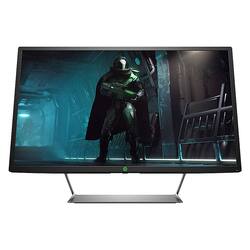
HP - Pavilion Gaming 32H 32" LED QHD FreeSync Monitor with HDR
- Key Specs
- Refresh Rate: 75Hz (The number of frames per second the device can produce natively without enhancement. Higher rates help produce smooth, seamless pictures.)
- Maximum Resolution: 2560 x 1440 (Maximum resolution refers to the highest number of pixels that a screen can process and display. Higher resolution signals produce more detailed images.)
- Response Time: 3 milliseconds (The speed at which pixels can change colors is called response time. It is measured in milliseconds (ms).)
- Panel Type: VA (Technology that affects response time and image quality.)
- Synchronization Technology: FreeSync (AMD Adaptive Sync) (Generally, these technologies allow syncing between a computer/console game's frame rate and the device's refresh rate for a smoother display without tearing.)
- Screen Size: 32 inches (Size of the screen, measured diagonally from corner to corner.)
- General
- Product Name: Pavilion Gaming 32H 32" LED QHD FreeSync Monitor with HDR
- Brand: HP
- Operating System Compatibility: Mac, Windows
- Model Number: 32H
- Display
- Refresh Rate: 75Hz (The number of frames per second the device can produce natively without enhancement. Higher rates help produce smooth, seamless pictures.)
- Maximum Resolution: 2560 x 1440 (Maximum resolution refers to the highest number of pixels that a screen can process and display. Higher resolution signals produce more detailed images.)
- Native Resolution: 2560 x 1440 (Native resolution of a screen refers to its single, fixed resolution. Sometimes screens must scale an image up or down in order to fit the native resolution. This can cause a loss of resolution or detail.)
- Contrast Ratio: 1,000,000:1 (Measured difference between a displayed image's brightest whites and darkest blacks. The larger the first number, the more detail and color that can be displayed.)
- Response Time: 3 milliseconds (The speed at which pixels can change colors is called response time. It is measured in milliseconds (ms).)
- Display Type: LED
- Panel Type: VA (Technology that affects response time and image quality.)
- Synchronization Technology: FreeSync (AMD Adaptive Sync) (Generally, these technologies allow syncing between a computer/console game's frame rate and the device's refresh rate for a smoother display without tearing.)
- Aspect Ratio: 16:9 (The measurement of the width of a screen compared to the height of a screen, expressed as a ratio.)
- Brightness: 600 candela per square meter (A measure of the total light output.)
- Screen Size: 32 inches (Size of the screen, measured diagonally from corner to corner.)
- High Dynamic Range (HDR): true (An HDR-compatible 4K TV or other HDR-compatible product displays HDR video content when it's available from sources like 4K Ultra HD Blu-ray Discs and 4K streaming services.)
- High Dynamic Range Format: VESA Certified DisplayHDR 600 (There are a few HDR formats that tell the TV or other HDR-compatible product how to best utilize its capabilities to display HDR content. HDR technology can support one or multiple formats, each with various benefits to picture quality.)
- Horizontal Frequency: 112 kilohertz (Also known as "horizontal scan rate," this measurement describes the number of horizontal lines displayed per second and is used to calculate a screen's refresh rate.)
- Horizontal Viewing Angle: 178 degrees (The maximum angle at which the display can be viewed with acceptable visual performance from either side.)
- Vertical Viewing Angle: 178 degrees (The maximum angle at which the display can be viewed with acceptable visual performance from above or below.)
- Compatibility
- Wall Mountable: true (The product is able to be secured to a wall. Some products are designed ready to mount, while others may require additional hardware/accessories for installation.)
- VESA Wall Mount Standard: 100mm x 100mm (VESA wall mount standards refer to the spacing of screw holes built into a TV in order to fit with standard TV wall mounts. These standards are implemented into most TVs and monitors.)
- Features
- Tiltable: true
- Anti-Glare: true (Product has features, such as a matte finish, that reduce the likelihood for screen glare.)
- Dimensions
- Product Height Without Stand: 20.6 inches
- Product Width: 29.1 inches (The out of box width of the item. Width is measured as the horizontal distance from one side of the item to the other as it would be primarily used or placed.)
- Product Depth (With Stand): 7.0 inches
- Product Depth Without Stand: 7 inches
- Product Weight: 21.8 pounds (The out of box weight of the item.)
- Stand Included: true
- Power
- Power Consumption: 54 watts
- Power Saving/Off Mode: 0.5 watts (This mode will turn the display and/or the device off, or into a standby mode, after a preset length of time with no activity to conserve power.)
- Certifications Listings & Approvals
- ENERGY STAR Certified: false (Devices carrying the ENERGY STAR service mark, such as computer products and peripherals, kitchen appliances, and other products, generally use 20% to 30% less energy than required by federal standards.)
- EPEAT Qualified: false (The Electronic Product Environmental Assessment Tool (EPEAT) was designed to provide an environmental assessment tool for purchasers. In order to qualify for EPEAT, a product must meet all 23 required criteria.)
- Warranty
- Manufacturer's Warranty - Parts: 1 year
- Manufacturer's Warranty - Labor: 1 year
- Other
- UPC: 192018453746
Enjoy vibrant scenes in your favorite game environments with this 32-inch HP Pavilion HDR display. The QHD resolution and 60Hz refresh rate support stunning visuals while delivering broadcast-standard frames, and the anti-glare properties ensure a comfortable viewing experience in various lighting conditions. This HP Pavilion HDR display supports DisplayPort and HDMI for flexible input options.
- HDR600 VESA Certified Display HDR technology: Ensures lifelike fidelity and striking color, so games and movies are seen exactly as the developer or filmmaker intended.
- 2K Quad HD 2560 x 1440 resolution: Expand your gaming performance in line with the power of your graphics card.
- 3 ms response time: Delivers solid performance for precise gaming and video work.
- 75 Hz refresh rate: Delivers powerful performance so that you can get the most out of your games and videos.
- 32" antiglare LED monitor: Efficient screen type uses LEDs to provide precise backlighting to pixels.
- FreeSync Technology: Adaptive synchronization technology that matches the frame rate of the monitor to any compatible AMD graphics card.
- 2 HDMI and DisplayPort inputs: Allow you to set up DVD players and other AV sources for a clear, high quality audio and video signal.
- 178° horizontal and vertical viewing angles: Allow you to view the screen from a wide range of angles.
- 1,000,000:1 dynamic contrast ratio (3,000:1 typical): Ensures images are crisp and clear with deep blacks and bright highlights.
- 600 cd/m² brightness: Produces bright images that can clearly be seen even in well-lit rooms.
- ENERGY STAR certified: Designed to use less energy and meets strict energy efficiency guidelines set by the Environmental Protection Agency and U.S. Department of Energy.
Whats Included
- HP Pavilion Gaming 32 HDR 32" LED QHD FreeSync Monitor
Product Manuals
Q: Does this monitor have speakers
A: The HP Pavilion Gaming 32HDR monitor does not have speakers. You could connect speakers to the monitor using the audio out port on the monitor. You would just need speakers with the 3.5 mm audio cable.
Q: Can this monitor be daisy chained to another monitor for two screen usage?
A: No this does not "daisy chain". All of the video connectors are inputs.
Q: Has anyone tried using G-sync with this? Also, is text sharp and free of jaggies? thank you
A: undefined
Q: What is the DisplayPort's version on this monitor?
A: The specs only say 1 DisplayPort™. A version is not listed.
Q: What is the DisplayPort version of this monitor?
A: The DisplayPort version is not listed in the specs. Is it listed as 1 DisplayPort™.
Q: What is the actual refresh rate? HP's website says 60 hz this ad says 75 hz
A: This monitor will have a 75Hz refresh rate.
A: Yes, you can get lower resolution or smaller monitors that will be less expensive and still work with your Pavilion model. The resolution (level of detail) may be less on the less expensive models, and there may be a difference in the way the lesser models handle fast motion on screen. The question about auto syncing isn't clear. When setting up your monitor(s), check the Display Settings in Windows to ensure the monitors are set as you wish.
A: This is just a monitor, and will need to be connected to a PC.



















