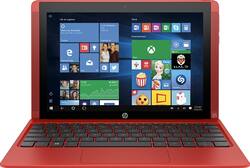
HP - Pavilion x2 - 10.1" - Tablet - 32GB - With Keyboard - Sunset Red
- Key Specs
- Screen Size: 10.1 inches (Size of the screen, measured diagonally from corner to corner.)
- Screen Resolution: 1280 x 800 (Screens come in a range of resolutions (measured in pixels, horizontal x vertical). The higher the resolution, the greater the picture quality.)
- Processor Model: Intel Atom x5-Z8300 (Your computer's processor is like its brain. Working in combination with system memory, the power of the processor determines the complexity of software you can run, how many programs you can have open at the same time, and how fast those programs will run. Most computers feature an AMD, Intel or Snapdragon processor.)
- 2-in-1 Design: true (A laptop and a tablet combined in one lightweight, portable device. Sometimes referred to as "convertible" or "hybrid" laptops, these devices deliver the processing power and keyboard of a laptop. When you're ready to play, either detach the screen or fold your 2-in-1 into tablet mode to comfortably watch movies, play games, read an e-book and more.)
- General
- Product Name: Pavilion x2 - 10.1" - Tablet - 32GB - With Keyboard
- Brand: HP
- Model Number: 10-n114dx
- Display
- Screen Size: 10.1 inches (Size of the screen, measured diagonally from corner to corner.)
- Screen Resolution: 1280 x 800 (Screens come in a range of resolutions (measured in pixels, horizontal x vertical). The higher the resolution, the greater the picture quality.)
- Processor
- Processor Brand: Intel
- Processor Model: Intel Atom x5-Z8300 (Your computer's processor is like its brain. Working in combination with system memory, the power of the processor determines the complexity of software you can run, how many programs you can have open at the same time, and how fast those programs will run. Most computers feature an AMD, Intel or Snapdragon processor.)
- Memory
- System Memory (RAM): 2 gigabytes (Random-access memory (RAM) is a computing device's short-term data storage, which allows active information to be accessed quickly. The size and type of RAM determines how efficiently the device can handle large amounts of information at one time. For example, gaming or video editing requires more RAM for optimal performance.)
- Expandable Memory Compatibility: microSD
- Connectivity
- Headphone Jack: true (The device features an interface that allows for the connection of headphones.)
- Camera
- Front-Facing Camera: true
- Features
- 2-in-1 Design: true (A laptop and a tablet combined in one lightweight, portable device. Sometimes referred to as "convertible" or "hybrid" laptops, these devices deliver the processing power and keyboard of a laptop. When you're ready to play, either detach the screen or fold your 2-in-1 into tablet mode to comfortably watch movies, play games, read an e-book and more.)
- Certifications Listings & Approvals
- ENERGY STAR Certified: false (Devices carrying the ENERGY STAR service mark, such as computer products and peripherals, kitchen appliances, and other products, generally use 20% to 30% less energy than required by federal standards.)
- Other
- UPC: 889894439963
HP Pavilion x2 Tablet: Stay connected and productive wherever you go with this versatile tablet. You can attach the 93%-size island-style keyboard to convert between laptop, tent and stand modes, or just use the 10.1" touch screen to navigate features in tablet mode.
- Windows 10 operating system: Windows 10 brings back the Start Menu from Windows 7 and introduces new features, like the Edge Web browser that lets you markup Web pages on your screen. Learn more ›
- 10.1" WLED-backlit screen with IPS technology, 1280 x 800 resolution and an antiglare finish: Clear, bright resolution for watching movies, surfing the Web, reading books and more.
- 32GB internal storage plus microSD slot: Store your software, apps, music, movies, photos and more. Expand storage with a microSD card (sold separately).
- Quad-core processor: The right combination of fast performance and power efficiency. It allows rapid multitasking, delivers smooth response and unleashes stunning graphics.
- HP TrueVision front-facing HD webcam: With integrated dual-array digital microphones lets you video chat with loved ones and snap photos.
- 93%-size island-style keyboard included: So you can easily switch between laptop, tablet, stand and tent modes.
- Office mobile apps help you stay productive: Word, Excel, PowerPoint and OneNote apps let you take your work on the go.
- SuperSpeed USB 3.0 port: Along with a USB 2.0 Type-C port lets you connect peripherals.
- Micro HDMI v1.4 output: Allows you to connect to your HDTV or high-definition monitor.
Whats Included
- Pavilion x2 - 10.1" - Tablet - 32GB - With Keyboard
- 2-cell lithium-ion polymer battery
- 15W USB Type-C AC adapter
- Owner's manual
Q: Does it use microsoft office?
A: It doesn't have the full version of Microsoft Office 365, but it will open and do word documents, excel documents, and even PowerPoint document (with the software that is pre-installed). It is just a stripped down version of each product, so you don't have all options available.
Q: How much free space it have?
A: It has 32GB internal, with software updates, expect to see about 15GB truly available. You can add to it by getting a large capacity micro SD. I have a 256GB in mine. The good thins is that you can point all your saved items to it in the setting menu.
Q: What is the expected battery life for regular use?
A: Hello, I see that you are interested in knowing the expected battery life for the HP Pavilion x2 10.1. The expected life for this tablet will be 4-5 hours of battery life before this tablet dies. I also suggest you not leave the tablet on the charger after it is fully charged or you will burn the battery out and the expected battery life will lessen. Hopefully that helps you out, and thanks again for choosing HP.
Q: Can I use it with a wireless mouse?
A: Good question. Yes, you can use a wireless mouse with this tablet because it comes with a USB 3.0 port. For more details about this tablet, please visit the following link: http://store.hp.com/wcsstore/hpusstore/pdf/n3r47ua.pdf I hope this helps.
Q: What kind of sd card can I use to have more memory on the tablet?
A: Good question. You can expand the storage space on the tablet by inserting a microSD card into its slot. For more specs on this tablet, please visit the following link: http://store.hp.com/wcsstore/hpusstore/pdf/n3r47ua.pdf I hope this helps.
Q: Does the keyboard detach from the screen - so you could use the screen as a tablet too
A: Yes, the tablet will disconnect from the keyboard.
Q: Talk to text
A: Great question. You can use talk to text on this tablet thanks to Windows 10. For instructions on how to get started with speech recognition on the tablet, please visit the following link: http://windows.microsoft.com/en-us/windows-10/getstarted-use-speech-recognition I hope this helps!
A: I used it to play mine craft and it worked fine, but if your looking to play a higher end game like league of legends or Battlefield, I would not get this. There's just not enough processing power or graphics to play high end games.


















