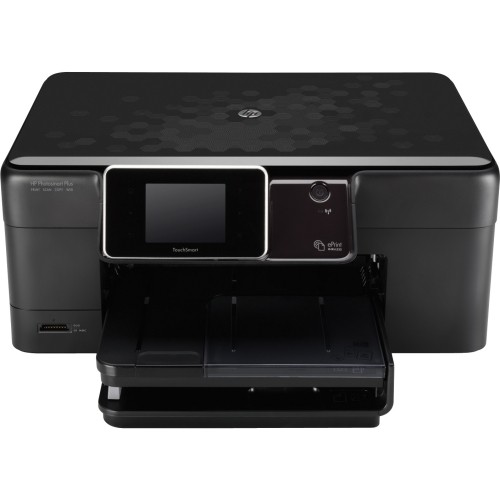
HP - Photosmart Plus Wireless e-All-in-One Printer
This item is no longer available in new condition.
See similar items below.
Description
Features
Prints up to 32 ppm* in black, up to 30 ppm* in color
To generate documents quickly.
3-in-1 functionality
Prints with or without a PC, scans and copies for convenience.
HP ePrint technology
Enables simple mobile printing from most Internet-connected, e-mail-capable devices; also supports Apple® AirPrint for use with an iPad®, iPhone® or iPod® touch.
Wireless 802.11b/g/n capability
Enables wireless printing and sharing from multiple PCs in your home.
Up to 4800 x 1200 optimized dpi color resolution
To produce clear, lab-quality images.
Memory card slot
Allows easy, direct-from-memory printing. Supports Memory Stick Duo, Secure Digital and MultiMediaCard formats (cards not included).
Borderless printing up to 8.5" x 11"
For expanded images with enhanced details. Supports letter, legal, executive, 3" x 5", 3.5" x 5", 4" x 6", 5" x 7" and 8" x 10" paper sizes and no. 10 envelopes for wide-ranging use.
Copies up to 32 cpm* in black, up to 30 cpm* in color
For quick production of up to 50 copies. Resizes copies from 25% to 400% for simple rescaling.
Flatbed scanner with 24-bit color and 8.5" x 11.7" scan area
Plus a scan resolution up to 1200 x 2400 dpi to reproduce large documents and exact colors.
Up to 125-sheet input capacity
To handle large printing tasks. Also accommodates up to 40 transparencies, up to 40 label sheets, up to 60 photo paper sheets or up to 40 cards. Envelope feeder accommodates up to 15 envelopes at a time.
HP photo software
Provides fun photo editing options. HP Quick Forms offers fun templates for calendars, games and more.
USB 2.0 connectivity
For a secure connection to your computer.
*Print speeds vary with use. See manufacturer for info on print speeds.
Apple, the Apple logo and iTunes are trademarks of Apple Computer, Inc., registered in the U.S. and other countries. iPod is a trademark of Apple Computer, Inc.
iPad is a trademark of Apple Inc., registered in the U.S. and other countries
What's Included
HP Photosmart Plus Wireless e-All-in-One Printer
564 black, cyan, magenta and yellow Photosmart ink cartridges
Power cord, power supply
Reference guide, software CD, accessory bag
Owner's manual
Other
- Energy Star CompatibleYes
- <a href="javascript:winopengld('1087340571468','pcmcat38200050027','cat12080')">Print Speed (B&W)</a>Up to 32 ppm (Print speeds vary with use. See manufacturer for info on print speeds.)
- <a href="javascript:winopengld('1087340571541','pcmcat38200050027','cat12080')">Print Speed (Color)</a>Up to 30 ppm (Print speeds vary with use. See manufacturer for info on print speeds.)
- Print Speed (Photo)In as little as 16 seconds (Print speeds vary with use. See manufacturer for info on print speeds.)
- <a href="javascript:winopengld('1087340571577','pcmcat38200050027','cat12080')">Black Printer Resolution</a>Up to 600 x 600 dpi
- <a href="javascript:winopengld('1087340571611','pcmcat38200050027','cat12080')">Color Printer Resolution</a>Up to 4800 x 1200 optimized dpi when printing from a computer on select HP photo papers
- <a href="javascript:winopengld('1087340571658','pcmcat38200050027','cat12080')">Media Types</a>Plain, inkjet and photo paper, transparencies, envelopes, labels, index cards, greeting cards
- <a href="javascript:winopengld('1087340571708','pcmcat38200050027','cat12080')">Media Sizes</a>Letter, legal, executive, 3" x 5", 3.5" x 5", 4" x 6", 5" x 7", 8" x 10", no. 10 envelopes
- <a href="javascript:winopengld('1087340571743','pcmcat38200050027','cat12080')">Input Paper Capacity</a>Up to 125 sheets
- <a href="javascript:winopengld('1087340571783','pcmcat38200050027','cat12080')">Output Paper Capacity</a>Up to 50 sheets
- <a href="javascript:winopengld('1087340571817','pcmcat38200050027','cat12080')">Memory</a>64MB
- <a href="javascript:winopengld('1087340571851','pcmcat38200050027','cat12080')">Type of Interface</a>USB 2.0
- <a href="javascript:winopengld('1087340572115','pcmcat38200050027','cat12080')">Total Ink Tanks/Cartridge</a>1 black, 1 cyan, 1 magenta, 1 yellow (included)
- <a href="javascript:winopengld('1087340572271','pcmcat38200050027','cat12080')">Print Quality</a>For photos and documents
- PC-Free PrintingYes
- <a href="javascript:winopengld('1087340809469','pcmcat38200050027','cat12080')">Duty Cycle</a>Up to 1,250 pages/mo.
- <a href="javascript:winopengld('1087340809515','pcmcat38200050027','cat12080')">Networking Capabilities</a>Wireless LAN (802.11b/g/n)
- <a href="javascript:winopengld('1087340809619','pcmcat38200050027','cat12080')">Scanner Resolution (dpi)</a>Up to 1200 x 2400 dpi hardware; up to 1200 dpi optical
- <a href="javascript:winopengld('1087340809653','pcmcat38200050027','cat12080')">Bit Depth</a>24
- Scanner TypeFlatbed
- <a href="javascript:winopengld('1087340809696','pcmcat38200050027','cat12080')">Scan Method</a>Flatbed
- <a href="javascript:winopengld('1087340809730','pcmcat38200050027','cat12080')">Copier Resolution (dpi)</a>Up to 1200 optimized dpi black; up to 4800 x 1200 optimized dpi color
- <a href="javascript:winopengld('1087340809772','pcmcat38200050027','cat12080')">Copier Speed (B&W)</a>Up to 32 cpm (Copier speeds vary with use. See manufacturer for info on copier speeds.)
- <a href="javascript:winopengld('1087340809806','pcmcat38200050027','cat12080')">Copier Speed (Color)</a>Up to 30 cpm (Copier speeds vary with use. See manufacturer for info on copier speeds.)
- <a href="javascript:winopengld('1087340809851','pcmcat38200050027','cat12080')">Multiple Copies</a>Up to 50
- <a href="javascript:winopengld('1087340809918','pcmcat38200050027','cat12080')">Reduction/ Enlargement</a>25%-400%
- <a href="javascript:winopengld('1087340809999','pcmcat38200050027','cat12080')">Automatic Document Feeder</a>Yes
- Minimum System RequirementsPC: 233MHz Intel® Pentium® II, Celeron® processor or compatible; Windows XP, Vista or 7; 750MB hard disk space; Mac: PowerPC G4 or G5 or Intel® Core™ processor; OS X 10.5 or 10.6; 300MB hard disk space; CD-ROM/DVD drive
- Wireless NetworkingYes
- UPC884962892947
Customer reviews
Rating 3.2 out of 5 stars with 17 reviews
(17 customer reviews)to a friend
Customers are saying
Customers commend the ease of setup and installation. However, a significant number of customers express dissatisfaction with the print quality, citing issues such as high ink consumption and unreliable wireless printing. Problems with text printing and frequent blank pages were also reported. The cost of ink cartridges was another common complaint.
This summary was generated by AI based on customer reviews.
Rated 4 out of 5 stars
Nice printer....
||Posted .This reviewer received promo considerations or sweepstakes entry for writing a review.For the price it has good quality, really easy setup, works great on my network.
I would recommend this to a friendRated 5 out of 5 stars
Deal of the day steal!
||Posted .This reviewer received promo considerations or sweepstakes entry for writing a review.I got this for less than it would have cost me just to buy ink refills for my 8 month old Lexmark. It has more features than my other printer and looks sleeker. How do they do these deals?? Who is John Galt?
I would recommend this to a friend- Cons mentioned:Print quality
Rated 3 out of 5 stars
Great printer, but bad wireless with Mac OS X
Posted .This reviewer received promo considerations or sweepstakes entry for writing a review.Printer works great plugged in with usb. Prints and scans wirelessly with my PC Laptop running Windows 7. Even prints great via wireless iPhone or iPad. My biggest setback was trying to scan via Mac OS X (both Snow Leopard and Lion) Could never get it to work. Printing wirelessly seems to work randomly as well. I ended up connecting it to my iMac through USB in order to get the scanning and printing to work everytime. Defeats the wireless capability. It is a great printer, it's just that I could not get it to work with my iMac. All other devices worked fine, ipad, iphone, windows 7 laptop.
No, I would not recommend this to a friend - Cons mentioned:Print quality
Rated 3 out of 5 stars
Good printer
Posted .This reviewer received promo considerations or sweepstakes entry for writing a review.I was surprised how big the printer was in this day & age. Also has multiple color cartridges instead of just two like our other printers. Mine did NOT come with a USB cable & I bought it for a relative who did not know his Internet password. That was a pain.
No, I would not recommend this to a friend - Cons mentioned:Print quality
Rated 1 out of 5 stars
Would not recommend
Posted .This reviewer received promo considerations or sweepstakes entry for writing a review.To say that this printer has high ink consumption is an understatement. I don't know where it all goes. I don't print a lot and because of the high consumption, I try not to, but the ink cartridges run out extremely fast - absurdly fast. I work from home, and furnish my own supplies, including printer and ink, so I lose money every time I have to replace cartridges. Also, my printer shuts itself down at random times, and goes into sleep mode, at which time the touch screen doesn't even work. To get it back up and running, I have to unplug the power cord and plug it back in. I have tried to find an answer to this through HP's web site, to no avail. I will definitely not buy an HP printer next time.
No, I would not recommend this to a friend - Cons mentioned:Print quality
Rated 1 out of 5 stars
After a year &4months it just stopped working
Posted .This reviewer received promo considerations or sweepstakes entry for writing a review.BEWARE OF HP PRINTERS. AFTER ONLY 1 YEAR AND 4 MONTHS MY HP PHOTOSMART plus B209A PRINTER JUST STOPPED WORKING, WORKED LAST NIGHT TO PRINT TAX FORM. NEXT DAY IT WOULD NOT PRINT FROM COMPUTER OR FROM THE GLASS. THE ERROR MESSAGE SAY LOW INK, EVEN AFTER I PUT IN ALL NEW INK. CALLED HP SERVICES, AND THAT WHEN I GOT ANGRY, THEY TREATED ME AS IF THEY WERE WAITING FOR ME TO CALL, AS IF THEY KNEW ITS BEEN A YEAR AND THE WARRANTY IS GONE, THATS ALSO THE ONLY THING THEY WERE CONCERNED ABOUT MY PAYING MORE MONEY. I FEEL AS IF I COULD HEAR THEM LAUGHING AT ME FOR BUYING ONE OF THEIR PRINTERS. SO DO YOURSELF A FAVOR BUY FROM ANOTHER COMPANY.
No, I would not recommend this to a friend - Cons mentioned:Print quality
Rated 1 out of 5 stars
Awful!!
Posted .This reviewer received promo considerations or sweepstakes entry for writing a review.This is probably one of the worst pieces of office equipment I have ever purchased. Aside from the fact that I still to this day can't get the wireless printing feature to actually work, it eats up ink cartridges like crazy. And then if you put in a brand new black ink cartridge but the colored ones are a bit low, it won't even print simple black text properly making you buy the color ink as well. So you end up with twice the expense. Well played HP. I will never buy another HP product again.
No, I would not recommend this to a friend - Cons mentioned:Print quality
Rated 1 out of 5 stars
Horrible piece of junk
Posted .This reviewer received promo considerations or sweepstakes entry for writing a review.So maybe I just got a lemon but this is what it does: prints blank sheets about 40% of the time, prints copies with the colors all messed up 50% of the time, and maybe if you won the lottery on the same day your trying to print something, it will print correctly 10% of the time. I would really like to say this is a great product but id also like to say im dating a super model.
No, I would not recommend this to a friend
Q: QuestionUSB CONNECTIONWHAT TYPE OR MODLE USB CABLE IS NEDDED TO CONNECT AS NON WIRELESS???? PLEASE THANKS
Asked by Anonymous.
- A:Answer USB printer cables have universal connections, so any USB printer cable will work. It is recommended to use a USB 2.0 printer cable for better performance.
Answered by HP Team

Q: QuestionDimensionsWhat are the dimensions of this printer? My daughter is going to college and we're looking for something "compact"
Asked by Anonymous.
- A:Answer The Dimensions of this printer are (W x D x H) 17.8 x 22.75 x 17.9 in (maximum); 17.8 x 15.79 x 7.83 in (minimum).
Answered by HP Team
Q: Questiondoes it print on cd/dvd
Asked by Anonymous.
- A:Answer HP does not offer a current printer that has the direct print to CD/DVD feature.
Answered by HP Team
Q: QuestionCan I purchase just the power cord, power supply for a HP Photosmart 8050
Asked by Anonymous.
Q: Questionwill this printer send and accept fax
Asked by Anonymous.
- A:Answer not to my knowledge
Answered by jrbrjasper
Q: QuestionIs this printer compatable with IPAD 3?
Asked by Anonymous.
- A:Answer This printer is compatible with the iPad if the HP iPrint Photo Software is downloaded. For more information, you can visit the following HP website: http://h10025.www1.hp.com/ewfrf/wc/document?docname=c01616126&cc=us&dlc=en&lc=en&jumpid=reg_R1002_USEN
Answered by HP Team
Q: Questionwill it scan to pdf?Most printers scan to any else but pdf. I need pdf.
Asked by iluvtofu.
- A:Answer This HP Printer does not support PDF.
Answered by HP Team
Q: QuestionIs it conpatible/ work well with Dell Inspiron DESKTOP?
Asked by Angie.
- A:Answer This HP Printer supports the Windows XP Home, XP Professional, XP Media Center Edition, and Tablet PC Edition (SP2 or later) (32-bit only) operating systems. If your dell has any of the above operating systems installed you should not have any problems but I cannot guarantee compatibility because HP does not test or support third party products like Dell.
Answered by HP Team
Most viewed
- $999.99Your price for this item is $999.99
- $499.99Your price for this item is $499.99
- $249.99Your price for this item is $249.99
- $899.00Your price for this item is $899.00$999.00The comparable value for this item is $999.00
- $239.99Your price for this item is $239.99$499.99The comparable value for this item is $499.99
- $579.99Your price for this item is $579.99$869.99The comparable value for this item is $869.99
- $529.99Your price for this item is $529.99$629.99The comparable value for this item is $629.99
- $299.00Your price for this item is $299.00$349.00The comparable value for this item is $349.00
- $279.99Your price for this item is $279.99$379.99The comparable value for this item is $379.99
- $69.99Your price for this item is $69.99
- $1,249.99Your price for this item is $1,249.99
- $499.99Your price for this item is $499.99
- $779.99Your price for this item is $779.99
- $169.00Your price for this item is $169.00$399.00The comparable value for this item is $399.00
- $499.00Your price for this item is $499.00$599.00The comparable value for this item is $599.00
- $1,567.89Your price for this item is $1,567.89
- $649.99Your price for this item is $649.99
- $115.99Your price for this item is $115.99$139.99The comparable value for this item is $139.99
- $299.99Your price for this item is $299.99$499.99The comparable value for this item is $499.99
- $79.99Your price for this item is $79.99$499.99The comparable value for this item is $499.99