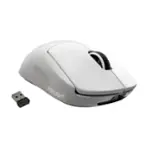
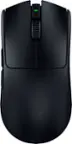
HyperX - Pulsefire Haste Lightweight Wireless Optical Gaming Mouse - Wireless - White
- Key Specs
- Lighting Type: RGB
- Maximum Sensitivity: 16000 dots per inch (Mouse sensitivity is measured in dots per inch (DPI). The higher the DPI, the more sensitive the mouse is and may be more useful for high-density pixel screens. Lower DPI typically means more precision and accuracy in mouse movement.)
- Number of Buttons (Total): 6
- Connection Type: Wireless
- General
- Brand: HyperX
- Model Number: 4P5D8AA
- Product Name: Pulsefire Haste Lightweight Wireless Optical Gaming Mouse
- Color: White
- System Requirements: Windows (The software that a product must have for it to be able to integrate with another product.)
- Features
- Mouse Type: Gaming
- Lighting Type: RGB
- Customizable Lighting: true
- Maximum Number of Memory Profiles: 1
- Performance
- Mouse Operation: Button(s)
- Mouse Grip Style: Palm grip (In comparison to many palm and claw grips, ergonomic grip mice are designed for a specific handedness and put the hand and wrist in a position to promote comfort. Customizable grips feature buttons/keys that can be configured to perform specific actions and may also have customizable calibration and sensitivity settings.)
- Handedness: Right-handed
- Tracking Method: Optical (There are several types of computer mice, optical and laser being among the most common. Optical mice detect less detail and provide more precise and accurate movement. Laser mice detect more detail and can be used on a wider variety of surfaces, but are more sensitive to small movements.)
- Maximum Sensitivity: 16000 dots per inch (Mouse sensitivity is measured in dots per inch (DPI). The higher the DPI, the more sensitive the mouse is and may be more useful for high-density pixel screens. Lower DPI typically means more precision and accuracy in mouse movement.)
- Minimum Sensitivity: 400 dots per inch (Mouse sensitivity is measured in dots per inch (DPI). The higher the DPI, the more sensitive the mouse is. Lower DPI typically means more precision and accuracy in mouse movement, but higher DPI may be useful for high-density pixel screens.)
- Number of Buttons (Total): 6
- Number of Thumb Buttons: 2
- Number of Programmable Buttons: 6
- Designed for Game Genre: FPS, RTS
- Adjustable Weight: false
- Connectivity
- Connection Type: Wireless
- Wireless Connectivity: Radio Frequency (RF), Radio Frequency (RF - 2.4 Ghz/Low Latency) (The manner in which a device sends data to another device over a short distance without the use of wires or cables.)
- Maximum Wireless Range: 193 feet
- Operating System Compatibility: Windows
- Plug and Play Operation: true
- Number of Devices Connectable Simultaneously: 1
- Power
- Mouse Power Source: Battery-powered
- On/Off Switch: true
- Rechargeable Battery (Mouse): true
- Wireless Charging: false
- Charging Interface(s): USB-C (The connection for transmitting power to charge the device.)
- Battery Chemistry: Lithium-ion polymer
- Included
- Mouse Pad Included: false
- Dimensions
- Product Height: 1.5 inches (The out of box height of the item. Height is measured as the vertical distance from the bottom of the item to the top as it would be primarily used or placed.)
- Product Length: 4.89 inches (The out of box length of the item. Length is measured as the longest dimension of the item.)
- Product Width: 2.6 inches (The out of box width of the item. Width is measured as the horizontal distance from one side of the item to the other as it would be primarily used or placed.)
- Product Weight: 62 grams (The out of box weight of the item.)
- Warranty
- Warranty - Parts: 2 years
- Warranty - Labor: 2 years
- Other
- UPC: 196188046227
The HyperX Pulsefire Haste Wireless Gaming Mouse packs in all the best features of the ultra-lightweight Pulsefire Haste plus a wireless connection and long-lasting battery life, but only adds a mere 2g of additional weight*. If you’ve been hesitant to cut the mouse cord, fear not, as the Pulsefire Haste’s 1ms report rate and 2.4GHz signal provides a low-latency wireless connection that meets the demands of elite players. Not only that, but with up to 100 hours of battery life**, you’ll get over 4 full days of clicking on heads from a single charge of your honeycomb mouse. With a responsive, split-button design, you won’t have to worry about missed clicks, as the satisfying, tactile TTC Golden micro switches are rated for up to 80 million clicks. If you prefer a cable, HyperX also includes a HyperFlex cable which teams up with the virgin-grade PTFE skates to deliver a smooth, easy glide.
- Gaming-Grade Wireless Technology: Responsive 2.4GHz wireless RF connectivity delivers low-latency communication with a 1ms report rate.
- Ultra-light hex shell design: The wireless Pulsefire Haste is a mesh mousewith cut outs which make it lighter than a solid shell mouse, without sacrificing durability. The shell also allows for better airflow and ventilation.
- Up to 100 hours* of long-lasting battery life: You won’t have to worry about a dead battery leading to in-game deaths thanks to 100 hours of battery life on a single charge.
- Anti-dust, water-resistant: IP55 rated to withstand sweat and minor acquatic accidents, as well as dust, oil, and dirt.
- TTC Golden micro dustproof switches: These switches provide solid, satisfying clicks so you’ll know that they’re being registered. They also feature anti-dust coating, and are rated for up to 80 million clicks.
- Pure virgin-grade PTFE skates: The low-friction 100% PTFE skates help provide an easy, effortless glide to make the mouse more responsive. There’s also a replacement set of skates included in case they wear out.
- Grip tape included: If you prefer a bit more control and comfort, easy-to-apply grip tape for the left/right mouse buttons and left/right sides is included. Removing the tape is simple, and won’t leave sticky residue.
- Customizable with HyperX NGENUITY Software: Easily customize DPI settings, RGB lighting, button assignments, and record macros with powerful, easy-to-use, HyperX NGENUITY Software.
Whats Included
- Pulsefire Haste Lightweight Wireless Optical Gaming Mouse
- USB-C to A Cable
- Set of Extra Skates
- Grip Tape
- Quick Start Guide
- Warranty Card
- Marketing Card
Q: is the wireless adapter USB-C?
A: The port on the mouse is USB-C but the computer dongle is a USB-A.
Q: Is it compatible with Xbox series s
A: Hi there. The Pulsefire Haste Wireless is compatible with Xbox Series S in both Wireless and Wired mode. Please note that not all games support keyboard and mouse, so please check if your game supports it. You also cannot navigate the Xbox home menu or dashboard with a mouse. For wireless mode, the provided dongle must be plugged into the Xbox. For optimal performance in wireless mode, we suggest using the wireless adapter and keep it within 20cm of the mouse. If you have any more questions, please do not hesitate to reach out to us (HyperX) on our social channels.
Q: Are the buttons quiet or do they have an audible "click"?
A: I can barely ear the click. Love it!
Q: Can you change the color of the RGB on the scroll wheel
A: Yes you can!
Q: Is this mouse a good option for a 10 yr old?
A: Yes, it’s simple and light. Standard mouse + 2 buttons so it will not be hard to adjust.
Q: Is this product compatible with ps4
A: im pretty sure it is, as it works with my xbox
Q: Is there any led on the mouse we can turn on or off?
A: Unfortunately the RGB is only on the mouse wheel. It may be possible to turn it off in the app.
Q: Does it need batteries or is it rechargeable?
A: It charges VIA the charging cable, you do not need batteries.