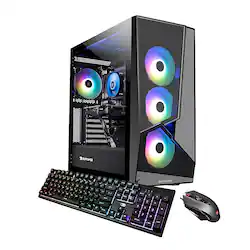
iBUYPOWER - SlateMR2140 Gaming Desktop - AMD Ryzen 5 5600 - 8GB DDR4 Memory - NVIDIA GTX 1650 4gb - 500GB SSD - Black
- Key Specs
- Processor Model: AMD Ryzen 5 5000 Series (Your computer's processor is like its brain. Working in combination with system memory, the power of the processor determines the complexity of software you can run, how many programs you can have open at the same time, and how fast those programs will run. Most computers feature an AMD, Intel or Snapdragon processor.)
- Storage Type: SSD
- Total Storage Capacity: 500 gigabytes
- System Memory (RAM): 8 gigabytes (Random-access memory (RAM) is a computing device's short-term data storage, which allows active information to be accessed quickly. The size and type of RAM determines how efficiently the device can handle large amounts of information at one time. For example, gaming or video editing requires more RAM for optimal performance.)
- Graphics Type: Dedicated (Dedicated graphics uses a separate graphics card for processing video images. Because it does not use memory from the system's RAM, there is no extra burden on the CPU and graphics are processed more efficiently. Integrated graphics shares system RAM to process video images.)
- Graphics: NVIDIA GeForce GTX 1650 (Often referred to as a "graphics processing unit" (GPU), this device is responsible for displaying image content and decoding/encoding video content in programs and games.)
- General
- Product Name: SlateMR2140 Gaming Desktop - AMD Ryzen 5 5600 - 8GB DDR4 Memory - NVIDIA GTX 1650 4gb - 500GB SSD
- Brand: iBUYPOWER
- Model Number: SlateMR2140
- Year of Release: 2022
- Color: Black
- Processor
- Processor Brand: AMD
- Processor Model: AMD Ryzen 5 5000 Series (Your computer's processor is like its brain. Working in combination with system memory, the power of the processor determines the complexity of software you can run, how many programs you can have open at the same time, and how fast those programs will run. Most computers feature an AMD, Intel or Snapdragon processor.)
- Processor Model Number: 5600
- Storage
- Storage Type: SSD
- Total Storage Capacity: 500 gigabytes
- Solid State Drive Capacity: 500 gigabytes (The amount of data that can be stored on the device's solid state drive (SSD). SSD is a flash-based storage with faster speeds than a hard disk drive (HDD).)
- Memory
- System Memory (RAM): 8 gigabytes (Random-access memory (RAM) is a computing device's short-term data storage, which allows active information to be accessed quickly. The size and type of RAM determines how efficiently the device can handle large amounts of information at one time. For example, gaming or video editing requires more RAM for optimal performance.)
- Type of Memory (RAM): DDR4 (Each type of RAM delivers a different level of speed, bandwidth, energy efficiency and performance.)
- Graphics
- Graphics Type: Dedicated (Dedicated graphics uses a separate graphics card for processing video images. Because it does not use memory from the system's RAM, there is no extra burden on the CPU and graphics are processed more efficiently. Integrated graphics shares system RAM to process video images.)
- GPU Brand: NVIDIA
- Graphics: NVIDIA GeForce GTX 1650 (Often referred to as a "graphics processing unit" (GPU), this device is responsible for displaying image content and decoding/encoding video content in programs and games.)
- Compatibility
- Operating System: Windows 11 Home (The operating system manages all software and hardware, including files, memory and connected devices. Most importantly, it lets you interact with your device and your programs in a visual way; otherwise, you'd be typing computer code to get anything done.)
- Motherboard Model Number: B550
- Connectivity
- Display Connector(s): 1 x HDMI (The number and type of connectors used to connect to an external display.)
- Number of HDMI Outputs (Total): 1
- Number of DisplayPort Outputs (Total): 0
- Number of USB Ports (Total): 6
- Number Of Ethernet Ports: 1
- Cooling
- CPU Cooling System: Air
- Power
- Power Supply Maximum Wattage: 600 watts
- Features
- Keyboard Type: RGB
- Customizable Keyboard Lighting: RGB
- Customizable Case Lighting: true
- Certifications Listings & Approvals
- ENERGY STAR Certified: false (Devices carrying the ENERGY STAR service mark, such as computer products and peripherals, kitchen appliances, and other products, generally use 20% to 30% less energy than required by federal standards.)
- EPEAT Qualified: false (The Electronic Product Environmental Assessment Tool (EPEAT) was designed to provide an environmental assessment tool for purchasers. In order to qualify for EPEAT, a product must meet all 23 required criteria.)
- Included
- Optical Drive Type: None (An optical disk drive (ODD) uses a laser light to read data from or write data to an optical disc. These discs include CDs, DVDs, and Blu-ray Discs. This allows you to play music or watch movies using prerecorded discs.)
- Keyboard Included: true
- Mouse Included: true
- Other
- UPC: 848604044118
Upgrade your current gaming rig with this iBUYPOWER Desktop. It’s 8GB of RAM and AMD Ryzen 5 5600 processor let you run multiple programs at once, and its NVIDIA GeForce GTX 1650 card renders fast-paced action smoothly without screen tearing. This iBUYPOWER desktop also has a 500GB solid state drive for saving your favorite games.
- Windows 11 Operating System: Windows 11 has all the power and security of Windows 10 with a redesigned and refreshed look. It also comes with new tools, sounds, and apps. Every detail has been considered. All of it comes together to bring you a refreshing experience on your PC.
- AMD Ryzen 5 5600: Native six-core processing delivers aggressive yet power-smart performance for advanced gaming, complex modeling and HD video editing.
- NVIDIA GTX 1650: Driven by 4GB dedicated video memory to quickly render high-quality images for videos and games.
- 8GB system memory for advanced multitasking: Reams of high-bandwidth DDR4 RAM to smoothly run your graphics-heavy PC games and video-editing applications, as well as numerous programs and browser tabs all at once.
- 500GB solid state drive (SSD) of storage space and speed: The SSD provides fast boot up and load times while the hard drive has ample space for your favorite games and files
Q: How many frames per second will it run on fortnite
A: rn after i got the best performance mode setting i’m getting 120 in game smooth but it’ll do 144 some pretty good aswell n u can get 200+ in a creative map
Q: Does it come with the keyboard and mouse?
A: Yes it comes with a pretty nice keyboard and mouse
Q: Can you add another Ram since it only comes with 8g of ram to make it at least 16gb?
A: Yes, you can add more ram to the system.
Q: How much maximum RAM will go into this PC? How many memory slots does it have?
A: The maximum ram is 128GB and there is 4 total slots.
Q: Can you run oculus quest 2 on this?
A: Yes, but you'll need a VR link cable to connect your headset to the PC, and Steam for VR games.
Q: What is the highest graphics card upgrade this pc can get
A: undefined
Q: how do i change the RGB what program do i use.
A: Hi there! You can download your BaseBoard Manufacturer's lighting software program to manage your RGB lighting. To identify your BaseBoard Manufacturer, click on the search window of your taskbar and search up "System Information". Hope this helps!
Q: Where is the second ssd storage slot? I only see one.
A: If you are talking about the additional M.2 storage slots on the MB, it depends on the MB. Usually it is either under the primary, can be located in the middle of the MB where the GPU will be covering it, or will be on the bottom of the board. It could also be covered by a heat sink and will need to be removed using a HM0 or HM1 screwdriver.



















